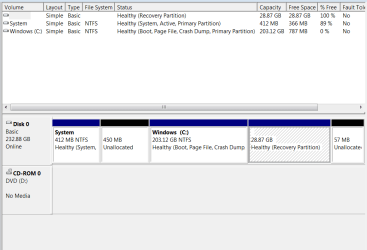
How do I make more room on my hard drive

it won't paste when I use Ctrl V. I don't think the prnt scrn button is working and I can't figure out how else to copy
 

My Computer My Computer

At a glance

windows 7 professional 64 bit
Computer type
PC/Desktop
Computer Manufacturer/Model Number
HP
OS
windows 7 professional 64 bit
Capture.PNG
 

My Computer My Computer

At a glance

windows 7 professional 64 bit
Computer type
PC/Desktop
Computer Manufacturer/Model Number
HP
OS
windows 7 professional 64 bit
open a command prompt and type:

powercfg -h off


then press enter.

That will get rid of your hibernation file

Hopefully that will release enough space to use program to find out what is hogging your windows partition.
 

My Computers My Computers

  • At a glance

    7 X64i5 84002x8gb 3200mhz
    Computer type
    PC/Desktop
    OS
    7 X64
    CPU
    i5 8400
    Motherboard
    gigabyte b365m ds3h
    Memory
    2x8gb 3200mhz
    Hard Drives
    various
    PSU
    pure power 11 400w cm
    Case
    Coolermaster
    Cooling
    cryorig m9i
  • At a glance

    7x64g54008gb ddr4 2400
    Computer type
    PC/Desktop
    OS
    7x64
    CPU
    g5400
    Motherboard
    ga b365m ds3h
    Memory
    8gb ddr4 2400
    PSU
    xfx pro 450w
are there spaces or do these all go together. I tried copying and pasting and its telling me it is no recognized as an internal or external command operable program or batch file. if I enter a space then type it nothing happens except the prompt comes back
 
Last edited:

My Computer My Computer

At a glance

windows 7 professional 64 bit
Computer type
PC/Desktop
Computer Manufacturer/Model Number
HP
OS
windows 7 professional 64 bit
powercfg.jpg

nothing happens except the prompt comes back

Yes, After you press enter, the prompt comes back. That is normal. if you had a hibernation file, it should be gone. hibernation files can be 2 gb or more.

Check and see if you have any more space on your drive.
 

My Computers My Computers

  • At a glance

    7 X64i5 84002x8gb 3200mhz
    Computer type
    PC/Desktop
    OS
    7 X64
    CPU
    i5 8400
    Motherboard
    gigabyte b365m ds3h
    Memory
    2x8gb 3200mhz
    Hard Drives
    various
    PSU
    pure power 11 400w cm
    Case
    Coolermaster
    Cooling
    cryorig m9i
  • At a glance

    7x64g54008gb ddr4 2400
    Computer type
    PC/Desktop
    OS
    7x64
    CPU
    g5400
    Motherboard
    ga b365m ds3h
    Memory
    8gb ddr4 2400
    PSU
    xfx pro 450w
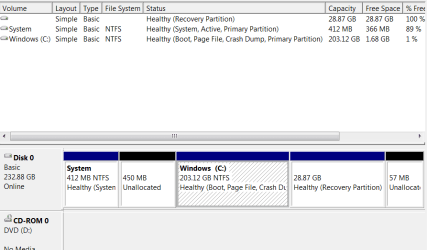
1.67 gb free now, but far from 203. I ran everything all of you have suggested. What else can I do now? I appreciate your help
 

My Computer My Computer

At a glance

windows 7 professional 64 bit
Computer type
PC/Desktop
Computer Manufacturer/Model Number
HP
OS
windows 7 professional 64 bit
this is now what I have
 

Attachments

  • 2nd.PNG
    2nd.PNG
    12.8 KB · Views: 1

My Computer My Computer

At a glance

windows 7 professional 64 bit
Computer type
PC/Desktop
Computer Manufacturer/Model Number
HP
OS
windows 7 professional 64 bit

My Computers My Computers

  • At a glance

    7 X64i5 84002x8gb 3200mhz
    Computer type
    PC/Desktop
    OS
    7 X64
    CPU
    i5 8400
    Motherboard
    gigabyte b365m ds3h
    Memory
    2x8gb 3200mhz
    Hard Drives
    various
    PSU
    pure power 11 400w cm
    Case
    Coolermaster
    Cooling
    cryorig m9i
  • At a glance

    7x64g54008gb ddr4 2400
    Computer type
    PC/Desktop
    OS
    7x64
    CPU
    g5400
    Motherboard
    ga b365m ds3h
    Memory
    8gb ddr4 2400
    PSU
    xfx pro 450w
Yay! I freed up 133 GB. thanks everyone.
 

My Computer My Computer

At a glance

windows 7 professional 64 bit
Computer type
PC/Desktop
Computer Manufacturer/Model Number
HP
OS
windows 7 professional 64 bit
Hi Kamrn,

You should now have enough space to run a little program which will tell what is hogging your drive.

I use Glaryutilities it has a lot of functions, including disk space analysis. The free version will be fine for this

Glary Utilities - Free System Utilities to Clean Registry, Fix PC Errors, Protect Privacy | Glarysoft

Glary Utilities is perfect for these sort of tasks. I have used it for years. I usually do a weekly cleanup which includes running Glary Utilities & CCleaner [both WITHOUT the registry cleaner]!
 

My Computer My Computer

At a glance

Win 7 HP SP1 64-bit Vista HB SP2 32-bit Linux...Intel(R) Pentium(R) CPU P6200 @ 2.13GHz4.00 GBIntel(R) Graphics Media Accelerator HD
Computer type
Laptop
Computer Manufacturer/Model Number
Fujitsu LIFEBOOK
OS
Win 7 HP SP1 64-bit Vista HB SP2 32-bit Linux Mint 18.3
CPU
Intel(R) Pentium(R) CPU P6200 @ 2.13GHz
Motherboard
FUJITSU FJNBB06
Memory
4.00 GB
Graphics Card(s)
Intel(R) Graphics Media Accelerator HD
Sound Card
[1] Realtek High Definition Audio [2] Intel(R) Display Audio
Screen Resolution
1366 x 768 x 32 bits (4294967296 colors) @ 59 Hz
Hard Drives
TOSHIBA MK5076GSX
Antivirus
AVG FREE

My Computers My Computers

  • At a glance

    7 X64i5 84002x8gb 3200mhz
    Computer type
    PC/Desktop
    OS
    7 X64
    CPU
    i5 8400
    Motherboard
    gigabyte b365m ds3h
    Memory
    2x8gb 3200mhz
    Hard Drives
    various
    PSU
    pure power 11 400w cm
    Case
    Coolermaster
    Cooling
    cryorig m9i
  • At a glance

    7x64g54008gb ddr4 2400
    Computer type
    PC/Desktop
    OS
    7x64
    CPU
    g5400
    Motherboard
    ga b365m ds3h
    Memory
    8gb ddr4 2400
    PSU
    xfx pro 450w
I recommend you make an image of your system. If something goes horribly wrong, e.g. if the hard drive dies ( which it will, eventually) you can restore the image and be up and running with all your programs, data etc exactly as they are now.

There are several programs with free versions that will do it. You need somewhere to store the image - preferably an external hard drive - though it could also be stored on a very large usb stick.

You could use Aomei backupper - free (standard) version. Or macrium free version. Or you can get O&O Diskimage - they are giving away their diskimage Pro v12 at the moment.

Best Windows Backup and Restore Software | AOMEI Backupper

O&O diskImage 12 has a more functions and options than the other two - so some people might find it a little less simple to use.
Register: (the registration page is in German - don't worry about that)

Registrieren Sie sich hier fur Ihre kostenlose Vollversion von O&O DiskImage 12

They send an email. Click the link in the email they sent you and you will receive another email with your license key

Download English version of the program:
Download Archive
 

My Computers My Computers

  • At a glance

    7 X64i5 84002x8gb 3200mhz
    Computer type
    PC/Desktop
    OS
    7 X64
    CPU
    i5 8400
    Motherboard
    gigabyte b365m ds3h
    Memory
    2x8gb 3200mhz
    Hard Drives
    various
    PSU
    pure power 11 400w cm
    Case
    Coolermaster
    Cooling
    cryorig m9i
  • At a glance

    7x64g54008gb ddr4 2400
    Computer type
    PC/Desktop
    OS
    7x64
    CPU
    g5400
    Motherboard
    ga b365m ds3h
    Memory
    8gb ddr4 2400
    PSU
    xfx pro 450w
Back
Top