Popping web page problem, all blocked firewall rules do not work!

leophanvn

New member
Local time
11:54 PM
Messages
4
[1,2,3,4 on the attached image]

I have a web page
Video Wallpaper for Windows 10,8,7
that keeps opening after an interval of time. I tried antivirus and antimalware programs but none works! So I tried to block the website ip range with windows firewall. But it seems that every block rule I set (1) become useless since it appears in "Allow programs to communicate through Windows firewall" (2). And I can't change the setting there (3) & (4). Please help me to get rid of that popping web page or gain back the control of windows firewall ! I don't want to re-install my windows. Thank you in advance!
 

Attachments

  • help virus.jpg
    help virus.jpg
    115.2 KB · Views: 3

My Computer My Computer

Computer type
PC/Desktop
Computer Manufacturer/Model Number
Dell
OS
Thái Nguyên
CPU
Core i5 2.27
Memory
4gb
Graphics Card(s)
ATI Mobility Radeon HD 545v
Antivirus
Microsoft essential security
Browser
Chrome

My Computer My Computer

Computer type
PC/Desktop
Computer Manufacturer/Model Number
HP Desktop & Compaq Laptop
OS
Win 10 x64, Linux Lite, Win 7 x64, BlackArch, & Kali
Hard Drives
Samsung 850 Pro 256Gb,
Hitachi HDD 1Tb,
Crucial MX SSD 250Gb
Segate 3Tb USB 3.0 Ext. Backup HDD
Internet Speed
150Mbps dn, 20Mbps up
Antivirus
Avast Free, Malwarebytes Anti-Exploit & Anti-Ransomware
Browser
Firefox, Chrome, Opera, & VPN
Hi Snick. I tried Malwarebytes Premium, Hitman pro, Adware cleaner, Window Essential Security. After seeing your suggestion above, I tried TDSSkiller, but still, no detection. I really wonder how the program manipulate windows firewall.
 

My Computer My Computer

Computer type
PC/Desktop
Computer Manufacturer/Model Number
Dell
OS
Thái Nguyên
CPU
Core i5 2.27
Memory
4gb
Graphics Card(s)
ATI Mobility Radeon HD 545v
Antivirus
Microsoft essential security
Browser
Chrome
Antivirus won't find it as it's not a virus it's either running at start, schedule task, browser add-on did you install the software? Is it set as a screen saver?
 

My Computer My Computer

Computer type
PC/Desktop
OS
win 8 32 bit
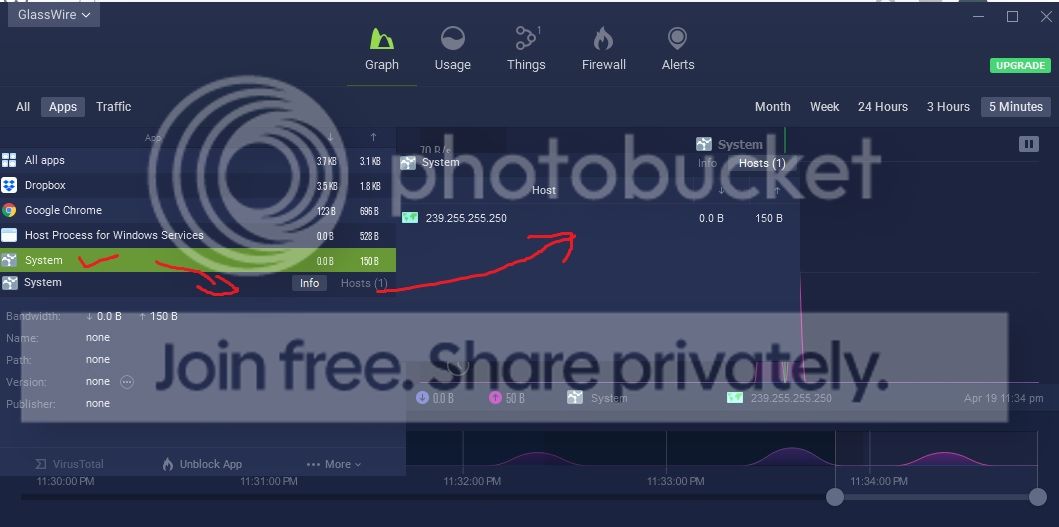
samuria, Yes, I installed the software for video wallpaper, not screen saver (screen saver on my laptop is disabled). You see, there must be something nasty going on since I can not control my windows firewall. I used Glasswire and find this process
suspicious but could do nothing with it.
virus_zpsbevlagf0.jpg
 

My Computer My Computer

Computer type
PC/Desktop
Computer Manufacturer/Model Number
Dell
OS
Thái Nguyên
CPU
Core i5 2.27
Memory
4gb
Graphics Card(s)
ATI Mobility Radeon HD 545v
Antivirus
Microsoft essential security
Browser
Chrome
I now understand that this pop up website is part of the program I installed. This pop up won't happen if I uninstall the program. But I really want to use the program. Is there a way to block the program from using chrome? Or a way for me to have the "change settings" back in firewall (No.3 of image above)?
 

My Computer My Computer

Computer type
PC/Desktop
Computer Manufacturer/Model Number
Dell
OS
Thái Nguyên
CPU
Core i5 2.27
Memory
4gb
Graphics Card(s)
ATI Mobility Radeon HD 545v
Antivirus
Microsoft essential security
Browser
Chrome
The problem is that the software can open ports from inside the of which bypass the firewall
 

My Computer My Computer

Computer type
PC/Desktop
OS
win 8 32 bit
Back
Top