Solved How to get back right-click Close Tray on optical drive?

hasefo

New member
Local time
4:25 AM
Messages
8
When I bought this computer (HP Elite 8000 with Windows 7 Pro x64), or maybe just something I installed, there was a right-click (on the optical drive) context menu item called Close Tray that did exactly what it said, somewhere near Eject.

When I reinstalled from factory software, Close Tray is gone... and I'm not seeing how to restore it.

I found some posts here and elsewhere about adding it using programs but none of them do it to the right-click context of the optical drive... does anyone know how to do this? I imagine it would work the same for Windows 10.

It's possible a program I installed previously added it, but I'm not sure what... currently I have CDBurnerXP, VLC, and HandBrake installed, so if anyone knows what program could add this option, that would be great.
 

My Computer My Computer

At a glance

Windows 7 Professional 64-bit
Computer type
PC/Desktop
OS
Windows 7 Professional 64-bit

My Computer My Computer

At a glance

Win 10 x64, Linux Lite, Win 7 x64, BlackArch,...
Computer type
PC/Desktop
Computer Manufacturer/Model Number
HP Desktop & Compaq Laptop
OS
Win 10 x64, Linux Lite, Win 7 x64, BlackArch, & Kali
Hard Drives
Samsung 850 Pro 256Gb,
Hitachi HDD 1Tb,
Crucial MX SSD 250Gb
Segate 3Tb USB 3.0 Ext. Backup HDD
Internet Speed
150Mbps dn, 20Mbps up
Antivirus
Avast Free, Malwarebytes Anti-Exploit & Anti-Ransomware
Browser
Firefox, Chrome, Opera, & VPN

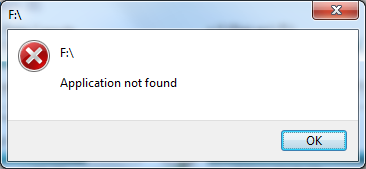
Ran the tutorial exactly, and I got this:

b2d0ZS6.png


There are other things in the Nirsoft ZIP file, does it need those too?

Odd - I copied those files directly to System32, and they were in SysWOW64 when I went in and checked! Whaaat? I know I moved em into system32. After moving them again, all I get is the cmd window opening for a split second, and nothing happens. The apparent "not found" was due to those files moving themselves into SysWOW64 somehow.

I can see the "DVDOPEN" entry being added to my Temp folder, but nothing happens :mad:


SOLVED! Solved Solved Solved! When you set up this cack, always MAKE SURE any Virtual drives that act like optical drives do not precede your real optical drive! So, it was actually WORKING the whole time, just can't see a virtual drive being unmounted and remounted over and over again :roflmao:

For UltraISO: turn off all virtual drives. Then save that, and the commands should work. After that, turn Virtual Drives back on and change the drive letter to any drive letter that is AFTER the drive letter of your default optical drive.
 
Last edited:

My Computer My Computer

At a glance

Windows 10/Windows 7 (My Idea- Virtual PC)Intel(R) Core(TM) i5-3470 CPU @ 3.20GHz16 GBnVidia GeForce GTX 750 Ti (2GB)
Computer type
PC/Desktop
Computer Manufacturer/Model Number
Lenovo Thinkcenter M92p
OS
Windows 10/Windows 7 (My Idea- Virtual PC)
CPU
Intel(R) Core(TM) i5-3470 CPU @ 3.20GHz
Motherboard
Lenovo MahoBay
Memory
16 GB
Graphics Card(s)
nVidia GeForce GTX 750 Ti (2GB)
Sound Card
nVidia HD Audio
Monitor(s) Displays
RCA 4KTV 50"
Screen Resolution
3840p x 2160p
Hard Drives
Onboard:
Seagate ST500DM009-2F110A 500GB
WDC WD4000FYYZ-01UL1B1 (WD-WCC131910831) [3726 GB]

USB 3.0
My Book 1140 (WCAZAD122454) [1862 GB]
Apple MDT MD10EAVS-00D7B0 (0000AB123473) [931 GB]

External:
WD Blue Innostar/Matsunichi (465 GB)
WD
PSU
Stock Thinkcenter M92p
Case
Stock Thinkcenter M92p
Cooling
Active
Keyboard
BYTEC BY-GA-KT-100-AC
Mouse
BYTEC
Internet Speed
1 GHz Down, 40 Mbps Up
Antivirus
Windows Defender
Browser
EDGE
Other Info
Old Other Info:
I finally have an Intel machine that has more than 8GB of Ram.
My ASUS M2N-SE AMD Windows 7 machine is back to Windows 7. Replaced the AMD 4400+ CPU and maxed out the RAM (4GB).
My Core Duo machine is only 2GB of Ram and it is locked to Windows XP in order to run Pro Tools 6.4, which I have been using since 2004.
I have one other Dell OptiPlex 980 tower, Identical to this one,
XweAponX,

Thank you for:
Stating your problem
Excellent troubleshooting, &
Detailed explanation of your resolution!
:thumbsup:
 

My Computer My Computer

At a glance

Win 10 x64, Linux Lite, Win 7 x64, BlackArch,...
Computer type
PC/Desktop
Computer Manufacturer/Model Number
HP Desktop & Compaq Laptop
OS
Win 10 x64, Linux Lite, Win 7 x64, BlackArch, & Kali
Hard Drives
Samsung 850 Pro 256Gb,
Hitachi HDD 1Tb,
Crucial MX SSD 250Gb
Segate 3Tb USB 3.0 Ext. Backup HDD
Internet Speed
150Mbps dn, 20Mbps up
Antivirus
Avast Free, Malwarebytes Anti-Exploit & Anti-Ransomware
Browser
Firefox, Chrome, Opera, & VPN
Thank you.

It seems this comment - Eject and Close CD/DVD Tray - Add to Desktop Context Menu - implies what I thought, that the Close Tray option was there on the previous Windows install because I had LG's whatever drivers at the time that included the option... of course I don't remember if I even installed the software for the drive, nor what it would be, but I can definitely look for it.

If I can't find it then I'll try the suggested solution.
 

My Computer My Computer

At a glance

Windows 7 Professional 64-bit
Computer type
PC/Desktop
OS
Windows 7 Professional 64-bit
Back
Top