Windows 7 x64 Not Bootable After KB4503292 Monthly Rollup 2019-06

jorro

New member
Local time
9:41 PM
Messages
5
After installing the 2019-06 Monthly Quality Rollup (KB4503292) on Windows 7 Pro x64, the OS could not boot, and the Automatic Repair did not help.

The issue was diagnosed as a "Bad Driver." The only driver changed is the "Microsoft (Processor) 06/21/2006 6.1.7601.24475" (an upgrade from version 24441).


System Restore fails, too (tried the last 3 Restore Points) - gets stuck after ~15 minutes (the hard drive activity LED stops blinking, only the progress bar cycles indefinitely).

This on a relatively new (2+ years) high-end Dell workstation (Precision T5810) with a Xeon E5-1650 v3 CPU, with two HDDs in RAID 1. Hard drives and all other HW were checked OK with the BIOS Diagnostics utility.


I know about the McAfee VirusScan Enterprise 8.8 incompatibility (https://support.microsoft.com/en-us/help/4503292/windows-7-update-kb4503292) but my Organization doesn't use the Threat Intelligence Exchange module which seems to cause a similar problem.
 

My Computer My Computer

At a glance

Windows 7 Professional x64
Computer type
PC/Desktop
Computer Manufacturer/Model Number
Dell
OS
Windows 7 Professional x64
Hi jorro,
Welcome to SevenForums!

After installing the 2019-06 Monthly Quality Rollup (KB4503292) on Windows 7 Pro x64, the OS could not boot, and the Automatic Repair did not help

What is automatic repair?

Did you try starting your computer,
repeatedly pressing <F8> at 1 second intervals
Then choose Last known good configuration?
 

My Computer My Computer

At a glance

Win 10 x64, Linux Lite, Win 7 x64, BlackArch,...
Computer type
PC/Desktop
Computer Manufacturer/Model Number
HP Desktop & Compaq Laptop
OS
Win 10 x64, Linux Lite, Win 7 x64, BlackArch, & Kali
Hard Drives
Samsung 850 Pro 256Gb,
Hitachi HDD 1Tb,
Crucial MX SSD 250Gb
Segate 3Tb USB 3.0 Ext. Backup HDD
Internet Speed
150Mbps dn, 20Mbps up
Antivirus
Avast Free, Malwarebytes Anti-Exploit & Anti-Ransomware
Browser
Firefox, Chrome, Opera, & VPN
Hi jorro,
Welcome to SevenForums!

What is automatic repair?

Did you try starting your computer,
repeatedly pressing <F8> at 1 second intervals
Then choose Last known good configuration?

Thank you!

1) Automatic Repair (Startup Repair) starts after a failed Windows startup.

2) Yes, I have tried the F8 boot options and the "Last Known Good Configuration" in particular: it did not work. :(

3) I left System Restore overnight. Initially it gets stuck (no hard drive activity for a very long time), but this one completed eventually. However, the PC could not start again. Now trying System Restore to an earlier point (before the Dell drivers update when some new Intel USB drivers were installed).
 

My Computer My Computer

At a glance

Windows 7 Professional x64
Computer type
PC/Desktop
Computer Manufacturer/Model Number
Dell
OS
Windows 7 Professional x64
An update:
The System Restore to 03 June 2019 gave an Unspecified Error message (Error 0x80070002).
However: the System Restore has in fact been successful, and the system booted normally.
I am now running System File Checker scan (sfc /scannow), and have scheduled a full partition check of C: on next startup.
System File Checker did not find any irregularity violations.
 

My Computer My Computer

At a glance

Windows 7 Professional x64
Computer type
PC/Desktop
Computer Manufacturer/Model Number
Dell
OS
Windows 7 Professional x64
Once again M$ backup/restore is not working correctly. Fortunately you had a positive result!

Irregardless, I'm glad to hear your issue was resolved!

We here on SevenForums highly recommend an external hard drive and either AOMEI Backupper Free or Macrium Reflect Free. I tend to steer towards AOMEI as the GUI (graphical user interface) is a little easier to navigate. The both perform basically the same function.

Top 10 Cheap External Hard Drives to Choose From
Or if you have an old good 3.5" HDD laying around
Or if you have an old good 2.5" HDD laying around
 

My Computer My Computer

At a glance

Win 10 x64, Linux Lite, Win 7 x64, BlackArch,...
Computer type
PC/Desktop
Computer Manufacturer/Model Number
HP Desktop & Compaq Laptop
OS
Win 10 x64, Linux Lite, Win 7 x64, BlackArch, & Kali
Hard Drives
Samsung 850 Pro 256Gb,
Hitachi HDD 1Tb,
Crucial MX SSD 250Gb
Segate 3Tb USB 3.0 Ext. Backup HDD
Internet Speed
150Mbps dn, 20Mbps up
Antivirus
Avast Free, Malwarebytes Anti-Exploit & Anti-Ransomware
Browser
Firefox, Chrome, Opera, & VPN
Thanks for advice on backup solutions Snick!
I wish I could close this thread as Solved, but a key issue is still pending:
I must still install the Monthly Rollup 2019-06 as it contains a fix for a major security flaw in Windows 7, and I may end up right where I started.
The "BadDriver" file has not been identified, so I don't know who to follow on this (Microsoft? Intel? Dell?).
Any ideas how to learn which the bad driver file is after I proceed with those updates again?
 

My Computer My Computer

At a glance

Windows 7 Professional x64
Computer type
PC/Desktop
Computer Manufacturer/Model Number
Dell
OS
Windows 7 Professional x64
You're welcome on the advice.

Driver isn't a system file, however, sfc /scannow was good to run.

Need to see some logs to make a determination.
Please download and run Auto_SURT
When it completes, zip the CBS folder on your desktop and upload please!

Have you perused Device Manager to look for Driver Errors? You can remove & resintall them!

To do so:

  1. Click :orb:, in searchbox type device manager
  2. Click on device manager
  3. Expand (click each >) and look for :warn:
  4. Right-click on it and select Uninstall.
  5. Wait while Windows removes the files.
  6. Click the Action menu at the top of the screen.
  7. Click Scan for Hardware Changes and Windows re-installs fresh copies of the drivers.
 

My Computer My Computer

At a glance

Win 10 x64, Linux Lite, Win 7 x64, BlackArch,...
Computer type
PC/Desktop
Computer Manufacturer/Model Number
HP Desktop & Compaq Laptop
OS
Win 10 x64, Linux Lite, Win 7 x64, BlackArch, & Kali
Hard Drives
Samsung 850 Pro 256Gb,
Hitachi HDD 1Tb,
Crucial MX SSD 250Gb
Segate 3Tb USB 3.0 Ext. Backup HDD
Internet Speed
150Mbps dn, 20Mbps up
Antivirus
Avast Free, Malwarebytes Anti-Exploit & Anti-Ransomware
Browser
Firefox, Chrome, Opera, & VPN
Once again, thank you!
There aren't any warnings in Device Manager (after the System Restore).
Please see the result from running the System Update Readiness Tool for Windows 7 x64:


[FONT=&quot]Belnet FileSender
[/FONT]

[FONT=&quot][/FONT]
 

My Computer My Computer

At a glance

Windows 7 Professional x64
Computer type
PC/Desktop
Computer Manufacturer/Model Number
Dell
OS
Windows 7 Professional x64
No problem.

Downloading CBS folder now, slow 500 kb, Not on my end. 180 Mbps down 20 Mbps up.

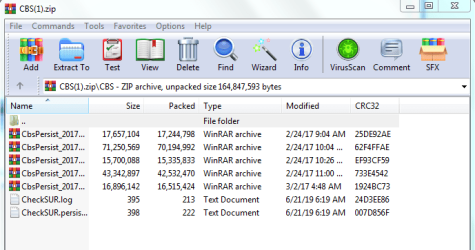
Humm . . . no CBS log. CheckSUR.log is clean. System Restore appears to have removed the CBS.log. Weird it wasn't generated with SURT run. The persistcabs are from 2017.
Capture.PNG

Appears as though you are now good to go!
Seriously consider an external hdd purchase or make one from a spare drive or two. I have a few external hdds. I purchased one and built three for personal home use. You can purchase a usb 3.0 case for 3.5 inch drive for $20 US. 2.5 inch are cheaper!

FYI: When the CBS.log is approx 50 MB, they are archived/compressed persistcab folders!
 

My Computer My Computer

At a glance

Win 10 x64, Linux Lite, Win 7 x64, BlackArch,...
Computer type
PC/Desktop
Computer Manufacturer/Model Number
HP Desktop & Compaq Laptop
OS
Win 10 x64, Linux Lite, Win 7 x64, BlackArch, & Kali
Hard Drives
Samsung 850 Pro 256Gb,
Hitachi HDD 1Tb,
Crucial MX SSD 250Gb
Segate 3Tb USB 3.0 Ext. Backup HDD
Internet Speed
150Mbps dn, 20Mbps up
Antivirus
Avast Free, Malwarebytes Anti-Exploit & Anti-Ransomware
Browser
Firefox, Chrome, Opera, & VPN
Back
Top