Solved IE 11 Opens Home Page But Also Opens Second Tab To Microsoft Settings

poolmon

New member
Power User
VIP
Local time
2:51 PM
Messages
172
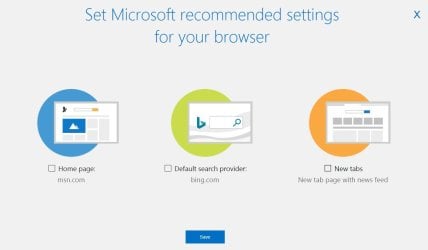
My IE 11 Browser has recently started to open a second tab the first time I open it each day and immediately switches to it. The tab is a Microsoft Tab which asks me if I'd like to utilize certain Microsoft/Windows/IE default settings. I dismiss it and it does not show again until I reboot and open IE again after startup. This just started after this month's Windows update. Anyone know how to stop this nagging behavior?
 

My Computer My Computer

At a glance

win 7
OS
win 7
Hello,

The setting can be found in Internet Options.

From Internet Explorer > Tools > Internet Options, then select the General Tab.

Under Home Page, there will be a code box containing the two lines. Delete the line containing the address that you no longer require.
 

My Computer My Computer

At a glance

Windows 7 x64, Vista x64, 8.1 smartphoneIntel E8400 65W 64-bitDDR2 2 x 2GB, 1GB x 2XFX Radeon HD5750
Computer type
PC/Desktop
OS
Windows 7 x64, Vista x64, 8.1 smartphone
CPU
Intel E8400 65W 64-bit
Motherboard
Gigabyte EP45-UD3LR
Memory
DDR2 2 x 2GB, 1GB x 2
Graphics Card(s)
XFX Radeon HD5750
Sound Card
AMD High Definition Audio; Realtek High Definition Audio
Monitor(s) Displays
iiyama prolite X2377HDS
Screen Resolution
1920 x 1080
Hard Drives
500GB 7200 rpm Seagate ST3500413AS 16MB, 500GB 5400 rpm Toshiba MQ02ABF050H 32MB, 200GB 7200 rpm Seagate ST3200820AS 8MB, 2TB 7200 rpm Western Digital WD20EZRX 64MB
PSU
Enermax Liberty Modular
Case
Antec P193 Midi Tower
Keyboard
Mionix ZIBAL 60
Mouse
Razer USB 2.0 Diamondback Mouse or Huion Graphics Tablet
Browser
Internet Explorer, Lunascape, Firefox, Opera, Avast Safezone
Hello,

The setting can be found in Internet Options.

From Internet Explorer > Tools > Internet Options, then select the General Tab.

Under Home Page, there will be a code box containing the two lines. Delete the line containing the address that you no longer require.
There is only 1 line in the box. That is my home page www.google.com.
 

My Computer My Computer

At a glance

win 7
OS
win 7
To further diagnose the problem, you could look at the Internet Explorer shortcut Icon that you click when launching the browser. Go to IE Icon > right-mouse click > select Properties > select Shortcut Tab.
In particular, look at the Target Path and check that this path only points to "%programfiles%\internet explorer\iexplore.exe". Make sure that the Target Path does not include an URL address as a parameter tagged onto the end of the command.
 

My Computer My Computer

At a glance

Windows 7 x64, Vista x64, 8.1 smartphoneIntel E8400 65W 64-bitDDR2 2 x 2GB, 1GB x 2XFX Radeon HD5750
Computer type
PC/Desktop
OS
Windows 7 x64, Vista x64, 8.1 smartphone
CPU
Intel E8400 65W 64-bit
Motherboard
Gigabyte EP45-UD3LR
Memory
DDR2 2 x 2GB, 1GB x 2
Graphics Card(s)
XFX Radeon HD5750
Sound Card
AMD High Definition Audio; Realtek High Definition Audio
Monitor(s) Displays
iiyama prolite X2377HDS
Screen Resolution
1920 x 1080
Hard Drives
500GB 7200 rpm Seagate ST3500413AS 16MB, 500GB 5400 rpm Toshiba MQ02ABF050H 32MB, 200GB 7200 rpm Seagate ST3200820AS 8MB, 2TB 7200 rpm Western Digital WD20EZRX 64MB
PSU
Enermax Liberty Modular
Case
Antec P193 Midi Tower
Keyboard
Mionix ZIBAL 60
Mouse
Razer USB 2.0 Diamondback Mouse or Huion Graphics Tablet
Browser
Internet Explorer, Lunascape, Firefox, Opera, Avast Safezone
To further diagnose the problem, you could look at the Internet Explorer shortcut Icon that you click when launching the browser. Go to IE Icon > right-mouse click > select Properties > select Shortcut Tab.
In particular, look at the Target Path and check that this path only points to "%programfiles%\internet explorer\iexplore.exe". Make sure that the Target Path does not include an URL address as a parameter tagged onto the end of the command.
The Icon Path is clean. Today for the first time IE did not open the second tab after startup. I will have to monitor. Thanks for the tips.

EDIT: It just did it again. Here is the second window
 

Attachments

  • MS Nag.JPG
    MS Nag.JPG
    44.4 KB · Views: 1
Last edited:

My Computer My Computer

At a glance

win 7
OS
win 7
poolmon. Are you sure it's the settings page. I have found that since the last Preview of "Monthly Quality Roll up (KB4503277)", there has been a second tab loaded in IE11, which is in fact a Microsoft tab urging the user to use that tab as your home page.

I have found that after you have closed that tab immediately on IE11 starting up for a days, it has now stopped loading.
 

My Computer My Computer

At a glance

Windows 7 Home Premium 64 bit sp1Intel i5 3570 3.4Ghz Ivy Bridge SKT 1155 quad...G-Skill Rip Jaws 16Gb (8x2) DDR3 -1600 PC3 12...Gigabyte NVIDIA GT610 1Gb DDR3 810/1200 PCI-E...
Computer type
PC/Desktop
Computer Manufacturer/Model Number
Self built using existing case
OS
Windows 7 Home Premium 64 bit sp1
CPU
Intel i5 3570 3.4Ghz Ivy Bridge SKT 1155 quad core
Motherboard
Gigabyte Z77-HD3 SKT 1155 2xSata 3, 4x USB 3.0
Memory
G-Skill Rip Jaws 16Gb (8x2) DDR3 -1600 PC3 12800 CL 10 red
Graphics Card(s)
Gigabyte NVIDIA GT610 1Gb DDR3 810/1200 PCI-E 2.0 Silent
Sound Card
NVIDIA High Definition & Realtech High Definition Audio
Monitor(s) Displays
2 x Philips 226V4L 16:9 aspect ratio
Screen Resolution
1920 x 1080 HD
Hard Drives
Samsung 840 Pro 256gb SSD, SATA 3.
Hitachi Touro Portable 1tb, USB 3.0 HDD used for image b/ups.
PSU
Corsair VS450
Case
Codeng
Cooling
PSU fan & CPU fan
Keyboard
Logitech
Mouse
Logitech Wireless trackball M570
Internet Speed
Wireless 3G. 3mg down & 550kb up.
Antivirus
Bitdefender Internet Security 2020
Browser
Opera (Current Version) & Firefox
Other Info
MS Office 2013 Pro. Davis weather station software. MGE Nova 600 avr UPS.
poolmon. Are you sure it's the settings page. I have found that since the last Preview of "Monthly Quality Roll up (KB4503277)", there has been a second tab loaded in IE11, which is in fact a Microsoft tab urging the user to use that tab as your home page.

I have found that after you have closed that tab immediately on IE11 starting up for a days, it has now stopped loading.


Yes. See my edit to my previous post where I posted the extra tab/page coming up.
I'm going to uncheck the boxes displayed (which were all checked initially) and press SAVE to see if that gets rid of it. This just started a few weeks back after the monthly update.
 

My Computer My Computer

At a glance

win 7
OS
win 7
Yes, I agree it does show Settings, but they are settings suggested by MS, so you will open on their page, which no doubt has promo material they want you to see.

I think if you press Save it will then become your home page. I just closed the tab for few days & the nagging has now stopped.
 

My Computer My Computer

At a glance

Windows 7 Home Premium 64 bit sp1Intel i5 3570 3.4Ghz Ivy Bridge SKT 1155 quad...G-Skill Rip Jaws 16Gb (8x2) DDR3 -1600 PC3 12...Gigabyte NVIDIA GT610 1Gb DDR3 810/1200 PCI-E...
Computer type
PC/Desktop
Computer Manufacturer/Model Number
Self built using existing case
OS
Windows 7 Home Premium 64 bit sp1
CPU
Intel i5 3570 3.4Ghz Ivy Bridge SKT 1155 quad core
Motherboard
Gigabyte Z77-HD3 SKT 1155 2xSata 3, 4x USB 3.0
Memory
G-Skill Rip Jaws 16Gb (8x2) DDR3 -1600 PC3 12800 CL 10 red
Graphics Card(s)
Gigabyte NVIDIA GT610 1Gb DDR3 810/1200 PCI-E 2.0 Silent
Sound Card
NVIDIA High Definition & Realtech High Definition Audio
Monitor(s) Displays
2 x Philips 226V4L 16:9 aspect ratio
Screen Resolution
1920 x 1080 HD
Hard Drives
Samsung 840 Pro 256gb SSD, SATA 3.
Hitachi Touro Portable 1tb, USB 3.0 HDD used for image b/ups.
PSU
Corsair VS450
Case
Codeng
Cooling
PSU fan & CPU fan
Keyboard
Logitech
Mouse
Logitech Wireless trackball M570
Internet Speed
Wireless 3G. 3mg down & 550kb up.
Antivirus
Bitdefender Internet Security 2020
Browser
Opera (Current Version) & Firefox
Other Info
MS Office 2013 Pro. Davis weather station software. MGE Nova 600 avr UPS.
Yes, I agree it does show Settings, but they are settings suggested by MS, so you will open on their page, which no doubt has promo material they want you to see.

I think if you press Save it will then become your home page. I just closed the tab for few days & the nagging has now stopped.


I tried both closing the browser tab directly and "X-ing" out the page. It sporadically came back. This time I unchecked each of the the pre-checked boxes and pressed save. Hopefully that will do the trick. It did not change my homepage or search engine. . . . yet that is.
 

My Computer My Computer

At a glance

win 7
OS
win 7
Well, I have been proven wrong as soon as I opened IE11, this morning, up came that damned MS page. I only use IE11 for one website, which is set as my home page. So I opened Settings in IE11 & on the General Tab I actually have this website listed as the Home Page & I had set the Start Up button to start with this Home Page, but this had been changed to Start with Tabs from the last Session, so I have reset it. I then clicked on the Apply button, so I will see if that fixes it.
 

My Computer My Computer

At a glance

Windows 7 Home Premium 64 bit sp1Intel i5 3570 3.4Ghz Ivy Bridge SKT 1155 quad...G-Skill Rip Jaws 16Gb (8x2) DDR3 -1600 PC3 12...Gigabyte NVIDIA GT610 1Gb DDR3 810/1200 PCI-E...
Computer type
PC/Desktop
Computer Manufacturer/Model Number
Self built using existing case
OS
Windows 7 Home Premium 64 bit sp1
CPU
Intel i5 3570 3.4Ghz Ivy Bridge SKT 1155 quad core
Motherboard
Gigabyte Z77-HD3 SKT 1155 2xSata 3, 4x USB 3.0
Memory
G-Skill Rip Jaws 16Gb (8x2) DDR3 -1600 PC3 12800 CL 10 red
Graphics Card(s)
Gigabyte NVIDIA GT610 1Gb DDR3 810/1200 PCI-E 2.0 Silent
Sound Card
NVIDIA High Definition & Realtech High Definition Audio
Monitor(s) Displays
2 x Philips 226V4L 16:9 aspect ratio
Screen Resolution
1920 x 1080 HD
Hard Drives
Samsung 840 Pro 256gb SSD, SATA 3.
Hitachi Touro Portable 1tb, USB 3.0 HDD used for image b/ups.
PSU
Corsair VS450
Case
Codeng
Cooling
PSU fan & CPU fan
Keyboard
Logitech
Mouse
Logitech Wireless trackball M570
Internet Speed
Wireless 3G. 3mg down & 550kb up.
Antivirus
Bitdefender Internet Security 2020
Browser
Opera (Current Version) & Firefox
Other Info
MS Office 2013 Pro. Davis weather station software. MGE Nova 600 avr UPS.
The Icon Path is clean. Today for the first time IE did not open the second tab after startup. I will have to monitor. Thanks for the tips.

EDIT: It just did it again. Here is the second window
I did a google image search on your nag screen and it came up empty. Wonder if its not really microsoft at all but some malware on your computer.
 

My Computer My Computer

At a glance

Win7 pro x64stock i7 7700kCorsair Vengeance LPX 16GB (2x8GB) DDR4 @ 320...integrated Intel HD 630
Computer type
PC/Desktop
Computer Manufacturer/Model Number
diy
OS
Win7 pro x64
CPU
stock i7 7700k
Motherboard
Gigabyte Z270N-WIFI mini-ITX
Memory
Corsair Vengeance LPX 16GB (2x8GB) DDR4 @ 3200MHz
Graphics Card(s)
integrated Intel HD 630
Sound Card
onboard Realtek ALC1220
Monitor(s) Displays
two vertically mounted samsung 55" 4k un55mu8000
Screen Resolution
1920x1280
Hard Drives
256GB Samsung EVO 960 M.2 pci-e NVMe SSD
PSU
SilverStone Nightjar ST45NF 450Watt Fanless
Case
No case. Motherboard is mounted directly onto power supply
Cooling
Evercool low profile 815EP with Panaflow 12L fan at 7v
Keyboard
Ortek MCK-86 mini
Mouse
Belkin 5-button USB
Internet Speed
spectrum 400mbps
I did a google image search on your nag screen and it came up empty. Wonder if its not really microsoft at all but some malware on your computer.
From what I can see it appears legit. It happened after a Microsoft Update, no virus detected and no maleware detected. No browser hijack detected nor any rootkits.
 

My Computer My Computer

At a glance

win 7
OS
win 7
Same thing is happening to me on both my Win7 computers and my Win8.1 computer - also no malware detected.
 

My Computer My Computer

At a glance

Win7 64i3 and i5
Computer type
PC/Desktop
Computer Manufacturer/Model Number
Dell ASUS
OS
Win7 64
CPU
i3 and i5
has anyone tried just giving in to the nag screen, that is, allow it to have its way by saying yes to whatever it suggests? Then reboot and see if the nag screen has gone away. And only then, manually resetting your home page/search provider/etc back to what you wanted.
 

My Computer My Computer

At a glance

Win7 pro x64stock i7 7700kCorsair Vengeance LPX 16GB (2x8GB) DDR4 @ 320...integrated Intel HD 630
Computer type
PC/Desktop
Computer Manufacturer/Model Number
diy
OS
Win7 pro x64
CPU
stock i7 7700k
Motherboard
Gigabyte Z270N-WIFI mini-ITX
Memory
Corsair Vengeance LPX 16GB (2x8GB) DDR4 @ 3200MHz
Graphics Card(s)
integrated Intel HD 630
Sound Card
onboard Realtek ALC1220
Monitor(s) Displays
two vertically mounted samsung 55" 4k un55mu8000
Screen Resolution
1920x1280
Hard Drives
256GB Samsung EVO 960 M.2 pci-e NVMe SSD
PSU
SilverStone Nightjar ST45NF 450Watt Fanless
Case
No case. Motherboard is mounted directly onto power supply
Cooling
Evercool low profile 815EP with Panaflow 12L fan at 7v
Keyboard
Ortek MCK-86 mini
Mouse
Belkin 5-button USB
Internet Speed
spectrum 400mbps
has anyone tried just giving in to the nag screen, that is, allow it to have its way by saying yes to whatever it suggests? Then reboot and see if the nag screen has gone away. And only then, manually resetting your home page/search provider/etc back to what you wanted.


I unchecked all the pre-checked boxes on the nag screen, then pressed "save" and have not been bothered since. Hopefully that took care of it. But, don't forget to uncheck each box first or it will change everything to the pre-checked MS recommendations.
 

My Computer My Computer

At a glance

win 7
OS
win 7
Unchecking and saving didn't work for me nut will try checking and saving and then resetting tab options.
 

My Computer My Computer

At a glance

Win7 64i3 and i5
Computer type
PC/Desktop
Computer Manufacturer/Model Number
Dell ASUS
OS
Win7 64
CPU
i3 and i5
Same thing has been happening to me for the last few days. I've just been closing the tab and moving on. If it persists I'll do some more diags and try to find a fix. It seems to be a bit sporadic.
 

My Computer My Computer

At a glance

Win 7 Home Prem x64 SP1AMD FX6350 Vishera 3.9Ghz16Gb Ballistix Sport 2x8Gb DDR3-1600nVidia GEForce 1050Ti 4mg
Computer type
PC/Desktop
Computer Manufacturer/Model Number
Custom Build
OS
Win 7 Home Prem x64 SP1
CPU
AMD FX6350 Vishera 3.9Ghz
Motherboard
ASUS M5A97 R2.0
Memory
16Gb Ballistix Sport 2x8Gb DDR3-1600
Graphics Card(s)
nVidia GEForce 1050Ti 4mg
Sound Card
on board Realtek HD w/Logitech 2.1 speakers
Monitor(s) Displays
AOC 2243w
Screen Resolution
1920x1080
Hard Drives
500g Samsung Evo 850 OS SSD,
250g Samsung Evo 850 SSD for data,
1Tb Toshiba SSD for b/u's.
PSU
Corsair CX750 modular
Case
MasterCooler Elite 330
Cooling
2x case, Coolermaster Viper CPU stack
Keyboard
ms wireless desktop 2000
Mouse
ms wireless desktop 2000
Internet Speed
Cable:Average about 250Mbps down, 25Mbps Up +/-
Antivirus
MSE, Cclnr, MwBytes, SA-S
Browser
IE11
OOPS. . . It started again!
Unchecking the boxes had limited lasting effect. Yes indeed it is sporadic, but persistent . . .

EDIT.
After affirmatively responding to the first additional popup tab by unchecking the boxes and pressing save and having another popup tab follow, and responding to it in the negative (rather than just xing it out) the problem seems to have gone away. Either this of just via time elapsed the problem seems solved.
 
Last edited:

My Computer My Computer

At a glance

win 7
OS
win 7
Back
Top