
Google Chrome Pinned/Tasks on taskbar icon

Bert02

New member
Member
Local time
10:44 PM
Messages
13
I have pinned google chrome to the taskbar and was wondering if I was able to pin a different chrome user to the right click menu of google chrome on the taskbar. Like Windows explorer, excel, word etc are able to pin folders and shortcuts to the menu.
Either through a reg hack or actually able to do it.
 

Attachments
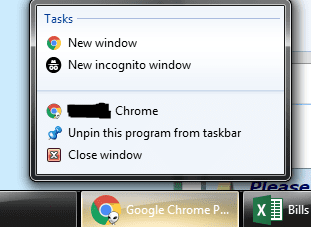
  • Chromepinned.PNG
    Chromepinned.PNG
    27.9 KB · Views: 12

My Computer

Computer type
PC/Desktop
Computer Manufacturer/Model Number
Custom
OS
Windows 7 Ultimate x64
CPU
Intel(R) Core(TM) i5-3570K CPU @ 3.40GHz
Motherboard
ASRock Z77 Extreme4
Memory
16GB 2x F3-1600C10-8GAO
Graphics Card(s)
NVIDIA GeForce GTX 260
Sound Card
onboard
Screen Resolution
1920x1080
Hard Drives
(1) Hitachi HDS721050CLA362
(2) SanDisk SDSSDX240GG25
(3) WDC WD5000AAKS-00TMA0
PSU
Antec Quattro 850W
Hi Bert02,

I have pinned google chrome to the taskbar and was wondering if I was able to pin a different chrome user to the right click menu of google chrome on the taskbar. Like Windows explorer, excel, word etc are able to pin folders and shortcuts to the menu.
Either through a reg hack or actually able to do it.

I did some investigating and found this which might be of use => [SOLVED] Separate Taskbar Shortcuts for Google Chrome Accounts.

I hope this helps!
 

My Computer

Computer type
Laptop
Computer Manufacturer/Model Number
Fujitsu LIFEBOOK
OS
Win 7 HP SP1 64-bit Vista HB SP2 32-bit Linux Mint 18.3
CPU
Intel(R) Pentium(R) CPU P6200 @ 2.13GHz
Motherboard
FUJITSU FJNBB06
Memory
4.00 GB
Graphics Card(s)
Intel(R) Graphics Media Accelerator HD
Sound Card
[1] Realtek High Definition Audio [2] Intel(R) Display Audio
Screen Resolution
1366 x 768 x 32 bits (4294967296 colors) @ 59 Hz
Hard Drives
TOSHIBA MK5076GSX
Antivirus
AVG FREE
Hi
I have alredy created defferent icons for different users. I would rather not have 4 chrome icons pinned. I was hoping to have the default profile as the icon and if i right click the icon i could choose one of the other profiles.
Im guessing if it is possible it would require a registry hack
 

My Computer

Computer type
PC/Desktop
Computer Manufacturer/Model Number
Custom
OS
Windows 7 Ultimate x64
CPU
Intel(R) Core(TM) i5-3570K CPU @ 3.40GHz
Motherboard
ASRock Z77 Extreme4
Memory
16GB 2x F3-1600C10-8GAO
Graphics Card(s)
NVIDIA GeForce GTX 260
Sound Card
onboard
Screen Resolution
1920x1080
Hard Drives
(1) Hitachi HDS721050CLA362
(2) SanDisk SDSSDX240GG25
(3) WDC WD5000AAKS-00TMA0
PSU
Antec Quattro 850W
Hi Bert02,

I have alredy created defferent icons for different users. I would rather not have 4 chrome icons pinned. I was hoping to have the default profile as the icon and if i right click the icon i could choose one of the other profiles.

Im guessing if it is possible it would require a registry hack

Quite possibly. Perhaps somebody else will be able to help you!
I am sure that there are others who would also like this feature!
 

My Computer

Computer type
Laptop
Computer Manufacturer/Model Number
Fujitsu LIFEBOOK
OS
Win 7 HP SP1 64-bit Vista HB SP2 32-bit Linux Mint 18.3
CPU
Intel(R) Pentium(R) CPU P6200 @ 2.13GHz
Motherboard
FUJITSU FJNBB06
Memory
4.00 GB
Graphics Card(s)
Intel(R) Graphics Media Accelerator HD
Sound Card
[1] Realtek High Definition Audio [2] Intel(R) Display Audio
Screen Resolution
1366 x 768 x 32 bits (4294967296 colors) @ 59 Hz
Hard Drives
TOSHIBA MK5076GSX
Antivirus
AVG FREE
Back
Top