Solved Google Chrome pinned to taskbar error

Equonix

New member
Local time
12:34 AM
Messages
17
Hey.

When I open Google Chrome on my taskbar it opens under a different icon then the pinned icon.

VAlel.png


How do I get it so that Chrome opens up on the same icon?
(I know that the icon next to it does that as well but when I have used Chrome in the past it opened under the pinned icon)


Thanks.
 

My Computer

OS
Windows 7 Professional x64

My Computer

Computer type
Laptop
Computer Manufacturer/Model Number
Sony Vaio VPCEB47GM Laptop
OS
Win 7 Pro 64-bit
CPU
Intel i5 2.4 Ghz
Memory
8GB DDR3
Graphics Card(s)
Intel HD 3000
Sound Card
IDT High Definition
Monitor(s) Displays
15.6 WGXA Anti-Glare LED
Screen Resolution
1280x800
Hard Drives
640Gb 7200rpm
Antivirus
MSE
Browser
Opera (primary) with IE9 backup
Thanks i fixed it :)
 

My Computer

OS
Windows 7 Professional x64
That's great news! Thanks for posting back. :thumbsup:
 

My Computer

Computer type
Laptop
Computer Manufacturer/Model Number
Sony Vaio VPCEB47GM Laptop
OS
Win 7 Pro 64-bit
CPU
Intel i5 2.4 Ghz
Memory
8GB DDR3
Graphics Card(s)
Intel HD 3000
Sound Card
IDT High Definition
Monitor(s) Displays
15.6 WGXA Anti-Glare LED
Screen Resolution
1280x800
Hard Drives
640Gb 7200rpm
Antivirus
MSE
Browser
Opera (primary) with IE9 backup
Thanks to you, for the quick response :)
 

My Computer

OS
Windows 7 Professional x64
My bad, I thought I fixed it... :( the problem is still occuring. :/
 

My Computer

OS
Windows 7 Professional x64
OK, I take back my previous post:

That's great news! Thanks for posting back. :thumbsup:

On a serious note, what did you initially do that made you think the problem was solved, and what is happening now? Are both Chromes the same bit-ness or is one 32-bit and the other 64-bit? Anything else you can add would be greatly appreciated.
 

My Computer

Computer type
Laptop
Computer Manufacturer/Model Number
Sony Vaio VPCEB47GM Laptop
OS
Win 7 Pro 64-bit
CPU
Intel i5 2.4 Ghz
Memory
8GB DDR3
Graphics Card(s)
Intel HD 3000
Sound Card
IDT High Definition
Monitor(s) Displays
15.6 WGXA Anti-Glare LED
Screen Resolution
1280x800
Hard Drives
640Gb 7200rpm
Antivirus
MSE
Browser
Opera (primary) with IE9 backup
Well I tried all the steps above and then I launched Chrome and it worked under 1 icon (what it should be doing) then I closed it and opened Chrome again to make sure the problem was fixed but it opened up under a new icon again. The icon's both look exactly the same though, one just has unknown recent / pages bookmarks when i right click it and the other one is normal. This never happened before only when I installed my SSD.
 

My Computer

OS
Windows 7 Professional x64
It seems it either a 32/64 bit issue or if not we could be dealing with something worse. More info of the version of chrome would help us help you. Look in control panel, program files, etc- see what version and if applicable how many chromes do you have :) r. Click the icons, look at the info under properties. Post information to help determine what it could be.
Hey here's an idea, have you tried just uninstalling chrome and re installing it again.
Export your bookmarks and be done!
 

My Computer

OS
Win764
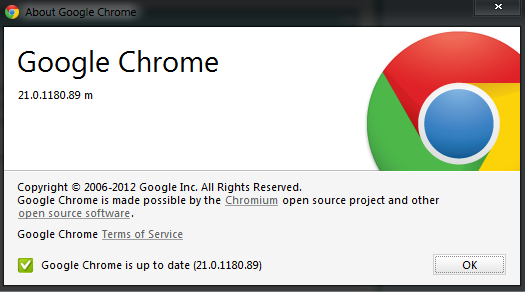
That's the information about Chrome.
h9nzB.png


Im not sure if this helps but... (I open the one on the left and it makes a new icon and launches it. -Then when I try to launch it off the new icon it connects to the old (normal) icon)
R7GFYT.jpg


This is the old (normal icon)
eId5MA.jpg
 

My Computer

OS
Windows 7 Professional x64
This might be a long-shot but what happens if you uninstall Chrome and then try reinstalling a fresh copy? Perhaps there was a glitch during original install of Version 21. If you want to give this a try I recommend using Revo Pro to uninstall. (It has a free 30 day trial period.) Revo has a forced uninstall option that is pretty good at finding those obscure bits and pieces that usually get left behind when using the native Windows uninstall process.

Revo Uninstaller Pro - Uninstall Software, Remove Programs easily, Forced Uninstall
 

My Computer

Computer type
Laptop
Computer Manufacturer/Model Number
Sony Vaio VPCEB47GM Laptop
OS
Win 7 Pro 64-bit
CPU
Intel i5 2.4 Ghz
Memory
8GB DDR3
Graphics Card(s)
Intel HD 3000
Sound Card
IDT High Definition
Monitor(s) Displays
15.6 WGXA Anti-Glare LED
Screen Resolution
1280x800
Hard Drives
640Gb 7200rpm
Antivirus
MSE
Browser
Opera (primary) with IE9 backup
I have tried that now when i try to download and install Chrome it comes up with this error message
NgPFn4.jpg
 

My Computer

OS
Windows 7 Professional x64
See if Chrome is still showing in your start menu (start > all programs) and/or control panel > programs and features. If it's showing in both places (or just in the start menu) use the Chrome uninstaller (start menu > Google Chrome > Uninstall.) If it's only showing in programs and features, use that to uninstall. But the Chrome uninstaller is my first choice.

If you still can't get rid of Chrome there's a manual work around from Google. (NOTE: Step 9 shows it's for Vista but it's the same command for Windows 7.)

Manually uninstall Google Chrome in Windows - Google Chrome Help

Since this involves a registry change I recommend creating a restore point BEFORE doing anything else.
 

My Computer

Computer type
Laptop
Computer Manufacturer/Model Number
Sony Vaio VPCEB47GM Laptop
OS
Win 7 Pro 64-bit
CPU
Intel i5 2.4 Ghz
Memory
8GB DDR3
Graphics Card(s)
Intel HD 3000
Sound Card
IDT High Definition
Monitor(s) Displays
15.6 WGXA Anti-Glare LED
Screen Resolution
1280x800
Hard Drives
640Gb 7200rpm
Antivirus
MSE
Browser
Opera (primary) with IE9 backup
Chrome isn't anywhere (installation) i can't find it under control panel programs and features it just comes up with that error message when i try to install Chrome
 

My Computer

OS
Windows 7 Professional x64

My Computer

Computer type
Laptop
Computer Manufacturer/Model Number
Sony Vaio VPCEB47GM Laptop
OS
Win 7 Pro 64-bit
CPU
Intel i5 2.4 Ghz
Memory
8GB DDR3
Graphics Card(s)
Intel HD 3000
Sound Card
IDT High Definition
Monitor(s) Displays
15.6 WGXA Anti-Glare LED
Screen Resolution
1280x800
Hard Drives
640Gb 7200rpm
Antivirus
MSE
Browser
Opera (primary) with IE9 backup
wont let me run the .reg file after i saved it to all files.
 

My Computer

OS
Windows 7 Professional x64
It was supposed to be saved to your desktop.
 

My Computer

Computer type
Laptop
Computer Manufacturer/Model Number
Sony Vaio VPCEB47GM Laptop
OS
Win 7 Pro 64-bit
CPU
Intel i5 2.4 Ghz
Memory
8GB DDR3
Graphics Card(s)
Intel HD 3000
Sound Card
IDT High Definition
Monitor(s) Displays
15.6 WGXA Anti-Glare LED
Screen Resolution
1280x800
Hard Drives
640Gb 7200rpm
Antivirus
MSE
Browser
Opera (primary) with IE9 backup
I saved it to my desktop (under all files) as a .reg file
 

My Computer

OS
Windows 7 Professional x64
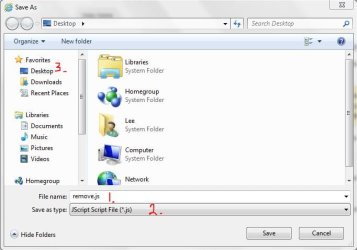
When you right-clicked on the link to save the remove.reg file it should have looked like this:

remove.JPG

Item 1 would be renamed to: remove.reg
Item 2 would be: all files
Item 3 is select (click on) desktop
Final step is to click on Save button.

When I followed these steps the file appeared on my desktop with a registry icon like this:

thumb_Regedit.png


Is that what you got?
 

My Computer

Computer type
Laptop
Computer Manufacturer/Model Number
Sony Vaio VPCEB47GM Laptop
OS
Win 7 Pro 64-bit
CPU
Intel i5 2.4 Ghz
Memory
8GB DDR3
Graphics Card(s)
Intel HD 3000
Sound Card
IDT High Definition
Monitor(s) Displays
15.6 WGXA Anti-Glare LED
Screen Resolution
1280x800
Hard Drives
640Gb 7200rpm
Antivirus
MSE
Browser
Opera (primary) with IE9 backup
Sorry haven't been on busy with school
7p0sHp.jpg

7p0sHp.jpghttp:
 

My Computer

OS
Windows 7 Professional x64
Back
Top