Win7 Style Builder - Changing Notification Window Color On Taskbar

kidcryptid

New member
Local time
4:53 PM
Messages
1
Hey guys. I have recently came across a great .theme on DeviantArt. But there is one thing I don't like about it. I don't know the exact term to reference it, but for example, when I have a messaging application running such as AIM or Pidgin, and someone sends me a message, usually the window/icon on my taskbar will flash orange to notify me of a new message. In this style however, the taskbar stays the same color even if someone sends me a message. I was wondering where about in the Win7 Style Builder or Windows Style Builder application I can change this at? Any help would be appreciated. Thanks!
 

My Computer My Computer

Computer type
PC/Desktop
OS
Windows 7 Ultimate x64
Welcome to the Seven Forums

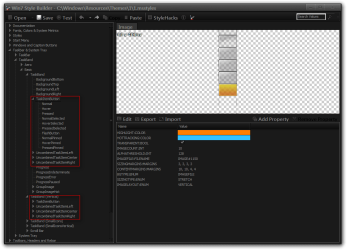
I think most likely you are talking about the taskbar buttons they are located under Taskbar & System Tray > TaskBand > Basic look at the screenshot below will show you the locations, there are 4 images for the horizontal and vertical taskbar's each image has 7 to 10 different states, have a look at this tutorial may explain more of the different states.
http://www.sevenforums.com/tutorials/266336-taskbar-button-change-color-orange-flashing-button.html

Jerry
Win7 Style Builder - CWindowsResourcesThemes.msstyles.png
 

My Computer My Computer

Computer type
Laptop
Computer Manufacturer/Model Number
Sager NP9170
OS
Win 7 Pro x64 / Win 10 Pro
CPU
Intel(R) Core(TM) i7-3630QM CPU @ 2.40GHz
Motherboard
CLEVO P170EM
Memory
12 GB
Graphics Card(s)
(1) Intel(R) HD Graphics 4000 (2) NVIDIA GeForce GTX 675M
Sound Card
(1) Realtek High Definition Audio (2) Intel(R) Display Aud
Monitor(s) Displays
17.3
Screen Resolution
1920x1080
Hard Drives
(1) Samsung 860 EVO 500GB(OS) (1) Samsung 860 EVO 500GB(Data)
Keyboard
Backlite
Antivirus
MSE, Malwarebytes Pro
Browser
Firefox
Other Info
DESKTOP: Custom-built.
OS: Win 10 Pro x64.
CASE: Rosewill R5.
CPU: Intel I5 4670K CPU @ 3.40GHz.
CPU COOLER: Cool Master Hyper 212 EVO.
MOTHERBOARD: Asus Z87-A.
MEMORY: Kingston HyperX 2x4 GB.
GPU: Nvidia Geforce 650 TI.
PSU: Corsair TX750.
DRIVES: (1) Samsung 840 120 GB SSD (2) Western Digital blue 500 GB 7200 RPM.
Bingo can you help me..
 
Last edited by a moderator:

My Computer My Computer

Computer type
PC/Desktop
OS
Window 7 Ultimate 32bit
Thread is 5 years old.
 

My Computer My Computer

Computer type
PC/Desktop
Computer Manufacturer/Model Number
HP p6-2020t
OS
Win 7 Ult 64-bit
CPU
G620 2.6GHZ Pentium R
Memory
6 GB
Monitor(s) Displays
25" HPLV2311
Screen Resolution
1920 x 1200
Hard Drives
1 SATA, 1 exterior SATA
Case
HP
Cooling
PSU
Antivirus
Glasswire
Browser
Waterfox; Firefox; Chrome for work
Other Info
Firewall--Glasswire
Similar specs in Gateway DX4200
Verizon FIOS Wired network

1 other Win7 computer-- has SSD
Thread is 5 years old.

Please can you help me.. I want to remove white line refresh menu on desktop... The line in posistion in the under propertir menu... Please helm me
 

My Computer My Computer

Computer type
PC/Desktop
OS
Window 7 Ultimate 32bit
I don't know what you mean. Can you take a screenshot?
 

My Computer My Computer

Computer type
PC/Desktop
Computer Manufacturer/Model Number
HP p6-2020t
OS
Win 7 Ult 64-bit
CPU
G620 2.6GHZ Pentium R
Memory
6 GB
Monitor(s) Displays
25" HPLV2311
Screen Resolution
1920 x 1200
Hard Drives
1 SATA, 1 exterior SATA
Case
HP
Cooling
PSU
Antivirus
Glasswire
Browser
Waterfox; Firefox; Chrome for work
Other Info
Firewall--Glasswire
Similar specs in Gateway DX4200
Verizon FIOS Wired network

1 other Win7 computer-- has SSD
Back
Top