
KB4512486 Security Only Quality Update for Windows 7 - Aug. 13

Brink

Administrator
Staff member
Local time
7:33 AM
Messages
74,889
Location
Oklahoma
August 13, 2019 - KB4512486 (Security-only update)

Applies to: Windows 7 Service Pack 1, Windows Server 2008 R2 Service Pack 1


Improvements and fixes

This security update includes quality improvements. Key changes include:

  • Security updates to Windows App Platform and Frameworks, Windows Wireless Networking, Windows Storage and Filesystems, Windows Virtualization, Windows Datacenter Networking, the Microsoft JET Database Engine, Windows Input and Composition, Windows MSXML, and Windows Server.
For more information about the resolved security vulnerabilities, please refer to the Security Update Guide.

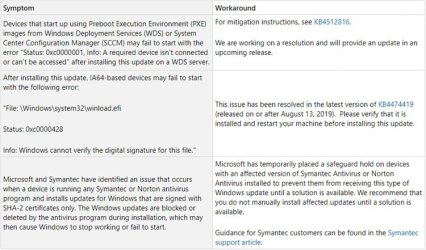
Known issues in this update

KB4512486.jpg

[UPDATED 8/16] - KB4517297 Non-security Update for Windows 7 - August 16
8--16.jpg


How to get this update

Before installing this update

Microsoft strongly recommends you install the latest servicing stack update (SSU) for your operating system before installing the latest Rollup. SSUs improve the reliability of the update process to mitigate potential issues while installing the Rollup and applying Microsoft security fixes.

If you are using Windows Update, the latest SSU (KB4490628) will be offered to you automatically. To get the standalone package for the latest SSU, search for it in the Microsoft Update Catalog.

Prerequisite: The SHA-2 update (KB4474419) must be installed before installing this update. For more information on SHA-2 updates, see 2019 SHA-2 Code Signing Support requirement for Windows and WSUS.

Install this update

Windows Update and Microsoft Update - See the other options below.

Microsoft Update Catalog - To get the standalone package for this update, go to the Microsoft Update Catalog.

Windows Server Update Services (WSUS) - This update will automatically synchronize with WSUS if you configure Products and Classifications as follows:
Product: Windows 7 Service Pack 1, Windows Server 2008 R2 Service Pack 1
Classification: Security Updates[/TD]

File information

For a list of the files that are provided in this update, download the file information for update 4512486.

Source: https://support.microsoft.com/en-us/help/4512486

See also:

Direct download links for KB4512486 MSU file from Microsoft Update Catalog:

:ar: Download KB4512486 MSU for Windows 7 32-bit (x86) - 25.2 MB

:ar: Download KB4512486 MSU for Windows 7 64-bit (x64) - 42.2 MB
 
Last edited:

My Computer My Computer

At a glance

64-bit Windows 11 Pro for WorkstationsIntel i7-8700K OC'd to 5 GHz64 GB (4x16GB) G.SKILL TridentZ RGB DDR4 3600...ASUS ROG-STRIX-GTX1080TI-O11G-GAMING
Computer type
PC/Desktop
Computer Manufacturer/Model Number
Self built custom
OS
64-bit Windows 11 Pro for Workstations
CPU
Intel i7-8700K OC'd to 5 GHz
Motherboard
ASUS ROG Maximus XI Formula Z390
Memory
64 GB (4x16GB) G.SKILL TridentZ RGB DDR4 3600 MHz
Graphics Card(s)
ASUS ROG-STRIX-GTX1080TI-O11G-GAMING
Sound Card
Integrated
Monitor(s) Displays
2 x Samsung Odyssey G7 27"
Screen Resolution
2560x1440
Hard Drives
1TB Samsung 990 PRO M.2,
4TB Samsung 990 PRO PRO M.2,
TerraMaster F8 SSD Plus NAS
PSU
Seasonic Prime Titanium 850W
Case
Thermaltake Core P3
Cooling
Corsair Hydro H115i
Keyboard
Logitech wireless K800
Mouse
Logitech MX Master 4
Internet Speed
2 Gb/s Download and 100 Mb/s Upload
Antivirus
Malwarebyte Anti-Malware Premium
Browser
Google Chrome
Other Info
Logitech Z625 speaker system,
Logitech BRIO 4K Pro webcam,
HP Color LaserJet Pro MFP M477fdn,
APC SMART-UPS RT 1000 XL - SURT1000XLI,
Galaxy S23 Plus phone
I have 2 x64 systems fail with:
Code:
Installation Failure: Windows failed to install the following update with error 0x80092004: Security Update for Windows (KB4512486).
Another x86 system updated fine.


Update: It appears I didn't have the Servicing Stack KB4490628 installed on the x64 systems. :confused: Don't know how that happened but I'm sure it wasn't offered to me automatically. I had to discover it missing, locate and install. Once SSU installed kb4512486 updates fine.
 
Last edited:

My Computer My Computer

At a glance

Win 7 Proi3-471016 GB DDR3MSI GTX 950
Computer type
PC/Desktop
Computer Manufacturer/Model Number
myBuild
OS
Win 7 Pro
CPU
i3-4710
Motherboard
Gigabyte GA-B85M-D3H
Memory
16 GB DDR3
Graphics Card(s)
MSI GTX 950
Sound Card
RealTek HD onboard
Monitor(s) Displays
Asus IPS
Screen Resolution
1080
Hard Drives
Samsung 850 EVO
WD Red
PSU
Antec
Case
Antec
Cooling
3 Fans
Warning!!!

looks like updates KB4512486 AND KB4512506 kills Windows 7 with nvme SSD drives. two out of ~100 pc's won't boot with these updates installed, and only these two has nvme SSD as boot drives.
tried to remove both and install separately - it's enough one of these patches to kill Windows 7 machine.
 

My Computer My Computer

At a glance

Windows 10 Professional
Computer type
PC/Desktop
OS
Windows 10 Professional
As well as the three updates listed here, I've also got:

"KB4503548

The Microsoft .NET Framework 4.8 is a highlycompatible, in-place update for all the previous versions of .NET Framework4.X.."

But is is also unchecked.

Has anyone else got this update - and why would it be unchecked?
 

My Computer My Computer

At a glance

Windows 7 Home Premium 64 Bit (Service Pack 1)Premium Dual Core P62004 GBIntel (R) HD Graphic
Computer type
Laptop
Computer Manufacturer/Model Number
Samsung S3511
OS
Windows 7 Home Premium 64 Bit (Service Pack 1)
CPU
Premium Dual Core P6200
Motherboard
Samsung S3511
Memory
4 GB
Graphics Card(s)
Intel (R) HD Graphic
Sound Card
Realtek High Definition Audio
Screen Resolution
1366 x 768
Hard Drives
C: D: E: (NTFS)
Cooling
Drive temperature: 38 / 100
Mouse
Wired Logitech B100
Antivirus
McAfee Total Protection
Browser
Supermium Portable and r3dfox
As well as the three updates listed here, I've also got:

"KB4503548

The Microsoft .NET Framework 4.8 is a highlycompatible, in-place update for all the previous versions of .NET Framework4.X.."

But is is also unchecked.

Has anyone else got this update - and why would it be unchecked?


I got it too unchecked and i installed it afterward, thought i already had it on my PC as stand-alone package a while ago. Version number of the package didn't changed after this tuesday patch.


It might be unchecked because it is not a security/cumulative patch, but an entire install of the .Net Framework.
 

My Computer My Computer

At a glance

Windows 7 Professional SP1 - x64 [Non-UEFI Boot]Ivy Bridge Core i5 3570K (Delidded)G.Skill "Ares" DDR3 PC3-12800 - 1600MHz (16Gb)Asus Dual-RX480-O4G
Computer type
PC/Desktop
Computer Manufacturer/Model Number
Custom Build
OS
Windows 7 Professional SP1 - x64 [Non-UEFI Boot]
CPU
Ivy Bridge Core i5 3570K (Delidded)
Motherboard
Asus P8Z77-V LE PLUS
Memory
G.Skill "Ares" DDR3 PC3-12800 - 1600MHz (16Gb)
Graphics Card(s)
Asus Dual-RX480-O4G
Sound Card
Creative Sound Blaster Z w/5.1 sound system
Monitor(s) Displays
Asus IPS 23"
Screen Resolution
16/9
Hard Drives
Internal:
500Go Sata 6Gb/s (x2)
500Go Sata 3Gb/s (x2)
SSD 60Go Sata 6Gb/s
PSU
In Win C 900W Series 80+ Platinum
Case
Thermaltake Chaser A71
Cooling
Custom Water Cooling Loop
Keyboard
Cooler Master QuickFire XTi
Mouse
Razer Imperator 2012 (4G)
Antivirus
MSE
Browser
IE 11.0.xxx Rtm
Other Info
"Raid0" with Intel Smart Response Technology (HDD/SSD)
looks like updates KB4512486 AND KB4512506 kills Windows 7 with nvme SSD drives. two out of ~100 pc's won't boot with these updates installed, and only these two has nvme SSD as boot drives.
tried to remove both and install separately - it's enough one of these patches to kill Windows 7 machine.


WHAT???@! what?@! what? Are you serious? I don't know what nvme means, so, pray tell me, I'm still running all my machines with old SLC [single] layer SSD boot drives, of 30-60 GiB in size. So I probably avoided this. Crystal Disk says my SSD boot drive on this machine still has 91% life left.
All x86, if that matters.

I had installed the security only and these without reboot problems, though was anxious at the length of time it took to create a restore point and to come back to life after the reboot.
 

My Computer My Computer

At a glance

W7 Ultimate 32-bit
Computer type
PC/Desktop
Computer Manufacturer/Model Number
Custom Build
OS
W7 Ultimate 32-bit
Motherboard
ASUS M4N68T-M V2
PSU
Seasonic G-series 650W, can't afford the X,still Top/Line.
Case
Cooler Master Storm Scout 2, Ghost White version.
Cooling
5 fans....no liquid needed, everything under 100F
Keyboard
veteran PS2
Mouse
veteran PS2
Internet Speed
50Mps
Antivirus
AVG 2016 + TinyWall-to enhance Windows 7 firewall.
Browser
several

My Computer My Computer

At a glance

64-bit Windows 11 Pro for WorkstationsIntel i7-8700K OC'd to 5 GHz64 GB (4x16GB) G.SKILL TridentZ RGB DDR4 3600...ASUS ROG-STRIX-GTX1080TI-O11G-GAMING
Computer type
PC/Desktop
Computer Manufacturer/Model Number
Self built custom
OS
64-bit Windows 11 Pro for Workstations
CPU
Intel i7-8700K OC'd to 5 GHz
Motherboard
ASUS ROG Maximus XI Formula Z390
Memory
64 GB (4x16GB) G.SKILL TridentZ RGB DDR4 3600 MHz
Graphics Card(s)
ASUS ROG-STRIX-GTX1080TI-O11G-GAMING
Sound Card
Integrated
Monitor(s) Displays
2 x Samsung Odyssey G7 27"
Screen Resolution
2560x1440
Hard Drives
1TB Samsung 990 PRO M.2,
4TB Samsung 990 PRO PRO M.2,
TerraMaster F8 SSD Plus NAS
PSU
Seasonic Prime Titanium 850W
Case
Thermaltake Core P3
Cooling
Corsair Hydro H115i
Keyboard
Logitech wireless K800
Mouse
Logitech MX Master 4
Internet Speed
2 Gb/s Download and 100 Mb/s Upload
Antivirus
Malwarebyte Anti-Malware Premium
Browser
Google Chrome
Other Info
Logitech Z625 speaker system,
Logitech BRIO 4K Pro webcam,
HP Color LaserJet Pro MFP M477fdn,
APC SMART-UPS RT 1000 XL - SURT1000XLI,
Galaxy S23 Plus phone
UPDATE 8/14:

"Known issues" updated. See first post for more details. :-)
 

My Computer My Computer

At a glance

64-bit Windows 11 Pro for WorkstationsIntel i7-8700K OC'd to 5 GHz64 GB (4x16GB) G.SKILL TridentZ RGB DDR4 3600...ASUS ROG-STRIX-GTX1080TI-O11G-GAMING
Computer type
PC/Desktop
Computer Manufacturer/Model Number
Self built custom
OS
64-bit Windows 11 Pro for Workstations
CPU
Intel i7-8700K OC'd to 5 GHz
Motherboard
ASUS ROG Maximus XI Formula Z390
Memory
64 GB (4x16GB) G.SKILL TridentZ RGB DDR4 3600 MHz
Graphics Card(s)
ASUS ROG-STRIX-GTX1080TI-O11G-GAMING
Sound Card
Integrated
Monitor(s) Displays
2 x Samsung Odyssey G7 27"
Screen Resolution
2560x1440
Hard Drives
1TB Samsung 990 PRO M.2,
4TB Samsung 990 PRO PRO M.2,
TerraMaster F8 SSD Plus NAS
PSU
Seasonic Prime Titanium 850W
Case
Thermaltake Core P3
Cooling
Corsair Hydro H115i
Keyboard
Logitech wireless K800
Mouse
Logitech MX Master 4
Internet Speed
2 Gb/s Download and 100 Mb/s Upload
Antivirus
Malwarebyte Anti-Malware Premium
Browser
Google Chrome
Other Info
Logitech Z625 speaker system,
Logitech BRIO 4K Pro webcam,
HP Color LaserJet Pro MFP M477fdn,
APC SMART-UPS RT 1000 XL - SURT1000XLI,
Galaxy S23 Plus phone
As well as the three updates listed here, I've also got:

"KB4503548

The Microsoft .NET Framework 4.8 is a highlycompatible, in-place update for all the previous versions of .NET Framework4.X.."

But is is also unchecked.

Has anyone else got this update - and why would it be unchecked?

Was yours in the optional section or important section? Mine was in optional, those updates never come checked, only updates in the important section come checked.
 

My Computer My Computer

At a glance

Win 7 Ultimate, Win 8.1 Pro, Linux Mint 19 Ci...Intel i5 4690KCorsair Vengeance LP 32GB DDR3MSI GTX 1060 GAMING X 6GB
Computer type
PC/Desktop
Computer Manufacturer/Model Number
Custom Build
OS
Win 7 Ultimate, Win 8.1 Pro, Linux Mint 19 Cinnamon (All 64-Bit)
CPU
Intel i5 4690K
Motherboard
Gigabyte Z97X-UD3H
Memory
Corsair Vengeance LP 32GB DDR3
Graphics Card(s)
MSI GTX 1060 GAMING X 6GB
Sound Card
Onboard
Hard Drives
Samsung 850 EVO 250GB SSD (x2)
Samsung 860 EVO 1TB SSD (x2)
Crucial MX300 525GB SSD
WD Blue 2TB 5400rpm Intellipark Disabled (x2)
PSU
Corsair HX750i
Case
Phanteks Enthoo Pro
Cooling
CM Hyper 212 EVO on CPU, Noctua Redux NF-P14S 1500rpm (x6)
Keyboard
Corsair K70 RGB LUX
Mouse
Corsair Sabre RGB
Antivirus
Avast Free, MalwareBytes, SAS & CryptoPrevent
Browser
Chrome
Other Info
StarTech PEXESAT322I 2 Port PCI-E SATA Card
ASUS PCE-AC56 Dual-band AC1300 Wireless Card
Akasa FC.Six Manual Fan Controller
And a Partridge in a Pear Tree!
Hi Brds7t7,

Was yours in the optional section or important section? Mine was in optional, those updates never come checked, only updates in the important section come checked.

Good point!
 

My Computer My Computer

At a glance

Win 7 HP SP1 64-bit Vista HB SP2 32-bit Linux...Intel(R) Pentium(R) CPU P6200 @ 2.13GHz4.00 GBIntel(R) Graphics Media Accelerator HD
Computer type
Laptop
Computer Manufacturer/Model Number
Fujitsu LIFEBOOK
OS
Win 7 HP SP1 64-bit Vista HB SP2 32-bit Linux Mint 18.3
CPU
Intel(R) Pentium(R) CPU P6200 @ 2.13GHz
Motherboard
FUJITSU FJNBB06
Memory
4.00 GB
Graphics Card(s)
Intel(R) Graphics Media Accelerator HD
Sound Card
[1] Realtek High Definition Audio [2] Intel(R) Display Audio
Screen Resolution
1366 x 768 x 32 bits (4294967296 colors) @ 59 Hz
Hard Drives
TOSHIBA MK5076GSX
Antivirus
AVG FREE
Was yours in the optional section or important section?.


It was in the important section, but unchecked. Does that make a difference?
 

My Computer My Computer

At a glance

Windows 7 Home Premium 64 Bit (Service Pack 1)Premium Dual Core P62004 GBIntel (R) HD Graphic
Computer type
Laptop
Computer Manufacturer/Model Number
Samsung S3511
OS
Windows 7 Home Premium 64 Bit (Service Pack 1)
CPU
Premium Dual Core P6200
Motherboard
Samsung S3511
Memory
4 GB
Graphics Card(s)
Intel (R) HD Graphic
Sound Card
Realtek High Definition Audio
Screen Resolution
1366 x 768
Hard Drives
C: D: E: (NTFS)
Cooling
Drive temperature: 38 / 100
Mouse
Wired Logitech B100
Antivirus
McAfee Total Protection
Browser
Supermium Portable and r3dfox
Strange, I don't think I've ever had a .NET Framework version update (except for the .NET Security rollups/updates) appear in the Important section.

Is your Windows update set to "Give me recommended updates the same way I receive important"? If so, that might explain why it appeared in the important section. It would still come unchecked though.
 

My Computer My Computer

At a glance

Win 7 Ultimate, Win 8.1 Pro, Linux Mint 19 Ci...Intel i5 4690KCorsair Vengeance LP 32GB DDR3MSI GTX 1060 GAMING X 6GB
Computer type
PC/Desktop
Computer Manufacturer/Model Number
Custom Build
OS
Win 7 Ultimate, Win 8.1 Pro, Linux Mint 19 Cinnamon (All 64-Bit)
CPU
Intel i5 4690K
Motherboard
Gigabyte Z97X-UD3H
Memory
Corsair Vengeance LP 32GB DDR3
Graphics Card(s)
MSI GTX 1060 GAMING X 6GB
Sound Card
Onboard
Hard Drives
Samsung 850 EVO 250GB SSD (x2)
Samsung 860 EVO 1TB SSD (x2)
Crucial MX300 525GB SSD
WD Blue 2TB 5400rpm Intellipark Disabled (x2)
PSU
Corsair HX750i
Case
Phanteks Enthoo Pro
Cooling
CM Hyper 212 EVO on CPU, Noctua Redux NF-P14S 1500rpm (x6)
Keyboard
Corsair K70 RGB LUX
Mouse
Corsair Sabre RGB
Antivirus
Avast Free, MalwareBytes, SAS & CryptoPrevent
Browser
Chrome
Other Info
StarTech PEXESAT322I 2 Port PCI-E SATA Card
ASUS PCE-AC56 Dual-band AC1300 Wireless Card
Akasa FC.Six Manual Fan Controller
And a Partridge in a Pear Tree!
Is your Windows update set to "Give me recommended updates the same way I receive important"? If so, that might explain why it appeared in the important section. It would still come unchecked though.

Yes, that is checked.
 

My Computer My Computer

At a glance

Windows 7 Home Premium 64 Bit (Service Pack 1)Premium Dual Core P62004 GBIntel (R) HD Graphic
Computer type
Laptop
Computer Manufacturer/Model Number
Samsung S3511
OS
Windows 7 Home Premium 64 Bit (Service Pack 1)
CPU
Premium Dual Core P6200
Motherboard
Samsung S3511
Memory
4 GB
Graphics Card(s)
Intel (R) HD Graphic
Sound Card
Realtek High Definition Audio
Screen Resolution
1366 x 768
Hard Drives
C: D: E: (NTFS)
Cooling
Drive temperature: 38 / 100
Mouse
Wired Logitech B100
Antivirus
McAfee Total Protection
Browser
Supermium Portable and r3dfox

My Computer My Computer

At a glance

64-bit Windows 11 Pro for WorkstationsIntel i7-8700K OC'd to 5 GHz64 GB (4x16GB) G.SKILL TridentZ RGB DDR4 3600...ASUS ROG-STRIX-GTX1080TI-O11G-GAMING
Computer type
PC/Desktop
Computer Manufacturer/Model Number
Self built custom
OS
64-bit Windows 11 Pro for Workstations
CPU
Intel i7-8700K OC'd to 5 GHz
Motherboard
ASUS ROG Maximus XI Formula Z390
Memory
64 GB (4x16GB) G.SKILL TridentZ RGB DDR4 3600 MHz
Graphics Card(s)
ASUS ROG-STRIX-GTX1080TI-O11G-GAMING
Sound Card
Integrated
Monitor(s) Displays
2 x Samsung Odyssey G7 27"
Screen Resolution
2560x1440
Hard Drives
1TB Samsung 990 PRO M.2,
4TB Samsung 990 PRO PRO M.2,
TerraMaster F8 SSD Plus NAS
PSU
Seasonic Prime Titanium 850W
Case
Thermaltake Core P3
Cooling
Corsair Hydro H115i
Keyboard
Logitech wireless K800
Mouse
Logitech MX Master 4
Internet Speed
2 Gb/s Download and 100 Mb/s Upload
Antivirus
Malwarebyte Anti-Malware Premium
Browser
Google Chrome
Other Info
Logitech Z625 speaker system,
Logitech BRIO 4K Pro webcam,
HP Color LaserJet Pro MFP M477fdn,
APC SMART-UPS RT 1000 XL - SURT1000XLI,
Galaxy S23 Plus phone
Yes, that is checked.

That's the reason then. The .NET version updates are actually classed as recommended and not important. If you uncheck that option it will move to the optional section. I always have that unchecked to keep a lot of unnecessary updates out of the important section.

The .NET Framework version updates will never come checked, unless it's flagged as an important update.
 

My Computer My Computer

At a glance

Win 7 Ultimate, Win 8.1 Pro, Linux Mint 19 Ci...Intel i5 4690KCorsair Vengeance LP 32GB DDR3MSI GTX 1060 GAMING X 6GB
Computer type
PC/Desktop
Computer Manufacturer/Model Number
Custom Build
OS
Win 7 Ultimate, Win 8.1 Pro, Linux Mint 19 Cinnamon (All 64-Bit)
CPU
Intel i5 4690K
Motherboard
Gigabyte Z97X-UD3H
Memory
Corsair Vengeance LP 32GB DDR3
Graphics Card(s)
MSI GTX 1060 GAMING X 6GB
Sound Card
Onboard
Hard Drives
Samsung 850 EVO 250GB SSD (x2)
Samsung 860 EVO 1TB SSD (x2)
Crucial MX300 525GB SSD
WD Blue 2TB 5400rpm Intellipark Disabled (x2)
PSU
Corsair HX750i
Case
Phanteks Enthoo Pro
Cooling
CM Hyper 212 EVO on CPU, Noctua Redux NF-P14S 1500rpm (x6)
Keyboard
Corsair K70 RGB LUX
Mouse
Corsair Sabre RGB
Antivirus
Avast Free, MalwareBytes, SAS & CryptoPrevent
Browser
Chrome
Other Info
StarTech PEXESAT322I 2 Port PCI-E SATA Card
ASUS PCE-AC56 Dual-band AC1300 Wireless Card
Akasa FC.Six Manual Fan Controller
And a Partridge in a Pear Tree!
looks like updates KB4512486 AND KB4512506 kills Windows 7 with nvme SSD drives. two out of ~100 pc's won't boot with these updates installed, and only these two has nvme SSD as boot drives.
tried to remove both and install separately - it's enough one of these patches to kill Windows 7 machine.
I have one machine too that got BSOD 0x0000007B INACCESSIBLE_BOOT_DEVICE after installing KB4512506, it uses a Samsung 960 EVO NVMe SSD.

I tried to use the latest Samsung NVMe driver instead of the Microsoft one bundled in KB2990941 but it did not help.

The fix described in KB2839011 for uninstalling a patch from the WinPE environment did work fine, as did restoring a previous recovery point.

What is strange is I have another workstation with a Samsung SM961 NVMe SSD that I held off to update until today when I could do a full backup but it went through without any issues!
 

My Computer My Computer

At a glance

Win7 x64
Computer type
PC/Desktop
OS
Win7 x64
Perhaps MS is trying to trick people into switching to W10 again? :rolleyes:
 

My Computer My Computer

At a glance

W7 Ultimate SP1, LM19.2 MATE, W10 Home 1703, ...AMD Phenom II x6 1100T, 3.3 GHz12GB DDR3 1333 G-Skill (4GB x 2), G-Skill (2G...NVIDIA GeForce GTX 660
Computer type
PC/Desktop
Computer Manufacturer/Model Number
n/a
OS
W7 Ultimate SP1, LM19.2 MATE, W10 Home 1703, W10 Pro 1703 VM, #All 64 bit
CPU
AMD Phenom II x6 1100T, 3.3 GHz
Motherboard
ASUS M4A88T-M/USB3 (AM3)
Memory
12GB DDR3 1333 G-Skill (4GB x 2), G-Skill (2GB x 2)
Graphics Card(s)
NVIDIA GeForce GTX 660
Sound Card
Realtek?
Monitor(s) Displays
Samsung S23B350
Screen Resolution
1920x1080
Hard Drives
WD Green 2TB (SATA), WD Green 3TB (SATA), WD Blue 4TB (SATA), WD Blue 6TB (SATA)
PSU
Cooler Master
Case
Antec GX300 Tower
Cooling
3x Antec TRICOOL 120mm Fans
Mouse
Wired Optical
Internet Speed
DSL
Antivirus
Avast
Browser
Pale Moon (64 bit)
Other Info
2018-12-27 Upgraded HDDs
2015-12-10 Upgraded case, graphics card, storage
2015-08-15 Upgraded motherboard & RAM
2015-07-15 Upgraded LM17.1 to LM17.2
Surprised that hasn't been mentioned in the known issues? Although, killing someone's ability to actually boot into their PC probably isn't on MS list of priorities! :rolleyes:
I haven't installed the last 2 Security updates (except for the SHA-2 update). I decided to cut off the security updates 6 months early and save myself further hassle. Haven't got the patience anymore to be fixing MS shi* updates.

MS bork-ups know no bounds these days! :rolleyes: And they want everyone to upgrade to Windows 10?? I'd rather :banghead: tbh!
 

My Computer My Computer

At a glance

Win 7 Ultimate, Win 8.1 Pro, Linux Mint 19 Ci...Intel i5 4690KCorsair Vengeance LP 32GB DDR3MSI GTX 1060 GAMING X 6GB
Computer type
PC/Desktop
Computer Manufacturer/Model Number
Custom Build
OS
Win 7 Ultimate, Win 8.1 Pro, Linux Mint 19 Cinnamon (All 64-Bit)
CPU
Intel i5 4690K
Motherboard
Gigabyte Z97X-UD3H
Memory
Corsair Vengeance LP 32GB DDR3
Graphics Card(s)
MSI GTX 1060 GAMING X 6GB
Sound Card
Onboard
Hard Drives
Samsung 850 EVO 250GB SSD (x2)
Samsung 860 EVO 1TB SSD (x2)
Crucial MX300 525GB SSD
WD Blue 2TB 5400rpm Intellipark Disabled (x2)
PSU
Corsair HX750i
Case
Phanteks Enthoo Pro
Cooling
CM Hyper 212 EVO on CPU, Noctua Redux NF-P14S 1500rpm (x6)
Keyboard
Corsair K70 RGB LUX
Mouse
Corsair Sabre RGB
Antivirus
Avast Free, MalwareBytes, SAS & CryptoPrevent
Browser
Chrome
Other Info
StarTech PEXESAT322I 2 Port PCI-E SATA Card
ASUS PCE-AC56 Dual-band AC1300 Wireless Card
Akasa FC.Six Manual Fan Controller
And a Partridge in a Pear Tree!
And they want everyone to upgrade to Windows 10?? I'd rather :banghead: tbh!
I updated my Linux Mint to 19.2 a couple of weeks ago.
It's quite nice.

I still haven't got around to installing VMware Player, so that I can run my W10 Pro 1703 VM again.
I probably won't bother.
 

My Computer My Computer

At a glance

W7 Ultimate SP1, LM19.2 MATE, W10 Home 1703, ...AMD Phenom II x6 1100T, 3.3 GHz12GB DDR3 1333 G-Skill (4GB x 2), G-Skill (2G...NVIDIA GeForce GTX 660
Computer type
PC/Desktop
Computer Manufacturer/Model Number
n/a
OS
W7 Ultimate SP1, LM19.2 MATE, W10 Home 1703, W10 Pro 1703 VM, #All 64 bit
CPU
AMD Phenom II x6 1100T, 3.3 GHz
Motherboard
ASUS M4A88T-M/USB3 (AM3)
Memory
12GB DDR3 1333 G-Skill (4GB x 2), G-Skill (2GB x 2)
Graphics Card(s)
NVIDIA GeForce GTX 660
Sound Card
Realtek?
Monitor(s) Displays
Samsung S23B350
Screen Resolution
1920x1080
Hard Drives
WD Green 2TB (SATA), WD Green 3TB (SATA), WD Blue 4TB (SATA), WD Blue 6TB (SATA)
PSU
Cooler Master
Case
Antec GX300 Tower
Cooling
3x Antec TRICOOL 120mm Fans
Mouse
Wired Optical
Internet Speed
DSL
Antivirus
Avast
Browser
Pale Moon (64 bit)
Other Info
2018-12-27 Upgraded HDDs
2015-12-10 Upgraded case, graphics card, storage
2015-08-15 Upgraded motherboard & RAM
2015-07-15 Upgraded LM17.1 to LM17.2
looks like updates KB4512486 AND KB4512506 kills Windows 7 with nvme SSD drives. two out of ~100 pc's won't boot with these updates installed, and only these two has nvme SSD as boot drives.
tried to remove both and install separately - it's enough one of these patches to kill Windows 7 machine.

I have one machine too that got BSOD 0x0000007B INACCESSIBLE_BOOT_DEVICE after installing KB4512506, it uses a Samsung 960 EVO NVMe SSD.

I tried to use the latest Samsung NVMe driver instead of the Microsoft one bundled in KB2990941 but it did not help.

The fix described in KB2839011 for uninstalling a patch from the WinPE environment did work fine, as did restoring a previous recovery point.

What is strange is I have another workstation with a Samsung SM961 NVMe SSD that I held off to update until today when I could do a full backup but it went through without any issues!
I have realized the problem is not with NVMe SSD drives, it is with UEFI boot mode, which is a requirement for NVMe but can be used with any other drive as well.
Now I know why the second machine accepted the patch without issues: it had the "Win7 post SP1 rollup" patch KB3125574 applied.
Contained in this rollup is the recommended update KB3133977 for Bitlocker.
That patch is what works as a workaround for the problem: if you have it installed the system can then accept this months patch Tuesday patches: KB4512486 or KB4512506.
Microsoft has updated the patch notes for the latter with that info too, however they have done nothing to stop PC's being bricked by the update still: as KB3133977 is still only listed as a recommended update!
 

My Computer My Computer

At a glance

Win7 x64
Computer type
PC/Desktop
OS
Win7 x64
Back
Top