Screenshots and Files - Upload and Post in Seven Forums

How to Upload and Post a Screenshot and File in Seven Forums


This tutorial will show you how to upload and attach a screenshot, image, or a file in your post here at Seven Forums.

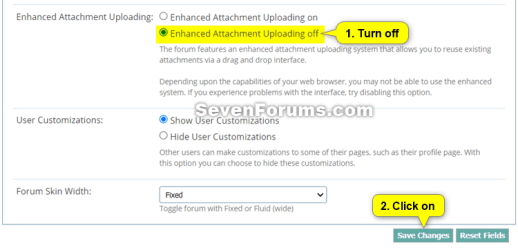
You will need to turn off enhanced attachment uploading at the bottom of your account's Settings > General Settings page, and Save changes before having the options displayed in this tutorial.
enhanced_attachment_uploading.png

If you are intending to upload large log or diagnostic files then please upload them to a reputable file sharing service such as OneDrive, Google Drive, Dropbox or Amazon Cloud Drive (US) (UK) and post a share link rather then uploading to the forum


You can only upload the file types below up to the size limit per single file.


File TypeMax File Size
7z4.00 MB
bat600.0 KB
docx2.00 MB
gif1.00 MB
ico1.00 MB
jpeg2.00 MB
jpg2.00 MB
log2.00 MB
pdf2.00 MB
png2.00 MB
psd2.00 MB
ps11.00 MB
rar4.00 MB
reg2.00 MB
txt2.00 MB
vbs2.00 MB
wav1.00 MB
xlsx1.00 MB
zip4.00 MB


Contents

  • Option One: To Insert a File or Image into a Post
  • Option Two: To Upload and Insert a File or Image into a "Go Advanced" Post


OPTION ONE

To Insert a File or Image into a Post


If you wanted to create a screenshot to upload, you can create one with Paint (mspaint.exe) or Snipping Tool to upload.


1 While editing your post, place the cursor where you would like to insert the file or image at, and click/tap on the image icon on the toolbar. (see screenshot below)
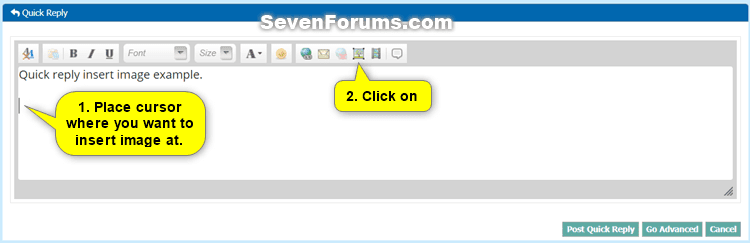
Quick_Reply-1.png

2 Do step 3 (computer) or step 4 (URL) below from where the image you want to upload is located.


3 To Insert File or Image from your Computer

A) Click/tap on the From Computer tab, and click/tap on the Choose Files button. (see screenshot below)
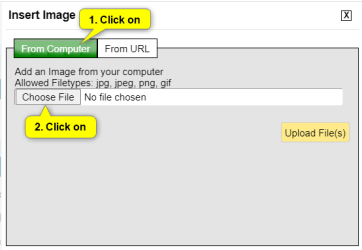
Quick_Reply-2.png

B) Navigate to and select one or more (limit 5 at once) file(s) and/or image(s) you want to insert into your post, and click/tap on the Open button. (see screenshot below)
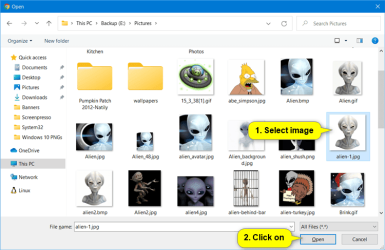
Quick_Reply-3.png

C) Click/tap on the Upload File(s) button, and go to step 5 below. (see screenshot below)
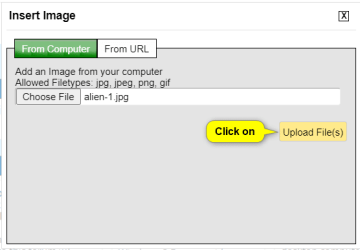
Quick_Reply-4.png


4 To Insert Image from URL

A) Click/tap on the From URL tab, and enter the URL address of the image. (see screenshot below)

B) Check the Retrieve remote file and reference locally box, click/tap on OK, and go to step 5 below. (see screenshot below)
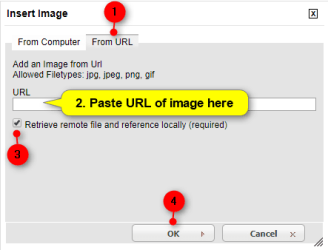
Quick_Reply-5.png


5 Your file(s) and/or image(s) will now be uploaded and inserted into your post. (see screenshot below)

If you like, you could double click/tap on an inserted image to adjust the Image Settings for it below. When finished, click/tap on OK to apply.
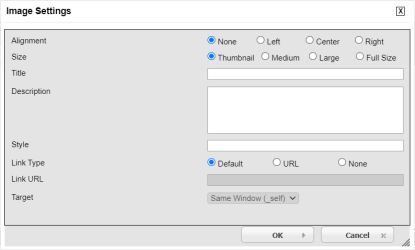
Quick_Reply-7.png

Quick_Reply-6.png

6 When finished with your post, click/tap on either the Post Quick Reply or Submit Reply button to post it. (see screenshot above)


OPTION TWO

To Upload and Insert a File or Image into a "Go Advanced" Post


If you wanted to create a screenshot to upload, you can create one with direct screenshot, Paint (mspaint.exe) or Snipping Tool ready to upload.


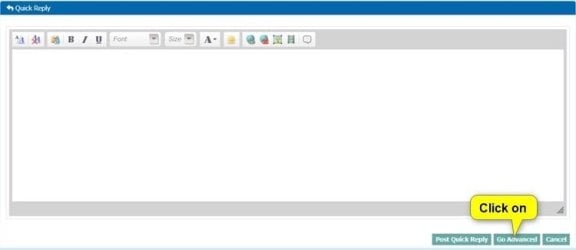
1 While editing your post, click/tap on the Go Advanced button. (see screenshot below)
Go_Advanced-1.jpg

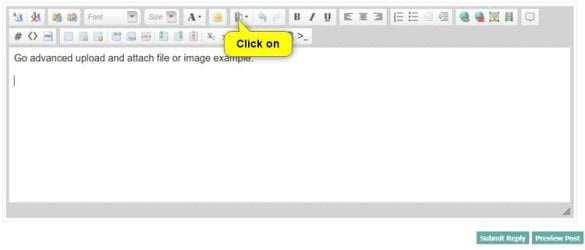
2 Click/tap on the paperclip icon on the toolbar. (see screenshot below)
Go_Advanced-3.jpg

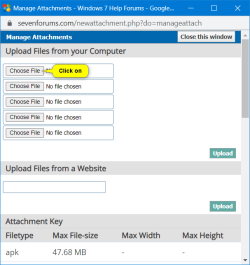
3 Click/tap on an empty Choose File button. (see screenshot below)
Go_Advanced-4.png

4 Navigate to and select the file or image you want to upload, and click/tap on the Open button. (see screenshot below)
Quick_Reply-3.png

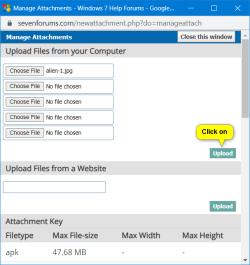
5 When finished choosing files to upload, click/tap on the Upload button. (see screenshot below)
Go_Advanced-5.png

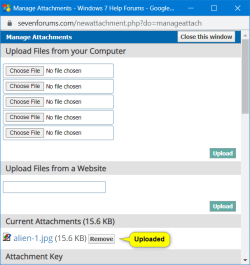
6 After your chosen files have been uploaded, you can close the Manage Attachments window. (see screenshot below)

If you would like to remove one of the uploaded Current Attachments, click/tap on the Remove button to the right of the file you would like to remove.

Go_Advanced-6.png

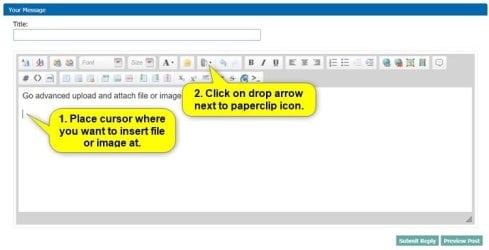
7 While back editing your post, place the cursor where you would like to insert the file or image at, and click/tap on the arrow to the right of the paperclip icon on the toolbar. (see screenshot below)
Go_Advanced-7.jpg

8 Click/tap on the uploaded file in the drop menu you want to insert at this location in your post. (see screenshot below)
Go_Advanced-8.jpg

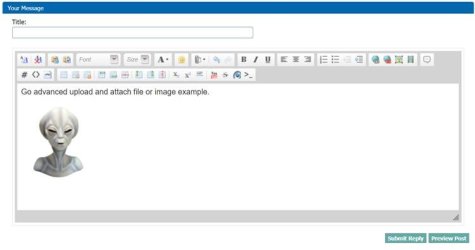
9 Your file(s) and/or image(s) will now be inserted into your post. (see screenshot below)

If you like, you could double click/tap on an inserted image to adjust the Image Settings for it below. When finished, click/tap on OK to apply.
Quick_Reply-7.png

Go_Advanced-9.jpg

10 When finished with your post, click/tap on either the Submit Reply button to post it. (see screenshot above)


That's it,
Shawn Brink


Last edited:
what if the file size is more than 2 mb say 52 mb.
 

My Computer My Computer

Computer type
Laptop
Computer Manufacturer/Model Number
toshiba
OS
windows 7 ultimate 32 bits
CPU
intel celeron cpu 540 1.86 GHz
Motherboard
asus
Memory
kingston 4Gb
Graphics Card(s)
mobile intel(R) 965 Express Chipset Family
Hard Drives
WDC WD800BEVS-22RST0 ATA Device
Antivirus
avast 2017
Browser
ie11,ff54
Hello qpod, :-)

You could see of zipping the file may reduce it enough to meet the max size for .zip files.

Otherwise, the file will need to be reduced in size depending on its file type, or use a hosting site to link from.
 

My Computer My Computer

Computer type
PC/Desktop
Computer Manufacturer/Model Number
Self built custom
OS
64-bit Windows 11 Pro for Workstations
CPU
Intel i7-8700K OC'd to 5 GHz
Motherboard
ASUS ROG Maximus XI Formula Z390
Memory
64 GB (4x16GB) G.SKILL TridentZ RGB DDR4 3600 MHz
Graphics Card(s)
ASUS ROG-STRIX-GTX1080TI-O11G-GAMING
Sound Card
Integrated
Monitor(s) Displays
2 x Samsung Odyssey G7 27"
Screen Resolution
2560x1440
Hard Drives
1TB Samsung 990 PRO M.2,
4TB Samsung 990 PRO PRO M.2,
TerraMaster F8 SSD Plus NAS
PSU
Seasonic Prime Titanium 850W
Case
Thermaltake Core P3
Cooling
Corsair Hydro H115i
Keyboard
Logitech wireless K800
Mouse
Logitech MX Master 4
Internet Speed
2 Gb/s Download and 100 Mb/s Upload
Antivirus
Malwarebyte Anti-Malware Premium
Browser
Google Chrome
Other Info
Logitech Z625 speaker system,
Logitech BRIO 4K Pro webcam,
HP Color LaserJet Pro MFP M477fdn,
APC SMART-UPS RT 1000 XL - SURT1000XLI,
Galaxy S23 Plus phone
other than hosting site is there other solution.
 

My Computer My Computer

Computer type
Laptop
Computer Manufacturer/Model Number
toshiba
OS
windows 7 ultimate 32 bits
CPU
intel celeron cpu 540 1.86 GHz
Motherboard
asus
Memory
kingston 4Gb
Graphics Card(s)
mobile intel(R) 965 Express Chipset Family
Hard Drives
WDC WD800BEVS-22RST0 ATA Device
Antivirus
avast 2017
Browser
ie11,ff54
What type of file are you wanting to upload?
 

My Computer My Computer

Computer type
PC/Desktop
Computer Manufacturer/Model Number
Self built custom
OS
64-bit Windows 11 Pro for Workstations
CPU
Intel i7-8700K OC'd to 5 GHz
Motherboard
ASUS ROG Maximus XI Formula Z390
Memory
64 GB (4x16GB) G.SKILL TridentZ RGB DDR4 3600 MHz
Graphics Card(s)
ASUS ROG-STRIX-GTX1080TI-O11G-GAMING
Sound Card
Integrated
Monitor(s) Displays
2 x Samsung Odyssey G7 27"
Screen Resolution
2560x1440
Hard Drives
1TB Samsung 990 PRO M.2,
4TB Samsung 990 PRO PRO M.2,
TerraMaster F8 SSD Plus NAS
PSU
Seasonic Prime Titanium 850W
Case
Thermaltake Core P3
Cooling
Corsair Hydro H115i
Keyboard
Logitech wireless K800
Mouse
Logitech MX Master 4
Internet Speed
2 Gb/s Download and 100 Mb/s Upload
Antivirus
Malwarebyte Anti-Malware Premium
Browser
Google Chrome
Other Info
Logitech Z625 speaker system,
Logitech BRIO 4K Pro webcam,
HP Color LaserJet Pro MFP M477fdn,
APC SMART-UPS RT 1000 XL - SURT1000XLI,
Galaxy S23 Plus phone
its a CBS folder size 938 kb
CbsPersist_20180716023334 size 2609 kb
CbsPersist_20180716025236 size 6585 kb
CbsPersist_20180716030850 size 2054 kb
CbsPersist_20180716061717 size 11920kb
CbsPersist_20180716064432 size 8918 kb
FilterList size 1kb


original file size is 32 mb
after using winrar or winzip it is compressed to 26.8 mb
which is still way more than 2 mb.
 

My Computer My Computer

Computer type
Laptop
Computer Manufacturer/Model Number
toshiba
OS
windows 7 ultimate 32 bits
CPU
intel celeron cpu 540 1.86 GHz
Motherboard
asus
Memory
kingston 4Gb
Graphics Card(s)
mobile intel(R) 965 Express Chipset Family
Hard Drives
WDC WD800BEVS-22RST0 ATA Device
Antivirus
avast 2017
Browser
ie11,ff54

My Computer My Computer

Computer type
PC/Desktop
Computer Manufacturer/Model Number
Self built custom
OS
64-bit Windows 11 Pro for Workstations
CPU
Intel i7-8700K OC'd to 5 GHz
Motherboard
ASUS ROG Maximus XI Formula Z390
Memory
64 GB (4x16GB) G.SKILL TridentZ RGB DDR4 3600 MHz
Graphics Card(s)
ASUS ROG-STRIX-GTX1080TI-O11G-GAMING
Sound Card
Integrated
Monitor(s) Displays
2 x Samsung Odyssey G7 27"
Screen Resolution
2560x1440
Hard Drives
1TB Samsung 990 PRO M.2,
4TB Samsung 990 PRO PRO M.2,
TerraMaster F8 SSD Plus NAS
PSU
Seasonic Prime Titanium 850W
Case
Thermaltake Core P3
Cooling
Corsair Hydro H115i
Keyboard
Logitech wireless K800
Mouse
Logitech MX Master 4
Internet Speed
2 Gb/s Download and 100 Mb/s Upload
Antivirus
Malwarebyte Anti-Malware Premium
Browser
Google Chrome
Other Info
Logitech Z625 speaker system,
Logitech BRIO 4K Pro webcam,
HP Color LaserJet Pro MFP M477fdn,
APC SMART-UPS RT 1000 XL - SURT1000XLI,
Galaxy S23 Plus phone
thanks.
 

My Computer My Computer

Computer type
Laptop
Computer Manufacturer/Model Number
toshiba
OS
windows 7 ultimate 32 bits
CPU
intel celeron cpu 540 1.86 GHz
Motherboard
asus
Memory
kingston 4Gb
Graphics Card(s)
mobile intel(R) 965 Express Chipset Family
Hard Drives
WDC WD800BEVS-22RST0 ATA Device
Antivirus
avast 2017
Browser
ie11,ff54
You're most welcome.
 

My Computer My Computer

Computer type
PC/Desktop
Computer Manufacturer/Model Number
Self built custom
OS
64-bit Windows 11 Pro for Workstations
CPU
Intel i7-8700K OC'd to 5 GHz
Motherboard
ASUS ROG Maximus XI Formula Z390
Memory
64 GB (4x16GB) G.SKILL TridentZ RGB DDR4 3600 MHz
Graphics Card(s)
ASUS ROG-STRIX-GTX1080TI-O11G-GAMING
Sound Card
Integrated
Monitor(s) Displays
2 x Samsung Odyssey G7 27"
Screen Resolution
2560x1440
Hard Drives
1TB Samsung 990 PRO M.2,
4TB Samsung 990 PRO PRO M.2,
TerraMaster F8 SSD Plus NAS
PSU
Seasonic Prime Titanium 850W
Case
Thermaltake Core P3
Cooling
Corsair Hydro H115i
Keyboard
Logitech wireless K800
Mouse
Logitech MX Master 4
Internet Speed
2 Gb/s Download and 100 Mb/s Upload
Antivirus
Malwarebyte Anti-Malware Premium
Browser
Google Chrome
Other Info
Logitech Z625 speaker system,
Logitech BRIO 4K Pro webcam,
HP Color LaserJet Pro MFP M477fdn,
APC SMART-UPS RT 1000 XL - SURT1000XLI,
Galaxy S23 Plus phone
I have no idea as to how to jump through all those hoops. I can send the screen shot to your email, as the HELP site says the file is too big.
 

My Computer My Computer

Computer type
PC/Desktop
Computer Manufacturer/Model Number
HP
OS
Win 7 Home Premium 64 bit
Antivirus
Windows defender
Browser
IE 11
I have no idea as to how to jump through all those hoops. I can send the screen shot to your email, as the HELP site says the file is too big.

Hello,

You could reduce the size of the screenshot in Paint (mspaint.exe).
 

My Computer My Computer

Computer type
PC/Desktop
Computer Manufacturer/Model Number
Self built custom
OS
64-bit Windows 11 Pro for Workstations
CPU
Intel i7-8700K OC'd to 5 GHz
Motherboard
ASUS ROG Maximus XI Formula Z390
Memory
64 GB (4x16GB) G.SKILL TridentZ RGB DDR4 3600 MHz
Graphics Card(s)
ASUS ROG-STRIX-GTX1080TI-O11G-GAMING
Sound Card
Integrated
Monitor(s) Displays
2 x Samsung Odyssey G7 27"
Screen Resolution
2560x1440
Hard Drives
1TB Samsung 990 PRO M.2,
4TB Samsung 990 PRO PRO M.2,
TerraMaster F8 SSD Plus NAS
PSU
Seasonic Prime Titanium 850W
Case
Thermaltake Core P3
Cooling
Corsair Hydro H115i
Keyboard
Logitech wireless K800
Mouse
Logitech MX Master 4
Internet Speed
2 Gb/s Download and 100 Mb/s Upload
Antivirus
Malwarebyte Anti-Malware Premium
Browser
Google Chrome
Other Info
Logitech Z625 speaker system,
Logitech BRIO 4K Pro webcam,
HP Color LaserJet Pro MFP M477fdn,
APC SMART-UPS RT 1000 XL - SURT1000XLI,
Galaxy S23 Plus phone
Hi,


I had a question similar to this but it was solved. I use photoscape free, much better the ms paint.


regards,


klxdrt
 

My Computer My Computer

Computer type
PC/Desktop
Computer Manufacturer/Model Number
locally made
OS
w7 pro 32 bit w/XP virt enabled.
CPU
AMD A6-3650
Motherboard
ASUS F1A55-M CSM
Memory
4 GB DDR3 RAM
Graphics Card(s)
NVIDIA GeForce 210
Sound Card
NVIDIA High Definition Audio
Monitor(s) Displays
28" HD monitor
Screen Resolution
1680 x 1050 x 32 bits (4294967296 colors) @ 59 Hz
Hard Drives
2 x 500 GB Western Digital Blue Hard Drive
PSU
?
Case
?
Cooling
3-4 fans
Keyboard
big yellow keys
Mouse
logitec
Internet Speed
60 mb
Antivirus
panda
Browser
ff
Other Info
scanner, webcam, bw printer, fax modem, cd/dvd burner, PC usb ports: 2 usb3, 6 usb2 plus 7 port usb hub, 2 tb usb3, 1 Tb usb3, 500Mb usb2, 120Mb USB2 portable drives, asst of flash drives 250 Mb to 32 Gb. backup PC, office
:thumbsup:
 

My Computer My Computer

Computer type
PC/Desktop
Computer Manufacturer/Model Number
Self built custom
OS
64-bit Windows 11 Pro for Workstations
CPU
Intel i7-8700K OC'd to 5 GHz
Motherboard
ASUS ROG Maximus XI Formula Z390
Memory
64 GB (4x16GB) G.SKILL TridentZ RGB DDR4 3600 MHz
Graphics Card(s)
ASUS ROG-STRIX-GTX1080TI-O11G-GAMING
Sound Card
Integrated
Monitor(s) Displays
2 x Samsung Odyssey G7 27"
Screen Resolution
2560x1440
Hard Drives
1TB Samsung 990 PRO M.2,
4TB Samsung 990 PRO PRO M.2,
TerraMaster F8 SSD Plus NAS
PSU
Seasonic Prime Titanium 850W
Case
Thermaltake Core P3
Cooling
Corsair Hydro H115i
Keyboard
Logitech wireless K800
Mouse
Logitech MX Master 4
Internet Speed
2 Gb/s Download and 100 Mb/s Upload
Antivirus
Malwarebyte Anti-Malware Premium
Browser
Google Chrome
Other Info
Logitech Z625 speaker system,
Logitech BRIO 4K Pro webcam,
HP Color LaserJet Pro MFP M477fdn,
APC SMART-UPS RT 1000 XL - SURT1000XLI,
Galaxy S23 Plus phone
Back
Top