Hard drive runs constantly even in safe mode

den942

New member
Local time
1:21 AM
Messages
27
I am trouble shooting my sister's Compaq desk top PC. It is running Windows 7 Home Premium 64 bit.

It has a WDC WD50 00AAKS-65V0A SCSI Disk Device - 465.76 GB hard drive with 6 Gig of memory. All available updates are installed.


The hard drive never stops running, even in Safe Mode. I have tried disabling Start UP programs and it has not helped. How do I find the cause?


What info do I need to attach to help find the problem?


AMD Athlon(tm) II X2 240 Processor

PEGATRON CORPORATION Narra6

BIOS Date: 01/07/10 11:37:11 Ver: 5.17
6.00 GB 5.75 GB usable
WDC WD50 00AAKS-65V0A SCSI Disk Device
(1) AMD High Definition Audio Device (2) Realtek High Definition Audio

(1) ATI Radeon HD 2400 Series (2) NVIDIA GeForce 6150SE nForce 430

Microsoft Windows 7 Home Premium 64-bit 7601 Multiprocessor Free Service Pack 1
 

My Computer My Computer

At a glance

Windows 7 Ultimate 64 bitAMD Phenom II X4 945PDP Systems DDR3 1066 12 gig totalZotac GeForce GT 430
Computer type
PC/Desktop
Computer Manufacturer/Model Number
custom build
OS
Windows 7 Ultimate 64 bit
CPU
AMD Phenom II X4 945
Motherboard
Gigabyte GA-970A- DS3 1gig DDR3 memory
Memory
PDP Systems DDR3 1066 12 gig total
Graphics Card(s)
Zotac GeForce GT 430
Hard Drives
Western Digital WDC 2500JS-60NCB1
Antivirus
McAfee
Browser
Firefox 20.0.1
Hi den942,

The hard drive never stops running, even in Safe Mode. I have tried disabling Start UP programs and it has not helped.

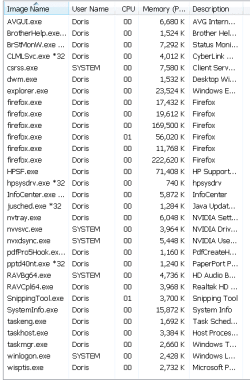
What do the Processes show?
 

My Computer My Computer

At a glance

Win 7 HP SP1 64-bit Vista HB SP2 32-bit Linux...Intel(R) Pentium(R) CPU P6200 @ 2.13GHz4.00 GBIntel(R) Graphics Media Accelerator HD
Computer type
Laptop
Computer Manufacturer/Model Number
Fujitsu LIFEBOOK
OS
Win 7 HP SP1 64-bit Vista HB SP2 32-bit Linux Mint 18.3
CPU
Intel(R) Pentium(R) CPU P6200 @ 2.13GHz
Motherboard
FUJITSU FJNBB06
Memory
4.00 GB
Graphics Card(s)
Intel(R) Graphics Media Accelerator HD
Sound Card
[1] Realtek High Definition Audio [2] Intel(R) Display Audio
Screen Resolution
1366 x 768 x 32 bits (4294967296 colors) @ 59 Hz
Hard Drives
TOSHIBA MK5076GSX
Antivirus
AVG FREE

My Computer My Computer

At a glance

Windows 7 Ultimate 64 bitAMD Phenom II X4 945PDP Systems DDR3 1066 12 gig totalZotac GeForce GT 430
Computer type
PC/Desktop
Computer Manufacturer/Model Number
custom build
OS
Windows 7 Ultimate 64 bit
CPU
AMD Phenom II X4 945
Motherboard
Gigabyte GA-970A- DS3 1gig DDR3 memory
Memory
PDP Systems DDR3 1066 12 gig total
Graphics Card(s)
Zotac GeForce GT 430
Hard Drives
Western Digital WDC 2500JS-60NCB1
Antivirus
McAfee
Browser
Firefox 20.0.1
Are there security and monitoring utilities constantly reporting/writing to said HD?
 

My Computer My Computer

At a glance

Windows 7 Professional 64-bitDesktop i5; Acers i5 & i7desktop 16GB; 1 Acer 8GB & 1 Acer 16GB
Computer type
PC/Desktop
Computer Manufacturer/Model Number
Antec desktop; Acer Aspire laptops
OS
Windows 7 Professional 64-bit
CPU
Desktop i5; Acers i5 & i7
Memory
desktop 16GB; 1 Acer 8GB & 1 Acer 16GB
Hard Drives
1TB split into 2 equal partitions [OS and data] usable by RJS
Internet Speed
AT&T DSL
Browser
FF, GChrome, msIE
Other Info
Windows 7 Firewall, Emsisoft AM/AV, MSE [scan-only], SpywareBlaster, Ruiware/BillP combine
Are there security and monitoring utilities constantly reporting/writing to said HD?


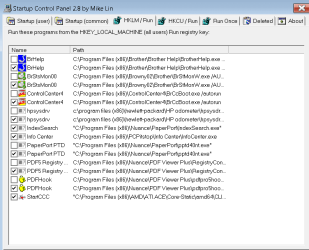
The hard drive still ran constantly with those set to not run at start up. The items shown are the only items that start when Windows starts.
Also, when I uncheck any box in this program, a duplicate pops up with the box checked. What is that about?
 

Attachments

  • Startup_Capture.PNG
    Startup_Capture.PNG
    10.5 KB · Views: 2
Last edited:

My Computer My Computer

At a glance

Windows 7 Ultimate 64 bitAMD Phenom II X4 945PDP Systems DDR3 1066 12 gig totalZotac GeForce GT 430
Computer type
PC/Desktop
Computer Manufacturer/Model Number
custom build
OS
Windows 7 Ultimate 64 bit
CPU
AMD Phenom II X4 945
Motherboard
Gigabyte GA-970A- DS3 1gig DDR3 memory
Memory
PDP Systems DDR3 1066 12 gig total
Graphics Card(s)
Zotac GeForce GT 430
Hard Drives
Western Digital WDC 2500JS-60NCB1
Antivirus
McAfee
Browser
Firefox 20.0.1
Hi den942,

The hard drive still ran constantly with those set to not run at start up. The items shown are the only items that start when Windows starts.

What is WU set to?
 

My Computer My Computer

At a glance

Win 7 HP SP1 64-bit Vista HB SP2 32-bit Linux...Intel(R) Pentium(R) CPU P6200 @ 2.13GHz4.00 GBIntel(R) Graphics Media Accelerator HD
Computer type
Laptop
Computer Manufacturer/Model Number
Fujitsu LIFEBOOK
OS
Win 7 HP SP1 64-bit Vista HB SP2 32-bit Linux Mint 18.3
CPU
Intel(R) Pentium(R) CPU P6200 @ 2.13GHz
Motherboard
FUJITSU FJNBB06
Memory
4.00 GB
Graphics Card(s)
Intel(R) Graphics Media Accelerator HD
Sound Card
[1] Realtek High Definition Audio [2] Intel(R) Display Audio
Screen Resolution
1366 x 768 x 32 bits (4294967296 colors) @ 59 Hz
Hard Drives
TOSHIBA MK5076GSX
Antivirus
AVG FREE
Hi den942,


What is WU set to?


What is WU and where is it? If you mean Windows Update, It is set to Check for Updates but let me choose whether to download and install them. I tried Never Check for Updates but it did not stopp the hard drive running...
 

My Computer My Computer

At a glance

Windows 7 Ultimate 64 bitAMD Phenom II X4 945PDP Systems DDR3 1066 12 gig totalZotac GeForce GT 430
Computer type
PC/Desktop
Computer Manufacturer/Model Number
custom build
OS
Windows 7 Ultimate 64 bit
CPU
AMD Phenom II X4 945
Motherboard
Gigabyte GA-970A- DS3 1gig DDR3 memory
Memory
PDP Systems DDR3 1066 12 gig total
Graphics Card(s)
Zotac GeForce GT 430
Hard Drives
Western Digital WDC 2500JS-60NCB1
Antivirus
McAfee
Browser
Firefox 20.0.1
ControlCenter4 is probably set as a service or it's made to make its self bootable all the time. Have a look at Autoruns and under the Everything tab search for ControlCenter4.

To see what is using a hard drive IO. Go into Task Manager and under the View options select "Select Columns." Now check off I/O Reads and I/O Writes. Now in Task Manager hit the I/O Reads and/or the I/O Writes tab to sort from highest.

Autoruns for Windows - Windows Sysinternals | Microsoft Docs

Startup Control Panel allows you to add start up items, but I don't think Autoruns allows you to.
 

My Computer My Computer

At a glance

Windows 7 Ultimate x64
Computer type
PC/Desktop
OS
Windows 7 Ultimate x64
Back
Top