Cloning a boot drive, keeping original as backup questions.

Elthesh

New member
Local time
1:19 PM
Messages
2
I currently have windows 7 installed on a partition of a 2 gig SSHD. I just purchased an SSD slightly larger than the Windows partition on the SSHD. Once I've cloned windows onto the SSD, I'm trying to figure out how to go about the following... I want to leave the original windows installation intact and update it weekly to keep it as a backup in case the SSD ever fails. I assume I can't leave the original drive as is because it will also be setup as a boot drive. Unless there is a better method, I think I can just go into diskpart and set that partition on the SSHD to inactive. I'm then wondering if the SSD ever fails, should it be as simple as going back into diskpart and making that partition on the SSHD active again and windows will see it as a boot drive again?
 

My Computer My Computer

At a glance

Windows 7 64
Computer type
PC/Desktop
OS
Windows 7 64
Hi Elthesh,
Greets,

1. It seems you have just cloned the main windows partition. Depending on your configuration, It is possible that the active partition is there on some other partition of the original OS Disk. Does the windows partition show as the active partition as well ?
If yes, then both of your disks will be bootable independently whether both are attached or not. Is it so ?
Did you detach the Original OS disk & tried to boot into the new disk with cloned partition ?

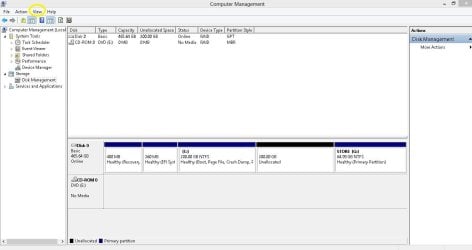
2. I request you to keep both the disks attached & get me two snaps from the Disk Management.

Disk Management - Post a Screen Capture Image

I need two types of views :

(i) Standard

(ii) From the Disk Management Window's top menu, navigate to VIEW>Top>Disk List & Get me the screenshot. For eg.

Disk Management Capture.JPG

3. I fear you need two licenses for that practice or one of your boots from the disks will show OS as not genuine & you won't be able to use the in-built ''Windows Update'' feature on that.

Let me know.

Thanks & Regards. ...
 

My Computer My Computer

At a glance

Windows 7 Ultimate x32 With Sp1 + Vista Ultim...Intel Mobile Core 2 Duo T5750 @ 2.00GHz Merom...2.00GB Dual-Channel DDR2 @ 332MHz (5-5-5-15)Mobile Intel(R) 965 Express Chipset Family
Computer type
Laptop
Computer Manufacturer/Model Number
hp compaq presario c795VU notebook pc
OS
Windows 7 Ultimate x32 With Sp1 + Vista Ultimate x32 with Sp1 & Sp2 !!
CPU
Intel Mobile Core 2 Duo T5750 @ 2.00GHz Merom 65nm Technolog
Motherboard
Hewlett-Packard 30D9 (CPU)
Memory
2.00GB Dual-Channel DDR2 @ 332MHz (5-5-5-15)
Graphics Card(s)
Mobile Intel(R) 965 Express Chipset Family
Sound Card
High Definition Audio Device
Monitor(s) Displays
LP154WX4-TLCB on Mobile Intel 965 Express Chipset Family
Screen Resolution
1280x800 @ 60Hz
Hard Drives
149GB Western Digital WDC WD1600BEVS-60VAT0 ATA Device (SATA)
Keyboard
Standard 101/102-Key or Microsoft Natural PS/2 Key + HP QLB
Mouse
ALPS pointing device
Antivirus
Kaspersky AV 2017(Win 7) & AVG AntiVirus Free 2016 (VISTA)
Browser
google chrome
What about this: use macrium reflect or anything similar to make full images of SysRes and OS partition maybe once every week or bi-monthly.
 

My Computer My Computer

At a glance

Windows 7 Professional 64-bitDesktop i5; Acers i5 & i7desktop 16GB; 1 Acer 8GB & 1 Acer 16GB
Computer type
PC/Desktop
Computer Manufacturer/Model Number
Antec desktop; Acer Aspire laptops
OS
Windows 7 Professional 64-bit
CPU
Desktop i5; Acers i5 & i7
Memory
desktop 16GB; 1 Acer 8GB & 1 Acer 16GB
Hard Drives
1TB split into 2 equal partitions [OS and data] usable by RJS
Internet Speed
AT&T DSL
Browser
FF, GChrome, msIE
Other Info
Windows 7 Firewall, Emsisoft AM/AV, MSE [scan-only], SpywareBlaster, Ruiware/BillP combine
What about this: use macrium reflect or anything similar to make full images of SysRes and OS partition maybe once every week or bi-monthly.

That's more practical!
 

My Computer My Computer

At a glance

Windows 7 Ultimate x32 With Sp1 + Vista Ultim...Intel Mobile Core 2 Duo T5750 @ 2.00GHz Merom...2.00GB Dual-Channel DDR2 @ 332MHz (5-5-5-15)Mobile Intel(R) 965 Express Chipset Family
Computer type
Laptop
Computer Manufacturer/Model Number
hp compaq presario c795VU notebook pc
OS
Windows 7 Ultimate x32 With Sp1 + Vista Ultimate x32 with Sp1 & Sp2 !!
CPU
Intel Mobile Core 2 Duo T5750 @ 2.00GHz Merom 65nm Technolog
Motherboard
Hewlett-Packard 30D9 (CPU)
Memory
2.00GB Dual-Channel DDR2 @ 332MHz (5-5-5-15)
Graphics Card(s)
Mobile Intel(R) 965 Express Chipset Family
Sound Card
High Definition Audio Device
Monitor(s) Displays
LP154WX4-TLCB on Mobile Intel 965 Express Chipset Family
Screen Resolution
1280x800 @ 60Hz
Hard Drives
149GB Western Digital WDC WD1600BEVS-60VAT0 ATA Device (SATA)
Keyboard
Standard 101/102-Key or Microsoft Natural PS/2 Key + HP QLB
Mouse
ALPS pointing device
Antivirus
Kaspersky AV 2017(Win 7) & AVG AntiVirus Free 2016 (VISTA)
Browser
google chrome
If you clone a drive and leave it in then you have two drives with the same disk signature ànd windows will see them both as the same drive and be confused. Cloning to ssd needs setting changing for it go work at its best
 

My Computer My Computer

At a glance

win 8 32 bit
Computer type
PC/Desktop
OS
win 8 32 bit
samuria : Great!

1.
If you clone a drive and leave it in then you have two drives with the same disk signature ànd windows will see them both as the same drive and be confused.

Great to know, Master Stroke!

2.
Cloning to ssd needs setting changing for it go work at its best

Sir,

(i) I really missed he is going from an HDD to SSD.
I heard that when Macrium Reflect is used to drag & drop the partitions, it takes care of those settings automatically. Isn't it ? Will that still be able to fool windows ?

(ii) I saw you shared a very good link in the past , particularly for using SSD. May we have it again ?

Thanks & Regards. ...

EDIT : Elthesh :

1. No license problem if both disks are used only & only on the same pc (as mentioned by sir samuria )

2. Better use Macrium Reflect's drag & drop method to clone the disk but first try to answer all the required Info.

3. Or you can be easy just making system images from time to time with Macrium Reflect Free ( as suggested by sir RolandJS ). This can come useful to you in that case : See : Macrium Reflect Free

4. And yes : Are you aware about SSD practices ?
 
Last edited:

My Computer My Computer

At a glance

Windows 7 Ultimate x32 With Sp1 + Vista Ultim...Intel Mobile Core 2 Duo T5750 @ 2.00GHz Merom...2.00GB Dual-Channel DDR2 @ 332MHz (5-5-5-15)Mobile Intel(R) 965 Express Chipset Family
Computer type
Laptop
Computer Manufacturer/Model Number
hp compaq presario c795VU notebook pc
OS
Windows 7 Ultimate x32 With Sp1 + Vista Ultimate x32 with Sp1 & Sp2 !!
CPU
Intel Mobile Core 2 Duo T5750 @ 2.00GHz Merom 65nm Technolog
Motherboard
Hewlett-Packard 30D9 (CPU)
Memory
2.00GB Dual-Channel DDR2 @ 332MHz (5-5-5-15)
Graphics Card(s)
Mobile Intel(R) 965 Express Chipset Family
Sound Card
High Definition Audio Device
Monitor(s) Displays
LP154WX4-TLCB on Mobile Intel 965 Express Chipset Family
Screen Resolution
1280x800 @ 60Hz
Hard Drives
149GB Western Digital WDC WD1600BEVS-60VAT0 ATA Device (SATA)
Keyboard
Standard 101/102-Key or Microsoft Natural PS/2 Key + HP QLB
Mouse
ALPS pointing device
Antivirus
Kaspersky AV 2017(Win 7) & AVG AntiVirus Free 2016 (VISTA)
Browser
google chrome
What I have been doing for quite a while is: installing os on a small drive 80-120-etc drive, install all progs tips etc, & then clone to a larger drive. I then use PWfree (partition Wizard free) (already installed on the small drive!). Really simple to increase new drive to max part. size with PW. Store that orig hdd for backup. You can still add newer progs etc. on your backup, just dont be UGing it every day or week!
 

My Computer My Computer

At a glance

Windows 7 Home Premium bitamd?4 gig
Computer type
Laptop
Computer Manufacturer/Model Number
toshiba 505
OS
Windows 7 Home Premium bit
CPU
amd?
Motherboard
?
Memory
4 gig
Monitor(s) Displays
Samsung S27D360 &S24D300 - Acer K222HQL - Eizo 21" (4x3)
Screen Resolution
1280 x 720 -1600x900 - (eizo 1024x768
Hard Drives
240 ssd
PSU
amd (?)
Mouse
logitech tackball
Antivirus
360 total security
Browser
firefox portable 29.0.1
That should work fine.

If you clone the entire disk, all of the windows software I know of will adjust the disk sig automatically as required.
Only some cloning software used from boot media ( such as Clonezilla ) will do a true clone nowadays.

If you are just cloning partition(s) you need to make sure you also clone the system partition as well as the windows partition. Depending on your setup, you might have a separate system partition. Most imaging programs and partition software can do that sort of "copy" and make necessary adjustments so the cloned system will boot.

Partition Wizard ( free version) seems to work fine.


I currently have windows 7 installed on a partition of a 2 gig SSHD. I just purchased an SSD slightly larger than the Windows partition on the SSHD. Once I've cloned windows onto the SSD, I'm trying to figure out how to go about the following... I want to leave the original windows installation intact and update it weekly to keep it as a backup in case the SSD ever fails. I assume I can't leave the original drive as is because it will also be setup as a boot drive. Unless there is a better method, I think I can just go into diskpart and set that partition on the SSHD to inactive. I'm then wondering if the SSD ever fails, should it be as simple as going back into diskpart and making that partition on the SSHD active again and windows will see it as a boot drive again?
 

My Computers My Computers

  • At a glance

    7 X64i5 84002x8gb 3200mhz
    Computer type
    PC/Desktop
    OS
    7 X64
    CPU
    i5 8400
    Motherboard
    gigabyte b365m ds3h
    Memory
    2x8gb 3200mhz
    Hard Drives
    various
    PSU
    pure power 11 400w cm
    Case
    Coolermaster
    Cooling
    cryorig m9i
  • At a glance

    7x64g54008gb ddr4 2400
    Computer type
    PC/Desktop
    OS
    7x64
    CPU
    g5400
    Motherboard
    ga b365m ds3h
    Memory
    8gb ddr4 2400
    PSU
    xfx pro 450w
Hi All,
Greets,

1. SIW2 : Great Stuff Sir, Thanks.

All Friends : Just to share what I make out of it.
It were olden days when you have to apply Drag & Drop , etc. mechanism to clone from HDD to SSD. Modern age Imaging & Partition programs don't actually make a true clone & actually make optimized clones & partition copies. So, we need not apply any settings before hand. Just clone it from HDD & apply to SSD. It will manage to boot automatically.

2. As said above : It's not urgent to know about SSD settings in first place! The programs will manage to boot & work with it automatically ( if you clone all the system crucial partitions )
But ....
In long run, It would be good to know & follow best SSD practices! For eg.

I think using Defraggler is better than using win 7 in-built Disk Defragmenter. It seems it is optimized for SSDs. If you allow Defraggler, It will hijack windows inbuilt functionality & that should be better!
Be a little watchful during its installation! Its long back but I think Defraggler offers to install Chrome & Google Internet Toolbar during the installation. I will opt out of Google Internet Toolbar.

( And yes there is a portable version available for Defraggler : Portable Defraggler From SoftPedia )

Thanks & Regards. ...
 
Last edited:

My Computer My Computer

At a glance

Windows 7 Ultimate x32 With Sp1 + Vista Ultim...Intel Mobile Core 2 Duo T5750 @ 2.00GHz Merom...2.00GB Dual-Channel DDR2 @ 332MHz (5-5-5-15)Mobile Intel(R) 965 Express Chipset Family
Computer type
Laptop
Computer Manufacturer/Model Number
hp compaq presario c795VU notebook pc
OS
Windows 7 Ultimate x32 With Sp1 + Vista Ultimate x32 with Sp1 & Sp2 !!
CPU
Intel Mobile Core 2 Duo T5750 @ 2.00GHz Merom 65nm Technolog
Motherboard
Hewlett-Packard 30D9 (CPU)
Memory
2.00GB Dual-Channel DDR2 @ 332MHz (5-5-5-15)
Graphics Card(s)
Mobile Intel(R) 965 Express Chipset Family
Sound Card
High Definition Audio Device
Monitor(s) Displays
LP154WX4-TLCB on Mobile Intel 965 Express Chipset Family
Screen Resolution
1280x800 @ 60Hz
Hard Drives
149GB Western Digital WDC WD1600BEVS-60VAT0 ATA Device (SATA)
Keyboard
Standard 101/102-Key or Microsoft Natural PS/2 Key + HP QLB
Mouse
ALPS pointing device
Antivirus
Kaspersky AV 2017(Win 7) & AVG AntiVirus Free 2016 (VISTA)
Browser
google chrome
Maybe it is best not to defrag every encountered hybrid or SSD -- according to some sources. Some other sources ok the defragging of such HDs. Personally, after bi-monthly defragging with Defraggler a couple of laptops' hybrid HDs, I had to replace both hybrids. Check with the HDs' manufacturers about their hybrid or SSD products before defragging.
 

My Computer My Computer

At a glance

Windows 7 Professional 64-bitDesktop i5; Acers i5 & i7desktop 16GB; 1 Acer 8GB & 1 Acer 16GB
Computer type
PC/Desktop
Computer Manufacturer/Model Number
Antec desktop; Acer Aspire laptops
OS
Windows 7 Professional 64-bit
CPU
Desktop i5; Acers i5 & i7
Memory
desktop 16GB; 1 Acer 8GB & 1 Acer 16GB
Hard Drives
1TB split into 2 equal partitions [OS and data] usable by RJS
Internet Speed
AT&T DSL
Browser
FF, GChrome, msIE
Other Info
Windows 7 Firewall, Emsisoft AM/AV, MSE [scan-only], SpywareBlaster, Ruiware/BillP combine
Maybe it is best not to defrag every encountered hybrid or SSD -- according to some sources. Some other sources ok the defragging of such HDs. Personally, after bi-monthly defragging with Defraggler a couple of laptops' hybrid HDs, I had to replace both hybrids. Check with the HDs' manufacturers about their hybrid or SSD products before defragging.

RolandJS : Very well said. That's why Defraggler warns / prompts when you choose to defrag an SSD.

Thanks & Regards. ...
 

My Computer My Computer

At a glance

Windows 7 Ultimate x32 With Sp1 + Vista Ultim...Intel Mobile Core 2 Duo T5750 @ 2.00GHz Merom...2.00GB Dual-Channel DDR2 @ 332MHz (5-5-5-15)Mobile Intel(R) 965 Express Chipset Family
Computer type
Laptop
Computer Manufacturer/Model Number
hp compaq presario c795VU notebook pc
OS
Windows 7 Ultimate x32 With Sp1 + Vista Ultimate x32 with Sp1 & Sp2 !!
CPU
Intel Mobile Core 2 Duo T5750 @ 2.00GHz Merom 65nm Technolog
Motherboard
Hewlett-Packard 30D9 (CPU)
Memory
2.00GB Dual-Channel DDR2 @ 332MHz (5-5-5-15)
Graphics Card(s)
Mobile Intel(R) 965 Express Chipset Family
Sound Card
High Definition Audio Device
Monitor(s) Displays
LP154WX4-TLCB on Mobile Intel 965 Express Chipset Family
Screen Resolution
1280x800 @ 60Hz
Hard Drives
149GB Western Digital WDC WD1600BEVS-60VAT0 ATA Device (SATA)
Keyboard
Standard 101/102-Key or Microsoft Natural PS/2 Key + HP QLB
Mouse
ALPS pointing device
Antivirus
Kaspersky AV 2017(Win 7) & AVG AntiVirus Free 2016 (VISTA)
Browser
google chrome
Back
Top