Solved Cloning my program HDD to new NVMe

RogerR

New member
Pro User
Local time
1:19 PM
Messages
607
Location
Upstate, AZ
I keep my programs on a separate drive from the OS (a WD spinner). I've recently added an SX8200 Pro M.2 drive and want to make it the program disk. How best to accomplish that without losing all the shortcuts and associations?


I have Minitool Partition Wizard; could I use the migrate OS to SSD wizard? I've never really got on with Macrium Reflect.
 

My Computer My Computer

Computer type
PC/Desktop
Computer Manufacturer/Model Number
Custom
OS
7 x64 Ultimate
CPU
AMD Ryzen 5
Motherboard
Gigabyte GA-AB350-Gaming
Memory
16GB DDR4
Graphics Card(s)
Radeon R7 360
Monitor(s) Displays
2 x Dell U2518D
Screen Resolution
2560x1440 2560x1440
Hard Drives
WD 500GB x2
Samsung SSD 128MB (OS)
XPG SX8200 Pro M.2 2280 1TB
PSU
Antec 500
Cooling
Hyper 212 EVO
Keyboard
Logitech cordless K800
Mouse
Logitech M510
Antivirus
Avira
You could try changing the copied disk drive letter to whatever was drive letter of your original programs partition.

I have Minitool Partition Wizard; could I use the migrate OS to SSD wizard?
No, because that would migrate the OS. You only want to migrate the progams partition. Use the copy partition function, then change the drive letter.
 

My Computers My Computers

System One System Two

  • Computer type
    PC/Desktop
    OS
    7 X64
    CPU
    i5 8400
    Motherboard
    gigabyte b365m ds3h
    Memory
    2x8gb 3200mhz
    Hard Drives
    various
    PSU
    pure power 11 400w cm
    Case
    Coolermaster
    Cooling
    cryorig m9i
  • Computer type
    PC/Desktop
    OS
    7x64
    CPU
    g5400
    Motherboard
    ga b365m ds3h
    Memory
    8gb ddr4 2400
    PSU
    xfx pro 450w
You could try changing the copied disk drive letter to whatever was drive letter of your original programs partition.


No, because that would migrate the OS. You only want to migrate the progams partition. Use the copy partition function, then change the drive letter.


Thanks SIW2. I think I'm wrestling with Migrate vs Copy. I certainly don't want to move the OS.


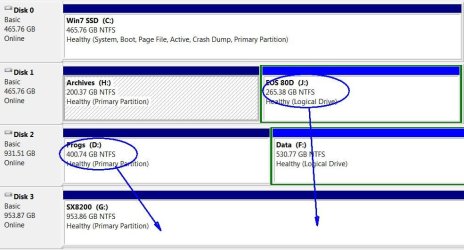
Here's what I want to do:
 

Attachments

  • Clipboard01.jpg
    Clipboard01.jpg
    67.7 KB · Views: 0

My Computer My Computer

Computer type
PC/Desktop
Computer Manufacturer/Model Number
Custom
OS
7 x64 Ultimate
CPU
AMD Ryzen 5
Motherboard
Gigabyte GA-AB350-Gaming
Memory
16GB DDR4
Graphics Card(s)
Radeon R7 360
Monitor(s) Displays
2 x Dell U2518D
Screen Resolution
2560x1440 2560x1440
Hard Drives
WD 500GB x2
Samsung SSD 128MB (OS)
XPG SX8200 Pro M.2 2280 1TB
PSU
Antec 500
Cooling
Hyper 212 EVO
Keyboard
Logitech cordless K800
Mouse
Logitech M510
Antivirus
Avira
Any decent partition manager and many disk image programs can copy partitions. Pretty sure you can do it with PartWiz.

You might have to delete the G first ( probably PartWiz will only copy into unallocated space, for safety).

Then Copy D partition to SX8200.

Then copy J into the remaining unallocated space on the SX8200.

Then release the drive letters ( or change to something else ) from the original D and J partitions.

Then set the two copied partitions to D and J.
 

My Computers My Computers

System One System Two

  • Computer type
    PC/Desktop
    OS
    7 X64
    CPU
    i5 8400
    Motherboard
    gigabyte b365m ds3h
    Memory
    2x8gb 3200mhz
    Hard Drives
    various
    PSU
    pure power 11 400w cm
    Case
    Coolermaster
    Cooling
    cryorig m9i
  • Computer type
    PC/Desktop
    OS
    7x64
    CPU
    g5400
    Motherboard
    ga b365m ds3h
    Memory
    8gb ddr4 2400
    PSU
    xfx pro 450w
PartWiz did fine - it was the "unallocated space" requirement that was throwing me. Once I deleted that empty partition, everything copied easily enough. Because I was moving programs that were in use, Partition Wizard rebooted into a shell to complete the operations before returning me to Windows. I re-lettered the drives and all the programs run normally from their shortcuts.


Thanks SIW2!
 

My Computer My Computer

Computer type
PC/Desktop
Computer Manufacturer/Model Number
Custom
OS
7 x64 Ultimate
CPU
AMD Ryzen 5
Motherboard
Gigabyte GA-AB350-Gaming
Memory
16GB DDR4
Graphics Card(s)
Radeon R7 360
Monitor(s) Displays
2 x Dell U2518D
Screen Resolution
2560x1440 2560x1440
Hard Drives
WD 500GB x2
Samsung SSD 128MB (OS)
XPG SX8200 Pro M.2 2280 1TB
PSU
Antec 500
Cooling
Hyper 212 EVO
Keyboard
Logitech cordless K800
Mouse
Logitech M510
Antivirus
Avira
:-)
 

My Computers My Computers

System One System Two

  • Computer type
    PC/Desktop
    OS
    7 X64
    CPU
    i5 8400
    Motherboard
    gigabyte b365m ds3h
    Memory
    2x8gb 3200mhz
    Hard Drives
    various
    PSU
    pure power 11 400w cm
    Case
    Coolermaster
    Cooling
    cryorig m9i
  • Computer type
    PC/Desktop
    OS
    7x64
    CPU
    g5400
    Motherboard
    ga b365m ds3h
    Memory
    8gb ddr4 2400
    PSU
    xfx pro 450w
Back
Top