Upgrade to 10 or fix network?

MG312

New member
Local time
1:48 PM
Messages
28
Hi

My business has 7 pc's all networked through a broadband router, sub linked via 2 network switches - sounds complicated but it used to work fine, apart from a couple of small network issues.

All of them used to run Windows 7, mostly Professional, one Home Premium.

2 of the 7 pc's were replaced around a year ago with new machines both running Windows 10 Professional. In my naivety I assumed MS would have got to grips with network problems but it appears not. I haven't been able to get the two Windows 10 pc's to allow access to each others files or printers, despite a fair amount of Googling.

Not quite sure when it happened but approx 5 or 6 weeks ago we noticed that the new pc's were starting to be picky with the Win 7 pc's, so we can't transfer files fully or print. As the image below shows, some pc's can access others but don't allow reciprocal access, colour coded to help the anomalies stand out.

This has been frustrating the hell out of me for some time now, and I really don't have the time to sit at each pc (again) and try to resolve the issues.

So, do I get a specialist in at no doubt some considerable cost, or in light of MS withdrawing support for 7, upgrade everything to Windows 10 and hope for the best? Or buy a new Ethernet switch and reconnect?


Your thoughts would be apprciated.
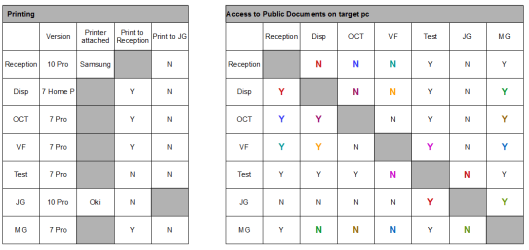


Network issues.png
 
Last edited:

My Computer My Computer

Computer type
PC/Desktop
OS
Windows 7 Professional
Hi MG312,

As your running a Business network, UNfortunately your safest option Security wise is to upgrade to 10:cry:

The free upgrade is still unofficially available, i actually prepped this comp last week for W10 using my old spinner - Ask your boss for the money saved as a bonus:zip:
Upgrade to Windows 10 from Windows 7 for Free | Tutorials
Allthough MS has offered to extend W7 for Bussiness's at a cost, per machine.

back to your problem, have a read of these

Deprecated and Removed Features in Windows 10 Version 1803 - Windows 10 Forums


Enable or Disable SMB1 File Sharing Protocol in Windows | Tutorials


Roy
 

My Computer My Computer

Computer type
PC/Desktop
Computer Manufacturer/Model Number
medionl/Aspire 6930G/acer x55a
OS
W7 home premium 32bit/W7HP 64bit/w10 tp insider ring
CPU
E5300 dual core
Motherboard
medion MS7366
Memory
3gb
Graphics Card(s)
Nvidia Geforce 7100 Nforce 630i
Monitor(s) Displays
avixc
Internet Speed
n (isp resticted to 72)
Antivirus
mse/pands
Browser
palemoon
Other Info
Belkin Fd7050 n USB using Railink RT2870 drivers, more upto date
Have you been using homegroup as that has now gone so you need to use workgroups. 10 is more secure so you often need to enter a username password of the 10 pc when connecting
 

My Computer My Computer

Computer type
PC/Desktop
OS
win 8 32 bit
Have you been using homegroup as that has now gone so you need to use workgroups. 10 is more secure so you often need to enter a username password of the 10 pc when connecting


Thanks.


No I've not used homegroups, and when trying to get the Win 7 pc's to access each other I am asked for Network username and password, which is something I have not figured out.
 

My Computer My Computer

Computer type
PC/Desktop
OS
Windows 7 Professional
"...Win 7 pc's to access each other I am asked for Network username and password, which is something I have not figured out..."
For a long time, S03 accessed S02 just fine, however, S02 could never access S03 -- getting the same popup you got, asking for username and password, of course, nothing worked. After doing a Repair Install on S02, suddenly, at least for now, both can access each other -- go figure. I'll be watching this thread to learn the solution set. :)
 

My Computer My Computer

Computer type
PC/Desktop
Computer Manufacturer/Model Number
Antec desktop; Acer Aspire laptops
OS
Windows 7 Professional 64-bit
CPU
Desktop i5; Acers i5 & i7
Memory
desktop 16GB; 1 Acer 8GB & 1 Acer 16GB
Hard Drives
1TB split into 2 equal partitions [OS and data] usable by RJS
Internet Speed
AT&T DSL
Browser
FF, GChrome, msIE
Other Info
Windows 7 Firewall, Emsisoft AM/AV, MSE [scan-only], SpywareBlaster, Ruiware/BillP combine
By default windows passes the current user and password so its possible if you have an account with same details on the pc your connecting to it wont ask for details. That is the simplest solution to have accounts on all pcs with same name password then there is no problems
 

My Computer My Computer

Computer type
PC/Desktop
OS
win 8 32 bit
Thanks Samuria


Most of the pc's are set up with no users - they boot straight into windows and I do not recall setting any usernames or passwords on any of them. Only the pc's named MG, JG and OCT have usernames.
 

My Computer My Computer

Computer type
PC/Desktop
OS
Windows 7 Professional

My Computer My Computer

Computer type
PC/Desktop
Computer Manufacturer/Model Number
medionl/Aspire 6930G/acer x55a
OS
W7 home premium 32bit/W7HP 64bit/w10 tp insider ring
CPU
E5300 dual core
Motherboard
medion MS7366
Memory
3gb
Graphics Card(s)
Nvidia Geforce 7100 Nforce 630i
Monitor(s) Displays
avixc
Internet Speed
n (isp resticted to 72)
Antivirus
mse/pands
Browser
palemoon
Other Info
Belkin Fd7050 n USB using Railink RT2870 drivers, more upto date
Most of the pc's are set up with no users - they boot straight into windows...


You can't boot into Windows without a user account, there must be one even if you don't see it at start up. Sounds like they have been set up to automatically log in as per Torchwood's link.

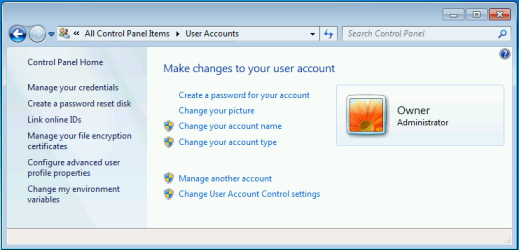
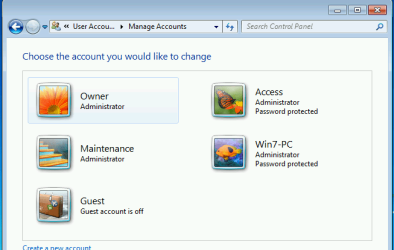
On one of these PCs after it has booted into Windows, open User Accounts in Control Panel. It will show the name of the user account there. It will also say 'Password protected' if it has a password, but won't if there's a blank password.

If this account is an administrator you can then click 'Manage another account' to show all available accounts. This will work both in W7 and W10.
 

Attachments

  • W7 User Account.PNG
    W7 User Account.PNG
    19.5 KB · Views: 13
  • W7 Manage Accounts.PNG
    W7 Manage Accounts.PNG
    20.9 KB · Views: 12

My Computers My Computers

System One System Two

  • Computer type
    Laptop
    Computer Manufacturer/Model Number
    Toshiba satellite C650D
    OS
    Windows 7 Home Premium x64
    CPU
    AMD V120
    Memory
    4GB
    Internet Speed
    150 Mbps
    Antivirus
    MSE
    Browser
    IE11, Edge, Firefox
    Other Info
    I also have W7 Pro on my System Two, and several W7 Hyper-V VMs. My other machines run Windows 10/11. Their specs are in my Ten Forums & Eleven Forum profiles.
  • Computer type
    Laptop
    System Manufacturer/Model Number
    Lenovo Thinkpad T430
    OS
    Windows 7 Pro x64
    CPU
    Intel i5-3320M
    Memory
    8 GB
    Hard Drives
    250GB Samsung SSD 860 EVO
    Antivirus
    MSE
"...Win 7 pc's to access each other I am asked for Network username and password, which is something I have not figured out..."
For a long time, S03 accessed S02 just fine, however, S02 could never access S03 -- getting the same popup you got, asking for username and password, of course, nothing worked. After doing a Repair Install on S02, suddenly, at least for now, both can access each other -- go figure. I'll be watching this thread to learn the solution set. :)

Like I said, things are broken that you don't realize until something doesn't work, forcing something is band-aide at best.
Repair Install/InPlaceUpgrade cures many ill machines.
Bill
 

My Computer My Computer

Computer type
PC/Desktop
Computer Manufacturer/Model Number
HP Desktop & Compaq Laptop
OS
Win 10 x64, Linux Lite, Win 7 x64, BlackArch, & Kali
Hard Drives
Samsung 850 Pro 256Gb,
Hitachi HDD 1Tb,
Crucial MX SSD 250Gb
Segate 3Tb USB 3.0 Ext. Backup HDD
Internet Speed
150Mbps dn, 20Mbps up
Antivirus
Avast Free, Malwarebytes Anti-Exploit & Anti-Ransomware
Browser
Firefox, Chrome, Opera, & VPN
Correct! After Repair Install of one of two laptops, they communicate with each other.
 

My Computer My Computer

Computer type
PC/Desktop
Computer Manufacturer/Model Number
Antec desktop; Acer Aspire laptops
OS
Windows 7 Professional 64-bit
CPU
Desktop i5; Acers i5 & i7
Memory
desktop 16GB; 1 Acer 8GB & 1 Acer 16GB
Hard Drives
1TB split into 2 equal partitions [OS and data] usable by RJS
Internet Speed
AT&T DSL
Browser
FF, GChrome, msIE
Other Info
Windows 7 Firewall, Emsisoft AM/AV, MSE [scan-only], SpywareBlaster, Ruiware/BillP combine
Thanks for all replies so far. I'm not sure I have the time to do a repair install on 7 pc's, with a few different versions of Windows to figure out.


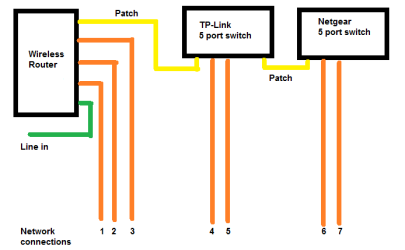
I'm looking at my network cabling at the moment. The network seems quite slow, so I'm wondering if the router set up could be improved. These are the connections:


Network configuration.png


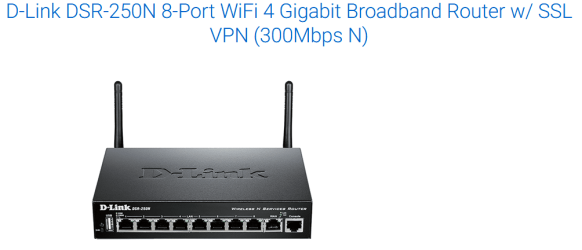
Would upgrading to a Gigabit set up help? Thinking of replacing the TPLink and Netgear 100 Mbps switches with one single 8 port switch like this:


Gigabit switch.png


Would I need to insert new hardware into the pc's to make these work to max speed?
 

My Computer My Computer

Computer type
PC/Desktop
OS
Windows 7 Professional
Back
Top