UEFI (Unified Extensible Firmware Interface) - Install Windows 7 with

How to Install Windows 7 Using the "Unified Extensible Firmware Interface" (UEFI)


   Information
In addition to better interoperability, UEFI firmware provides several technical advantages:
  • Compatibility with operating systems that support only BIOS
  • Ability to boot from large disks
  • CPU-independent architecture
  • CPU-independent drivers
  • Flexible pre-OS environment
  • Modular design
Two of the most notable Windows features for UEFI systems are the following:
  • Multicast deployment, which enables large scale network-based image deployment in manufacturing and enterprise settings.
  • Fast boot and resume from hibernation, which improves user experience.
The rich UEFI interface provides ample room for innovation in the development of operating system features. Along with the other members of the Unified EFI Forum, Microsoft is investigating the following:
  • Rootkit prevention
  • Network authentication
-Microsoft Corporation
This method can also be used for the UEFI installation of Windows 8, Windows Server 2008 SP1, Windows Server 2008 R2, and Windows Vista SP1.

   Note
You will need to satisfy the following requirements in order to proceed:

  • A Windows 7 compatible system
  • A Windows 7 x64-bit installation media. 32-bit is not supported.
  • A UEFI v2.0+ compliant PC. Check your chipset manufacturer/firmware documentation.
  • A blank, partition-free, hard disk for installation.
   Warning

  • Disabling UEFI will make the system unbootable as there is no MBR on the disks.
  • You CANNOT make a sector-by-sector copy of GPT disks. The Disk and Partition GUIDs will no longer be unique. This must never happen. You can make a sector-by-sector copy of the contents of ESP or basic data partitions.
  • Disable secure boot before installing Windows 7.


Here's How:

1. Do step 2 or 3 below depending on what installation Media you are using.

2. If using a Retail 64-bit Windows 7 Installation DVD A) Insert the DVD, restart the computer, and go to step 4 below.
3. If using a 64-bit Windows 7 Installation USB Flash Drive with UEFI A) If you have not already, you will need to create a Windows 7 installation bootable USB flash drive for UEFI from either a Windows 7 installation ISO or DVD.

B) Connect the USB, restart the computer, and go to step 4 below.
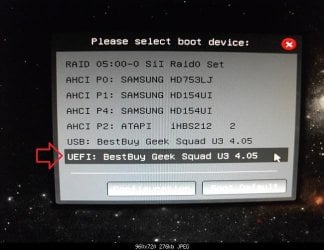
4. Press whatever key (ex: F11) it shows to boot to your motherboard's boot menu, and select to boot from the DVD or UEFI USB. (see screenshot below) UEFI_USB_Boot_Menu.jpg
5. Do steps 3 to 7 in the tutorial link below. http://www.sevenforums.com/tutorials/1649-clean-install-windows-7-a.html
6. Delete all partitions/volumes on the disk # (ex: Disk 0) that you want to install Windows 7 as UEFI on until that disk # shows as unallocated space. (see screenshot below) Step7.jpg
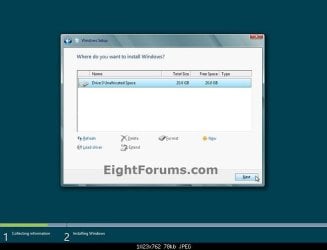
7. When you are finished, click/tap on New, Apply (for full size of disk), and OK. (see screenshot above)

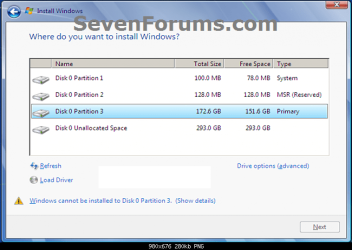
8. You will notice that the disk has now been formatted as GPT with 3 partitions. Select the "Primary" partition 3, and click/tap on Next. (see screenshot below)
NOTE: You might receive a "Windows can't be installed on drive 0" warning, but as long as you can click on the Next button, you're fine.
   Note
The 3 partitions are:
  • Partition 1 - System - The EFI System partition that contains the NTLDR, HAL, Boot.txt, and other files that are needed to boot the system, such as drivers.
  • Partition 2 - MSR - The Microsoft Reserved (MSR) partition that reserves space on each disk drive for subsequent use by operating system software.
  • Partition 3 - Primary - Where Windows is to be installed to.

    It is imperative that these 3 partitions remain in the exact order as they are


Windows7.PNG
9. You can now finish doing the steps in either tutorial below.

10. That's it. You have successfully installed Windows 7 on an UEFI system.


External Links:


Windows and GPT FAQ
Unified Extensible Firmware Interface - Wikipedia, the free encyclopedia
UEFI and Windows
 
Last edited by a moderator:

My Computers My Computers

System One System Two

  • Computer type
    PC/Desktop
    Computer Manufacturer/Model Number
    PRO904059
    OS
    Linux Lite
    CPU
    Intel(R) Core(TM) i5-7300U CPU @ 2.60GHz 2.71 GHz
    Memory
    8.00 GB (7.87 GB usable)
    Hard Drives
    250 GB solid state drive
    Antivirus
    ESET Smart Security Premium
    Browser
    Firefox ESR
  • Computer type
    PC/Desktop
    System Manufacturer/Model Number
    Dell OptiPlex 9020
    OS
    Windows 10 Pro 21H2
    CPU
    Intel(R) Core(TM) i5-4590 CPU @ 3.30GHz
    Memory
    8.00 GB
    Graphics Card(s)
    Nvidia Quadro K620
    Browser
    Firefox ESR

My Computer My Computer

Computer type
PC/Desktop
Computer Manufacturer/Model Number
Self built custom
OS
64-bit Windows 11 Pro for Workstations
CPU
Intel i7-8700K OC'd to 5 GHz
Motherboard
ASUS ROG Maximus XI Formula Z390
Memory
64 GB (4x16GB) G.SKILL TridentZ RGB DDR4 3600 MHz
Graphics Card(s)
ASUS ROG-STRIX-GTX1080TI-O11G-GAMING
Sound Card
Integrated
Monitor(s) Displays
2 x Samsung Odyssey G7 27"
Screen Resolution
2560x1440
Hard Drives
1TB Samsung 990 PRO M.2,
4TB Samsung 990 PRO PRO M.2,
TerraMaster F8 SSD Plus NAS
PSU
Seasonic Prime Titanium 850W
Case
Thermaltake Core P3
Cooling
Corsair Hydro H115i
Keyboard
Logitech wireless K800
Mouse
Logitech MX Master 4
Internet Speed
2 Gb/s Download and 100 Mb/s Upload
Antivirus
Malwarebyte Anti-Malware Premium
Browser
Google Chrome
Other Info
Logitech Z625 speaker system,
Logitech BRIO 4K Pro webcam,
HP Color LaserJet Pro MFP M477fdn,
APC SMART-UPS RT 1000 XL - SURT1000XLI,
Galaxy S23 Plus phone
oh ok
 

My Computers My Computers

System One System Two

  • Computer type
    PC/Desktop
    Computer Manufacturer/Model Number
    PRO904059
    OS
    Linux Lite
    CPU
    Intel(R) Core(TM) i5-7300U CPU @ 2.60GHz 2.71 GHz
    Memory
    8.00 GB (7.87 GB usable)
    Hard Drives
    250 GB solid state drive
    Antivirus
    ESET Smart Security Premium
    Browser
    Firefox ESR
  • Computer type
    PC/Desktop
    System Manufacturer/Model Number
    Dell OptiPlex 9020
    OS
    Windows 10 Pro 21H2
    CPU
    Intel(R) Core(TM) i5-4590 CPU @ 3.30GHz
    Memory
    8.00 GB
    Graphics Card(s)
    Nvidia Quadro K620
    Browser
    Firefox ESR
i fresh install windows 7, then i enabled secure boot, then it doesn't boot it says "operating system loader signature not found in secure boot database ('db')" then i disabled secure boot then it boot fine
 

My Computers My Computers

System One System Two

  • Computer type
    PC/Desktop
    Computer Manufacturer/Model Number
    PRO904059
    OS
    Linux Lite
    CPU
    Intel(R) Core(TM) i5-7300U CPU @ 2.60GHz 2.71 GHz
    Memory
    8.00 GB (7.87 GB usable)
    Hard Drives
    250 GB solid state drive
    Antivirus
    ESET Smart Security Premium
    Browser
    Firefox ESR
  • Computer type
    PC/Desktop
    System Manufacturer/Model Number
    Dell OptiPlex 9020
    OS
    Windows 10 Pro 21H2
    CPU
    Intel(R) Core(TM) i5-4590 CPU @ 3.30GHz
    Memory
    8.00 GB
    Graphics Card(s)
    Nvidia Quadro K620
    Browser
    Firefox ESR
please see file attached
 

Attachments

Last edited:

My Computers My Computers

System One System Two

  • Computer type
    PC/Desktop
    Computer Manufacturer/Model Number
    PRO904059
    OS
    Linux Lite
    CPU
    Intel(R) Core(TM) i5-7300U CPU @ 2.60GHz 2.71 GHz
    Memory
    8.00 GB (7.87 GB usable)
    Hard Drives
    250 GB solid state drive
    Antivirus
    ESET Smart Security Premium
    Browser
    Firefox ESR
  • Computer type
    PC/Desktop
    System Manufacturer/Model Number
    Dell OptiPlex 9020
    OS
    Windows 10 Pro 21H2
    CPU
    Intel(R) Core(TM) i5-4590 CPU @ 3.30GHz
    Memory
    8.00 GB
    Graphics Card(s)
    Nvidia Quadro K620
    Browser
    Firefox ESR
Other than leaving secure boot disabled, I found this at the link below that may help.

:ar: https://www.dell.com/community/Lapt...ignature-not-found-in-SecureBoot/td-p/5074574

Operating System Loader Has No Signature . . .

these steps resolved my issue:

1. On Startup, press F12

2. Reset Bios to default settings

3. Restart laptop

4. In Bios, select Boot Sequence menu

5. Manually ADD additional line with the name "Windows Boot Manager"

6. Select /EFI/BOOT/BOOTX64.EFI

7. Exit
 

My Computer My Computer

Computer type
PC/Desktop
Computer Manufacturer/Model Number
Self built custom
OS
64-bit Windows 11 Pro for Workstations
CPU
Intel i7-8700K OC'd to 5 GHz
Motherboard
ASUS ROG Maximus XI Formula Z390
Memory
64 GB (4x16GB) G.SKILL TridentZ RGB DDR4 3600 MHz
Graphics Card(s)
ASUS ROG-STRIX-GTX1080TI-O11G-GAMING
Sound Card
Integrated
Monitor(s) Displays
2 x Samsung Odyssey G7 27"
Screen Resolution
2560x1440
Hard Drives
1TB Samsung 990 PRO M.2,
4TB Samsung 990 PRO PRO M.2,
TerraMaster F8 SSD Plus NAS
PSU
Seasonic Prime Titanium 850W
Case
Thermaltake Core P3
Cooling
Corsair Hydro H115i
Keyboard
Logitech wireless K800
Mouse
Logitech MX Master 4
Internet Speed
2 Gb/s Download and 100 Mb/s Upload
Antivirus
Malwarebyte Anti-Malware Premium
Browser
Google Chrome
Other Info
Logitech Z625 speaker system,
Logitech BRIO 4K Pro webcam,
HP Color LaserJet Pro MFP M477fdn,
APC SMART-UPS RT 1000 XL - SURT1000XLI,
Galaxy S23 Plus phone

My Computers My Computers

System One System Two

  • Computer type
    PC/Desktop
    Computer Manufacturer/Model Number
    PRO904059
    OS
    Linux Lite
    CPU
    Intel(R) Core(TM) i5-7300U CPU @ 2.60GHz 2.71 GHz
    Memory
    8.00 GB (7.87 GB usable)
    Hard Drives
    250 GB solid state drive
    Antivirus
    ESET Smart Security Premium
    Browser
    Firefox ESR
  • Computer type
    PC/Desktop
    System Manufacturer/Model Number
    Dell OptiPlex 9020
    OS
    Windows 10 Pro 21H2
    CPU
    Intel(R) Core(TM) i5-4590 CPU @ 3.30GHz
    Memory
    8.00 GB
    Graphics Card(s)
    Nvidia Quadro K620
    Browser
    Firefox ESR
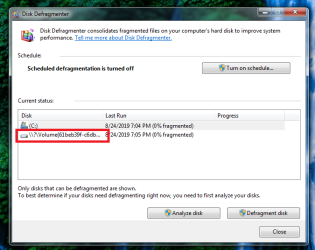
After I converted from GPT to MBR disk with AOMEI Partition Assistant, can anyone what's that for??
 

Attachments

  • Untitled.png
    Untitled.png
    42.5 KB · Views: 702

My Computers My Computers

System One System Two

  • Computer type
    PC/Desktop
    Computer Manufacturer/Model Number
    PRO904059
    OS
    Linux Lite
    CPU
    Intel(R) Core(TM) i5-7300U CPU @ 2.60GHz 2.71 GHz
    Memory
    8.00 GB (7.87 GB usable)
    Hard Drives
    250 GB solid state drive
    Antivirus
    ESET Smart Security Premium
    Browser
    Firefox ESR
  • Computer type
    PC/Desktop
    System Manufacturer/Model Number
    Dell OptiPlex 9020
    OS
    Windows 10 Pro 21H2
    CPU
    Intel(R) Core(TM) i5-4590 CPU @ 3.30GHz
    Memory
    8.00 GB
    Graphics Card(s)
    Nvidia Quadro K620
    Browser
    Firefox ESR
f23948, :-)

This would most likely be from an unlabeled system or OEM partition.

It is safe to ignore.
 

My Computer My Computer

Computer type
PC/Desktop
Computer Manufacturer/Model Number
Self built custom
OS
64-bit Windows 11 Pro for Workstations
CPU
Intel i7-8700K OC'd to 5 GHz
Motherboard
ASUS ROG Maximus XI Formula Z390
Memory
64 GB (4x16GB) G.SKILL TridentZ RGB DDR4 3600 MHz
Graphics Card(s)
ASUS ROG-STRIX-GTX1080TI-O11G-GAMING
Sound Card
Integrated
Monitor(s) Displays
2 x Samsung Odyssey G7 27"
Screen Resolution
2560x1440
Hard Drives
1TB Samsung 990 PRO M.2,
4TB Samsung 990 PRO PRO M.2,
TerraMaster F8 SSD Plus NAS
PSU
Seasonic Prime Titanium 850W
Case
Thermaltake Core P3
Cooling
Corsair Hydro H115i
Keyboard
Logitech wireless K800
Mouse
Logitech MX Master 4
Internet Speed
2 Gb/s Download and 100 Mb/s Upload
Antivirus
Malwarebyte Anti-Malware Premium
Browser
Google Chrome
Other Info
Logitech Z625 speaker system,
Logitech BRIO 4K Pro webcam,
HP Color LaserJet Pro MFP M477fdn,
APC SMART-UPS RT 1000 XL - SURT1000XLI,
Galaxy S23 Plus phone
oh ok cool thank you Brink
 
Last edited:

My Computers My Computers

System One System Two

  • Computer type
    PC/Desktop
    Computer Manufacturer/Model Number
    PRO904059
    OS
    Linux Lite
    CPU
    Intel(R) Core(TM) i5-7300U CPU @ 2.60GHz 2.71 GHz
    Memory
    8.00 GB (7.87 GB usable)
    Hard Drives
    250 GB solid state drive
    Antivirus
    ESET Smart Security Premium
    Browser
    Firefox ESR
  • Computer type
    PC/Desktop
    System Manufacturer/Model Number
    Dell OptiPlex 9020
    OS
    Windows 10 Pro 21H2
    CPU
    Intel(R) Core(TM) i5-4590 CPU @ 3.30GHz
    Memory
    8.00 GB
    Graphics Card(s)
    Nvidia Quadro K620
    Browser
    Firefox ESR
It's the easiest way.
Ok, so finally got to test this Windows 7 install on a UEFI system, haven't tested on my lappy yet which was the sole reason for me being here but I've just being procrastinating and postponing due to school work and that the fact I need my laptop working and not screwed up for a few weeks whilst I mess around trying to install windows 7 on its 4TB RAID0 boot drive system....

This test system happens to be running one of the latest Ryzen boards - the ASRock x570M Pro4 mATX is what I've tested this USB method on. I disabled CSM to ensure full UEFI compatibility and what do you know? The install hangs on "Windows is starting" screen, not even into the setup stage and it refuses to load or has frozen at that particular progress....waiting a good two hours, nope still stuck on that screen with no further progress....

So....USB is the easiest method huh? Well it would appear USB method also exhibit the same issue as installing via DVD....:shock:
 

My Computer My Computer

Computer type
PC/Desktop
Computer Manufacturer/Model Number
custom build
OS
The one I am using to register is my Windows 7 Professional x64 one.
CPU
Intel Core i7-3970x
Motherboard
Asus Rampage 4 Extreme
Memory
Cosair Dominator Platinum
Graphics Card(s)
2x eVGA GTX 770 4GB CLassified with ACX cooler
Antivirus
I have KIS 2016 which is an internet security suite....?
Browser
Fiefox
Win7fuser,

No worries. I understand wanting to wait.

How did you create the bootable USB?

Is your BIOS set to allow USB at boot?
 

My Computer My Computer

Computer type
PC/Desktop
Computer Manufacturer/Model Number
Self built custom
OS
64-bit Windows 11 Pro for Workstations
CPU
Intel i7-8700K OC'd to 5 GHz
Motherboard
ASUS ROG Maximus XI Formula Z390
Memory
64 GB (4x16GB) G.SKILL TridentZ RGB DDR4 3600 MHz
Graphics Card(s)
ASUS ROG-STRIX-GTX1080TI-O11G-GAMING
Sound Card
Integrated
Monitor(s) Displays
2 x Samsung Odyssey G7 27"
Screen Resolution
2560x1440
Hard Drives
1TB Samsung 990 PRO M.2,
4TB Samsung 990 PRO PRO M.2,
TerraMaster F8 SSD Plus NAS
PSU
Seasonic Prime Titanium 850W
Case
Thermaltake Core P3
Cooling
Corsair Hydro H115i
Keyboard
Logitech wireless K800
Mouse
Logitech MX Master 4
Internet Speed
2 Gb/s Download and 100 Mb/s Upload
Antivirus
Malwarebyte Anti-Malware Premium
Browser
Google Chrome
Other Info
Logitech Z625 speaker system,
Logitech BRIO 4K Pro webcam,
HP Color LaserJet Pro MFP M477fdn,
APC SMART-UPS RT 1000 XL - SURT1000XLI,
Galaxy S23 Plus phone
@Win7fuser,

No worries. I understand wanting to wait.

How did you create the bootable USB?

Is your BIOS set to allow USB at boot?
Thank for the prompt reply.

I used Rufus - I think I followed on one of the guides here or the windows 8 one creating a USB bootable windows install drive. There is no explicit option in the BIOS to allow USB to boot, but it detects the USB that was created by Rufus fine and was able to boot from it with no issues. So USB boot seems to be permanently on, without an option to turn it off....
 

My Computer My Computer

Computer type
PC/Desktop
Computer Manufacturer/Model Number
custom build
OS
The one I am using to register is my Windows 7 Professional x64 one.
CPU
Intel Core i7-3970x
Motherboard
Asus Rampage 4 Extreme
Memory
Cosair Dominator Platinum
Graphics Card(s)
2x eVGA GTX 770 4GB CLassified with ACX cooler
Antivirus
I have KIS 2016 which is an internet security suite....?
Browser
Fiefox
Thank for the prompt reply.

I used Rufus - I think I followed on one of the guides here or the windows 8 one creating a USB bootable windows install drive. There is no explicit option in the BIOS to allow USB to boot, but it detects the USB that was created by Rufus fine and was able to boot from it with no issues. So USB boot seems to be permanently on, without an option to turn it off....

May be an issue with the ISO if not from an official source.
 

My Computer My Computer

Computer type
PC/Desktop
Computer Manufacturer/Model Number
Self built custom
OS
64-bit Windows 11 Pro for Workstations
CPU
Intel i7-8700K OC'd to 5 GHz
Motherboard
ASUS ROG Maximus XI Formula Z390
Memory
64 GB (4x16GB) G.SKILL TridentZ RGB DDR4 3600 MHz
Graphics Card(s)
ASUS ROG-STRIX-GTX1080TI-O11G-GAMING
Sound Card
Integrated
Monitor(s) Displays
2 x Samsung Odyssey G7 27"
Screen Resolution
2560x1440
Hard Drives
1TB Samsung 990 PRO M.2,
4TB Samsung 990 PRO PRO M.2,
TerraMaster F8 SSD Plus NAS
PSU
Seasonic Prime Titanium 850W
Case
Thermaltake Core P3
Cooling
Corsair Hydro H115i
Keyboard
Logitech wireless K800
Mouse
Logitech MX Master 4
Internet Speed
2 Gb/s Download and 100 Mb/s Upload
Antivirus
Malwarebyte Anti-Malware Premium
Browser
Google Chrome
Other Info
Logitech Z625 speaker system,
Logitech BRIO 4K Pro webcam,
HP Color LaserJet Pro MFP M477fdn,
APC SMART-UPS RT 1000 XL - SURT1000XLI,
Galaxy S23 Plus phone
May be an issue with the ISO if not from an official source.

Are these valid?
en_windows_7_professional_with_sp1_x64_dvd_u_676939.iso
SHA1: 0BCFC54019EA175B1EE51F6D2B207A3D14DD2B58
SHA256: 3dae1a531b90fa72e59b4a86b20216188d398c8c070da4a5c5a44fe08b1b6e55
ISO/CRC: AD44DB36
 

My Computer My Computer

Computer type
PC/Desktop
Computer Manufacturer/Model Number
custom build
OS
The one I am using to register is my Windows 7 Professional x64 one.
CPU
Intel Core i7-3970x
Motherboard
Asus Rampage 4 Extreme
Memory
Cosair Dominator Platinum
Graphics Card(s)
2x eVGA GTX 770 4GB CLassified with ACX cooler
Antivirus
I have KIS 2016 which is an internet security suite....?
Browser
Fiefox
I don't know. It just depends on where you got it, and if ithey're a reliable source.
 

My Computer My Computer

Computer type
PC/Desktop
Computer Manufacturer/Model Number
Self built custom
OS
64-bit Windows 11 Pro for Workstations
CPU
Intel i7-8700K OC'd to 5 GHz
Motherboard
ASUS ROG Maximus XI Formula Z390
Memory
64 GB (4x16GB) G.SKILL TridentZ RGB DDR4 3600 MHz
Graphics Card(s)
ASUS ROG-STRIX-GTX1080TI-O11G-GAMING
Sound Card
Integrated
Monitor(s) Displays
2 x Samsung Odyssey G7 27"
Screen Resolution
2560x1440
Hard Drives
1TB Samsung 990 PRO M.2,
4TB Samsung 990 PRO PRO M.2,
TerraMaster F8 SSD Plus NAS
PSU
Seasonic Prime Titanium 850W
Case
Thermaltake Core P3
Cooling
Corsair Hydro H115i
Keyboard
Logitech wireless K800
Mouse
Logitech MX Master 4
Internet Speed
2 Gb/s Download and 100 Mb/s Upload
Antivirus
Malwarebyte Anti-Malware Premium
Browser
Google Chrome
Other Info
Logitech Z625 speaker system,
Logitech BRIO 4K Pro webcam,
HP Color LaserJet Pro MFP M477fdn,
APC SMART-UPS RT 1000 XL - SURT1000XLI,
Galaxy S23 Plus phone

My Computer My Computer

Computer type
PC/Desktop
Computer Manufacturer/Model Number
custom build
OS
The one I am using to register is my Windows 7 Professional x64 one.
CPU
Intel Core i7-3970x
Motherboard
Asus Rampage 4 Extreme
Memory
Cosair Dominator Platinum
Graphics Card(s)
2x eVGA GTX 770 4GB CLassified with ACX cooler
Antivirus
I have KIS 2016 which is an internet security suite....?
Browser
Fiefox
It appears to be valid. May have to install using Legacy BIOS.
 

My Computer My Computer

Computer type
PC/Desktop
Computer Manufacturer/Model Number
Self built custom
OS
64-bit Windows 11 Pro for Workstations
CPU
Intel i7-8700K OC'd to 5 GHz
Motherboard
ASUS ROG Maximus XI Formula Z390
Memory
64 GB (4x16GB) G.SKILL TridentZ RGB DDR4 3600 MHz
Graphics Card(s)
ASUS ROG-STRIX-GTX1080TI-O11G-GAMING
Sound Card
Integrated
Monitor(s) Displays
2 x Samsung Odyssey G7 27"
Screen Resolution
2560x1440
Hard Drives
1TB Samsung 990 PRO M.2,
4TB Samsung 990 PRO PRO M.2,
TerraMaster F8 SSD Plus NAS
PSU
Seasonic Prime Titanium 850W
Case
Thermaltake Core P3
Cooling
Corsair Hydro H115i
Keyboard
Logitech wireless K800
Mouse
Logitech MX Master 4
Internet Speed
2 Gb/s Download and 100 Mb/s Upload
Antivirus
Malwarebyte Anti-Malware Premium
Browser
Google Chrome
Other Info
Logitech Z625 speaker system,
Logitech BRIO 4K Pro webcam,
HP Color LaserJet Pro MFP M477fdn,
APC SMART-UPS RT 1000 XL - SURT1000XLI,
Galaxy S23 Plus phone
It appears to be valid. May have to install using Legacy BIOS.
Then it would be impossible to have a boot drive greater than 2TB......
 

My Computer My Computer

Computer type
PC/Desktop
Computer Manufacturer/Model Number
custom build
OS
The one I am using to register is my Windows 7 Professional x64 one.
CPU
Intel Core i7-3970x
Motherboard
Asus Rampage 4 Extreme
Memory
Cosair Dominator Platinum
Graphics Card(s)
2x eVGA GTX 770 4GB CLassified with ACX cooler
Antivirus
I have KIS 2016 which is an internet security suite....?
Browser
Fiefox
You could create separate partition(s) on the drive with anything over 2TB.
 

My Computer My Computer

Computer type
PC/Desktop
Computer Manufacturer/Model Number
Self built custom
OS
64-bit Windows 11 Pro for Workstations
CPU
Intel i7-8700K OC'd to 5 GHz
Motherboard
ASUS ROG Maximus XI Formula Z390
Memory
64 GB (4x16GB) G.SKILL TridentZ RGB DDR4 3600 MHz
Graphics Card(s)
ASUS ROG-STRIX-GTX1080TI-O11G-GAMING
Sound Card
Integrated
Monitor(s) Displays
2 x Samsung Odyssey G7 27"
Screen Resolution
2560x1440
Hard Drives
1TB Samsung 990 PRO M.2,
4TB Samsung 990 PRO PRO M.2,
TerraMaster F8 SSD Plus NAS
PSU
Seasonic Prime Titanium 850W
Case
Thermaltake Core P3
Cooling
Corsair Hydro H115i
Keyboard
Logitech wireless K800
Mouse
Logitech MX Master 4
Internet Speed
2 Gb/s Download and 100 Mb/s Upload
Antivirus
Malwarebyte Anti-Malware Premium
Browser
Google Chrome
Other Info
Logitech Z625 speaker system,
Logitech BRIO 4K Pro webcam,
HP Color LaserJet Pro MFP M477fdn,
APC SMART-UPS RT 1000 XL - SURT1000XLI,
Galaxy S23 Plus phone
Back
Top