Solved Toshiba Satellite C 850 - 1kn keyboard driver needed please

My Computer My Computer

At a glance

Win 7 HP SP1 64-bit Vista HB SP2 32-bit Linux...Intel(R) Pentium(R) CPU P6200 @ 2.13GHz4.00 GBIntel(R) Graphics Media Accelerator HD
Computer type
Laptop
Computer Manufacturer/Model Number
Fujitsu LIFEBOOK
OS
Win 7 HP SP1 64-bit Vista HB SP2 32-bit Linux Mint 18.3
CPU
Intel(R) Pentium(R) CPU P6200 @ 2.13GHz
Motherboard
FUJITSU FJNBB06
Memory
4.00 GB
Graphics Card(s)
Intel(R) Graphics Media Accelerator HD
Sound Card
[1] Realtek High Definition Audio [2] Intel(R) Display Audio
Screen Resolution
1366 x 768 x 32 bits (4294967296 colors) @ 59 Hz
Hard Drives
TOSHIBA MK5076GSX
Antivirus
AVG FREE
Pci\ven_8086&dev_1e22&subsys_fb311179&rev_04

View attachment 410142

View attachment 410143

hi There

Many thanks for that.
Sadly it is Russian.
So Installed Winzip
After I unzipped it I arrived at "Elan" further on I arrive at "Forced"
Then NTx86 (I went for that because I am running 32bit)
Then 15.6.0.3
Then the following [please see screenshot]
Is it me am I doing something wrong.:banghead:
Is it possible I could get a link to click on please:thumbsup:
 

Attachments

  • screenshot of zip file.jpg
    screenshot of zip file.jpg
    31.9 KB · Views: 0

My Computer My Computer

At a glance

Windows 7 64bit Service Pack 1Intel Core 2 Quad Q8300 @ 2.50GHz8.00GB Dual-Channel DDR3 @ 666MHzV223W (1680x1050@59Hz) 1023MB NVIDIA GeForce ...
Computer type
PC/Desktop
Computer Manufacturer/Model Number
Custom build
OS
Windows 7 64bit Service Pack 1
CPU
Intel Core 2 Quad Q8300 @ 2.50GHz
Motherboard
ASUSTeK Computer INC. P5E3 Premium (LGA775)
Memory
8.00GB Dual-Channel DDR3 @ 666MHz
Graphics Card(s)
V223W (1680x1050@59Hz) 1023MB NVIDIA GeForce GT 430 (NVIDIA)
Sound Card
NVIDIA Virtual Audio Device (Wave Extensible) (WDM)
Monitor(s) Displays
Acer 22"
Screen Resolution
X193HQL (Analog)
Hard Drives
Seagate 2.0TB
ST2000DL003-9VT166 ATA Device
PSU
700W
Cooling
Akassa heatsink and two coolingfansg
Keyboard
Logitech
Antivirus
Kaspersky Internet Security 2019
Browser
IE 11
Other Info
Will be undertaking a total upgrade from the case upwards next year.
Case, motherboard, ram, cpu and last but not least a 2TB SSD, but before I do that everything will be backed up to the cloud
Sadly it is Russian.

What is Russian?

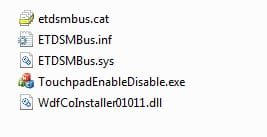
elan-inf.JPG


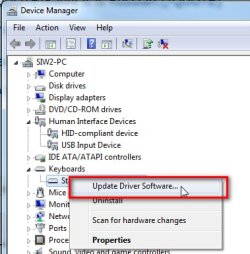
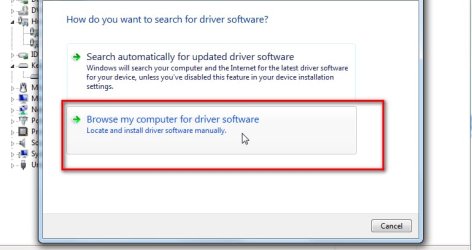
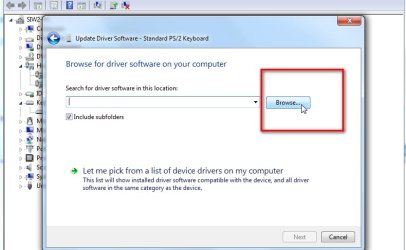
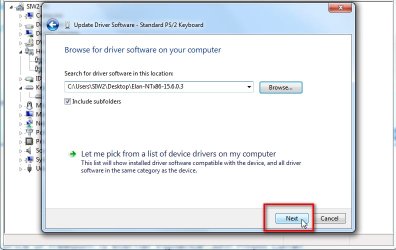
Use device manager to browse to the extracted drivers folder.

1. Right click the Device and Select "Update driver software"


devmgmt-1.JPG


2. Select "Browse my computer for driver software"


devmgmt-2.JPG


3. Click the Browse button and browse to the folder containing the extracted drivers


devmgmt-3.JPG


4. Click "Next"

devmgmt-4.JPG
 
Last edited:

My Computers My Computers

  • At a glance

    7 X64i5 84002x8gb 3200mhz
    Computer type
    PC/Desktop
    OS
    7 X64
    CPU
    i5 8400
    Motherboard
    gigabyte b365m ds3h
    Memory
    2x8gb 3200mhz
    Hard Drives
    various
    PSU
    pure power 11 400w cm
    Case
    Coolermaster
    Cooling
    cryorig m9i
  • At a glance

    7x64g54008gb ddr4 2400
    Computer type
    PC/Desktop
    OS
    7x64
    CPU
    g5400
    Motherboard
    ga b365m ds3h
    Memory
    8gb ddr4 2400
    PSU
    xfx pro 450w
Hi there
Many thanks for the reply.
Apologies for the "Russian" that changed once I had installed WinZip.
Sorry once again.
Right onwards and sideways.
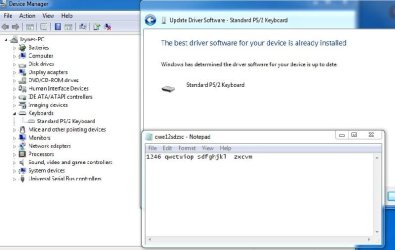
As you will see by the attachment I have used your very useful advice to the letter and the end result is seen in the "qwe12sdzxc" notepad
That was the first try.
So I uninstalled the keyboard, it would not let me progress any further till I rebooted, which is what I did.
And before I could do anything I had to reboot yet again.
So after the laptop had settled down I then tried your advice again, "same result"
In the notepad you will see the characters that I can type including spacebar the rest are missing.
What really puzzles me is that this is a new motherboard & processor I installed a few weeks ago and when I inputted the "product key" some of these characters were used.
The Windows 7 Professional 32 bit Product key I am looking at is "T" "B" "7" they are missing keys.
There is nothing wrong with the machine if I use a USB keyboard everything works except two USB ports on the right hand side and the customer was just happy to get it back.
Somebody else looked at it and they couldn't even get it to work at all.:confused: :confused: :confused: :confused: :confused:
Tony
 

Attachments

  • Taken from Toshiba keyboard.jpg
    Taken from Toshiba keyboard.jpg
    41.1 KB · Views: 0

My Computer My Computer

At a glance

Windows 7 64bit Service Pack 1Intel Core 2 Quad Q8300 @ 2.50GHz8.00GB Dual-Channel DDR3 @ 666MHzV223W (1680x1050@59Hz) 1023MB NVIDIA GeForce ...
Computer type
PC/Desktop
Computer Manufacturer/Model Number
Custom build
OS
Windows 7 64bit Service Pack 1
CPU
Intel Core 2 Quad Q8300 @ 2.50GHz
Motherboard
ASUSTeK Computer INC. P5E3 Premium (LGA775)
Memory
8.00GB Dual-Channel DDR3 @ 666MHz
Graphics Card(s)
V223W (1680x1050@59Hz) 1023MB NVIDIA GeForce GT 430 (NVIDIA)
Sound Card
NVIDIA Virtual Audio Device (Wave Extensible) (WDM)
Monitor(s) Displays
Acer 22"
Screen Resolution
X193HQL (Analog)
Hard Drives
Seagate 2.0TB
ST2000DL003-9VT166 ATA Device
PSU
700W
Cooling
Akassa heatsink and two coolingfansg
Keyboard
Logitech
Antivirus
Kaspersky Internet Security 2019
Browser
IE 11
Other Info
Will be undertaking a total upgrade from the case upwards next year.
Case, motherboard, ram, cpu and last but not least a 2TB SSD, but before I do that everything will be backed up to the cloud
Sorry I forgot to include in my original post this a new keyboard.

I have briefly reviewed this thread . . .

Request: Searching for a Toshiba Satellite C 850 - 1kn keyboard driver.

Advice given:

[1] Uninstall the keyboard driver from device manager and restart the laptop [automatically gets re-installed].
[2] Re-seating the ribbon cable on the motherboard.
[3] Run MS_Info32_Find_Problem_Devices.bat [one PCI issue found].

What you have done:

[1] Installed NEW motherboard, NEW processor, NEW keyboard and then installed a NEW OS.
[2] Tested with an external USB keyboard which works fine.
[3] PCI error found so downloaded and installed drivers.

I am really starting to think that the NEW keyboard is the problem. Either the keyboard is faulty or the ribbon needs re-seating replacing [cheap option] on the MB.

If you had this work done at a shop, I would definately take it back to them!

I hope this helps!
 

My Computer My Computer

At a glance

Win 7 HP SP1 64-bit Vista HB SP2 32-bit Linux...Intel(R) Pentium(R) CPU P6200 @ 2.13GHz4.00 GBIntel(R) Graphics Media Accelerator HD
Computer type
Laptop
Computer Manufacturer/Model Number
Fujitsu LIFEBOOK
OS
Win 7 HP SP1 64-bit Vista HB SP2 32-bit Linux Mint 18.3
CPU
Intel(R) Pentium(R) CPU P6200 @ 2.13GHz
Motherboard
FUJITSU FJNBB06
Memory
4.00 GB
Graphics Card(s)
Intel(R) Graphics Media Accelerator HD
Sound Card
[1] Realtek High Definition Audio [2] Intel(R) Display Audio
Screen Resolution
1366 x 768 x 32 bits (4294967296 colors) @ 59 Hz
Hard Drives
TOSHIBA MK5076GSX
Antivirus
AVG FREE
I have briefly reviewed this thread . . .

Request: Searching for a Toshiba Satellite C 850 - 1kn keyboard driver.

Advice given:

[1] Uninstall the keyboard driver from device manager and restart the laptop [automatically gets re-installed].
[2] Re-seating the ribbon cable on the motherboard.
[3] Run MS_Info32_Find_Problem_Devices.bat [one PCI issue found].

What you have done:

[1] Installed NEW motherboard, NEW processor, NEW keyboard and then installed a NEW OS.
[2] Tested with an external USB keyboard which works fine.
[3] PCI error found so downloaded and installed drivers.

I am really starting to think that the NEW keyboard is the problem. Either the keyboard is faulty or the ribbon needs re-seating replacing [cheap option] on the MB.

If you had this work done at a shop, I would definately take it back to them!

I hope this helps!


Good morning Paul
Thanks for that.
I am now going to power down the laptop, remove the battery, lift the keyboard off and inspect the ribbon and clam shell holder under a magnifying glass.
I will report back in a while.
Tony
 

My Computer My Computer

At a glance

Windows 7 64bit Service Pack 1Intel Core 2 Quad Q8300 @ 2.50GHz8.00GB Dual-Channel DDR3 @ 666MHzV223W (1680x1050@59Hz) 1023MB NVIDIA GeForce ...
Computer type
PC/Desktop
Computer Manufacturer/Model Number
Custom build
OS
Windows 7 64bit Service Pack 1
CPU
Intel Core 2 Quad Q8300 @ 2.50GHz
Motherboard
ASUSTeK Computer INC. P5E3 Premium (LGA775)
Memory
8.00GB Dual-Channel DDR3 @ 666MHz
Graphics Card(s)
V223W (1680x1050@59Hz) 1023MB NVIDIA GeForce GT 430 (NVIDIA)
Sound Card
NVIDIA Virtual Audio Device (Wave Extensible) (WDM)
Monitor(s) Displays
Acer 22"
Screen Resolution
X193HQL (Analog)
Hard Drives
Seagate 2.0TB
ST2000DL003-9VT166 ATA Device
PSU
700W
Cooling
Akassa heatsink and two coolingfansg
Keyboard
Logitech
Antivirus
Kaspersky Internet Security 2019
Browser
IE 11
Other Info
Will be undertaking a total upgrade from the case upwards next year.
Case, motherboard, ram, cpu and last but not least a 2TB SSD, but before I do that everything will be backed up to the cloud
Hi sheffieldyorky,

I am now going to power down the laptop, remove the battery, lift the keyboard off and inspect the ribbon and clam shell holder under a magnifying glass.
I will report back in a while.
:thumbsup:
So your avatar [brilliant by the way] will be you in a short while!
:roflmao:
 

My Computer My Computer

At a glance

Win 7 HP SP1 64-bit Vista HB SP2 32-bit Linux...Intel(R) Pentium(R) CPU P6200 @ 2.13GHz4.00 GBIntel(R) Graphics Media Accelerator HD
Computer type
Laptop
Computer Manufacturer/Model Number
Fujitsu LIFEBOOK
OS
Win 7 HP SP1 64-bit Vista HB SP2 32-bit Linux Mint 18.3
CPU
Intel(R) Pentium(R) CPU P6200 @ 2.13GHz
Motherboard
FUJITSU FJNBB06
Memory
4.00 GB
Graphics Card(s)
Intel(R) Graphics Media Accelerator HD
Sound Card
[1] Realtek High Definition Audio [2] Intel(R) Display Audio
Screen Resolution
1366 x 768 x 32 bits (4294967296 colors) @ 59 Hz
Hard Drives
TOSHIBA MK5076GSX
Antivirus
AVG FREE
Hi sheffieldyorky,


:thumbsup:
So your avatar [brilliant by the way] will be you in a short while!
:roflmao:


:grouphug:
So pleased that you like my "computer guy" BUT that's not me I use a BIG hammer and I don't have brown hair.
Anyway onwards and sideways :banghead:
Please see my latest offering.
That believe or not is the "old keyboard" but notice the "f" AND the "4" where they should not be.
Also on the bottom line of keys missing "x" "c" "v" "n" "m"
 

Attachments

My Computer My Computer

At a glance

Windows 7 64bit Service Pack 1Intel Core 2 Quad Q8300 @ 2.50GHz8.00GB Dual-Channel DDR3 @ 666MHzV223W (1680x1050@59Hz) 1023MB NVIDIA GeForce ...
Computer type
PC/Desktop
Computer Manufacturer/Model Number
Custom build
OS
Windows 7 64bit Service Pack 1
CPU
Intel Core 2 Quad Q8300 @ 2.50GHz
Motherboard
ASUSTeK Computer INC. P5E3 Premium (LGA775)
Memory
8.00GB Dual-Channel DDR3 @ 666MHz
Graphics Card(s)
V223W (1680x1050@59Hz) 1023MB NVIDIA GeForce GT 430 (NVIDIA)
Sound Card
NVIDIA Virtual Audio Device (Wave Extensible) (WDM)
Monitor(s) Displays
Acer 22"
Screen Resolution
X193HQL (Analog)
Hard Drives
Seagate 2.0TB
ST2000DL003-9VT166 ATA Device
PSU
700W
Cooling
Akassa heatsink and two coolingfansg
Keyboard
Logitech
Antivirus
Kaspersky Internet Security 2019
Browser
IE 11
Other Info
Will be undertaking a total upgrade from the case upwards next year.
Case, motherboard, ram, cpu and last but not least a 2TB SSD, but before I do that everything will be backed up to the cloud
Hi sheffieldyorky,

Please see my latest offering.
That believe or not is the "old keyboard" but notice the "f" AND the "4" where they should not be.
Also on the bottom line of keys missing "x" "c" "v" "n" "m"

I still think that it is a faulty keyboard!
Out of interest, what region do you have the OS set to?
Unless you can get another keyboard to try, I don't know what else to suggest!
 

My Computer My Computer

At a glance

Win 7 HP SP1 64-bit Vista HB SP2 32-bit Linux...Intel(R) Pentium(R) CPU P6200 @ 2.13GHz4.00 GBIntel(R) Graphics Media Accelerator HD
Computer type
Laptop
Computer Manufacturer/Model Number
Fujitsu LIFEBOOK
OS
Win 7 HP SP1 64-bit Vista HB SP2 32-bit Linux Mint 18.3
CPU
Intel(R) Pentium(R) CPU P6200 @ 2.13GHz
Motherboard
FUJITSU FJNBB06
Memory
4.00 GB
Graphics Card(s)
Intel(R) Graphics Media Accelerator HD
Sound Card
[1] Realtek High Definition Audio [2] Intel(R) Display Audio
Screen Resolution
1366 x 768 x 32 bits (4294967296 colors) @ 59 Hz
Hard Drives
TOSHIBA MK5076GSX
Antivirus
AVG FREE
Thanks to everybody who contributed to my thread, now looking for my BIG hammer.
This problem now solved "well sort of".
I have sent the keyboard back.
Looks like I may have ruined the clam shell with taking the keyboard in and out all the time.
The laptop was fine when it left afterwards, just so puzzled as to how it came back with the fault.
:rolleyes:
 

My Computer My Computer

At a glance

Windows 7 64bit Service Pack 1Intel Core 2 Quad Q8300 @ 2.50GHz8.00GB Dual-Channel DDR3 @ 666MHzV223W (1680x1050@59Hz) 1023MB NVIDIA GeForce ...
Computer type
PC/Desktop
Computer Manufacturer/Model Number
Custom build
OS
Windows 7 64bit Service Pack 1
CPU
Intel Core 2 Quad Q8300 @ 2.50GHz
Motherboard
ASUSTeK Computer INC. P5E3 Premium (LGA775)
Memory
8.00GB Dual-Channel DDR3 @ 666MHz
Graphics Card(s)
V223W (1680x1050@59Hz) 1023MB NVIDIA GeForce GT 430 (NVIDIA)
Sound Card
NVIDIA Virtual Audio Device (Wave Extensible) (WDM)
Monitor(s) Displays
Acer 22"
Screen Resolution
X193HQL (Analog)
Hard Drives
Seagate 2.0TB
ST2000DL003-9VT166 ATA Device
PSU
700W
Cooling
Akassa heatsink and two coolingfansg
Keyboard
Logitech
Antivirus
Kaspersky Internet Security 2019
Browser
IE 11
Other Info
Will be undertaking a total upgrade from the case upwards next year.
Case, motherboard, ram, cpu and last but not least a 2TB SSD, but before I do that everything will be backed up to the cloud
Hi sheffieldyorky,

Thanks to everybody who contributed to my thread, now looking for my BIG hammer.
This problem now solved "well sort of".
I have sent the keyboard back.
Looks like I may have ruined the clam shell with taking the keyboard in and out all the time.
The laptop was fine when it left afterwards, just so puzzled as to how it came back with the fault.
:thumbsup:
You can't say we didn't try!:banghead:
Please let us know if it works when it comes back!
 

My Computer My Computer

At a glance

Win 7 HP SP1 64-bit Vista HB SP2 32-bit Linux...Intel(R) Pentium(R) CPU P6200 @ 2.13GHz4.00 GBIntel(R) Graphics Media Accelerator HD
Computer type
Laptop
Computer Manufacturer/Model Number
Fujitsu LIFEBOOK
OS
Win 7 HP SP1 64-bit Vista HB SP2 32-bit Linux Mint 18.3
CPU
Intel(R) Pentium(R) CPU P6200 @ 2.13GHz
Motherboard
FUJITSU FJNBB06
Memory
4.00 GB
Graphics Card(s)
Intel(R) Graphics Media Accelerator HD
Sound Card
[1] Realtek High Definition Audio [2] Intel(R) Display Audio
Screen Resolution
1366 x 768 x 32 bits (4294967296 colors) @ 59 Hz
Hard Drives
TOSHIBA MK5076GSX
Antivirus
AVG FREE
Hi sheffieldyorky,


:thumbsup:
You can't say we didn't try!:banghead:
Please let us know if it works when it comes back!


Paul the keyboard has gone back for a refund :confused::confused::confused::confused::confused::confused:
 

My Computer My Computer

At a glance

Windows 7 64bit Service Pack 1Intel Core 2 Quad Q8300 @ 2.50GHz8.00GB Dual-Channel DDR3 @ 666MHzV223W (1680x1050@59Hz) 1023MB NVIDIA GeForce ...
Computer type
PC/Desktop
Computer Manufacturer/Model Number
Custom build
OS
Windows 7 64bit Service Pack 1
CPU
Intel Core 2 Quad Q8300 @ 2.50GHz
Motherboard
ASUSTeK Computer INC. P5E3 Premium (LGA775)
Memory
8.00GB Dual-Channel DDR3 @ 666MHz
Graphics Card(s)
V223W (1680x1050@59Hz) 1023MB NVIDIA GeForce GT 430 (NVIDIA)
Sound Card
NVIDIA Virtual Audio Device (Wave Extensible) (WDM)
Monitor(s) Displays
Acer 22"
Screen Resolution
X193HQL (Analog)
Hard Drives
Seagate 2.0TB
ST2000DL003-9VT166 ATA Device
PSU
700W
Cooling
Akassa heatsink and two coolingfansg
Keyboard
Logitech
Antivirus
Kaspersky Internet Security 2019
Browser
IE 11
Other Info
Will be undertaking a total upgrade from the case upwards next year.
Case, motherboard, ram, cpu and last but not least a 2TB SSD, but before I do that everything will be backed up to the cloud

My Computer My Computer

At a glance

Win 7 HP SP1 64-bit Vista HB SP2 32-bit Linux...Intel(R) Pentium(R) CPU P6200 @ 2.13GHz4.00 GBIntel(R) Graphics Media Accelerator HD
Computer type
Laptop
Computer Manufacturer/Model Number
Fujitsu LIFEBOOK
OS
Win 7 HP SP1 64-bit Vista HB SP2 32-bit Linux Mint 18.3
CPU
Intel(R) Pentium(R) CPU P6200 @ 2.13GHz
Motherboard
FUJITSU FJNBB06
Memory
4.00 GB
Graphics Card(s)
Intel(R) Graphics Media Accelerator HD
Sound Card
[1] Realtek High Definition Audio [2] Intel(R) Display Audio
Screen Resolution
1366 x 768 x 32 bits (4294967296 colors) @ 59 Hz
Hard Drives
TOSHIBA MK5076GSX
Antivirus
AVG FREE
I have briefly reviewed this thread . . .

Request: Searching for a Toshiba Satellite C 850 - 1kn keyboard driver.

Advice given:

[1] Uninstall the keyboard driver from device manager and restart the laptop [automatically gets re-installed].
[2] Re-seating the ribbon cable on the motherboard.
[3] Run MS_Info32_Find_Problem_Devices.bat [one PCI issue found].

What you have done:

[1] Installed NEW motherboard, NEW processor, NEW keyboard and then installed a NEW OS.
[2] Tested with an external USB keyboard which works fine.
[3] PCI error found so downloaded and installed drivers.

I am really starting to think that the NEW keyboard is the problem. Either the keyboard is faulty or the ribbon needs re-seating replacing [cheap option] on the MB.

If you had this work done at a shop, I would definately take it back to them!

I hope this helps!


Good morning Paul
I know this thread is marked as solved BUT using your above analysis
I have sent the new keyboard back and even had a chat with the supplier in Manchester, he is sending me a NEW keyboard I should have it Friday.
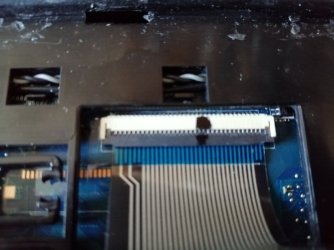
Just while we are talking about the keyboard I did notice that the "ribbon" had a distinctive crease across it, which I don't think will have helped the matter.
So the only items left are the "NEW motherboard, NEW processor"
My thinking that if it was the processor I would be getting completely different results.
So that only leaves the motherboard.
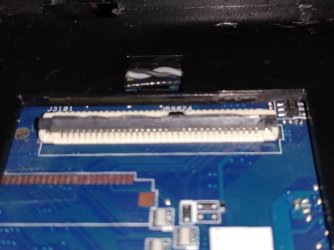
My thinking is the only vulnerable place on the motherboard as far as the keyboard is concerned is the "clam shell" and the pins that lie therein.
I have attached a couple of photos, if you want the clearer please ask.
My questions are as follows.
I have a rework "hot air" station what are thoughts in me taking it off and reseating it ?
I don't really fancy it because my illuminated magnifier is not all that strong.
So if I don't attempt that and ideas on how to clean the pins as seen in the photo.
Tony

 

Attachments

  • CLAM SHELL 1.jpg
    CLAM SHELL 1.jpg
    45.4 KB · Views: 0
  • CLAM SHELL 2.jpg
    CLAM SHELL 2.jpg
    43.8 KB · Views: 0

My Computer My Computer

At a glance

Windows 7 64bit Service Pack 1Intel Core 2 Quad Q8300 @ 2.50GHz8.00GB Dual-Channel DDR3 @ 666MHzV223W (1680x1050@59Hz) 1023MB NVIDIA GeForce ...
Computer type
PC/Desktop
Computer Manufacturer/Model Number
Custom build
OS
Windows 7 64bit Service Pack 1
CPU
Intel Core 2 Quad Q8300 @ 2.50GHz
Motherboard
ASUSTeK Computer INC. P5E3 Premium (LGA775)
Memory
8.00GB Dual-Channel DDR3 @ 666MHz
Graphics Card(s)
V223W (1680x1050@59Hz) 1023MB NVIDIA GeForce GT 430 (NVIDIA)
Sound Card
NVIDIA Virtual Audio Device (Wave Extensible) (WDM)
Monitor(s) Displays
Acer 22"
Screen Resolution
X193HQL (Analog)
Hard Drives
Seagate 2.0TB
ST2000DL003-9VT166 ATA Device
PSU
700W
Cooling
Akassa heatsink and two coolingfansg
Keyboard
Logitech
Antivirus
Kaspersky Internet Security 2019
Browser
IE 11
Other Info
Will be undertaking a total upgrade from the case upwards next year.
Case, motherboard, ram, cpu and last but not least a 2TB SSD, but before I do that everything will be backed up to the cloud
Hi sheffieldyorky,

I know this thread is marked as solved BUT using your above analysis
I have sent the new keyboard back and even had a chat with the supplier in Manchester, he is sending me a NEW keyboard I should have it Friday.
Just while we are talking about the keyboard I did notice that the "ribbon" had a distinctive crease across it, which I don't think will have helped the matter.
So the only items left are the "NEW motherboard, NEW processor"
My thinking that if it was the processor I would be getting completely different results.
So that only leaves the motherboard.
My thinking is the only vulnerable place on the motherboard as far as the keyboard is concerned is the "clam shell" and the pins that lie therein.
I have attached a couple of photos, if you want the clearer please ask.
My questions are as follows.
I have a rework "hot air" station what are thoughts in me taking it off and reseating it ?
I don't really fancy it because my illuminated magnifier is not all that strong.
So if I don't attempt that and ideas on how to clean the pins as seen in the photo.

I personally would wait until the new keyboard arrives on Friday rather than mucking about and possibly causing more problems/issues!
 

My Computer My Computer

At a glance

Win 7 HP SP1 64-bit Vista HB SP2 32-bit Linux...Intel(R) Pentium(R) CPU P6200 @ 2.13GHz4.00 GBIntel(R) Graphics Media Accelerator HD
Computer type
Laptop
Computer Manufacturer/Model Number
Fujitsu LIFEBOOK
OS
Win 7 HP SP1 64-bit Vista HB SP2 32-bit Linux Mint 18.3
CPU
Intel(R) Pentium(R) CPU P6200 @ 2.13GHz
Motherboard
FUJITSU FJNBB06
Memory
4.00 GB
Graphics Card(s)
Intel(R) Graphics Media Accelerator HD
Sound Card
[1] Realtek High Definition Audio [2] Intel(R) Display Audio
Screen Resolution
1366 x 768 x 32 bits (4294967296 colors) @ 59 Hz
Hard Drives
TOSHIBA MK5076GSX
Antivirus
AVG FREE
Sounds like a plan
Hail to the MASTER :-)
 

My Computer My Computer

At a glance

Windows 7 64bit Service Pack 1Intel Core 2 Quad Q8300 @ 2.50GHz8.00GB Dual-Channel DDR3 @ 666MHzV223W (1680x1050@59Hz) 1023MB NVIDIA GeForce ...
Computer type
PC/Desktop
Computer Manufacturer/Model Number
Custom build
OS
Windows 7 64bit Service Pack 1
CPU
Intel Core 2 Quad Q8300 @ 2.50GHz
Motherboard
ASUSTeK Computer INC. P5E3 Premium (LGA775)
Memory
8.00GB Dual-Channel DDR3 @ 666MHz
Graphics Card(s)
V223W (1680x1050@59Hz) 1023MB NVIDIA GeForce GT 430 (NVIDIA)
Sound Card
NVIDIA Virtual Audio Device (Wave Extensible) (WDM)
Monitor(s) Displays
Acer 22"
Screen Resolution
X193HQL (Analog)
Hard Drives
Seagate 2.0TB
ST2000DL003-9VT166 ATA Device
PSU
700W
Cooling
Akassa heatsink and two coolingfansg
Keyboard
Logitech
Antivirus
Kaspersky Internet Security 2019
Browser
IE 11
Other Info
Will be undertaking a total upgrade from the case upwards next year.
Case, motherboard, ram, cpu and last but not least a 2TB SSD, but before I do that everything will be backed up to the cloud
Back
Top