
Solved BOOTMGR is on wrong HDD / System Repair disk not compatible

Hello there,


What I would do is perform a clean install of windows in the new hard drive partiton. Then make a ghost image of the opertating system you wish to copy of using ghost 11.5.1xxx. Then Boom you will have a full bootable image of your operating system, all of it's programs on you new HDD.


There are plenty of instructions online on how to do this but if you need further assitance just ask. I have done this many of times when setting up office computers so they are all an exact recplica of each other and it works great.;);) Or if an office computer goes down and we want it set up with a fresh install with all drivers and programs already to go.
 

My Computer My Computer

At a glance

windows 7 x64amd vison
Computer type
PC/Desktop
Computer Manufacturer/Model Number
hp
OS
windows 7 x64
CPU
amd vison
Oh Hello, I expected we were all done.
I am constantly overwhelmed by the great degree of fine support offered here. How does one repay the service?

> RoyReddy : You are having only one OS on this multi disk PC, isn't it ? If yes, Its time to follow Sir samuria & other seniors.
Yes. One OS. Happy to report = Working well. Pleased to do as the seniors wisdom suggests.

> 1. Make sure that the OS disk is always disk 0. Swap the cables & make it sure.
Done! I did this during the repair and when I disconnected the other drives. Zero it is

> 2. Leave active partition only on the OS disk and Mark other active partitions as Inactive . If command line is not your cup of tea, you may use good 3rd party partitioning software such as DiskGenius .
Done!
CMD is fine with me. I am old enough:cool: to remember the Command Line and Windows v1. I was working at Commodore in Canada when we were introducing their PC Clone and then the Amiga. Frightening no?

> 3. Also learn to launch "One Time Boot Menu", It would be of great help. On Asus, its normally F8 or esc key.
Right On that works and I will keep it in mind for future.

> These steps will keep you & your system free from problems & confusions.
Terrific. These are very pleasant thoughts!

> Thanks & Regards. ...
No No Thanks are to you, I really must insist. 'Think these two disney chipmunks' Chip 'n' Dale - Wikipedia
 

My Computer My Computer

At a glance

Windows 7 Home Premium 64bitIntel12gAMD Rx480
Computer type
PC/Desktop
Computer Manufacturer/Model Number
brew
OS
Windows 7 Home Premium 64bit
CPU
Intel
Motherboard
Asus
Memory
12g
Graphics Card(s)
AMD Rx480
Hard Drives
several
Antivirus
Norton
Browser
Chrome
Hhhmm :geek:
this is a solid idea. Thank you for the suggestion. qwertyovbfd
New Harddrives are low-cost. I may even have one.

It sounds like what I was trying to achieve when I created my BootMgr Issue many months ago.


Hello there,
What I would do is perform a clean install of windows in the new hard drive partiton. Then make a ghost image of the opertating system you wish to copy of using ghost 11.5.1xxx. Then Boom you will have a full bootable image of your operating system, all of it's programs on you new HDD.

ooo.
 

My Computer My Computer

At a glance

Windows 7 Home Premium 64bitIntel12gAMD Rx480
Computer type
PC/Desktop
Computer Manufacturer/Model Number
brew
OS
Windows 7 Home Premium 64bit
CPU
Intel
Motherboard
Asus
Memory
12g
Graphics Card(s)
AMD Rx480
Hard Drives
several
Antivirus
Norton
Browser
Chrome

My Computer My Computer

At a glance

Windows 7 Home Premium 64bitIntel12gAMD Rx480
Computer type
PC/Desktop
Computer Manufacturer/Model Number
brew
OS
Windows 7 Home Premium 64bit
CPU
Intel
Motherboard
Asus
Memory
12g
Graphics Card(s)
AMD Rx480
Hard Drives
several
Antivirus
Norton
Browser
Chrome
Last edited:

My Computer My Computer

At a glance

Windows 7 Ultimate x32 With Sp1 + Vista Ultim...Intel Mobile Core 2 Duo T5750 @ 2.00GHz Merom...2.00GB Dual-Channel DDR2 @ 332MHz (5-5-5-15)Mobile Intel(R) 965 Express Chipset Family
Computer type
Laptop
Computer Manufacturer/Model Number
hp compaq presario c795VU notebook pc
OS
Windows 7 Ultimate x32 With Sp1 + Vista Ultimate x32 with Sp1 & Sp2 !!
CPU
Intel Mobile Core 2 Duo T5750 @ 2.00GHz Merom 65nm Technolog
Motherboard
Hewlett-Packard 30D9 (CPU)
Memory
2.00GB Dual-Channel DDR2 @ 332MHz (5-5-5-15)
Graphics Card(s)
Mobile Intel(R) 965 Express Chipset Family
Sound Card
High Definition Audio Device
Monitor(s) Displays
LP154WX4-TLCB on Mobile Intel 965 Express Chipset Family
Screen Resolution
1280x800 @ 60Hz
Hard Drives
149GB Western Digital WDC WD1600BEVS-60VAT0 ATA Device (SATA)
Keyboard
Standard 101/102-Key or Microsoft Natural PS/2 Key + HP QLB
Mouse
ALPS pointing device
Antivirus
Kaspersky AV 2017(Win 7) & AVG AntiVirus Free 2016 (VISTA)
Browser
google chrome
Last edited:

My Computer My Computer

At a glance

Win 10 x64, Linux Lite, Win 7 x64, BlackArch,...
Computer type
PC/Desktop
Computer Manufacturer/Model Number
HP Desktop & Compaq Laptop
OS
Win 10 x64, Linux Lite, Win 7 x64, BlackArch, & Kali
Hard Drives
Samsung 850 Pro 256Gb,
Hitachi HDD 1Tb,
Crucial MX SSD 250Gb
Segate 3Tb USB 3.0 Ext. Backup HDD
Internet Speed
150Mbps dn, 20Mbps up
Antivirus
Avast Free, Malwarebytes Anti-Exploit & Anti-Ransomware
Browser
Firefox, Chrome, Opera, & VPN
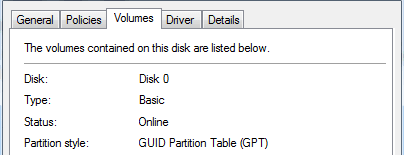
According to tips by SIW2, I converted my MBR disk containing OS Windows 7 Pro x64 into GPT disk without re-install Windows 7.
my procedure is NOT perfect but working. (I am moving the disk to NVMe boot, hence need to make it GPT 1st).

  1. started from MBR disk (Windows 7 Pro partition and data partition)
  2. run DiskGenius to convert this MBR disk onto GPT disk.
  3. powered down PC (If re-start, it wouldn't boot due to bootloader error, missing boot sector and MSR partition)
  4. at this moment, I run ghost image to backup the converted OS partition. to restore it later.
  5. clean-install Windows 7 on the GPT disk. this procedure will create boot sector and MSR partition correctly and a working OS partition. I went this way because it indeed took less time.
  6. when done, ghost restore image onto new OS partition to blow off the fresh-installed one.
  7. re-start. computer will request repairing. after repairing, it boot up.
Without re-install, my computer Windows 7 Pro x64 is up, plus data partition. the property confirmed the disk GPT.
in this way, I can save re-install/re-activate of Windows 7/Office and other software.

image.png


For geeks wanting to try manual MBR>GPT method with diskgenius:

1. First Right click the the disk and select Convert to GPT.

2. Then click Save All at top right. The disk has now been converted to gpt.

3. Some unallocated space is needed in which to create the ESP and MSR partitions on the gpt disk. If you dont already have unallocated space on the disk - Shrink the windows partition to create unallocated space.
 

My Computers My Computers

  • At a glance

    Windows 7 Pro 64-bitI7-970032 GB
    Computer type
    PC/Desktop
    Computer Manufacturer/Model Number
    HP Elite 800 G5
    OS
    Windows 7 Pro 64-bit
    CPU
    I7-9700
    Memory
    32 GB
  • At a glance

    Windows 7 Pro 64-bit
    Computer type
    Laptop
    System Manufacturer/Model Number
    ASUS UX305C
    OS
    Windows 7 Pro 64-bit
Back
Top