Solved BOOTMGR is on wrong HDD / System Repair disk not compatible

RoyReddy

New member
Local time
6:37 PM
Messages
10
Location
Toronto, Ontario, Canada
I have read a number of the 'not compatible' threads and tried a few solutions without resolve.
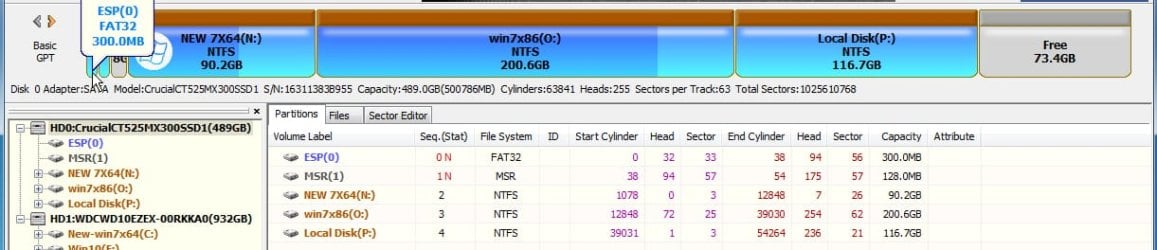
My goal is to boot without the Original boot drive and avoid reinstall of All the programs.

Bkgrnd
----
I upgraded my boot drive
from Original(2tb) Disk1 (D:)
to New(4tb). Disk3 (C:)
The original is a ticking problem. It was reporting Smart Errors as well as small in space.
I thought I had all of the contents and format/Install on the new drive but the system will not boot without the Original drive connected. Without it the Original connected "BOOTMGR missing" on boot.

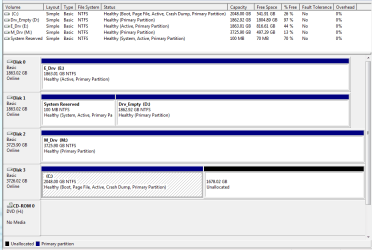
> Diskmanager screen capture attached

System Info reports;
Microsoft Windows 7 Home Premium 64-bit Service Pack 1
Boot Device: \Device\HarddiskVolume2
System Device: \Device\HarddiskVolume6


Tried
---------
* Boot from Win7_CD / Repair. error "the version of System Restore Options is not compatible with ...
* EasyRE without success. error "partition does not contain valid Windows installation ...

Other
----- Vineet Garg
the solution in the thread
System Repair disk not compatible with this version of Windows
seems so close to my issue, I am inspired to post and seek your direction and assistance.

thanks in advance Roy
 

Attachments
  • HDD DiskManager screen.PNG
    HDD DiskManager screen.PNG
    20.1 KB · Views: 2

My Computer My Computer

Computer type
PC/Desktop
Computer Manufacturer/Model Number
brew
OS
Windows 7 Home Premium 64bit
CPU
Intel
Motherboard
Asus
Memory
12g
Graphics Card(s)
AMD Rx480
Hard Drives
several
Antivirus
Norton
Browser
Chrome
Welcome to the forum. It's best practice to have c as disk 0 swap the cables. The other problems are you have a lot of drives set as active which will confuse the issue. You should be able to use free partition software to move c to the right enough to then copy the boot partition before it. It should then boot if not you will have to use bcedit to redo. Chances are your trying to do a repair with a disk at a different service pack than the PC
 

My Computer My Computer

Computer type
PC/Desktop
OS
win 8 32 bit
Also, get rid of all active flags except for the System Reserved partition, or, if no SysRes, the C partition - the OS partition - should be marked active.
 

My Computer My Computer

Computer type
PC/Desktop
Computer Manufacturer/Model Number
Antec desktop; Acer Aspire laptops
OS
Windows 7 Professional 64-bit
CPU
Desktop i5; Acers i5 & i7
Memory
desktop 16GB; 1 Acer 8GB & 1 Acer 16GB
Hard Drives
1TB split into 2 equal partitions [OS and data] usable by RJS
Internet Speed
AT&T DSL
Browser
FF, GChrome, msIE
Other Info
Windows 7 Firewall, Emsisoft AM/AV, MSE [scan-only], SpywareBlaster, Ruiware/BillP combine

My Computer My Computer

Computer type
PC/Desktop
Computer Manufacturer/Model Number
brew
OS
Windows 7 Home Premium 64bit
CPU
Intel
Motherboard
Asus
Memory
12g
Graphics Card(s)
AMD Rx480
Hard Drives
several
Antivirus
Norton
Browser
Chrome
You have a couple of issues, but multiple active flags is not one of them. Each disk can have one active partition, and there is absolutely no harm in that, so don't let that distract you. The active partition only comes into play when that disk is chosen as the boot disk by the BIOS. If an active partition's disk is not chosen as the boot disk, that disk's active flag is ignored.

In fact, that is a common method of multi-booting, in which different OSes are installed on different disks, and the BIOS one-time boot menu is used to select which disk (and therefore, which OS) to boot. Each disk must have its own active partition to do that. Whether you multi-boot is not my point, the point is the active flags are allowed.

It's not clear how you got to where you are now ... it kind of looks like Disk 1 used to be both your System and Boot disk -- i.e., what is now partition D: might have been where Windows used to be? But partition D: is now empty! Or was Windows (and still is?) on one of the other disks?

Whatever, the first partition on Disk 1 was your startup partition (aka, "System") and the OS partition (aka, "Boot") was elsewhere. You moved the OS partition but still have the same startup partition. That's why you can't boot if Disk 1 is removed. The proper procedure would have been to also move the startup partition to the new disk.

Samuria has suggested you slide the C: partition over slightly to make enough room to copy the startup partition to the same disk as the C: partition. That should work.

Another option is to copy the startup partition's files to C: and let C: do double-duty as both the "System" and "Boot" partitions.

However, before you get ahead of yourself, there's a larger issue you'll need to resolve first: GPT vs MBR.

It appears Disk 3 is using a MBR-style (vs. GPT-style) partition table. You can confirm by right-clicking the "Disk 3" tile (just left of "C:" in the disk layout map), selecting "Properties", "Volumes" tab, and reading the "Partition style". It will be either MBR or GPT.

This will make a huge difference.

If it's MBR, you will not be able to make use of all the extra space on that 4TB disk. MBR layouts are limited to a maximum of 2TB. You indicated one of the incentives for the new disk was the old disk was "small in space", so if you stick to MBR (as your old disk was) you will not gain the advantage of having bought a larger hard disk. You might have just as well bought another 2TB disk.

If it's GPT, you can make use of the entire 4TB, but you may need to reinstall Windows in UEFI mode. If Windows 7 is installed in MBR (aka, "Legacy") mode it is not a straightforward process to convert it to UEFI mode. (I think it can be done, but I haven't done it and don't know how difficult it may be. Perhaps someone else has suggestions, if that's the course you choose to follow.)

So as I see it, before choosing a course of action you first have to decide:
  1. Repair Win7 as a MBR/Legacy boot and abandon the rest of the disk space, or
  2. Reinstall Win7 in UEFI boot mode.
Not an easy choice.

(BTW, I'm assuming your motherboard supports UEFI mode ... but most modern computers do, so it's probably a safe assumption.)
 

My Computer My Computer

Computer type
PC/Desktop
Computer Manufacturer/Model Number
Dell Optiplex 7050
OS
Windows 7/8.1/10 multiboot
CPU
Intel Core i7-7700
Motherboard
Dell, Intel Q270 chipset
Memory
48GB (2x16GB Crucial DDR4-3200 + 2x8GB Hynix DDR4-2400)
Graphics Card(s)
Intel HD630 + AMD Radeon R7 450 PCIe
Monitor(s) Displays
Asus VC279 (27")
Screen Resolution
1920x1080
Hard Drives
Toshiba M.2 NVMe (256GB),
Samsung 960 Evo (500GB),
WD Red Plus 80EFBX (8TB)
Hi RoyReddy & all,
Greets,

1. Download an untouched M$ Installation media of Win 7 SP 1 x64 ISO .
For eg.
Direct Download Link for Win 7 Home Premium SP 1 x64

2. Make an MBR+BIOS Installation media with Rufus
Rufus Guide : Point 2
The only difference is that you have to make MBR+BIOS. So, you have to "Choose Partition scheme as MBR & Target system as BIOS ( or UEFI-CSM )

3. You have desktop. Can you disconnect /switch off / Power off the disks 0 , 1 & 2 ? ( The C: is on the disk 3 as per the disk management snap )

4. Leave only two disks connected : Pen Drive Installation media & the disk 3.
Eject & unplug all the other disks ( Internal & External ), CD-DVD, external memory cards, other pen drives, etc.

5. Launch the One time boot menu & boot into the pen drive.

6. Perform Startup Repair for three times CONSECUTIVELY!.

7. Now you should be able to boot in Disk 3 independently.

Anything else ?

There are also other ways. First try this & report.

Thanks & Regards. ...
 
Last edited:

My Computer My Computer

Computer type
Laptop
Computer Manufacturer/Model Number
hp compaq presario c795VU notebook pc
OS
Windows 7 Ultimate x32 With Sp1 + Vista Ultimate x32 with Sp1 & Sp2 !!
CPU
Intel Mobile Core 2 Duo T5750 @ 2.00GHz Merom 65nm Technolog
Motherboard
Hewlett-Packard 30D9 (CPU)
Memory
2.00GB Dual-Channel DDR2 @ 332MHz (5-5-5-15)
Graphics Card(s)
Mobile Intel(R) 965 Express Chipset Family
Sound Card
High Definition Audio Device
Monitor(s) Displays
LP154WX4-TLCB on Mobile Intel 965 Express Chipset Family
Screen Resolution
1280x800 @ 60Hz
Hard Drives
149GB Western Digital WDC WD1600BEVS-60VAT0 ATA Device (SATA)
Keyboard
Standard 101/102-Key or Microsoft Natural PS/2 Key + HP QLB
Mouse
ALPS pointing device
Antivirus
Kaspersky AV 2017(Win 7) & AVG AntiVirus Free 2016 (VISTA)
Browser
google chrome
thanks for the insights and straight-forward answers here.
It is MBR.
I am very keen not to mess up the machine and so I can accept the 2G unused space in exchange for a more safe-reliable repair.

There are a wide number of Partition manager software choices. If only it was simple.

You have a couple of issues, but multiple active flags is not one of them. Each disk can have one active partition, and there is absolutely no harm in that, so don't let that distract you. The active partition only comes into play when that disk is chosen as the boot disk by the BIOS. If an active partition's disk is not chosen as the boot disk, that disk's active flag is ignored.

In fact, that is a common method of multi-booting, in which different OSes are installed on different disks, and the BIOS one-time boot menu is used to select which disk (and therefore, which OS) to boot. Each disk must have its own active partition to do that. Whether you multi-boot is not my point, the point is the active flags are allowed.

It's not clear how you got to where you are now ... it kind of looks like Disk 1 used to be both your System and Boot disk -- i.e., what is now partition D: might have been where Windows used to be? But partition D: is now empty! Or was Windows (and still is?) on one of the other disks?

Whatever, the first partition on Disk 1 was your startup partition (aka, "System") and the OS partition (aka, "Boot") was elsewhere. You moved the OS partition but still have the same startup partition. That's why you can't boot if Disk 1 is removed. The proper procedure would have been to also move the startup partition to the new disk.

Samuria has suggested you slide the C: partition over slightly to make enough room to copy the startup partition to the same disk as the C: partition. That should work.

Another option is to copy the startup partition's files to C: and let C: do double-duty as both the "System" and "Boot" partitions.

However, before you get ahead of yourself, there's a larger issue you'll need to resolve first: GPT vs MBR.

It appears Disk 3 is using a MBR-style (vs. GPT-style) partition table. You can confirm by right-clicking the "Disk 3" tile (just left of "C:" in the disk layout map), selecting "Properties", "Volumes" tab, and reading the "Partition style". It will be either MBR or GPT.

This will make a huge difference.

If it's MBR, you will not be able to make use of all the extra space on that 4TB disk. MBR layouts are limited to a maximum of 2TB. You indicated one of the incentives for the new disk was the old disk was "small in space", so if you stick to MBR (as your old disk was) you will not gain the advantage of having bought a larger hard disk. You might have just as well bought another 2TB disk.

If it's GPT, you can make use of the entire 4TB, but you may need to reinstall Windows in UEFI mode. If Windows 7 is installed in MBR (aka, "Legacy") mode it is not a straightforward process to convert it to UEFI mode. (I think it can be done, but I haven't done it and don't know how difficult it may be. Perhaps someone else has suggestions, if that's the course you choose to follow.)

So as I see it, before choosing a course of action you first have to decide:
  1. Repair Win7 as a MBR/Legacy boot and abandon the rest of the disk space, or
  2. Reinstall Win7 in UEFI boot mode.
Not an easy choice.

(BTW, I'm assuming your motherboard supports UEFI mode ... but most modern computers do, so it's probably a safe assumption.)
 

My Computer My Computer

Computer type
PC/Desktop
Computer Manufacturer/Model Number
brew
OS
Windows 7 Home Premium 64bit
CPU
Intel
Motherboard
Asus
Memory
12g
Graphics Card(s)
AMD Rx480
Hard Drives
several
Antivirus
Norton
Browser
Chrome
Thanks RolandJS
I looked in Disk Manager and cannot determine where to change the Active Flag.
This leads me to assume that I need a more complete Partition Manager software tool.

With Several Drives marked active.. is that why there are so many drives in the BIOS Setup choices for Boot Drive Priority? Is there a connection to this
thanks

Also, get rid of all active flags except for the System Reserved partition, or, if no SysRes, the C partition - the OS partition - should be marked active.
 

My Computer My Computer

Computer type
PC/Desktop
Computer Manufacturer/Model Number
brew
OS
Windows 7 Home Premium 64bit
CPU
Intel
Motherboard
Asus
Memory
12g
Graphics Card(s)
AMD Rx480
Hard Drives
several
Antivirus
Norton
Browser
Chrome
Thanks much for your insight and direction.
My progress report so far.
#1 - done
#2 - done, slick and easy!
then I tried to boot from the USB drive as a test to see whether the machine would.
& it is not so I am wrestling with that. I tried without Disk2, the current boot drive connected.
Next I will try disconnecting all of the Drive as listed in step 3 before boot. I really would prefer to use USB.
I may need to just use the CD-ROm drive

Question about #3
the statement is
3. You have desktop. ...[/QUOTE said:
Are you describing the DISK3 Partition as holding the Desktop?
If it holds the Desktop then is it a complete entity? So when I fix the Boot partition the Desktop is intact?

I don't expect you to write a long answer, Maybe there is a reference you can suggest for me to read to learn more.

Thanks RrR


Hi RoyReddy & all,
Greets,

1. Download an untouched M$ Installation media of Win 7 SP 1 x64 ISO .
For eg.
Direct Download Link for Win 7 Home Premium SP 1 x64

2. Make an MBR+BIOS Installation media with Rufus
Rufus Guide : Point 2
The only difference is that you have to make MBR+BIOS. So, you have to "Choose Partition scheme as MBR & Target system as BIOS ( or UEFI-CSM )

3. You have desktop. Can you disconnect /switch off / Power off the disks 0 , 1 & 2 ? ( The C: is on the disk 3 as per the disk management snap )

4. Leave only two disks connected : Pen Drive Installation media & the disk 3.
Eject & unplug all the other disks ( Internal & External ), CD-DVD, external memory cards, other pen drives, etc.

5. Launch the One time boot menu & boot into the pen drive.

6. Perform Startup Repair for three times CONSECUTIVELY!.

7. Now you should be able to boot in Disk 3 independently.

Anything else ?

There are also other ways. First try this & report.

Thanks & Regards. ...
 

My Computer My Computer

Computer type
PC/Desktop
Computer Manufacturer/Model Number
brew
OS
Windows 7 Home Premium 64bit
CPU
Intel
Motherboard
Asus
Memory
12g
Graphics Card(s)
AMD Rx480
Hard Drives
several
Antivirus
Norton
Browser
Chrome
RoyReddy : Greets,

1.The basic questions to answer are : Why are you not able to boot into Win 7 USB installation media ? What is the exact situation ? How far you get with that ? Do you still get ''Not Compatible'' message ? Have you tried other USB ports ?

2. Forgot to mention that an untouched M$ Windows 7 sp 1 ISO will not support booting from USB 3 ports. You should try booting from an USB 2 port. You may use USB 3 pen drives but only try to boot from USB 2.0 ports.

3. Whether disks are connected or not, you will be always able to boot into the pen drive. You can launch One Time Boot menu & select the pen drive to boot from. Are you able to launch One Time Boot Menu at start & choose the pen drive to boot from ?
I asked you to disconnect other drives only to make a successful Startup Repair from the pen drive on the disk 3. That is to make it bootable independently. Disk detaching is required to write boot data properly to the disk 3 by Startup Repair & it has nothing to do with booting in the USB installation media.

4. You can always boot from a DVD If you can't boot from the pen drive.

5. Leave the Desktop question. It was really confusing.

Let me know.

Thanks & Regards. ...

ADD :

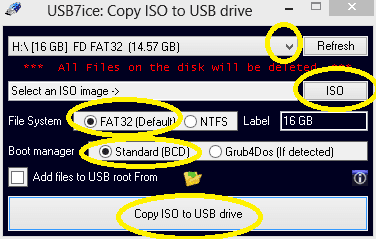
6. You may also try using USB7ice.exe to make a bootable USB Installation Media.

Download : USB7ice

Capture.PNG

Follow from top to bottom & let the things finish. for eg.

Usb7ice DONE.png
 
Last edited:

My Computer My Computer

Computer type
Laptop
Computer Manufacturer/Model Number
hp compaq presario c795VU notebook pc
OS
Windows 7 Ultimate x32 With Sp1 + Vista Ultimate x32 with Sp1 & Sp2 !!
CPU
Intel Mobile Core 2 Duo T5750 @ 2.00GHz Merom 65nm Technolog
Motherboard
Hewlett-Packard 30D9 (CPU)
Memory
2.00GB Dual-Channel DDR2 @ 332MHz (5-5-5-15)
Graphics Card(s)
Mobile Intel(R) 965 Express Chipset Family
Sound Card
High Definition Audio Device
Monitor(s) Displays
LP154WX4-TLCB on Mobile Intel 965 Express Chipset Family
Screen Resolution
1280x800 @ 60Hz
Hard Drives
149GB Western Digital WDC WD1600BEVS-60VAT0 ATA Device (SATA)
Keyboard
Standard 101/102-Key or Microsoft Natural PS/2 Key + HP QLB
Mouse
ALPS pointing device
Antivirus
Kaspersky AV 2017(Win 7) & AVG AntiVirus Free 2016 (VISTA)
Browser
google chrome
"...With Several Drives marked active.. is that why there are so many drives in the BIOS Setup choices for Boot Drive Priority? Is there a connection to this..." removing the Active flags from the extra partitions is not red-hot necessary until the bigger situation is solved. Those flags can wait :)
 

My Computer My Computer

Computer type
PC/Desktop
Computer Manufacturer/Model Number
Antec desktop; Acer Aspire laptops
OS
Windows 7 Professional 64-bit
CPU
Desktop i5; Acers i5 & i7
Memory
desktop 16GB; 1 Acer 8GB & 1 Acer 16GB
Hard Drives
1TB split into 2 equal partitions [OS and data] usable by RJS
Internet Speed
AT&T DSL
Browser
FF, GChrome, msIE
Other Info
Windows 7 Firewall, Emsisoft AM/AV, MSE [scan-only], SpywareBlaster, Ruiware/BillP combine
More to report from today's activities. Grumble { Man it is hours in front of this thing.}

on #1. I stripped the drives out and it booted from USB
So then I added back the DISK3 Drive C: and it booted from USB

I moved through the Repair steps and It performed a Repair step and asked to Restart
Armed with knowing it needed 3 cycles I proceeded.
BUT
On Reboot the BIOS screen was stuck at Detecting Sata4 ... for over 30 min ( Scrncap ready but Attachments :mad: not working
subsequent reboots repeatedly lead to an Error screen (Scrncap ready
Any Key to Boot from USB never did boot.

I reverted back to Boot from drives into Windows
& I find that the System Reserved Partitiion is now Mapped to Drive E: ( Scrncap ready


on #3. I dont know where to obtain the OneTimeBootMenu. is there a key combo required at startup?

Next
-----------
I have built another USB with Rufus and will try that after sending this update.
I will look at USBIce as well

thanks Large for your assistance. Roy


RoyReddy : Greets,

1.The basic questions to answer are : Why are you not able to boot into Win 7 USB installation media ? What is the exact situation ? How far you get with that ? Do you still get ''Not Compatible'' message ? Have you tried other USB ports ?

2. Forgot to mention that an untouched M$ Windows 7 sp 1 ISO will not support booting from USB 3 ports. You should try booting from an USB 2 port. You may use USB 3 pen drives but only try to boot from USB 2.0 ports.

3. Whether disks are connected or not, you will be always able to boot into the pen drive. You can launch One Time Boot menu & select the pen drive to boot from. Are you able to launch One Time Boot Menu at start & choose the pen drive to boot from ?
I asked you to disconnect other drives only to make a successful Startup Repair from the pen drive on the disk 3. That is to make it bootable independently. Disk detaching is required to write boot data properly to the disk 3 by Startup Repair & it has nothing to do with booting in the USB installation media.

4. You can always boot from a DVD If you can't boot from the pen drive.

5. Leave the Desktop question. It was really confusing.

Let me know.

Thanks & Regards. ...

ADD :

6. You may also try using USB7ice.exe to make a bootable USB Installation Media.

Download : USB7ice
 

My Computer My Computer

Computer type
PC/Desktop
Computer Manufacturer/Model Number
brew
OS
Windows 7 Home Premium 64bit
CPU
Intel
Motherboard
Asus
Memory
12g
Graphics Card(s)
AMD Rx480
Hard Drives
several
Antivirus
Norton
Browser
Chrome
System Reserved partition does not need a drive letter - diskmanagement can be used to remove the E later on.
 

My Computer My Computer

Computer type
PC/Desktop
Computer Manufacturer/Model Number
Antec desktop; Acer Aspire laptops
OS
Windows 7 Professional 64-bit
CPU
Desktop i5; Acers i5 & i7
Memory
desktop 16GB; 1 Acer 8GB & 1 Acer 16GB
Hard Drives
1TB split into 2 equal partitions [OS and data] usable by RJS
Internet Speed
AT&T DSL
Browser
FF, GChrome, msIE
Other Info
Windows 7 Firewall, Emsisoft AM/AV, MSE [scan-only], SpywareBlaster, Ruiware/BillP combine
"on #3. I dont know where to obtain the OneTimeBootMenu. is there a key combo required at startup?"


As soon as you see screen activity on boot, try repeatedly tapping F8 key. Should work on Asus board.
Art.
 

My Computer My Computer

Computer type
PC/Desktop
Computer Manufacturer/Model Number
Home built
OS
Win7 sp1 Pro 64bit / XP sp2 Pro (games only)
CPU
Intel Core 2 Duo E8400 @ 3.00GHz
Motherboard
Intel Corporation DP35DP (CPU1)
Memory
8.00 GB Dual-Channel DDR2 @ 400MHz (5-5-5-18)
Graphics Card(s)
1024MB GeForce GTX 560
Sound Card
NVIDIA High Definition Audio
Monitor(s) Displays
SyncMaster (2048x1152@60Hz)
Hard Drives
240GB Sandisc Extreme Pro SSD
244GB Seagate ST3250410AS
488GB Seagate ST500DM002-1BD142
931GB Western Digital WDC WD1003FZEX
PSU
Corsair 720
Case
ATX
Keyboard
HID Keyboard Device Logitech
Mouse
HID-compliant mouse Microsoft
Other Info
TSSTcorp CDDVDW SH-S223L

HL-DT-ST BD-RE BH12LS35
Success !
After building the USB with USB7ice I rebooted with only Disk1 and USB connected
:-):cool::shock: I dont think that the USB did anything, but maybe.
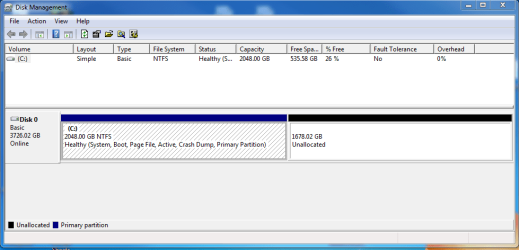
It BOOTED into Windows. I restarted with only Disk1

and It BOOTED into Windows and its all good.

I dont know how or why but I can live with that.
It works
I love-love stuff that works. I posted on IG that the genius members at SevenForums helped me to make it work

Now my Win7 box works with a proper Boot & System drive (scrncap attached)

I am over the moon happy folks. This is Remarkable! The Thorn has been removed from my left paw after many months of pain and worry! :party: :party: :party:
 

Attachments

  • HDD DiskManager screen Nov22_Disk0 working.PNG
    HDD DiskManager screen Nov22_Disk0 working.PNG
    19 KB · Views: 1

My Computer My Computer

Computer type
PC/Desktop
Computer Manufacturer/Model Number
brew
OS
Windows 7 Home Premium 64bit
CPU
Intel
Motherboard
Asus
Memory
12g
Graphics Card(s)
AMD Rx480
Hard Drives
several
Antivirus
Norton
Browser
Chrome
dg1261

If Windows 7 is installed in MBR (aka, "Legacy") mode it is not a straightforward process to convert it to UEFI mode. (I think it can be done, but I haven't done it and don't know how difficult it may be. Perhaps someone else has suggestions, if that's the course you choose to follow.)

Yes, I have done it.

NOTE- recommend a decent boot media before doing this - always a safety precaution.

Download this:
1904v3.iso
Extract to usb stick with this:
View attachment Usb7ice.zip

Then copy the cfg.ini file from your "C:\Program Files (x86)\AOMEI Partition Assistant" folder into the usb stick Uprograms\AomeiPartAssist folder. That will overwrite the standard edition cfg.ini file on the usb stick with the Pro cfg.ini file from your "C:\Program Files (x86)\AOMEI Partition Assistant" folder.


1. MBR>GPT can done automatically with the Pro version of aomei partition assistant

Compare ALL Editions of AOMEI Partition Assistant

How to Convert GPT to MBR or Convert MBR to GPT without Losing Data?

Aomei method can be done from within the system disk - it will reboot to perform the procedure in pre-os mode. Or you can get it to create winpe and boot that to do the job ( recommended)


2. Or MBR>GPT can be done manually with the free version of diskgenius. The manual diskgenius method needs to be done from outside the target system disk. Either from an os installed on another disk , or from winpe.


All-in-one Solution for Data Recovery, Partition Manager and Data Backup - DiskGenius
 
Last edited:

My Computers My Computers

System One System Two

  • Computer type
    PC/Desktop
    OS
    7 X64
    CPU
    i5 8400
    Motherboard
    gigabyte b365m ds3h
    Memory
    2x8gb 3200mhz
    Hard Drives
    various
    PSU
    pure power 11 400w cm
    Case
    Coolermaster
    Cooling
    cryorig m9i
  • Computer type
    PC/Desktop
    OS
    7x64
    CPU
    g5400
    Motherboard
    ga b365m ds3h
    Memory
    8gb ddr4 2400
    PSU
    xfx pro 450w
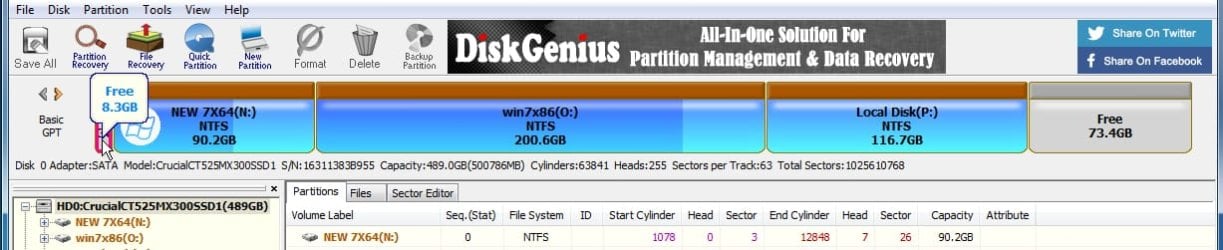
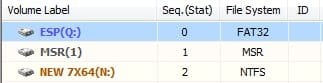
For geeks wanting to try manual MBR>GPT method with diskgenius:

1. First Right click the the disk and select Convert to GPT.

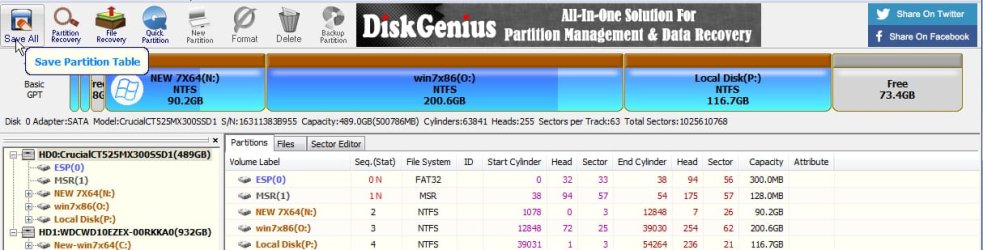
2. Then click Save All at top right. The disk has now been converted to gpt.

3. Some unallocated space is needed in which to create the ESP and MSR partitions on the gpt disk. If you dont already have unallocated space on the disk - Shrink the windows partition to create unallocated space.

NOTE:

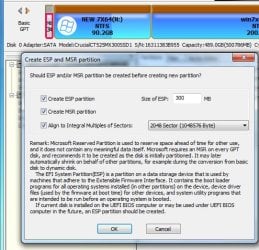
If you already have a 100mb or larger system partition on your mbr disk, you could change that into an esp partition after converting the disk to gpt. Delete it, rt click the unallocated space you just created and select create esp/msr. The esp should be 100mb minimum, and an msr is not strictly required so you can untick that if you like.Then click Save All and yes to format now.


If you dont already have a system partition, it is simpler for the average user to shrink their windows partition from the RIGHT - 1gb is sufficient. The esp and msr do not need to be at the start of the disk


1.jpg

4. RT click the unallocated space and select "Create ESP/MSR partition"

2.jpg
 
Last edited:

My Computers My Computers

System One System Two

  • Computer type
    PC/Desktop
    OS
    7 X64
    CPU
    i5 8400
    Motherboard
    gigabyte b365m ds3h
    Memory
    2x8gb 3200mhz
    Hard Drives
    various
    PSU
    pure power 11 400w cm
    Case
    Coolermaster
    Cooling
    cryorig m9i
  • Computer type
    PC/Desktop
    OS
    7x64
    CPU
    g5400
    Motherboard
    ga b365m ds3h
    Memory
    8gb ddr4 2400
    PSU
    xfx pro 450w
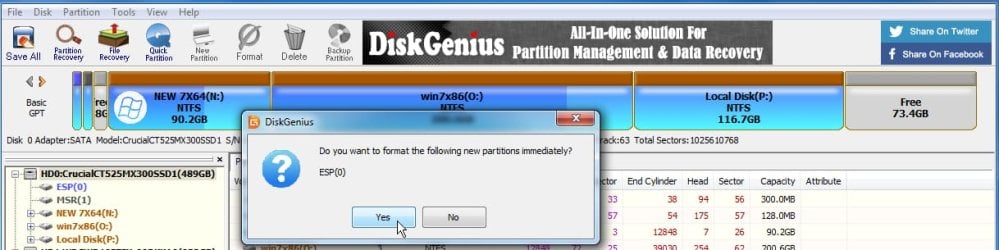
4. Ok what pops up next:

3.jpg

5. Say YES to Do you want to format the new partition immediately?

8.jpg

6. And there they are:

5.jpg

7. Click Save All


7.jpg
 
Last edited:

My Computers My Computers

System One System Two

  • Computer type
    PC/Desktop
    OS
    7 X64
    CPU
    i5 8400
    Motherboard
    gigabyte b365m ds3h
    Memory
    2x8gb 3200mhz
    Hard Drives
    various
    PSU
    pure power 11 400w cm
    Case
    Coolermaster
    Cooling
    cryorig m9i
  • Computer type
    PC/Desktop
    OS
    7x64
    CPU
    g5400
    Motherboard
    ga b365m ds3h
    Memory
    8gb ddr4 2400
    PSU
    xfx pro 450w
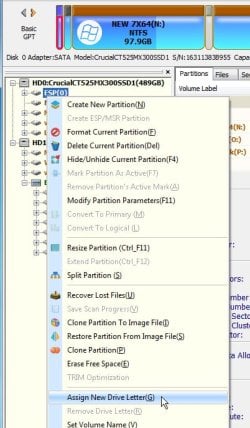
8. Rt click the ESP partition and select assign new drive letter

assign-new-drive-letter.jpg

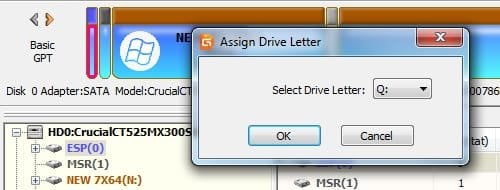
9. You can ccept whatever letter it offers, or pick one from the dropdown

assign-new-drive-letter2.jpg


10. Now it shows N for the windows partition and Q for the ESP partition on the target disk

assign-new-drive-letter3.jpg

11. Open admin command prompt and type:
(if using win10 bcdboot )
bcdboot N:\windows /s Q: /f UEFI


(if using win7 bcdboot there is no /f uefi switch )
bcdboot N:\windows /s Q:

One of the times I used Win7 bcdboot for this it didn't work correctly when the host was bios/mbr and the target was gpt. Win10 bcdboot is more reliable across boot modes.
View attachment bcdboot-10586.zip
 
Last edited:

My Computers My Computers

System One System Two

  • Computer type
    PC/Desktop
    OS
    7 X64
    CPU
    i5 8400
    Motherboard
    gigabyte b365m ds3h
    Memory
    2x8gb 3200mhz
    Hard Drives
    various
    PSU
    pure power 11 400w cm
    Case
    Coolermaster
    Cooling
    cryorig m9i
  • Computer type
    PC/Desktop
    OS
    7x64
    CPU
    g5400
    Motherboard
    ga b365m ds3h
    Memory
    8gb ddr4 2400
    PSU
    xfx pro 450w
Hi All,
Greets,

RoyReddy : You are having only one OS on this multi disk PC, isn't it ? If yes, Its time to follow Sir samuria & other seniors.

1. Make sure that the OS disk is always disk 0. Swap the cables & make it sure.

2. Leave active partition only on the OS disk and Mark other active partitions as Inactive . If command line is not your cup of tea, you may use good 3rd party partitioning software such as DiskGenius .

3. Also learn to launch "One Time Boot Menu", It would be of great help. On Asus, its normally F8 or esc key.

These steps will keep you & your system free from problems & confusions.

Thanks & Regards. ...
 

My Computer My Computer

Computer type
Laptop
Computer Manufacturer/Model Number
hp compaq presario c795VU notebook pc
OS
Windows 7 Ultimate x32 With Sp1 + Vista Ultimate x32 with Sp1 & Sp2 !!
CPU
Intel Mobile Core 2 Duo T5750 @ 2.00GHz Merom 65nm Technolog
Motherboard
Hewlett-Packard 30D9 (CPU)
Memory
2.00GB Dual-Channel DDR2 @ 332MHz (5-5-5-15)
Graphics Card(s)
Mobile Intel(R) 965 Express Chipset Family
Sound Card
High Definition Audio Device
Monitor(s) Displays
LP154WX4-TLCB on Mobile Intel 965 Express Chipset Family
Screen Resolution
1280x800 @ 60Hz
Hard Drives
149GB Western Digital WDC WD1600BEVS-60VAT0 ATA Device (SATA)
Keyboard
Standard 101/102-Key or Microsoft Natural PS/2 Key + HP QLB
Mouse
ALPS pointing device
Antivirus
Kaspersky AV 2017(Win 7) & AVG AntiVirus Free 2016 (VISTA)
Browser
google chrome
Back
Top