JavaScript is disabled. For a better experience, please enable JavaScript in your browser before proceeding.
You are using an out of date browser. It may not display this or other websites correctly.
You should upgrade or use an
alternative browser .
Ran chkdsk, selected incorrect bootup on red screen
Hello and thanks in advance for taking time to help here.
Windows 7 64 bit Xeon 12 gig PC/Desktop Build Windows 7 64 bit
New member
Thread Starter
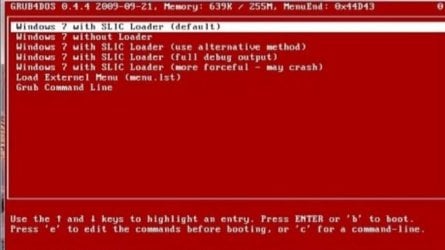
In doing research I found what the red screen looks like online. Pic attached.
20191221_203402.jpg
25.9 KB
· Views: 8
Windows 7 64 bit Xeon 12 gig PC/Desktop Build Windows 7 64 bit
Wish to be flying
Guru
Gold Member
VIP
Welcome to the Forum
Windows 7 HP 64 i5 6600K - 800MHz to 4200MHz 4+4G GSkill DDR4 3000 IG - Intel 530 PC/Desktop custom build Windows 7 HP 64 i5 6600K - 800MHz to 4200MHz GA-Z170-HD3P 4+4G GSkill DDR4 3000 IG - Intel 530 Samsung 226BW 1680x1050 (1) -1 SM951 – 128GB M.2 AHCI PCIe SSD drive for Windows 7 and Lubuntu Thermaltake 450W TR2 gold Old and good Chicony mechanical keyboard Logitech mX performance - 9 buttons (had to disable some) 500Mb/s Firefox 64 TinyWall firewall
Windows 7 Pro i7-4500U 800MHz to 3.0GHz (4+4)G DDR3 1600 IG intel 4400 + NVIDIA GeForce GT 745M Laptop Asus Q550LF Windows 7 Pro i7-4500U 800MHz to 3.0GHz Asus Q550LF (4+4)G DDR3 1600 IG intel 4400 + NVIDIA GeForce GT 745M Realtek LG Display LP156WF4-SPH1 1920 x 1080 BX500 120G SSD for Windows and programs + 500 Mb/s Firefox TinyWall firewall
New member
Thread Starter
Thank you. The gentleman I purchased the PC from a while back did mention he had linux on some part of the drive at one time. I receive Windows updates all the time so I dont believe it's there for piracy purposes. Do you know how to get back to that screen?
Windows 7 64 bit Xeon 12 gig PC/Desktop Build Windows 7 64 bit
New member
Thread Starter
Ok I found that if I wait a while the screen pops up when trying to boot. Do you know which option I should choose?I've tried the 1st two so far
Windows 7 64 bit Xeon 12 gig PC/Desktop Build Windows 7 64 bit
Well-known member
Guru
Gold Member
VIP
Hi
W7 home premium 32bit/W7HP 64bit/w10 tp insid... E5300 dual core 3gb Nvidia Geforce 7100 Nforce 630i PC/Desktop medionl/Aspire 6930G/acer x55a W7 home premium 32bit/W7HP 64bit/w10 tp insider ring E5300 dual core medion MS7366 3gb Nvidia Geforce 7100 Nforce 630i avixc n (isp resticted to 72) mse/pands palemoon Belkin Fd7050 n USB using Railink RT2870 drivers, more upto date
New member
Thread Starter
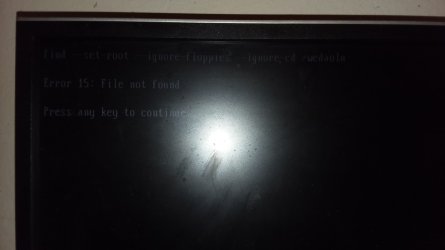
I've received Windows 7 updates from windows continuously over the last 2 years. The man I purchased the PC from assured me the Windows install was legitimate. This is a rebuild workhorse PC. In tinkering around some I've gotten to this screen.
20191222_112456.jpg
178.2 KB
· Views: 2
20191222_134600.jpg
528.4 KB
· Views: 2
Windows 7 64 bit Xeon 12 gig PC/Desktop Build Windows 7 64 bit
New member
Thread Starter
Man, sorry for the horrible quality of those pics. Any guidance is greatly appreciated
Windows 7 64 bit Xeon 12 gig PC/Desktop Build Windows 7 64 bit
Welcome to the Forum
Hi Mega,
If you look carefully at the photo, you can see that it is actually GRUB4DOS (in top left-hand corner), and not related to GRUB or GRUB2.
Windows 7 x64, Vista x64, 8.1 smartphone Intel E8400 65W 64-bit DDR2 2 x 2GB, 1GB x 2 XFX Radeon HD5750 PC/Desktop Windows 7 x64, Vista x64, 8.1 smartphone Intel E8400 65W 64-bit Gigabyte EP45-UD3LR DDR2 2 x 2GB, 1GB x 2 XFX Radeon HD5750 AMD High Definition Audio; Realtek High Definition Audio iiyama prolite X2377HDS 1920 x 1080 500GB 7200 rpm Seagate ST3500413AS 16MB, 500GB 5400 rpm Toshiba MQ02ABF050H 32MB, 200GB 7200 rpm Seagate ST3200820AS 8MB, 2TB 7200 rpm Western Digital WD20EZRX 64MB Enermax Liberty Modular Antec P193 Midi Tower Mionix ZIBAL 60 Razer USB 2.0 Diamondback Mouse or Huion Graphics Tablet Internet Explorer, Lunascape, Firefox, Opera, Avast Safezone
Man, sorry for the horrible quality of those pics. Any guidance is greatly appreciated
You can reach the Boot Manager by pressing F8 key continuously, just after BIOS screen, just before Windows logo screen.
Take a picture of the Boot Manager so we can see what we are dealing with.
Windows 7 x64, Vista x64, 8.1 smartphone Intel E8400 65W 64-bit DDR2 2 x 2GB, 1GB x 2 XFX Radeon HD5750 PC/Desktop Windows 7 x64, Vista x64, 8.1 smartphone Intel E8400 65W 64-bit Gigabyte EP45-UD3LR DDR2 2 x 2GB, 1GB x 2 XFX Radeon HD5750 AMD High Definition Audio; Realtek High Definition Audio iiyama prolite X2377HDS 1920 x 1080 500GB 7200 rpm Seagate ST3500413AS 16MB, 500GB 5400 rpm Toshiba MQ02ABF050H 32MB, 200GB 7200 rpm Seagate ST3200820AS 8MB, 2TB 7200 rpm Western Digital WD20EZRX 64MB Enermax Liberty Modular Antec P193 Midi Tower Mionix ZIBAL 60 Razer USB 2.0 Diamondback Mouse or Huion Graphics Tablet Internet Explorer, Lunascape, Firefox, Opera, Avast Safezone
New member
Thread Starter
F8 doesn't seem to bring anything up.
Windows 7 64 bit Xeon 12 gig PC/Desktop Build Windows 7 64 bit
New member
Thread Starter
F8 doesn't seem to provide anything.
Windows 7 64 bit Xeon 12 gig PC/Desktop Build Windows 7 64 bit
New member
Thread Starter
2019-12-22 18.29.15.jpg
359 KB
· Views: 0
Windows 7 64 bit Xeon 12 gig PC/Desktop Build Windows 7 64 bit
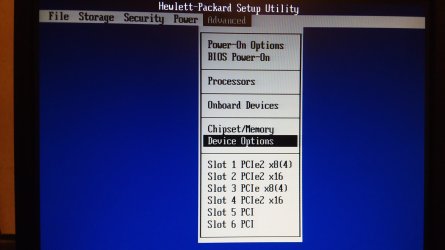
I wonder if there's a boot disk choice in Advanced.
Windows 7 Pro SP1 64 bit 8 GB Laptop Dell M6500 Precision Work Station Windows 7 Pro SP1 64 bit 8 GB 1920x 30 Mbps Norton Security IE 11
New member
Thread Starter
Here are the advanced options
2019-12-22 20.20.22.jpg
292.9 KB
· Views: 0
Windows 7 64 bit Xeon 12 gig PC/Desktop Build Windows 7 64 bit
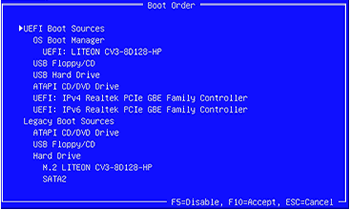
Open the Storage tab. There should be a Boot Order option. What is shown there?
Windows 7 Pro SP1 64 bit 8 GB Laptop Dell M6500 Precision Work Station Windows 7 Pro SP1 64 bit 8 GB 1920x 30 Mbps Norton Security IE 11
New member
Guru
Gold Member
VIP
Did you get any Windows install or repair or recovery DVDs from the party you bought the computer from?
Windows 7 Professional 64-bit Desktop i5; Acers i5 & i7 desktop 16GB; 1 Acer 8GB & 1 Acer 16GB PC/Desktop Antec desktop; Acer Aspire laptops Windows 7 Professional 64-bit Desktop i5; Acers i5 & i7 desktop 16GB; 1 Acer 8GB & 1 Acer 16GB 1TB split into 2 equal partitions [OS and data] usable by RJS AT&T DSL FF, GChrome, msIE Windows 7 Firewall, Emsisoft AM/AV, MSE [scan-only], SpywareBlaster, Ruiware/BillP combine
Open the Storage tab. There should be a Boot Order option. What is shown there?
That's the option. Select the "OS Boot Manager".
boot order.gif
29.9 KB
· Views: 4
Windows 10 Pro 64 bit AMD FX 9590 8 Core Black Edition Corsair Vengeance 16GB DDR3 AMD Radeon (TM) R9 380 Gaming Series PC/Desktop Custom Built By Me. Windows 10 Pro 64 bit AMD FX 9590 8 Core Black Edition MSI 990FXA GAMING (MS-7893) Corsair Vengeance 16GB DDR3 AMD Radeon (TM) R9 380 Gaming Series AMD High Definition Samsung 32" 60Hz 4ms Curved PLS LED 1920 X 1080 C: 223 GB SSD = E: 465 GB HDD = F: 931 GB HDD = G: 149 GB HDD = H: 931 GB HDD EVGA Supernova NEX750B 750W ATX EPS12V 80PLUS Bronze Cool Master Noctua NH-D15 Premium Cooler with 2x NF-A15 PWM 140mm Fan Fiber Optic: Download 332.7 Mbps / Upload 331.5 Mbps Windows Defender Slimjet (64bit)
Is there a Legacy Boot Sources option there and is the hard drive selected as the first boot option?
Windows 7 Pro SP1 64 bit 8 GB Laptop Dell M6500 Precision Work Station Windows 7 Pro SP1 64 bit 8 GB 1920x 30 Mbps Norton Security IE 11