How to fix boot for windows 7 when bcdboot says "failure to copy boot"

Epicity

New member
Local time
4:03 PM
Messages
16
How to fix boot for windows 7 when bcdboot says "failure to copy boot"

I decided to install win 10 on my new nvme ssd card (again) and since it was a new drive to dual boot I basically had to keep switching drives to boot from the bios which was a pain.


My old win 7 which also had win10 on the drive (different partition) used GRUB to boot but in a rush I think I accidentally deleted it which means that GRUB boot no longer exists.


So I decided to use EasyBCD on the NVME Win10 which seemed to only work with the other win10. So basically, I have two working win10s and one broken boot of win7.


And now BCDBoot won't copy it "failure to copy boot files". So I'm wondering how do i fix this so I can boot into Win7?
 

My Computer My Computer

At a glance

Windows 7 Home Premium 64bitIntel i3-41308GBR9 200 Series
Computer type
PC/Desktop
OS
Windows 7 Home Premium 64bit
CPU
Intel i3-4130
Motherboard
H81M-P33
Memory
8GB
Graphics Card(s)
R9 200 Series
Can you post a screenshot from disk manager showing all the details so we can see if its gpt disk and uefi
 

My Computer My Computer

At a glance

win 8 32 bit
Computer type
PC/Desktop
OS
win 8 32 bit
Here we go. The drive that's in question.

G is the one with win 7. The other win10 boots fine but it's not the one I"m currently on.

https://i.imgur.com/rHQmPXb.png
 

My Computer My Computer

At a glance

Windows 7 Home Premium 64bitIntel i3-41308GBR9 200 Series
Computer type
PC/Desktop
OS
Windows 7 Home Premium 64bit
CPU
Intel i3-4130
Motherboard
H81M-P33
Memory
8GB
Graphics Card(s)
R9 200 Series
I can't see that and it doesn't have all the details needed at the top
 

My Computer My Computer

At a glance

win 8 32 bit
Computer type
PC/Desktop
OS
win 8 32 bit

My Computer My Computer

At a glance

Windows 7 Home Premium 64bitIntel i3-41308GBR9 200 Series
Computer type
PC/Desktop
OS
Windows 7 Home Premium 64bit
CPU
Intel i3-4130
Motherboard
H81M-P33
Memory
8GB
Graphics Card(s)
R9 200 Series
The c drive is uefi so you need to edit the uefi loader YouTube
 

My Computer My Computer

At a glance

win 8 32 bit
Computer type
PC/Desktop
OS
win 8 32 bit
And now BCDBoot won't copy it "failure to copy boot files".

And it's

bcdboot G:\Windows

you attempted as an administrator?
 

My Computer My Computer

At a glance

Windows 7 Home Premium
Computer type
PC/Desktop
OS
Windows 7 Home Premium
And it's

bcdboot G:\Windows

you attempted as an administrator?

Yes, I was actually in the the system recovery mode when I tried that. And at the time it was D:\windows and that's where it failed
 

My Computer My Computer

At a glance

Windows 7 Home Premium 64bitIntel i3-41308GBR9 200 Series
Computer type
PC/Desktop
OS
Windows 7 Home Premium 64bit
CPU
Intel i3-4130
Motherboard
H81M-P33
Memory
8GB
Graphics Card(s)
R9 200 Series

My Computer My Computer

At a glance

Windows 7 Home Premium 64bitIntel i3-41308GBR9 200 Series
Computer type
PC/Desktop
OS
Windows 7 Home Premium 64bit
CPU
Intel i3-4130
Motherboard
H81M-P33
Memory
8GB
Graphics Card(s)
R9 200 Series
Does that fix my Win7? Cos I can boot into the C drive just fine.


You could probably use

# bootice to fix master and partition boot sectors to be in line with your OS you want to boot from each individual partition

# EasyBCD to design your boot menu per your gusto
 

My Computer My Computer

At a glance

Windows 7 Ultimate x64 SP1, updated to latest...Mobile Intel Core i7-4800MQ, 8x 3500 MHz (35 ...32 GB ie 4x 8GB SODIMMAMD FirePro M5100 and Intel(R) HD Graphics 4600
Computer type
Laptop
Computer Manufacturer/Model Number
Dell, Inc.
OS
Windows 7 Ultimate x64 SP1, updated to latest Java and .NET
CPU
Mobile Intel Core i7-4800MQ, 8x 3500 MHz (35 x 100)
Motherboard
Dell Precision M4800
Memory
32 GB ie 4x 8GB SODIMM
Graphics Card(s)
AMD FirePro M5100 and Intel(R) HD Graphics 4600
Sound Card
Realtek Audio and AMD High Definition Audio Device
Monitor(s) Displays
Built-in 1080p, ext 2x 27" 1080p, ext 1x 55" 1080p
Screen Resolution
4x 1920 x 1080 x 32 bits
Hard Drives
2x 1 TB SSD
multiple external drives
PSU
210W for docking station & laptop
Case
Metal
Cooling
2 Fans
Keyboard
US QWERTY
Mouse
touchpad, pointstick, ext mouse
Internet Speed
1Gbps Eth, 512Mbps cable
Antivirus
Avast latest
Browser
various
Yes, I was actually in the the system recovery mode when I tried that

Bcdboot does not depend on system recovery mode. Give it a shot running Windows.

Regards, VZ
 

My Computer My Computer

At a glance

Windows 7 Home Premium
Computer type
PC/Desktop
OS
Windows 7 Home Premium
Ok, I did end up fixing it but through some roundabout unintentional means.

I accidentally reset my boot using easyBCD which meant I had no boot menu at all. So using my win10 usb, the bcdboot actually managed to repair my 3 windows but only Win7 worked and i could only boot it from the drive that didn't run it, odd but it worked.

And once I got into win7 it was easy sailing with easy bcd as it worked fine there. Dunno why easybcd works in win7 to attach win 10 and not vice versa.
 

My Computer My Computer

At a glance

Windows 7 Home Premium 64bitIntel i3-41308GBR9 200 Series
Computer type
PC/Desktop
OS
Windows 7 Home Premium 64bit
CPU
Intel i3-4130
Motherboard
H81M-P33
Memory
8GB
Graphics Card(s)
R9 200 Series
Please don't use external links to post images. Use the paper clip on the Quick Reply window. Browse to the saved image - upload.

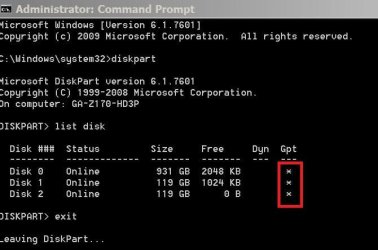
Disk 0 seems to be a Legacy-MBR type and disk disk 2 is UEFI-GPT. For what I know, you won't be able to direct boot Win 10 or Win 7 (on drive 0) from the UEFI boot loader.
Disk 0 has one master boot loader (probably on the last OS installed)
First thing to do is to detach disk 2 (MVMe ?)
Boot from a Win 10 installation disk and do a boot repair on disk 0.
Once you're able to boot into win 10 on disk 0, do a bcdboot X:\Windows (replace X with the drive letter under Win 10 on disk 0)

Finally, to choose from disk 0 or disk 2 you don't need to change BIOS boot priority. Launch Boot Menu (F11?) during POST.

To check the disk type (MBR or UEFI) on Disk manager - View (top menu) - Top - List Disk
Or
Open a CMD window as administrator and type:
diskpart
list disk (see last columns)
exit
exit
 

Attachments

  • List_Disk.JPG
    List_Disk.JPG
    38.4 KB · Views: 10

My Computers My Computers

  • At a glance

    Windows 7 HP 64i5 6600K - 800MHz to 4200MHz4+4G GSkill DDR4 3000IG - Intel 530
    Computer type
    PC/Desktop
    Computer Manufacturer/Model Number
    custom build
    OS
    Windows 7 HP 64
    CPU
    i5 6600K - 800MHz to 4200MHz
    Motherboard
    GA-Z170-HD3P
    Memory
    4+4G GSkill DDR4 3000
    Graphics Card(s)
    IG - Intel 530
    Monitor(s) Displays
    Samsung 226BW
    Screen Resolution
    1680x1050
    Hard Drives
    (1) -1 SM951 – 128GB M.2 AHCI PCIe SSD drive for Windows 7 and Lubuntu
    (2) -1 WD SATA 3 - 1T for Data
    (3) -1 WD SATA 3 - 1T for backup
    PSU
    Thermaltake 450W TR2 gold
    Keyboard
    Old and good Chicony mechanical keyboard
    Mouse
    Logitech mX performance - 9 buttons (had to disable some)
    Internet Speed
    500Mb/s
    Browser
    Firefox 64
    Other Info
    TinyWall firewall
  • At a glance

    Windows 7 Proi7-4500U 800MHz to 3.0GHz(4+4)G DDR3 1600IG intel 4400 + NVIDIA GeForce GT 745M
    Computer type
    Laptop
    System Manufacturer/Model Number
    Asus Q550LF
    OS
    Windows 7 Pro
    CPU
    i7-4500U 800MHz to 3.0GHz
    Motherboard
    Asus Q550LF
    Memory
    (4+4)G DDR3 1600
    Graphics Card(s)
    IG intel 4400 + NVIDIA GeForce GT 745M
    Sound Card
    Realtek
    Monitor(s) Displays
    LG Display LP156WF4-SPH1
    Screen Resolution
    1920 x 1080
    Hard Drives
    BX500 120G SSD for Windows and programs +
    1T HDD for data
    Internet Speed
    500 Mb/s
    Browser
    Firefox
    Other Info
    TinyWall firewall
From a UEFI boot loader, if you select a Windows on MBR disk it will reboot first and then load Windows, so it's not direct.
Makes more sense to launch the boot menu and directly choose the MBR disk. It will load a master boot load and then you can choose Win 10 or win 7.
 

My Computers My Computers

  • At a glance

    Windows 7 HP 64i5 6600K - 800MHz to 4200MHz4+4G GSkill DDR4 3000IG - Intel 530
    Computer type
    PC/Desktop
    Computer Manufacturer/Model Number
    custom build
    OS
    Windows 7 HP 64
    CPU
    i5 6600K - 800MHz to 4200MHz
    Motherboard
    GA-Z170-HD3P
    Memory
    4+4G GSkill DDR4 3000
    Graphics Card(s)
    IG - Intel 530
    Monitor(s) Displays
    Samsung 226BW
    Screen Resolution
    1680x1050
    Hard Drives
    (1) -1 SM951 – 128GB M.2 AHCI PCIe SSD drive for Windows 7 and Lubuntu
    (2) -1 WD SATA 3 - 1T for Data
    (3) -1 WD SATA 3 - 1T for backup
    PSU
    Thermaltake 450W TR2 gold
    Keyboard
    Old and good Chicony mechanical keyboard
    Mouse
    Logitech mX performance - 9 buttons (had to disable some)
    Internet Speed
    500Mb/s
    Browser
    Firefox 64
    Other Info
    TinyWall firewall
  • At a glance

    Windows 7 Proi7-4500U 800MHz to 3.0GHz(4+4)G DDR3 1600IG intel 4400 + NVIDIA GeForce GT 745M
    Computer type
    Laptop
    System Manufacturer/Model Number
    Asus Q550LF
    OS
    Windows 7 Pro
    CPU
    i7-4500U 800MHz to 3.0GHz
    Motherboard
    Asus Q550LF
    Memory
    (4+4)G DDR3 1600
    Graphics Card(s)
    IG intel 4400 + NVIDIA GeForce GT 745M
    Sound Card
    Realtek
    Monitor(s) Displays
    LG Display LP156WF4-SPH1
    Screen Resolution
    1920 x 1080
    Hard Drives
    BX500 120G SSD for Windows and programs +
    1T HDD for data
    Internet Speed
    500 Mb/s
    Browser
    Firefox
    Other Info
    TinyWall firewall
Back
Top