Create system repair disc on Win7 w/o DVD drive or Win7 .ISO file?

dc2000

New member
Member
VIP
Local time
3:16 PM
Messages
153
Hello:

I'm trying to create an image backup of our DVR system so that I can
repair it if its bootable hard drive fails. It is running on Windows
Embedded Standard, which is Windows 7, 64-bit. I was able to create an
image copy of disk C: but then it asked me if I want to create a
bootable disk, but showed an error that I don't have a DVD bay:

https://i.imgur.com/9QjaJmj.png

All I have is a USB drive.

I searched online and there's a lot of tutorials on how to create a
bootable USB drive for Windows 7, but all of them require copying
files from a Win 7 .iso or a bootable DVD. I don't have either. All I
have is this windows 7 installed on our DVR system.
 

My Computer My Computer

At a glance

Windows
OS
Windows
You can use totalmounter (free) to create a mounted iso with a drive letter that the thing will write to.
KernSafe iSCSI initiator, Virtual CD/DVD-RW Emulator, Virtual Encryption Disk and Virtual CD/DVD-ROM Emulator All-in-One free software.
Then you can extract the iso to create a bootable usb

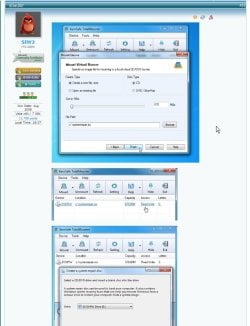
:ar: pretty pictures to show how

Alternatively - or in addition, you can borrow my win7 recovery media - it is quite fancy with explorer, internet connection and lots of other toys.

32 bit
17514x86.iso

64 bit
17514x64v15.iso

Download the iso and create bootable usb from it using usb7ice, or similar View attachment Usb7ice.zip
 

My Computers My Computers

  • At a glance

    7 X64i5 84002x8gb 3200mhz
    Computer type
    PC/Desktop
    OS
    7 X64
    CPU
    i5 8400
    Motherboard
    gigabyte b365m ds3h
    Memory
    2x8gb 3200mhz
    Hard Drives
    various
    PSU
    pure power 11 400w cm
    Case
    Coolermaster
    Cooling
    cryorig m9i
  • At a glance

    7x64g54008gb ddr4 2400
    Computer type
    PC/Desktop
    OS
    7x64
    CPU
    g5400
    Motherboard
    ga b365m ds3h
    Memory
    8gb ddr4 2400
    PSU
    xfx pro 450w
I'm trying to create an image backup of our DVR system so that I can repair it if its bootable hard drive fails. It is running on Windows Embedded Standard, which is Windows 7, 64-bit. I was able to create an image copy of disk C: but then it asked me if I want to create a bootable disk, but showed an error that I don't have a DVD bay...https://i.imgur.com/9QjaJmj.png

All I have is a USB drive.


Yes, that's one of the failings of the built in Microsoft system imaging. Another is that it's not terribly reliable.


I'd use something else to make a system image. My personal favourite is Macrium Reflect Free, and that does have the option to create a bootable recovery usb.
 

My Computers My Computers

  • At a glance

    Windows 7 Home Premium x64AMD V1204GB
    Computer type
    Laptop
    Computer Manufacturer/Model Number
    Toshiba satellite C650D
    OS
    Windows 7 Home Premium x64
    CPU
    AMD V120
    Memory
    4GB
    Internet Speed
    150 Mbps
    Antivirus
    MSE
    Browser
    IE11, Edge, Firefox
    Other Info
    I also have W7 Pro on my System Two, and several W7 Hyper-V VMs. My other machines run Windows 10/11. Their specs are in my Ten Forums & Eleven Forum profiles.
  • At a glance

    Windows 7 Pro x64Intel i5-3320M8 GB
    Computer type
    Laptop
    System Manufacturer/Model Number
    Lenovo Thinkpad T430
    OS
    Windows 7 Pro x64
    CPU
    Intel i5-3320M
    Memory
    8 GB
    Hard Drives
    250GB Samsung SSD 860 EVO
    Antivirus
    MSE
He never misses an opportunity to promote that product.

I suggest you make a system repair disk - it has useful functions, and microsoft system image is fine.

Or you can use my recovery media that I linked above. It has all the functions of the standard MS repair disc - and plenty of other stuff - for example aomei backuper and aomei partition assistant are included, and eset antivirus, as is diskgenius, and plenty more.
 

My Computers My Computers

  • At a glance

    7 X64i5 84002x8gb 3200mhz
    Computer type
    PC/Desktop
    OS
    7 X64
    CPU
    i5 8400
    Motherboard
    gigabyte b365m ds3h
    Memory
    2x8gb 3200mhz
    Hard Drives
    various
    PSU
    pure power 11 400w cm
    Case
    Coolermaster
    Cooling
    cryorig m9i
  • At a glance

    7x64g54008gb ddr4 2400
    Computer type
    PC/Desktop
    OS
    7x64
    CPU
    g5400
    Motherboard
    ga b365m ds3h
    Memory
    8gb ddr4 2400
    PSU
    xfx pro 450w
He never misses an opportunity to promote that product.

...microsoft system image is fine.

It's not, its most common failing is being unable to find the system image to restore just when you need it the most. I have seen that for myself.

I have the "Repair Disc Windows 7 64 Bit" that I created in Windows 7... I insert the Repair Disc and start the system. Get to System Recoevery Options. I have the external Hard Disk with the system backup image connected. Select System Image Recovery option. Says "Windows cannot find a system image on this computer...
System Image Recovery - Can't find System Image - Microsoft Community

I went to Advanced Recovery methods and I clicked "Use a system image you created earlier to recover your computer" .... Then I clicked "restart". The next thing I did was to choose a language. Then here comes the error. A message box popped up saying "Windows cannot find a system image on this computer"
Windows cannot find a system image on this computer ERROR - Microsoft Community

Microsoft deprecated it and stopped developing it nearly three years ago. They recommend you use something (anything) else.

Microsoft said:
System Image Backup (SIB) Solution
We recommend that users use full-disk backup solutions from other vendors.
Windows 10 features we’re no longer developing - Windows Deployment | Microsoft Docs
 

My Computers My Computers

  • At a glance

    Windows 7 Home Premium x64AMD V1204GB
    Computer type
    Laptop
    Computer Manufacturer/Model Number
    Toshiba satellite C650D
    OS
    Windows 7 Home Premium x64
    CPU
    AMD V120
    Memory
    4GB
    Internet Speed
    150 Mbps
    Antivirus
    MSE
    Browser
    IE11, Edge, Firefox
    Other Info
    I also have W7 Pro on my System Two, and several W7 Hyper-V VMs. My other machines run Windows 10/11. Their specs are in my Ten Forums & Eleven Forum profiles.
  • At a glance

    Windows 7 Pro x64Intel i5-3320M8 GB
    Computer type
    Laptop
    System Manufacturer/Model Number
    Lenovo Thinkpad T430
    OS
    Windows 7 Pro x64
    CPU
    Intel i5-3320M
    Memory
    8 GB
    Hard Drives
    250GB Samsung SSD 860 EVO
    Antivirus
    MSE
I searched online and there's a lot of tutorials on how to create a bootable USB drive for Windows 7, but all of them require copying files from a Win 7 .iso or a bootable DVD. I don't have either. All I have is this windows 7 installed on our DVR system.


Here's one that doesn't, it tells you where to find the files on your installed system.


You must get your hands dirty in the process, as it involves changing some security permissions on a system folder called Recovery and it also involves copying some system files onto your memory stick.
Create a USB memory stick with system recovery tools in Windows 7 | Digital Citizen
 

My Computers My Computers

  • At a glance

    Windows 7 Home Premium x64AMD V1204GB
    Computer type
    Laptop
    Computer Manufacturer/Model Number
    Toshiba satellite C650D
    OS
    Windows 7 Home Premium x64
    CPU
    AMD V120
    Memory
    4GB
    Internet Speed
    150 Mbps
    Antivirus
    MSE
    Browser
    IE11, Edge, Firefox
    Other Info
    I also have W7 Pro on my System Two, and several W7 Hyper-V VMs. My other machines run Windows 10/11. Their specs are in my Ten Forums & Eleven Forum profiles.
  • At a glance

    Windows 7 Pro x64Intel i5-3320M8 GB
    Computer type
    Laptop
    System Manufacturer/Model Number
    Lenovo Thinkpad T430
    OS
    Windows 7 Pro x64
    CPU
    Intel i5-3320M
    Memory
    8 GB
    Hard Drives
    250GB Samsung SSD 860 EVO
    Antivirus
    MSE
Hey dc2000 have you thought to buy a external DVD drive? They are only around $10-$15 CAD and very useful for servicing computers with no DVD drives. And on the plus side you don't have to buy/download/figure out another program.
 

My Computer My Computer

At a glance

Windows 7 Home 32 bit1.47 gigahertz Intel Pentium Dual T23102gbIntegrated
Computer type
Laptop
Computer Manufacturer/Model Number
Hewlett-Packard Presario C700 Notebook PC F.08
OS
Windows 7 Home 32 bit
CPU
1.47 gigahertz Intel Pentium Dual T2310
Motherboard
Hewlett-Packard 30D9 83.19
Memory
2gb
Graphics Card(s)
Integrated
Sound Card
Integrated
Monitor(s) Displays
Built-in
Screen Resolution
1600x900
Hard Drives
WDC WD3200BEKT-00PVMT0 [Hard drive] (320.07 GB) -- drive 0, s/n WD-WX11AC050066, rev 01.01A01, SMART Status: Healthy
Internet Speed
15mbps
Antivirus
Windows defender
Browser
Google chrome
They look ok to me

2020-02-17_180819.jpg
 

My Computers My Computers

  • At a glance

    7 X64i5 84002x8gb 3200mhz
    Computer type
    PC/Desktop
    OS
    7 X64
    CPU
    i5 8400
    Motherboard
    gigabyte b365m ds3h
    Memory
    2x8gb 3200mhz
    Hard Drives
    various
    PSU
    pure power 11 400w cm
    Case
    Coolermaster
    Cooling
    cryorig m9i
  • At a glance

    7x64g54008gb ddr4 2400
    Computer type
    PC/Desktop
    OS
    7x64
    CPU
    g5400
    Motherboard
    ga b365m ds3h
    Memory
    8gb ddr4 2400
    PSU
    xfx pro 450w
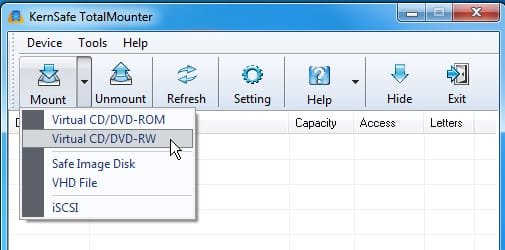
Clik MOUNT > virtual cd/dvd-RW

kernsafe1.jpg

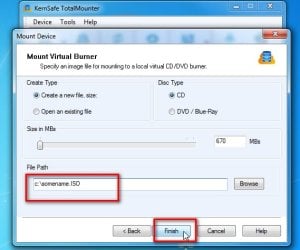
It will pop us a virtual cd by default.

So you only need to type in a path ( e.g. c:\somename.iso ). Then click Finish

kernsafe2.jpg

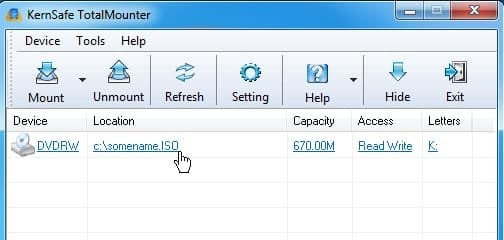
You can see it is mounted as a virtual cd\dvd RW drive

kernsafe3.jpg
 

My Computers My Computers

  • At a glance

    7 X64i5 84002x8gb 3200mhz
    Computer type
    PC/Desktop
    OS
    7 X64
    CPU
    i5 8400
    Motherboard
    gigabyte b365m ds3h
    Memory
    2x8gb 3200mhz
    Hard Drives
    various
    PSU
    pure power 11 400w cm
    Case
    Coolermaster
    Cooling
    cryorig m9i
  • At a glance

    7x64g54008gb ddr4 2400
    Computer type
    PC/Desktop
    OS
    7x64
    CPU
    g5400
    Motherboard
    ga b365m ds3h
    Memory
    8gb ddr4 2400
    PSU
    xfx pro 450w
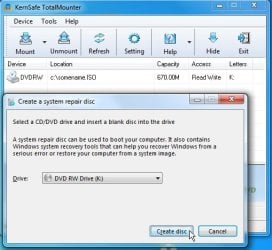
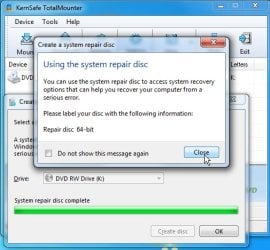
Run recdisc.exe and it thinks that is your cd\dvd drive

kernsafe4.jpg

2020-02-17_181659.jpg

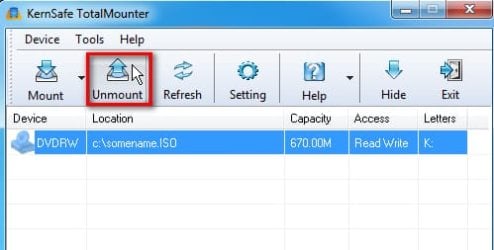
Click UNMOUNT

kernsafe5.jpg

And the little guy is where you specified - in this case c:\somename.iso

kernsafe6.jpg
 

My Computers My Computers

  • At a glance

    7 X64i5 84002x8gb 3200mhz
    Computer type
    PC/Desktop
    OS
    7 X64
    CPU
    i5 8400
    Motherboard
    gigabyte b365m ds3h
    Memory
    2x8gb 3200mhz
    Hard Drives
    various
    PSU
    pure power 11 400w cm
    Case
    Coolermaster
    Cooling
    cryorig m9i
  • At a glance

    7x64g54008gb ddr4 2400
    Computer type
    PC/Desktop
    OS
    7x64
    CPU
    g5400
    Motherboard
    ga b365m ds3h
    Memory
    8gb ddr4 2400
    PSU
    xfx pro 450w
Otherwise, or in addition, you can make a much fancier recovery media iso file ( which can the be extracted to bootable usb) by using the thing linked on my earlier post. I haven't updated that in a long while, but you could give it a try.

here it is:

new7x64upd.zip

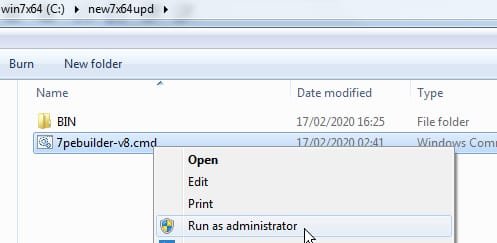
Extract the zip and run the .cmd file

new7x64upd.jpg


This can extract iso files to usb View attachment Usb7ice.zip
 
Last edited:

My Computers My Computers

  • At a glance

    7 X64i5 84002x8gb 3200mhz
    Computer type
    PC/Desktop
    OS
    7 X64
    CPU
    i5 8400
    Motherboard
    gigabyte b365m ds3h
    Memory
    2x8gb 3200mhz
    Hard Drives
    various
    PSU
    pure power 11 400w cm
    Case
    Coolermaster
    Cooling
    cryorig m9i
  • At a glance

    7x64g54008gb ddr4 2400
    Computer type
    PC/Desktop
    OS
    7x64
    CPU
    g5400
    Motherboard
    ga b365m ds3h
    Memory
    8gb ddr4 2400
    PSU
    xfx pro 450w
I might have a look at that new7x64upd when I have minute and add some extra drivers and other lovely stuff.
 

My Computers My Computers

  • At a glance

    7 X64i5 84002x8gb 3200mhz
    Computer type
    PC/Desktop
    OS
    7 X64
    CPU
    i5 8400
    Motherboard
    gigabyte b365m ds3h
    Memory
    2x8gb 3200mhz
    Hard Drives
    various
    PSU
    pure power 11 400w cm
    Case
    Coolermaster
    Cooling
    cryorig m9i
  • At a glance

    7x64g54008gb ddr4 2400
    Computer type
    PC/Desktop
    OS
    7x64
    CPU
    g5400
    Motherboard
    ga b365m ds3h
    Memory
    8gb ddr4 2400
    PSU
    xfx pro 450w
I might have a look at that new7x64upd when I have minute and add some extra drivers and other lovely stuff.

This is what I see instead of your pictures (even when you posted them here):

zkEcbNj.png


The URLs you're using:

Code:
https://www.sevenforums.com/attachments/general-discussion/411079d1581964123-create-system-repair-disc-win7-w-o-dvd-drive-win7-iso-file-kernsafe4.jpg

are probably not accessible with other user's credentials. Google console gives me this error:

Failed to load resource: the server responded with a status of 403

When I go there, it brings up the login screen.

So better use some good image sharing site. I use imgur.com
 

My Computer My Computer

At a glance

Windows
OS
Windows
Strange. They show up for me. Maybe something to do with your browser.

I must have posted thousands of images over the years. Plenty of other people can see them.
 

My Computers My Computers

  • At a glance

    7 X64i5 84002x8gb 3200mhz
    Computer type
    PC/Desktop
    OS
    7 X64
    CPU
    i5 8400
    Motherboard
    gigabyte b365m ds3h
    Memory
    2x8gb 3200mhz
    Hard Drives
    various
    PSU
    pure power 11 400w cm
    Case
    Coolermaster
    Cooling
    cryorig m9i
  • At a glance

    7x64g54008gb ddr4 2400
    Computer type
    PC/Desktop
    OS
    7x64
    CPU
    g5400
    Motherboard
    ga b365m ds3h
    Memory
    8gb ddr4 2400
    PSU
    xfx pro 450w
Strange. They show up for me...
They show up for me too. I have had this same conversation with another member on another thread. No matter how I posted the images they (and only they) couldn't see them, never found out why.... :(
 

My Computers My Computers

  • At a glance

    Windows 7 Home Premium x64AMD V1204GB
    Computer type
    Laptop
    Computer Manufacturer/Model Number
    Toshiba satellite C650D
    OS
    Windows 7 Home Premium x64
    CPU
    AMD V120
    Memory
    4GB
    Internet Speed
    150 Mbps
    Antivirus
    MSE
    Browser
    IE11, Edge, Firefox
    Other Info
    I also have W7 Pro on my System Two, and several W7 Hyper-V VMs. My other machines run Windows 10/11. Their specs are in my Ten Forums & Eleven Forum profiles.
  • At a glance

    Windows 7 Pro x64Intel i5-3320M8 GB
    Computer type
    Laptop
    System Manufacturer/Model Number
    Lenovo Thinkpad T430
    OS
    Windows 7 Pro x64
    CPU
    Intel i5-3320M
    Memory
    8 GB
    Hard Drives
    250GB Samsung SSD 860 EVO
    Antivirus
    MSE
They show up fine for me. what web browser are you using
 

My Computer My Computer

At a glance

Windows 7 Home 32 bit1.47 gigahertz Intel Pentium Dual T23102gbIntegrated
Computer type
Laptop
Computer Manufacturer/Model Number
Hewlett-Packard Presario C700 Notebook PC F.08
OS
Windows 7 Home 32 bit
CPU
1.47 gigahertz Intel Pentium Dual T2310
Motherboard
Hewlett-Packard 30D9 83.19
Memory
2gb
Graphics Card(s)
Integrated
Sound Card
Integrated
Monitor(s) Displays
Built-in
Screen Resolution
1600x900
Hard Drives
WDC WD3200BEKT-00PVMT0 [Hard drive] (320.07 GB) -- drive 0, s/n WD-WX11AC050066, rev 01.01A01, SMART Status: Healthy
Internet Speed
15mbps
Antivirus
Windows defender
Browser
Google chrome
It's a mystery.
 

My Computers My Computers

  • At a glance

    7 X64i5 84002x8gb 3200mhz
    Computer type
    PC/Desktop
    OS
    7 X64
    CPU
    i5 8400
    Motherboard
    gigabyte b365m ds3h
    Memory
    2x8gb 3200mhz
    Hard Drives
    various
    PSU
    pure power 11 400w cm
    Case
    Coolermaster
    Cooling
    cryorig m9i
  • At a glance

    7x64g54008gb ddr4 2400
    Computer type
    PC/Desktop
    OS
    7x64
    CPU
    g5400
    Motherboard
    ga b365m ds3h
    Memory
    8gb ddr4 2400
    PSU
    xfx pro 450w
Just download Macrium Reflect Free. When installed you can make images to your heart's content from within W7. Once set up it will also ask you if you want to make a rescue disk/flash drive, aka a Win PE drive. You plug in your USB drive and simply let it make a bootable version of MRF. You can then backup or restore existing images without booting into W7.

Never had to do a re-install again since using MRF years ago, not that W7 ever caused me many issues.
 

My Computer My Computer

At a glance

Windows 7 Pro 64 Bit, Windows 10 Pro 64 Bit, ...Intel Core i5-3470 3.2 GHz6GB RAMIntel HD Graphics
Computer type
PC/Desktop
Computer Manufacturer/Model Number
Dell Vostro
OS
Windows 7 Pro 64 Bit, Windows 10 Pro 64 Bit, Linux Mint 20.1 LTS
CPU
Intel Core i5-3470 3.2 GHz
Motherboard
Intel 7 Series C/216 Chipset
Memory
6GB RAM
Graphics Card(s)
Intel HD Graphics
Monitor(s) Displays
Asus VC239 (23.5")
Hard Drives
Western Digital WD10EZEX 1TB
Western Digital WD3200AAKS 320GB
PSU
Corsair 500W
Antivirus
Microsoft Essentials, Malwarebytes, Kapersky Rescue Disk
Browser
Firefox 87 64 Bit
Back
Top