

I have a new laptop running Win7 Pro 64 bit. I did an original system image when I first got it, so I'd have a good image if I had to revert to it.
I installed Norton and Malwarebytes, applied Windows Updates until the machine was caught up, installed my Office apps, Quicken, and Printer software, and applied all the updates I could find for the additional programs, and then made another backup.
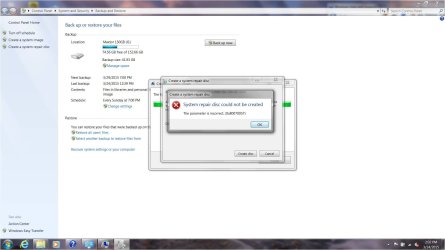
When I made the second backup, I also tried to create a system repair disk. It failed, with an error code of 0x80070057. I have attached a screen shot showing the error.
I found some old threads on this board with various suggestions of how to approach this, but I have also experienced the fallout of trying a solution suggested for someone else when the actual underlying issues were different. So I figured I would start here.
Recommendations, anyone?
I installed Norton and Malwarebytes, applied Windows Updates until the machine was caught up, installed my Office apps, Quicken, and Printer software, and applied all the updates I could find for the additional programs, and then made another backup.
When I made the second backup, I also tried to create a system repair disk. It failed, with an error code of 0x80070057. I have attached a screen shot showing the error.
I found some old threads on this board with various suggestions of how to approach this, but I have also experienced the fallout of trying a solution suggested for someone else when the actual underlying issues were different. So I figured I would start here.
Recommendations, anyone?
Attachments
My Computer
- Computer type
- Laptop
- Computer Manufacturer/Model Number
- ProStar Model P157SM-A
- OS
- Windows 7 Professional 64 bit SP 1
- CPU
- Intel Core i7-4710 MQ
- Motherboard
- No info
- Memory
- 16 GB
- Graphics Card(s)
- NVIDIA GeForce GTX 870M
- Hard Drives
- 256 GB Samsung SSD
1TB 7200 RPM Hard Drive
- Antivirus
- Norton Internet Security
- Browser
- Internet Explorer and Mozilla Firefox

