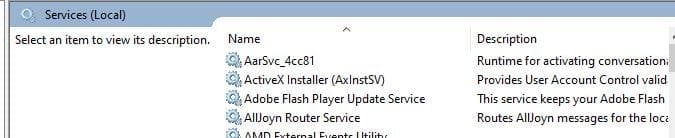
Windows Features and services.msc

WyattWhiteEagle

Member
Member
VIP
Local time
11:39 AM
Messages
166
The following services are plastered all over the internet as able to be enabled/disabled using the "Turn Windows Features on or off" in Control Panel. However, the places I've seen doesn't specify which feature controls which service.

Can anyone help?


------------------------------------------------------------------------------------

Service Name.............................................................Registry Name

Application Host Helper Service.....................................AppHostSvc
ASP.NET State Service.................................................aspnet_state
Client for NFS.............................................................NfsClnt
Fax...........................................................................Fax
IIS Admin Service.......................................................IISADMIN
Indexing Service.........................................................CISVC
LPD Service................................................................LPDSVC
Media Center Extender Service......................................Mcx2Svc
Message Queuing........................................................MSMQ
Message Queuing Triggers............................................MSMQTriggers
Microsoft FTP Service...................................................ftpsvc
Net.Msmq Listener Adapter...........................................NetMsmqActivator
Net.Pipe Listener Adapter.............................................NetPipeActivator
Net.Tcp Listener Adapter..............................................NetTcpActivator
Net.Tcp Port Sharing Service.........................................NetTcpPortSharing
RIP Listener................................................................iprip
Simple TCP/IP Services................................................simptcp
SNMP Service.............................................................SNMP
Telnet.......................................................................TlntSvr
Web Management Service............................................WMSVC
Windows Media Center Receiver Service.........................ehRecvr
Windows Media Center Scheduler Service.......................ehSched
Windows Media Player Network Sharing Service..............WMPNetworkSvc
Windows Presentation Foundation Font Cache 3.0.0.0......FontCache3.0.0.0
Windows Process Activation Service...............................WAS
Windows Search..........................................................WSearch
World Wide Web Publishing Service................................W3SVC

-------------------------------------------------------------------------------------
 
Last edited:

My Computer

Computer type
Laptop
Computer Manufacturer/Model Number
Acer Aspire E1-532
OS
Microsoft Windows 7 Home Premium 64-bit 7601 Multiprocessor Free Service Pack 1
CPU
Intel(R) Celeron(R) 2957U @ 1.40GHz
Motherboard
Acer EA50_HW
Memory
8.00 GB
Graphics Card(s)
Intel(R) HD Graphics
Sound Card
High Definition Audio Device
Screen Resolution
1366 x 768 x 32 bits (4294967296 colors) @ 59 Hz
Hard Drives
TOSHIBA MQ01ABD100 ATA Device
services.msc provides a description!

Capture.JPG
 

My Computer

Computer type
PC/Desktop
Computer Manufacturer/Model Number
HP Desktop & Compaq Laptop
OS
Win 10 x64, Linux Lite, Win 7 x64, BlackArch, & Kali
Hard Drives
Samsung 850 Pro 256Gb,
Hitachi HDD 1Tb,
Crucial MX SSD 250Gb
Segate 3Tb USB 3.0 Ext. Backup HDD
Internet Speed
150Mbps dn, 20Mbps up
Antivirus
Avast Free, Malwarebytes Anti-Exploit & Anti-Ransomware
Browser
Firefox, Chrome, Opera, & VPN
Double-click on the Service, then click on Dependency Tab of the Properties Window.

Not sure if that is what you mean -??

Each Windows Features could have several dependencies.
 

My Computer

Computer type
PC/Desktop
OS
Windows 7 x64, Vista x64, 8.1 smartphone
CPU
Intel E8400 65W 64-bit
Motherboard
Gigabyte EP45-UD3LR
Memory
DDR2 2 x 2GB, 1GB x 2
Graphics Card(s)
XFX Radeon HD5750
Sound Card
AMD High Definition Audio; Realtek High Definition Audio
Monitor(s) Displays
iiyama prolite X2377HDS
Screen Resolution
1920 x 1080
Hard Drives
500GB 7200 rpm Seagate ST3500413AS 16MB, 500GB 5400 rpm Toshiba MQ02ABF050H 32MB, 200GB 7200 rpm Seagate ST3200820AS 8MB, 2TB 7200 rpm Western Digital WD20EZRX 64MB
PSU
Enermax Liberty Modular
Case
Antec P193 Midi Tower
Keyboard
Mionix ZIBAL 60
Mouse
Razer USB 2.0 Diamondback Mouse or Huion Graphics Tablet
Browser
Internet Explorer, Lunascape, Firefox, Opera, Avast Safezone
... able to be enabled/disabled using the "Turn Windows Features on or off" in Control Panel.

Ok sorry for the seemingly vague question.

In Start>Control Panel>Programs and Features, there is "Turn Windows Features on or off" on the left pane.

If I put a check in everything, what all services will "appear" in services.msc?

If I uncheck everything, what all services will "disappear" from services.msc?
 

My Computer

Computer type
Laptop
Computer Manufacturer/Model Number
Acer Aspire E1-532
OS
Microsoft Windows 7 Home Premium 64-bit 7601 Multiprocessor Free Service Pack 1
CPU
Intel(R) Celeron(R) 2957U @ 1.40GHz
Motherboard
Acer EA50_HW
Memory
8.00 GB
Graphics Card(s)
Intel(R) HD Graphics
Sound Card
High Definition Audio Device
Screen Resolution
1366 x 768 x 32 bits (4294967296 colors) @ 59 Hz
Hard Drives
TOSHIBA MQ01ABD100 ATA Device
Windows features and services are completely separate things. It's simply not true that "features control services".

Features are built-in Windows programs and optional funtionalities that can be installed or uninstalled when needed.
Services are backgroud programs that run unattended independently from the user.

It's true that some features do use services, but that's just an implementation detail depending on what the feature is designed to do. But services also exist outside Windows features, both as built-in things and also as third party programs that happen to deploy services. Turning on and off features in any case isn't a proper way of controlling services.

What's your real intention about this?
 

My Computer

Computer type
Laptop
Computer Manufacturer/Model Number
Toshiba Sattelite A665-S6092
OS
Windows 7 Ultimate x64
CPU
Intel Core i7-740QM
Memory
8 GB DDR3
Graphics Card(s)
NVIDIA GeForce 330GT
Screen Resolution
1366x768
Hard Drives
Samsung 840 SSD 500GB
1TB USB3 external HD
Cooling
Coolermaster Notepal U3 notebook cooling pad
Internet Speed
3mbps ASDL
Antivirus
ClamWin 0.98.7
Browser
Opera 12.17 x86 (main), Firefox 38 (sec), IE11 (last resort)
What's your real intention about this?

My "real intention" is simply to just have that knowledge. There is no "hidden agenda or motive" or anything like that.

As for the rest of it, maybe a little "proof" behind my reasons for asking will help reveal my so-called "real intention"...

From SevenForums...

Services - Start or Disable

So now that we know the "How", here is a good guide IMO as to the "What" services to manipulate. The guy goes by the handle Black Viper, and he has shared the fruits of his labors, we just can confirm further as to its applicability.

The link is Windows 7 Service Configurations by Black Viper.

As I mentioned before on another site, my RAM usage went down by 100 MB after the "Tweaks" provided. Perhaps -100 MB is a good mod or is it negligible who can say? But anyway my great THANKS to the author.


Thank you Pogi, but it was already included in the yellow TIP box at the top. ;)

Thank you for sharing and confirming your results with Black Viper's suggestions though. :)

From Black Viper's page...

Black Viper's Windows 7 Service Pack 1 Service Configurations | Black Viper | www.blackviper.com

Black Viper said:
Two ** (asterisks) indicates you can add or remove this service by:

Head to Start
Select Control Panel
Select Programs
Select Programs and Features
Select Turn Windows Features on or off

So any "real intention" is to simply know the answers to these questions....

Ok sorry for the seemingly vague question.

In Start>Control Panel>Programs and Features, there is "Turn Windows Features on or off" on the left pane.

If I put a check in everything, which services will "appear" in services.msc?

If I uncheck everything, which services will "disappear" from services.msc?

Which feature(s) is linked to which service(s) in services.msc?

So far, the post that seems to guide someone closest to my answers, so far, is...

services.msc provides a description!
 
Last edited:

My Computer

Computer type
Laptop
Computer Manufacturer/Model Number
Acer Aspire E1-532
OS
Microsoft Windows 7 Home Premium 64-bit 7601 Multiprocessor Free Service Pack 1
CPU
Intel(R) Celeron(R) 2957U @ 1.40GHz
Motherboard
Acer EA50_HW
Memory
8.00 GB
Graphics Card(s)
Intel(R) HD Graphics
Sound Card
High Definition Audio Device
Screen Resolution
1366 x 768 x 32 bits (4294967296 colors) @ 59 Hz
Hard Drives
TOSHIBA MQ01ABD100 ATA Device
To become knowledgeable at least, if not an expert about "Windows Services" it would be good to read the Black Viper's website.

MS, by default, turns ON every service that any person might ever need, or just want. That's ridiculous!
It just overloads the PC system with BS!


After reading what Black Viper had to say about the Services in Windows XX, I used information on his web site to write a Batch File that could disable services that I did not want starting and running every time I boot up my PC.


So, every time I install any version of Windows, I run the batch file for that ver. of windows, and disable all the services that I won't be needing. It saves lots of space in RAM memory and makes my PC run much better.


Here's just a part of that "Services Stop.bat" file:

echo off
cls
rem This batch file will Stop selected Services and set them to Disabled.
rem The following are a few examples of task name vs actual program name.
rem Schedule = Task Scheduler
rem Themes = Themes
rem W32Time = Windows Time
rem SysMain = Superfetch
rem WinDefend = Windows Defender
rem
sc config Appinfo start= demand
sc stop Appinfo

sc config ALG start= demand
sc stop ALG

sc config AppMgmt start= demand
sc stop AppMgmt

sc config wbengine start= demand
sc stop wbengine

sc config CertPropSvc start= disabled
sc stop CertPropSvc

sc config Keylso start= demand
sc stop Keylso

sc config COMSysApp start= demand
sc stop COMSysApp

sc config DFSR start= disabled
sc stop DFSR

sc config W32Time start= disabled
sc stop W32Time

sc config DPS start= disabled
sc stop DPS

sc config TrkWks start= disabled
sc stop TrkWks


Good Luck Mate!
TM :cool:
 

My Computer

Computer type
PC/Desktop
Computer Manufacturer/Model Number
Various
OS
Win 7 Pro, SP1, x86, Win-11/Pro/64
CPU
AMD
Motherboard
Various
Memory
8GB Crucial
Graphics Card(s)
Various
Sound Card
OnBoard
Monitor(s) Displays
Acer 21.5"
Hard Drives
Crucial SSD, 500 GB
PSU
OEM
Case
SFF Slim Line Case
Cooling
OEM
Keyboard
eMachines
Mouse
Logitech Wireless
Internet Speed
varies
Antivirus
Windows Defender/Super Anti-Spyware
Browser
Firefox
Do you stop the 5 "rem" ones? I understand the rest.
 

My Computer

Computer type
PC/Desktop
Computer Manufacturer/Model Number
HP p6-2020t
OS
Win 7 Ult 64-bit
CPU
G620 2.6GHZ Pentium R
Memory
6 GB
Monitor(s) Displays
25" HPLV2311
Screen Resolution
1920 x 1200
Hard Drives
1 SATA, 1 exterior SATA
Case
HP
Cooling
PSU
Antivirus
Glasswire
Browser
Waterfox; Firefox; Chrome for work
Other Info
Firewall--Glasswire
Similar specs in Gateway DX4200
Verizon FIOS Wired network

1 other Win7 computer-- has SSD
Back
Top