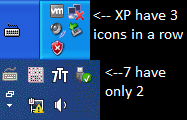
Hello I want to have 3 icons in a column, and get a similar effect to the Windows XP. Unfortunately in Windows 7 there is only 2 icons in a column.
Can I change it in registry, or in some program?
Go to Control Panel>Taskbar and Start Menu> Customize. Choose just the 6 icons you want (You might have to reboot) and tell it to hide the others. Then pull on the taskbar till it's in a 3x2 array. The double arrow on the left will hide the others in a box.
My Computer
At a glance
Win 7 Ult 64-bitG620 2.6GHZ Pentium R6 GB
Computer type
PC/Desktop
Computer Manufacturer/Model Number
HP p6-2020t
OS
Win 7 Ult 64-bit
CPU
G620 2.6GHZ Pentium R
Memory
6 GB
Monitor(s) Displays
25" HPLV2311
Screen Resolution
1920 x 1200
Hard Drives
1 SATA, 1 exterior SATA
Case
HP
Cooling
PSU
Antivirus
Glasswire
Browser
Waterfox; Firefox; Chrome for work
Other Info
Firewall--Glasswire
Similar specs in Gateway DX4200
Verizon FIOS Wired network