Cooling for QuadCore AMD FX-4350

fahl

New member
Member
Local time
9:16 AM
Messages
54
Location
Essex UK
Motherboard Name Gigabyte GA-78LMT-USB3 v4
CPU Type QuadCore AMD FX-4350, 4219 MHz (21 x 201)

Can anyone suggest reasonable priced Cooling Fan for above.
Must be quiet as existing one sounds like jet fighter.
Thanks
 

My Computer My Computer

Computer type
PC/Desktop
Computer Manufacturer/Model Number
custom build
OS
Windows 7 Ultimate x64
CPU
QuadCore AMD A8-7650K, 3800 MHz (38 x 100)
Motherboard
Asus A88XM-A
Memory
16 gb ddr3
Graphics Card(s)
AMD Radeon R7 Series
Hard Drives
SanDisk SDSSDHP128G SATA Disk Device
Antivirus
mcafee
Browser
Firefox
A lot of heat sinks have detachable fans, allowing user to replace fan on the heat sink. Usual size is 120mm - 140mm. Expect fan noise to be around 20 - 30 dB. If you don't have a HSF with detachable fan, then you'd have to replace complete HSF (Heat Sink Fan). Usually, the HSF comes with a kit full of mounting brackets for different CPU sockets. You should find plenty of modern HSF with AM3+ bracket still available, although stocks are low because of COVID-19 lockdown.
 

My Computer My Computer

Computer type
PC/Desktop
OS
Windows 7 x64, Vista x64, 8.1 smartphone
CPU
Intel E8400 65W 64-bit
Motherboard
Gigabyte EP45-UD3LR
Memory
DDR2 2 x 2GB, 1GB x 2
Graphics Card(s)
XFX Radeon HD5750
Sound Card
AMD High Definition Audio; Realtek High Definition Audio
Monitor(s) Displays
iiyama prolite X2377HDS
Screen Resolution
1920 x 1080
Hard Drives
500GB 7200 rpm Seagate ST3500413AS 16MB, 500GB 5400 rpm Toshiba MQ02ABF050H 32MB, 200GB 7200 rpm Seagate ST3200820AS 8MB, 2TB 7200 rpm Western Digital WD20EZRX 64MB
PSU
Enermax Liberty Modular
Case
Antec P193 Midi Tower
Keyboard
Mionix ZIBAL 60
Mouse
Razer USB 2.0 Diamondback Mouse or Huion Graphics Tablet
Browser
Internet Explorer, Lunascape, Firefox, Opera, Avast Safezone

My Computers My Computers

System One System Two

  • Computer type
    PC/Desktop
    Computer Manufacturer/Model Number
    custom build
    OS
    Windows 7 HP 64
    CPU
    i5 6600K - 800MHz to 4200MHz
    Motherboard
    GA-Z170-HD3P
    Memory
    4+4G GSkill DDR4 3000
    Graphics Card(s)
    IG - Intel 530
    Monitor(s) Displays
    Samsung 226BW
    Screen Resolution
    1680x1050
    Hard Drives
    (1) -1 SM951 – 128GB M.2 AHCI PCIe SSD drive for Windows 7 and Lubuntu
    (2) -1 WD SATA 3 - 1T for Data
    (3) -1 WD SATA 3 - 1T for backup
    PSU
    Thermaltake 450W TR2 gold
    Keyboard
    Old and good Chicony mechanical keyboard
    Mouse
    Logitech mX performance - 9 buttons (had to disable some)
    Internet Speed
    500Mb/s
    Browser
    Firefox 64
    Other Info
    TinyWall firewall
  • Computer type
    Laptop
    System Manufacturer/Model Number
    Asus Q550LF
    OS
    Windows 7 Pro
    CPU
    i7-4500U 800MHz to 3.0GHz
    Motherboard
    Asus Q550LF
    Memory
    (4+4)G DDR3 1600
    Graphics Card(s)
    IG intel 4400 + NVIDIA GeForce GT 745M
    Sound Card
    Realtek
    Monitor(s) Displays
    LG Display LP156WF4-SPH1
    Screen Resolution
    1920 x 1080
    Hard Drives
    BX500 120G SSD for Windows and programs +
    1T HDD for data
    Internet Speed
    500 Mb/s
    Browser
    Firefox
    Other Info
    TinyWall firewall
Motherboard Name Gigabyte GA-78LMT-USB3 v4
CPU Type QuadCore AMD FX-4350, 4219 MHz (21 x 201)

Can anyone suggest reasonable priced Cooling Fan for above.
Must be quiet as existing one sounds like jet fighter.
Thanks


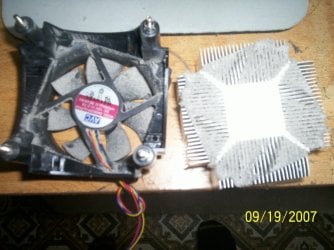
A Jet Fighter, eh? They'll all do that when they are DIRTY and cannot cool the CPU correctly.
Once a year, I take my own CPU cooling heat sink/fan assembly out to the kitchen sink and scrub it with soap and hot water. That's for the heat sink, as for the fan I carefully clean the blades, one at a time, so as to not break it.


AS a computer tech, I've had to remove many cpu heat sinks and thoroughly WASH the heat sink fins.
You must also replace the Heat Sink Grease after cleaning the heatsink.


Then with a clean and re-greased heat sink, the fan will run slower and not sound like a Jet Plane.
I just attached two pic's. One of a dirty heatsink, that was causing the fan to run at max speed,
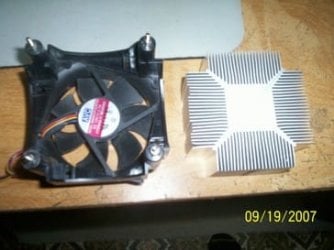
and the second one of the same fan and heatsink after cleaning.


Good Luck,
TechnoMage :cool:
 

Attachments

  • DirtyFan&HeatSink.jpg
    DirtyFan&HeatSink.jpg
    197.6 KB · Views: 0
  • After Cleaning.jpg
    After Cleaning.jpg
    25.2 KB · Views: 2

My Computer My Computer

Computer type
PC/Desktop
Computer Manufacturer/Model Number
Various
OS
Win 7 Pro, SP1, x86, Win-11/Pro/64
CPU
AMD
Motherboard
Various
Memory
8GB Crucial
Graphics Card(s)
Various
Sound Card
OnBoard
Monitor(s) Displays
Acer 21.5"
Hard Drives
Crucial SSD, 500 GB
PSU
OEM
Case
SFF Slim Line Case
Cooling
OEM
Keyboard
eMachines
Mouse
Logitech Wireless
Internet Speed
varies
Antivirus
Windows Defender/Super Anti-Spyware
Browser
Firefox
Back
Top