Hi, I think this history might be helpful to solving this.
Maybe 2 or 3 years ago I bought at D-Link ADSL2+ Modem model DSL-520B.
At the same time I bought a D-Link Wireless N300 Rounter (however I use Ethernet cables to connect)
I have two desktops running off of it as well as a laptop (all using cables).
So I got it set up.
I even used OBS studio to create an mp4 video of all the things I had to do thinking this would help speed this up in the future. So for sure I was getting into the modem using 192.168.1.1
So I started having issues with loosing internet connection.
I finally switched the Ethernet cable between the router and the modem.
That seemed to fixed it.
However it started to happen again so I decided to go out and buy the exact same modem again.
However before I installed the new modem I discovered that just by unplugging and re-plugging the cable it once again fixed it.
So the new modem has been sitting in the box all sealed up for a few months now.
My internet start to act up again and I started unplugging and re-plugging the cable in every time and that seemed to work.
But now it seems to be getting worse (loosing connection more frequently and when I am trying to trade the stock market so not good) so I decided to try the new modem.
So I got the video I created, watched it and entered 192.168.1.1 as I had done before.
I get a time out now.
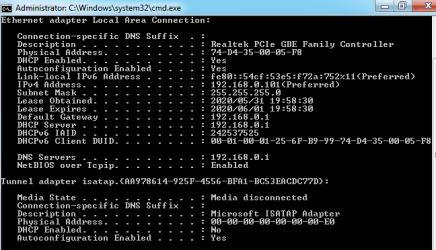
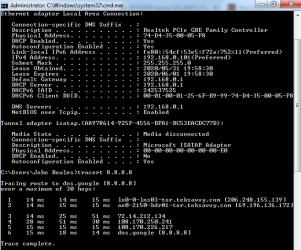
So I go to google and youtube and eventually learn to enter IPCONFIG to get my router's private IP address.
That address is 192.168.0.1 and I was reading that it needs to be 192.168.1.1 in order for me to get at the new modem.
So currently (as of now) the old modem seems to be working (watching youtube videos no problem).
But I need it to be more reliable and I want to try the new modem.
I am a bit nervous about this since I read that the router assigned the same IP address to the three computers. If this is true why would it all of a sudden change the assignment from 192.168.1.1 to 192.168.0.1? I have not touched the router since I bought it other than unplugging the power maybe three times.
Any thoughts?
I guess I should go to the router manual but I am betting it won't say that sometimes it changes the IP it assigns.
Thanks,
John
Maybe 2 or 3 years ago I bought at D-Link ADSL2+ Modem model DSL-520B.
At the same time I bought a D-Link Wireless N300 Rounter (however I use Ethernet cables to connect)
I have two desktops running off of it as well as a laptop (all using cables).
So I got it set up.
I even used OBS studio to create an mp4 video of all the things I had to do thinking this would help speed this up in the future. So for sure I was getting into the modem using 192.168.1.1
So I started having issues with loosing internet connection.
I finally switched the Ethernet cable between the router and the modem.
That seemed to fixed it.
However it started to happen again so I decided to go out and buy the exact same modem again.
However before I installed the new modem I discovered that just by unplugging and re-plugging the cable it once again fixed it.
So the new modem has been sitting in the box all sealed up for a few months now.
My internet start to act up again and I started unplugging and re-plugging the cable in every time and that seemed to work.
But now it seems to be getting worse (loosing connection more frequently and when I am trying to trade the stock market so not good) so I decided to try the new modem.
So I got the video I created, watched it and entered 192.168.1.1 as I had done before.
I get a time out now.
So I go to google and youtube and eventually learn to enter IPCONFIG to get my router's private IP address.
That address is 192.168.0.1 and I was reading that it needs to be 192.168.1.1 in order for me to get at the new modem.
So currently (as of now) the old modem seems to be working (watching youtube videos no problem).
But I need it to be more reliable and I want to try the new modem.
I am a bit nervous about this since I read that the router assigned the same IP address to the three computers. If this is true why would it all of a sudden change the assignment from 192.168.1.1 to 192.168.0.1? I have not touched the router since I bought it other than unplugging the power maybe three times.
Any thoughts?
I guess I should go to the router manual but I am betting it won't say that sometimes it changes the IP it assigns.
Thanks,
John
My Computer
At a glance
- Computer type
- PC/Desktop
- Computer Manufacturer/Model Number
- LG
- OS
- Windows 7 Professional 64 bit
- CPU
- Intel(R) Core(TM) I5-4430 [email protected]
- Memory
- 8 Gig (may increase)
- Hard Drives
- solid state drive and a regular drive
- Antivirus
- Avast
- Browser
- Chrome

 I also have an MS-Access reminder database I wrote like 25 years ago (I am 65 and have been programming since age 26). This time I created a reminder I have the video available but I included preparatory notes to not make this mistake again. So many things to remember