Take Ownership Shortcut

Add "Take Ownership" to Context Menu of Files, Folders, and Drives in Windows


   Information
This tutorial will show you how to add Take Ownership to the context menu of all files, folders, and drives for all users in Windows.

This will allow you to be able to instantly take ownership of a file, folder (and all contents), or drive (and all contents) by changing the owner to the current user and grant the Owner_Rights SID (current owner) full access permission.

You must be an administrator to be able to add, remove, and use the "Take Ownership" context menu.

   Note
Application files (ex: EXE, CMD, MSI) will continue to have Run as administrator instead of Take Ownership in their context menu.


When you right click or press and hold on a file, folder, or drive, and click/tap on Take Ownership, you may be prompted by UAC for permission to do so first.

If a user is logged in as an administrator, then the user would just click/tap on Yes to approve and take ownership. The owner of the file, folder, or drive would be changed to the current administrator user account. Permissions would be set to allow the Owner_Rights SID (current owner) full control of the file, folder, or drive.

If a user is logged in as a standard user, then the user would need to enter a selected administrator's password to approve and take ownership. The owner of the file, folder, or drive would be changed to the selected administrator account, and not the standard user. Permissions would be set to allow the Owner_Rights SID (current owner) full control of the file, folder, or drive.


The Take Ownership context menu will not be available when you right click on the C: drive, C:\Program Files folder, C:\Program Files (x86) folder, C:\ProgramData folder, C:\Users folder, and C:\Windows folder. This was done because taking ownership of these system folders can make Windows unstable since it would also take ownership of all the folder's content at the same time.

You will still be able to use the Take Ownership context menu of files inside the folder locations above.

If you would like to have a custom location(s) of your own to not have the context menu, then please feel free to post a request in this tutorial thread. I'll be happy to post back with a custom .reg file for it.

   Warning
This context menu will only work with English Windows installations.

If you have a different language, then please post a reply with what language you have instead. I'll be happy to post back a translated version for you.


EXAMPLE: Take Ownership in Context Menu
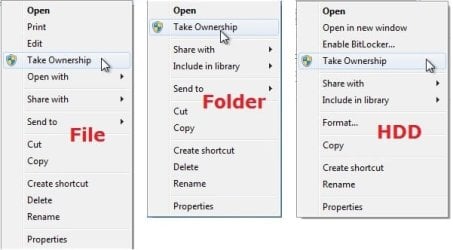
example.jpg


Here's How:

1. Do step 2, 3, or 4 below for what you would like to do.


2. To Add "Take Ownership" to Context Menu

   Note
Application files (ex: EXE, CMD, MSI) will still have Run as administrator instead of Take Ownership in the context menu when you use this step.

A) Click/tap on the Download button below to download the file below, and go to step 5 below.

Add_Take_Ownership_to_context_menu


Download


3. To Add "Take Ownership" with Pause to Context Menu

   Note
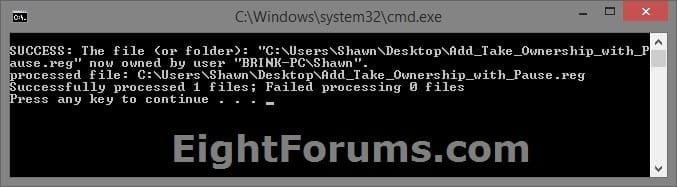
This option pauses the command when you use the "Take Ownership" context menu to be able to see the command results. This can be handy to verify setting ownership and permissions was successful or not.

Application files (ex: EXE, CMD, MSI) will still have Run as administrator instead of Take Ownership in the context menu when you use this step.


Take_Ownership_Pause.jpg


A) Click/tap on the Download button below to download the file below, and go to step 5 below.

Add_Take_Ownership_with_Pause_to_context_menu.reg


Download


4. To Remove "Take Ownership" from Context Menu

   Note
This is the default setting, and will also restore the default Run as administrator for .exe files.


A) Click/tap on the Download button below to download the file below, and go to step 5 below.

Remove_Take_Ownership_from_context_menu.reg


Download


5. Save the .reg file to your Desktop.

6. Double click on the downloaded .reg file to merge it.

7. If prompted, click on Run, Yes (UAC), Yes, and OK to approve the merge.

8. When finished, you can delete the downloaded .reg file if you like.


That's it,
Shawn


Attachments

Last edited:
added successfully, thanks Mr. z
 

My Computer My Computer

At a glance

Windows 7 Ultimate 32 bits sp1
Computer type
PC/Desktop
Computer Manufacturer/Model Number
HP Compaq DC5100 SFF
OS
Windows 7 Ultimate 32 bits sp1
Antivirus
Panda
Browser
IE 11, Chrome, and Firefox
Hi, brink, very useful reg fix.But , can i get the context menu while dealing with registry folders, or say key.
I am unable to tweak registry in the preference folder of windows media player.
there was a tutorial in the net, to tweak to show the save play lilst window bigger.
It does allow me to create a new dword key, but when i try to name the key vallue, it just stays as New key without allowing me to rename the key.
when i went to the properties, i saw there was an item RESTRICted.
i changed the permission, and still i could not rename the key value name and value of the key.
I expect your reply
 

My Computer My Computer

At a glance

Microsoft Windows 7 Ultimate 64-bit 7601 Mult...Intel(R) Core(TM)2 Duo CPU E7200 @ 2.53GHz4.00 GBNVIDIA GeForce 210
Computer type
PC/Desktop
Computer Manufacturer/Model Number
custom build
OS
Microsoft Windows 7 Ultimate 64-bit 7601 Multiprocessor Free Service Pack 1
CPU
Intel(R) Core(TM)2 Duo CPU E7200 @ 2.53GHz
Motherboard
To be filled by O.E.M. To be filled by O.E.M.
Memory
4.00 GB
Graphics Card(s)
NVIDIA GeForce 210
Sound Card
(1) NVIDIA High Definition Audio (2) Realtek High Definiti
Screen Resolution
1920 x 1080 x 32 bits (4294967296 colors) @ 60 Hz
Hard Drives
ST3500312CS ATA Device
Hi, brink, very useful reg fix.But , can i get the context menu while dealing with registry folders, or say key.
I am unable to tweak registry in the preference folder of windows media player.
there was a tutorial in the net, to tweak to show the save play lilst window bigger.
It does allow me to create a new dword key, but when i try to name the key vallue, it just stays as New key without allowing me to rename the key.
when i went to the properties, i saw there was an item RESTRICted.
i changed the permission, and still i could not rename the key value name and value of the key.
I expect your reply

Hello, :-)

I'm afraid that I haven't found a way to customize the context menu of Registry Editor for a "Take Ownership" item.

Just to verify, did you take ownership of the key first, then changed permissions to allow your account or administrators full control?

The tutorials below are still the same in Windows 7.

Change Owner of File, Folder, Drive, or Registry Key in Windows 10 | Tutorials

Change Permissions of Objects for Users and Groups in Windows 10 | Tutorials
 

My Computer My Computer

At a glance

64-bit Windows 11 Pro for WorkstationsIntel i7-8700K OC'd to 5 GHz64 GB (4x16GB) G.SKILL TridentZ RGB DDR4 3600...ASUS ROG-STRIX-GTX1080TI-O11G-GAMING
Computer type
PC/Desktop
Computer Manufacturer/Model Number
Self built custom
OS
64-bit Windows 11 Pro for Workstations
CPU
Intel i7-8700K OC'd to 5 GHz
Motherboard
ASUS ROG Maximus XI Formula Z390
Memory
64 GB (4x16GB) G.SKILL TridentZ RGB DDR4 3600 MHz
Graphics Card(s)
ASUS ROG-STRIX-GTX1080TI-O11G-GAMING
Sound Card
Integrated
Monitor(s) Displays
2 x Samsung Odyssey G7 27"
Screen Resolution
2560x1440
Hard Drives
1TB Samsung 990 PRO M.2,
4TB Samsung 990 PRO PRO M.2,
TerraMaster F8 SSD Plus NAS
PSU
Seasonic Prime Titanium 850W
Case
Thermaltake Core P3
Cooling
Corsair Hydro H115i
Keyboard
Logitech wireless K800
Mouse
Logitech MX Master 4
Internet Speed
2 Gb/s Download and 100 Mb/s Upload
Antivirus
Malwarebyte Anti-Malware Premium
Browser
Google Chrome
Other Info
Logitech Z625 speaker system,
Logitech BRIO 4K Pro webcam,
HP Color LaserJet Pro MFP M477fdn,
APC SMART-UPS RT 1000 XL - SURT1000XLI,
Galaxy S23 Plus phone
Hi, brink, very useful reg fix.But , can i get the context menu while dealing with registry folders, or say key.
I am unable to tweak registry in the preference folder of windows media player.
there was a tutorial in the net, to tweak to show the save play lilst window bigger.
It does allow me to create a new dword key, but when i try to name the key vallue, it just stays as New key without allowing me to rename the key.
when i went to the properties, i saw there was an item RESTRICted.
i changed the permission, and still i could not rename the key value name and value of the key.
I expect your reply


If I'm reading your post correctly, you are wanting to change or add a value to the registry for Windows Media Player and it won't let you due to permissions. I think I know exactly how this can be done as I was able to delete a protected key myself several years ago.

What you need is a little program called Run As System. This neat little, but very effective program will run anything as a system user providing you chose the correct path. In your case you'll want to run the registry as a system user and when you do that you should be able to edit/modify keys all you want.

Run As System - AprelTech


In the box of Run As System, you'll open the registry path which is:
Code:
C:\Windows\System32\regedt32.exe
Then hit Run!

Now the registry will open under the system level permission. You can even run command prompt as a system account.

But before you go on with messing around with the registry, especially as a very powerful system account, you'll want to backup the registry to a thumb drive or what ever and/or create a system restore point.
 

My Computer My Computer

At a glance

Windows 7 Ultimate x64
Computer type
PC/Desktop
OS
Windows 7 Ultimate x64
Something else I should mention here. If you're wanting to delete a stubborn registry key with the program Run As System or modify a key, then the reason why it may not want to be deleted or modified in the first place without Run As System was because it may have been previously used. To find out if a key was previously used or not try the program RegScanner. https://www.nirsoft.net/utils/regscanner.html
 

My Computer My Computer

At a glance

Windows 7 Ultimate x64
Computer type
PC/Desktop
OS
Windows 7 Ultimate x64
I just run Regedit as Admin - allows you to change most if not all entries, don't forget to backup the registry or at least the branch you intend to change before you do anything

You can also use this built in option to run Windows explorer (the File Manager), elevated to sort out messed up permissions [file name is explorer.exe]
 

My Computers My Computers

  • At a glance

    Windows 11 Pro x64 [Latest Release and Releas...Ryzen 9 5950X, 3.8 - 5.2 MHz64GB [2 x 32GB] DDR4 3200MHz4GB NVIDIA GEFORCE GTX 1650 Ti
    Computer type
    PC/Desktop
    Computer Manufacturer/Model Number
    ChillBlast - Custom to my design
    OS
    Windows 11 Pro x64 [Latest Release and Release Preview]
    CPU
    Ryzen 9 5950X, 3.8 - 5.2 MHz
    Motherboard
    Asus Prime X570-Pro
    Memory
    64GB [2 x 32GB] DDR4 3200MHz
    Graphics Card(s)
    4GB NVIDIA GEFORCE GTX 1650 Ti
    Sound Card
    On-board SPDIF to 5.1 System + HDMI [5.1 system]
    Monitor(s) Displays
    32" UHD 32 Bit HDR Monitor + 43" UHD 4K 32Bit HDR TV
    Screen Resolution
    2 x 3840 x 2160 @60Hz
    Hard Drives
    1TB M2 SSD OS, 500GB Fast Access SSD, 2 x 8TB Data + Various Externals from 1TB to 4TB, 10TB NAS
    PSU
    NZXT C750 80 PLUS Gold 750W Modular PSU
    Case
    Workstation Case [Matt Black]
    Cooling
    NZXT Kraken X63 280mm CPU Cooler +2x Quiet Case fans
    Keyboard
    Logitech Wireless MX Keys & K400 + others
    Mouse
    Logitech Wireless MX Master 3S
    Internet Speed
    920 MB Down 50 MB Up
    Antivirus
    BitDefender Total Security Pro
    Browser
    Chrome (always run latest Non-Beta)
    Other Info
    Also run ...
    Laptop - Quad 8GB - Windows 10 Pro x64
    Nexus 7 Android tablet x2
    Samsung 10.2" tablet
    Blackview TAB 8 4G Android Tablet c/w Keyboard
    Wacom Intuos Pro Medium Pen Pad
    Wacom Intuos Pro Small Pen Pad
    Wacom Expresskeys Remote
    Loopdeck+ Graphics Controller
    Shuttle Pro v2 Control
  • At a glance

    Windows 11 Pro x64 Latest RPIntel I7 10750H 5.0GHz32GB [2x16GB] DDR4 2933 MHznVidia GTX1650Ti 4 GB GDDR6
    Computer type
    Laptop
    System Manufacturer/Model Number
    Dell XPS 17 10750H
    OS
    Windows 11 Pro x64 Latest RP
    CPU
    Intel I7 10750H 5.0GHz
    Motherboard
    Dell XPS
    Memory
    32GB [2x16GB] DDR4 2933 MHz
    Graphics Card(s)
    nVidia GTX1650Ti 4 GB GDDR6
    Sound Card
    Stock [Realtek] 4 Speaker
    Monitor(s) Displays
    17" IPS UHD+ Infinity Edge Touchscreen
    Screen Resolution
    3840 x 2400
    Hard Drives
    2TB M2 NVMe, 4TB External + various 500GB & 1TB External NVMe (also have access to spinner HDD from
    PSU
    Stock
    Case
    Stock XPS Aluminium & Carbon Fibre
    Cooling
    Stock - Active Fan Control
    Keyboard
    Backlit + Various Logitech
    Mouse
    Stock Track Pad + Logitech MX Trackball
    Internet Speed
    72 MB Down 18MB Up
    Browser
    Chrome
    Other Info
    Also run ...
    Laptop - Quad 8GB - Windows 10 Pro x64
    Nexus 7 Android tablet x2
    10.2" tablet
    Sony Z3 Android Smartphone
    Wacom Intuos Pro Medium Pen Pad
    Wacom Intuos Pro Small Pen Pad
    Wacom Expresskeys Remote
    Loopdeck+ Graphics Controller
    Shuttle Pro v2 Control Pad
    10TB NAS
Hi, thanks for the tips. but this did not work for me.
i have 64 bit, and i checked the regedit32.exe sitting there.
i typed the path and run and tried to change, but nothing happens. Crusor was allowed in the new key , but that is all.
i am not able to rename the valule to my desired name
Instead of dword32 , i used dword 64. Am i correct
 

My Computer My Computer

At a glance

Microsoft Windows 7 Ultimate 64-bit 7601 Mult...Intel(R) Core(TM)2 Duo CPU E7200 @ 2.53GHz4.00 GBNVIDIA GeForce 210
Computer type
PC/Desktop
Computer Manufacturer/Model Number
custom build
OS
Microsoft Windows 7 Ultimate 64-bit 7601 Multiprocessor Free Service Pack 1
CPU
Intel(R) Core(TM)2 Duo CPU E7200 @ 2.53GHz
Motherboard
To be filled by O.E.M. To be filled by O.E.M.
Memory
4.00 GB
Graphics Card(s)
NVIDIA GeForce 210
Sound Card
(1) NVIDIA High Definition Audio (2) Realtek High Definiti
Screen Resolution
1920 x 1080 x 32 bits (4294967296 colors) @ 60 Hz
Hard Drives
ST3500312CS ATA Device
Dword32 is not data that you need to change it is the "format" of the data, whilst modern Windows are mostly 64 bit the registry still uses mostly 32 bit words. There should be an entry box to the right that allows you to enter the data

If anyone want to see the a fuller explanation of Dword32 and the 64 Bit equivalent the QWord you scan take a look here ... https://www.zubairalexander.com/blo...G-DWORD value stores,QWORD then you use QWORD. though it's a bit deep for most, including me ;)
 

My Computers My Computers

  • At a glance

    Windows 11 Pro x64 [Latest Release and Releas...Ryzen 9 5950X, 3.8 - 5.2 MHz64GB [2 x 32GB] DDR4 3200MHz4GB NVIDIA GEFORCE GTX 1650 Ti
    Computer type
    PC/Desktop
    Computer Manufacturer/Model Number
    ChillBlast - Custom to my design
    OS
    Windows 11 Pro x64 [Latest Release and Release Preview]
    CPU
    Ryzen 9 5950X, 3.8 - 5.2 MHz
    Motherboard
    Asus Prime X570-Pro
    Memory
    64GB [2 x 32GB] DDR4 3200MHz
    Graphics Card(s)
    4GB NVIDIA GEFORCE GTX 1650 Ti
    Sound Card
    On-board SPDIF to 5.1 System + HDMI [5.1 system]
    Monitor(s) Displays
    32" UHD 32 Bit HDR Monitor + 43" UHD 4K 32Bit HDR TV
    Screen Resolution
    2 x 3840 x 2160 @60Hz
    Hard Drives
    1TB M2 SSD OS, 500GB Fast Access SSD, 2 x 8TB Data + Various Externals from 1TB to 4TB, 10TB NAS
    PSU
    NZXT C750 80 PLUS Gold 750W Modular PSU
    Case
    Workstation Case [Matt Black]
    Cooling
    NZXT Kraken X63 280mm CPU Cooler +2x Quiet Case fans
    Keyboard
    Logitech Wireless MX Keys & K400 + others
    Mouse
    Logitech Wireless MX Master 3S
    Internet Speed
    920 MB Down 50 MB Up
    Antivirus
    BitDefender Total Security Pro
    Browser
    Chrome (always run latest Non-Beta)
    Other Info
    Also run ...
    Laptop - Quad 8GB - Windows 10 Pro x64
    Nexus 7 Android tablet x2
    Samsung 10.2" tablet
    Blackview TAB 8 4G Android Tablet c/w Keyboard
    Wacom Intuos Pro Medium Pen Pad
    Wacom Intuos Pro Small Pen Pad
    Wacom Expresskeys Remote
    Loopdeck+ Graphics Controller
    Shuttle Pro v2 Control
  • At a glance

    Windows 11 Pro x64 Latest RPIntel I7 10750H 5.0GHz32GB [2x16GB] DDR4 2933 MHznVidia GTX1650Ti 4 GB GDDR6
    Computer type
    Laptop
    System Manufacturer/Model Number
    Dell XPS 17 10750H
    OS
    Windows 11 Pro x64 Latest RP
    CPU
    Intel I7 10750H 5.0GHz
    Motherboard
    Dell XPS
    Memory
    32GB [2x16GB] DDR4 2933 MHz
    Graphics Card(s)
    nVidia GTX1650Ti 4 GB GDDR6
    Sound Card
    Stock [Realtek] 4 Speaker
    Monitor(s) Displays
    17" IPS UHD+ Infinity Edge Touchscreen
    Screen Resolution
    3840 x 2400
    Hard Drives
    2TB M2 NVMe, 4TB External + various 500GB & 1TB External NVMe (also have access to spinner HDD from
    PSU
    Stock
    Case
    Stock XPS Aluminium & Carbon Fibre
    Cooling
    Stock - Active Fan Control
    Keyboard
    Backlit + Various Logitech
    Mouse
    Stock Track Pad + Logitech MX Trackball
    Internet Speed
    72 MB Down 18MB Up
    Browser
    Chrome
    Other Info
    Also run ...
    Laptop - Quad 8GB - Windows 10 Pro x64
    Nexus 7 Android tablet x2
    10.2" tablet
    Sony Z3 Android Smartphone
    Wacom Intuos Pro Medium Pen Pad
    Wacom Intuos Pro Small Pen Pad
    Wacom Expresskeys Remote
    Loopdeck+ Graphics Controller
    Shuttle Pro v2 Control Pad
    10TB NAS
Hi, barman,
Ok, but give me workable solution.
i tried that also.
But, it allows me just to create a new key, but would not allow to name the key.
mine is the admin account, so there should not be any problem in Taking ownership.
but , just it allows the cursor, but would not delete or do anything in the created new key.
what would have been locking me from proceeding further.
if i activate the admin account thro cmd, then it asks for password and i could not log on to that account.
how to login to admin account to have more permission to edit the registry
 

My Computer My Computer

At a glance

Microsoft Windows 7 Ultimate 64-bit 7601 Mult...Intel(R) Core(TM)2 Duo CPU E7200 @ 2.53GHz4.00 GBNVIDIA GeForce 210
Computer type
PC/Desktop
Computer Manufacturer/Model Number
custom build
OS
Microsoft Windows 7 Ultimate 64-bit 7601 Multiprocessor Free Service Pack 1
CPU
Intel(R) Core(TM)2 Duo CPU E7200 @ 2.53GHz
Motherboard
To be filled by O.E.M. To be filled by O.E.M.
Memory
4.00 GB
Graphics Card(s)
NVIDIA GeForce 210
Sound Card
(1) NVIDIA High Definition Audio (2) Realtek High Definiti
Screen Resolution
1920 x 1080 x 32 bits (4294967296 colors) @ 60 Hz
Hard Drives
ST3500312CS ATA Device
Hi, simiplot
i downloaded the nirsoft software reg scanner, but how to use it if the key is previously used or not.
 

My Computer My Computer

At a glance

Microsoft Windows 7 Ultimate 64-bit 7601 Mult...Intel(R) Core(TM)2 Duo CPU E7200 @ 2.53GHz4.00 GBNVIDIA GeForce 210
Computer type
PC/Desktop
Computer Manufacturer/Model Number
custom build
OS
Microsoft Windows 7 Ultimate 64-bit 7601 Multiprocessor Free Service Pack 1
CPU
Intel(R) Core(TM)2 Duo CPU E7200 @ 2.53GHz
Motherboard
To be filled by O.E.M. To be filled by O.E.M.
Memory
4.00 GB
Graphics Card(s)
NVIDIA GeForce 210
Sound Card
(1) NVIDIA High Definition Audio (2) Realtek High Definiti
Screen Resolution
1920 x 1080 x 32 bits (4294967296 colors) @ 60 Hz
Hard Drives
ST3500312CS ATA Device
Amazing!

I needed to attach a BSOD minidump (.dmp) file to an email to my support, but every time I tried Windows told me "You don't have permission to open this file." I own this computer, am using my Administrator login, and am the sole owner of this machine; if I don't have permission I don't know who does! I spent all day trying various solutions I found via search, then, after many failed efforts, I ran across this Take Ownership Shortcut. I absolutely can't believe how simply this worked. I downloaded the file, scanned it with Malwarebytes to make sure it was safe (sorry, but you know how it is), then clicked install, and ten seconds later I'd navigated to the .dmp file, right clicked, clicked on 'Take Ownership' in the drop down menu, opened my e-mail draft, attached the file, and sent it off.


What a cinchy solution to a day long problem that almost had me tearing out my hair. Anybody wondering if this still works (in Feb 2021), yes. Yes it does. :-)
 

My Computer My Computer

At a glance

Windows 7 Pro x64Intel i5 - 347016 GBIntel(R) HD Graphics
Computer type
PC/Desktop
Computer Manufacturer/Model Number
Dell Optiplex 7010
OS
Windows 7 Pro x64
CPU
Intel i5 - 3470
Motherboard
Dell Inc. 0WR7PY
Memory
16 GB
Graphics Card(s)
Intel(R) HD Graphics
Sound Card
Realtek High Definition Audio
Monitor(s) Displays
Insignia 50" Flat Screen TV
Screen Resolution
1080p
Hard Drives
1863 GB HITACHI HUA723020ALA640 ATA Device (SATA)
Keyboard
Logitech K800
Mouse
Logitech M325
Internet Speed
25 Mbps down 5 Mbps up
Antivirus
MalwareBytes Premium
Browser
Firefox
Other Info
I am the rightful King of France
:thumbsup:
 

My Computer My Computer

At a glance

64-bit Windows 11 Pro for WorkstationsIntel i7-8700K OC'd to 5 GHz64 GB (4x16GB) G.SKILL TridentZ RGB DDR4 3600...ASUS ROG-STRIX-GTX1080TI-O11G-GAMING
Computer type
PC/Desktop
Computer Manufacturer/Model Number
Self built custom
OS
64-bit Windows 11 Pro for Workstations
CPU
Intel i7-8700K OC'd to 5 GHz
Motherboard
ASUS ROG Maximus XI Formula Z390
Memory
64 GB (4x16GB) G.SKILL TridentZ RGB DDR4 3600 MHz
Graphics Card(s)
ASUS ROG-STRIX-GTX1080TI-O11G-GAMING
Sound Card
Integrated
Monitor(s) Displays
2 x Samsung Odyssey G7 27"
Screen Resolution
2560x1440
Hard Drives
1TB Samsung 990 PRO M.2,
4TB Samsung 990 PRO PRO M.2,
TerraMaster F8 SSD Plus NAS
PSU
Seasonic Prime Titanium 850W
Case
Thermaltake Core P3
Cooling
Corsair Hydro H115i
Keyboard
Logitech wireless K800
Mouse
Logitech MX Master 4
Internet Speed
2 Gb/s Download and 100 Mb/s Upload
Antivirus
Malwarebyte Anti-Malware Premium
Browser
Google Chrome
Other Info
Logitech Z625 speaker system,
Logitech BRIO 4K Pro webcam,
HP Color LaserJet Pro MFP M477fdn,
APC SMART-UPS RT 1000 XL - SURT1000XLI,
Galaxy S23 Plus phone
I realize this thread has been dormant for a while but I hope the key player(s) are still monitoring activity here and can provide some guidance for me.

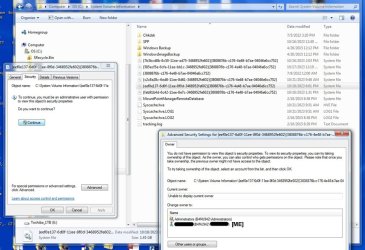
I am considering the use of the Take Ownership Context Menu to resolve what I think is causing a Macrium Reflect Cloning Operation to fail... Namely, the lack of required permissions to access a specified Volume (file?) in my System Volume Info folder, that is preventing the cloning operation from completing successfully.

The Macrium Reflect's failed clone log reports...

Volume Shadow Copy Service warning: VSS was denied access to the root of volume \\?\Volume{eef0e62f-6d0f-11ee-8f0d-3468952fe602}\. Denying administrators from accessing volume roots can cause many unexpected failures, and will prevent VSS from functioning properly. Check security on the volume, and try the operation again.

For more detail on the underlying failed cloning issue, see the following link to my recent post on this issue in the Sevenforums/backup-restore forum. Any additional thoughts/comments on that prior thread will be much appreciated.

Macrium Reflect V6 Clone Failed & System Volume Permissions

In any case, samuria replied to my prior thread and suggested I try this downloadable Take Ownership reg edit (sys command, add-on, add-in, ?) to take ownership and assign the required permissions in order to complete the clone successfully.

I am not at all familiar with the System Volume Info folder or what all is contained in this folder, so out of an abundance of caution, I'm posting here hoping someone can resolve my concerns before trying the Take Ownership tool as samuria suggested.
Sys-Volume-Info.jpg

My first concern is the Warning displayed at the top of the second pop-up window above; which warns that changing ownership can prevent the original owner from accessing the file/object.

Unfortunately, the current owner of the specified problematic Volume cannot be displayed; so I have no way of changing the ownership back to the original owner if and when the TAKE Ownership strategy works.

So 1), Is there any danger in changing ownership of the individual specified Volume {eef0e62f-6d0f...} that is highlighted above in the System Volume Info folder?

And 2), if I correctly understand the Take Ownership Tutorial, would it be better to take ownership and assign full permissions to the entire System Volume Info folder thereby taking ownership and attaining the required permissions for all the contents of the folder?

And finally 3), when taking ownership should I take ownership for myself (I do have administrator rights) or for "administrators"?

Thoughts, advice, and suggestions are greatly appreciated!
ZT
 

Attachments

  • SysVolumeInfo.jpg
    SysVolumeInfo.jpg
    87.4 KB · Views: 2

My Computers My Computers

  • At a glance

    Windows 7 Professional 64 bit
    Computer type
    PC/Desktop
    Computer Manufacturer/Model Number
    Dell 3847
    OS
    Windows 7 Professional 64 bit
  • Computer type
    PC/Desktop
I hope I'm posting this in the right place. I Googled extensively for a solution to this problem and tried all the ones that I could find which looked like they might help.

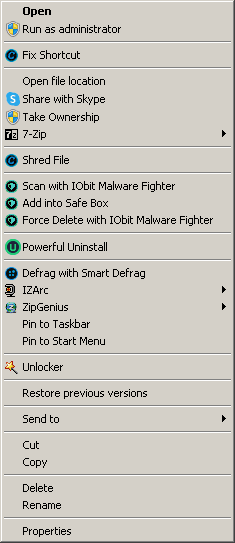
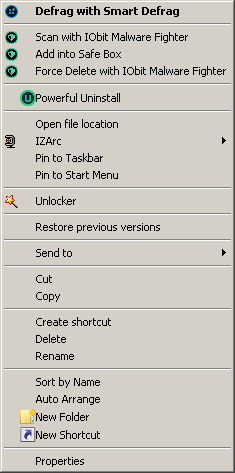
When I right-click the Command Prompt shortcut, the option to "Run as Administrator" is not there. The option to "Take Ownership" is also absent, as are a few others. A few other options that should not be there have appeared. These include "Sort by Name" and "Auto Arrange".

When I right-click the cmd.exe from within System32, I get the proper pop-up menu and can run as administrator from there but that is not very practical and I don't want to "Always run as administrator", even though I can't because all of the compatibility options for cmd.exe are greyed out.

It also seems that this problem isn't limited to the Command Prompt shortcut, as I can't "Run as Administrator" for any shortcut.

When I try to "Take Ownership" of an anything, be it a file or a folder in any location, I get a pop-up window saying:

C:\Windows\System32\CompatTel
Application not found

None of these problems occur in Safe Mode and they appear to be global. Getting one file to run by changing its permissions isn't going to solve it for the whole system. Even when I do try changing permissions of shortcuts, the "Allow" column is all greyed out.

I loaded up netplwiz and set my user account to Administratorm then did sfc /scannow.
I tried setting Secondary Logon to automatic and starting it but no luck there either.
 

My Computer My Computer

At a glance

Windows 7 Professional x64Intel Core i7 @ 3.20GHz 3.60GHz32GB (Crucial Hyper)EVGA GTX 960 4GB
Computer type
PC/Desktop
Computer Manufacturer/Model Number
Custom build
OS
Windows 7 Professional x64
CPU
Intel Core i7 @ 3.20GHz 3.60GHz
Motherboard
Gigabyte GA-X79-UD3
Memory
32GB (Crucial Hyper)
Graphics Card(s)
EVGA GTX 960 4GB
Hard Drives
Seagate ST375064ONS (Windows 7)
Seagate ST375064ONS (Windows XP [I dual boot])
5 x HGST HUS724020ALE640
Antivirus
Avast
Browser
Firefox
Hello Jez2k, :-)

The "Take Ownership" context menu added by this tutorial will not get added to executable files and their shortcuts so they can still keep the default "Run as administrator".

"CompatTel" may be for "Microsoft compatibility telemetry". Not sure why it would show not found when you try to use "Take Ownership" since it's unrelated to what is added by this tutorial.

You might try adding "Take Ownership" again from this tutorial to see if it may help.
 

My Computer My Computer

At a glance

64-bit Windows 11 Pro for WorkstationsIntel i7-8700K OC'd to 5 GHz64 GB (4x16GB) G.SKILL TridentZ RGB DDR4 3600...ASUS ROG-STRIX-GTX1080TI-O11G-GAMING
Computer type
PC/Desktop
Computer Manufacturer/Model Number
Self built custom
OS
64-bit Windows 11 Pro for Workstations
CPU
Intel i7-8700K OC'd to 5 GHz
Motherboard
ASUS ROG Maximus XI Formula Z390
Memory
64 GB (4x16GB) G.SKILL TridentZ RGB DDR4 3600 MHz
Graphics Card(s)
ASUS ROG-STRIX-GTX1080TI-O11G-GAMING
Sound Card
Integrated
Monitor(s) Displays
2 x Samsung Odyssey G7 27"
Screen Resolution
2560x1440
Hard Drives
1TB Samsung 990 PRO M.2,
4TB Samsung 990 PRO PRO M.2,
TerraMaster F8 SSD Plus NAS
PSU
Seasonic Prime Titanium 850W
Case
Thermaltake Core P3
Cooling
Corsair Hydro H115i
Keyboard
Logitech wireless K800
Mouse
Logitech MX Master 4
Internet Speed
2 Gb/s Download and 100 Mb/s Upload
Antivirus
Malwarebyte Anti-Malware Premium
Browser
Google Chrome
Other Info
Logitech Z625 speaker system,
Logitech BRIO 4K Pro webcam,
HP Color LaserJet Pro MFP M477fdn,
APC SMART-UPS RT 1000 XL - SURT1000XLI,
Galaxy S23 Plus phone
Thanks Brink but now I have two "Take Ownership" entries in the context menu. One of them works but the other loads up the "Open with... Choose default program" if its a txt file, for example.

I was able to take ownership of my Windows folder with it though (would've preferred it if I could've done that with my C: drive) but still no joy.

Maybe I posted in the wrong topic but I couldn't see anywhere else to place it.
 

My Computer My Computer

At a glance

Windows 7 Professional x64Intel Core i7 @ 3.20GHz 3.60GHz32GB (Crucial Hyper)EVGA GTX 960 4GB
Computer type
PC/Desktop
Computer Manufacturer/Model Number
Custom build
OS
Windows 7 Professional x64
CPU
Intel Core i7 @ 3.20GHz 3.60GHz
Motherboard
Gigabyte GA-X79-UD3
Memory
32GB (Crucial Hyper)
Graphics Card(s)
EVGA GTX 960 4GB
Hard Drives
Seagate ST375064ONS (Windows 7)
Seagate ST375064ONS (Windows XP [I dual boot])
5 x HGST HUS724020ALE640
Antivirus
Avast
Browser
Firefox
Thanks Brink but now I have two "Take Ownership" entries in the context menu. One of them works but the other loads up the "Open with... Choose default program" if its a txt file, for example.

I was able to take ownership of my Windows folder with it though (would've preferred it if I could've done that with my C: drive) but still no joy.

Maybe I posted in the wrong topic but I couldn't see anywhere else to place it.

It sounds like you may have added the original "Take Ownership" from some other site since the one from here worked for you.

Do you remember where you may have downloaded it, or if you still have its REG file? I can try to help reverse engineer it so you can get it removed since it doesn't work.

You wouldn't want to take ownership of the whole "C" drive. It can and will break things.
 

My Computer My Computer

At a glance

64-bit Windows 11 Pro for WorkstationsIntel i7-8700K OC'd to 5 GHz64 GB (4x16GB) G.SKILL TridentZ RGB DDR4 3600...ASUS ROG-STRIX-GTX1080TI-O11G-GAMING
Computer type
PC/Desktop
Computer Manufacturer/Model Number
Self built custom
OS
64-bit Windows 11 Pro for Workstations
CPU
Intel i7-8700K OC'd to 5 GHz
Motherboard
ASUS ROG Maximus XI Formula Z390
Memory
64 GB (4x16GB) G.SKILL TridentZ RGB DDR4 3600 MHz
Graphics Card(s)
ASUS ROG-STRIX-GTX1080TI-O11G-GAMING
Sound Card
Integrated
Monitor(s) Displays
2 x Samsung Odyssey G7 27"
Screen Resolution
2560x1440
Hard Drives
1TB Samsung 990 PRO M.2,
4TB Samsung 990 PRO PRO M.2,
TerraMaster F8 SSD Plus NAS
PSU
Seasonic Prime Titanium 850W
Case
Thermaltake Core P3
Cooling
Corsair Hydro H115i
Keyboard
Logitech wireless K800
Mouse
Logitech MX Master 4
Internet Speed
2 Gb/s Download and 100 Mb/s Upload
Antivirus
Malwarebyte Anti-Malware Premium
Browser
Google Chrome
Other Info
Logitech Z625 speaker system,
Logitech BRIO 4K Pro webcam,
HP Color LaserJet Pro MFP M477fdn,
APC SMART-UPS RT 1000 XL - SURT1000XLI,
Galaxy S23 Plus phone
Yes I still have it saved on a secondary drive for Windows re-installations. I downloaded it in August of 2017 and upon looking at it in Notepad, it appears to have be written by yourself, dated 2015, updated June 18th 2017 but it looks like I downloaded it from tenforums. It has always worked up until now. I used it to get ownership of my XP drive so that I could transfer that version of MS Paint into 7.

Might be worth mentioning that I am using Test Mode with driver signing disabled due to a problem with the NVIDIA driver. That shouldn't make "Run as administrator" disappear though.

Uploaded a couple of images of right-clicking Command Prompt. One is from Safe Mode, the other from Test Mode.

Safe Mode.png

Test Mode.png
 

My Computer My Computer

At a glance

Windows 7 Professional x64Intel Core i7 @ 3.20GHz 3.60GHz32GB (Crucial Hyper)EVGA GTX 960 4GB
Computer type
PC/Desktop
Computer Manufacturer/Model Number
Custom build
OS
Windows 7 Professional x64
CPU
Intel Core i7 @ 3.20GHz 3.60GHz
Motherboard
Gigabyte GA-X79-UD3
Memory
32GB (Crucial Hyper)
Graphics Card(s)
EVGA GTX 960 4GB
Hard Drives
Seagate ST375064ONS (Windows 7)
Seagate ST375064ONS (Windows XP [I dual boot])
5 x HGST HUS724020ALE640
Antivirus
Avast
Browser
Firefox
Yes I still have it saved on a secondary drive for Windows re-installations. I downloaded it in August of 2017 and upon looking at it in Notepad, it appears to have be written by yourself, dated 2015, updated June 18th 2017 but it looks like I downloaded it from tenforums. It has always worked up until now. I used it to get ownership of my XP drive so that I could transfer that version of MS Paint into 7.

Might be worth mentioning that I am using Test Mode with driver signing disabled due to a problem with the NVIDIA driver. That shouldn't make "Run as administrator" disappear though.

Uploaded a couple of images of right-clicking Command Prompt. One is from Safe Mode, the other from Test Mode.

Yeah, the W10 version uses a different method than the W7 version here.

If you still have the remove REG for the W10 version, you can use it to remove the one not working.
 

My Computer My Computer

At a glance

64-bit Windows 11 Pro for WorkstationsIntel i7-8700K OC'd to 5 GHz64 GB (4x16GB) G.SKILL TridentZ RGB DDR4 3600...ASUS ROG-STRIX-GTX1080TI-O11G-GAMING
Computer type
PC/Desktop
Computer Manufacturer/Model Number
Self built custom
OS
64-bit Windows 11 Pro for Workstations
CPU
Intel i7-8700K OC'd to 5 GHz
Motherboard
ASUS ROG Maximus XI Formula Z390
Memory
64 GB (4x16GB) G.SKILL TridentZ RGB DDR4 3600 MHz
Graphics Card(s)
ASUS ROG-STRIX-GTX1080TI-O11G-GAMING
Sound Card
Integrated
Monitor(s) Displays
2 x Samsung Odyssey G7 27"
Screen Resolution
2560x1440
Hard Drives
1TB Samsung 990 PRO M.2,
4TB Samsung 990 PRO PRO M.2,
TerraMaster F8 SSD Plus NAS
PSU
Seasonic Prime Titanium 850W
Case
Thermaltake Core P3
Cooling
Corsair Hydro H115i
Keyboard
Logitech wireless K800
Mouse
Logitech MX Master 4
Internet Speed
2 Gb/s Download and 100 Mb/s Upload
Antivirus
Malwarebyte Anti-Malware Premium
Browser
Google Chrome
Other Info
Logitech Z625 speaker system,
Logitech BRIO 4K Pro webcam,
HP Color LaserJet Pro MFP M477fdn,
APC SMART-UPS RT 1000 XL - SURT1000XLI,
Galaxy S23 Plus phone
Back
Top