How can I stop this intrusive Firefox pop up?

klxdrt

New member
Member
VIP
Local time
9:22 AM
Messages
188
Hi,

How can I stop this intrusive Firefox pop up?
Image below.

Regards,

klxdrt
 

Attachments

  • FF popup .jpg
    FF popup .jpg
    11.9 KB · Views: 17

My Computer My Computer

At a glance

w7 pro 32 bit w/XP virt enabled.AMD A6-36504 GB DDR3 RAMNVIDIA GeForce 210
Computer type
PC/Desktop
Computer Manufacturer/Model Number
locally made
OS
w7 pro 32 bit w/XP virt enabled.
CPU
AMD A6-3650
Motherboard
ASUS F1A55-M CSM
Memory
4 GB DDR3 RAM
Graphics Card(s)
NVIDIA GeForce 210
Sound Card
NVIDIA High Definition Audio
Monitor(s) Displays
28" HD monitor
Screen Resolution
1680 x 1050 x 32 bits (4294967296 colors) @ 59 Hz
Hard Drives
2 x 500 GB Western Digital Blue Hard Drive
PSU
?
Case
?
Cooling
3-4 fans
Keyboard
big yellow keys
Mouse
logitec
Internet Speed
60 mb
Antivirus
panda
Browser
ff
Other Info
scanner, webcam, bw printer, fax modem, cd/dvd burner, PC usb ports: 2 usb3, 6 usb2 plus 7 port usb hub, 2 tb usb3, 1 Tb usb3, 500Mb usb2, 120Mb USB2 portable drives, asst of flash drives 250 Mb to 32 Gb. backup PC, office
klxdrt


Had to change post, apparently there is no option "do not check for updates" FF 63 and ^
 
Last edited:

My Computer My Computer

At a glance

Win 10 x64, Linux Lite, Win 7 x64, BlackArch,...
Computer type
PC/Desktop
Computer Manufacturer/Model Number
HP Desktop & Compaq Laptop
OS
Win 10 x64, Linux Lite, Win 7 x64, BlackArch, & Kali
Hard Drives
Samsung 850 Pro 256Gb,
Hitachi HDD 1Tb,
Crucial MX SSD 250Gb
Segate 3Tb USB 3.0 Ext. Backup HDD
Internet Speed
150Mbps dn, 20Mbps up
Antivirus
Avast Free, Malwarebytes Anti-Exploit & Anti-Ransomware
Browser
Firefox, Chrome, Opera, & VPN
Why not simply update?
 

My Computer My Computer

At a glance

win 8 32 bit
Computer type
PC/Desktop
OS
win 8 32 bit
Why not simply update?

Good question!

Don't understand why OPs don't want to update their browers, windows updates, etc.

Security Risk!
 

My Computer My Computer

At a glance

Win 10 x64, Linux Lite, Win 7 x64, BlackArch,...
Computer type
PC/Desktop
Computer Manufacturer/Model Number
HP Desktop & Compaq Laptop
OS
Win 10 x64, Linux Lite, Win 7 x64, BlackArch, & Kali
Hard Drives
Samsung 850 Pro 256Gb,
Hitachi HDD 1Tb,
Crucial MX SSD 250Gb
Segate 3Tb USB 3.0 Ext. Backup HDD
Internet Speed
150Mbps dn, 20Mbps up
Antivirus
Avast Free, Malwarebytes Anti-Exploit & Anti-Ransomware
Browser
Firefox, Chrome, Opera, & VPN

My Computer My Computer

At a glance

Win 10 x64, Linux Lite, Win 7 x64, BlackArch,...
Computer type
PC/Desktop
Computer Manufacturer/Model Number
HP Desktop & Compaq Laptop
OS
Win 10 x64, Linux Lite, Win 7 x64, BlackArch, & Kali
Hard Drives
Samsung 850 Pro 256Gb,
Hitachi HDD 1Tb,
Crucial MX SSD 250Gb
Segate 3Tb USB 3.0 Ext. Backup HDD
Internet Speed
150Mbps dn, 20Mbps up
Antivirus
Avast Free, Malwarebytes Anti-Exploit & Anti-Ransomware
Browser
Firefox, Chrome, Opera, & VPN
Read my forum post here. Heed my advice on backing up the registry and/or creating a system restore point first. If all is said and done, if you go to Help | About Firefox, you should see that updates are disabled by the administrator as shown in my screenshot.

Don't try to use Tor, a VPN and very outdated bowers trying to connect to my website, it'll most likely get blocked.
 

My Computer My Computer

At a glance

Windows 7 Ultimate x64
Computer type
PC/Desktop
OS
Windows 7 Ultimate x64
Don't understand why OPs don't want to update their browers, windows updates, etc.

Security Risk!

There are many reasons for not updating, number one being stability. When something simply works, you don't want to disturb it, updates frequently bring new features and bug fixes, but also removes useful things, change things and may introduce bugs not present before. There is a strong reason why many banks and other billionary companies use old technology, because it works.

That's the very same reason why people refuse to downgrade to Windows 10 when one has 7, Windows Update is widely known to brick computers and browsers may change in unwanted ways.

Not to mention that the common catchphase of updates is "bring new security fixes" when more often than not security is not improved at all, or it is in a way that don't affect the user, or even may introduce vulnerabilities.
 

My Computer My Computer

At a glance

Windows 7 Ultimate x64Intel Core i7-740QM8 GB DDR3NVIDIA GeForce 330GT
Computer type
Laptop
Computer Manufacturer/Model Number
Toshiba Sattelite A665-S6092
OS
Windows 7 Ultimate x64
CPU
Intel Core i7-740QM
Memory
8 GB DDR3
Graphics Card(s)
NVIDIA GeForce 330GT
Screen Resolution
1366x768
Hard Drives
Samsung 840 SSD 500GB
1TB USB3 external HD
Cooling
Coolermaster Notepal U3 notebook cooling pad
Internet Speed
3mbps ASDL
Antivirus
ClamWin 0.98.7
Browser
Opera 12.17 x86 (main), Firefox 38 (sec), IE11 (last resort)
How can I stop this intrusive Firefox pop up?
The first question should be 'Why don't you want to update Firefox?' and, assuming there is a good reason, the second should be 'What version do you want to stay on?'.


For those who want a long-term stable release that only receives major updates on average every 42 weeks there is the Firefox Extended Support Release (ESR), currently available as 68.10.0esr or 78.0.2esr.
Choosing a Firefox update channel | Firefox for Enterprise Help


But even on the ESR channel you should install updates when offered. These will not upgrade you to a newer version, rather they will be essential minor updates such as crash fixes and security fixes. These should be expected at least every four weeks.
 

My Computers My Computers

  • At a glance

    Windows 7 Home Premium x64AMD V1204GB
    Computer type
    Laptop
    Computer Manufacturer/Model Number
    Toshiba satellite C650D
    OS
    Windows 7 Home Premium x64
    CPU
    AMD V120
    Memory
    4GB
    Internet Speed
    150 Mbps
    Antivirus
    MSE
    Browser
    IE11, Edge, Firefox
    Other Info
    I also have W7 Pro on my System Two, and several W7 Hyper-V VMs. My other machines run Windows 10/11. Their specs are in my Ten Forums & Eleven Forum profiles.
  • At a glance

    Windows 7 Pro x64Intel i5-3320M8 GB
    Computer type
    Laptop
    System Manufacturer/Model Number
    Lenovo Thinkpad T430
    OS
    Windows 7 Pro x64
    CPU
    Intel i5-3320M
    Memory
    8 GB
    Hard Drives
    250GB Samsung SSD 860 EVO
    Antivirus
    MSE
There are many reasons for not updating, number one being stability. When something simply works, you don't want to disturb it, updates frequently bring new features and bug fixes, but also removes useful things, change things and may introduce bugs not present before. There is a strong reason why many banks and other billionary companies use old technology, because it works.

That's the very same reason why people refuse to downgrade to Windows 10 when one has 7, Windows Update is widely known to brick computers and browsers may change in unwanted ways.

Not to mention that the common catchphase of updates is "bring new security fixes" when more often than not security is not improved at all, or it is in a way that don't affect the user, or even may introduce vulnerabilities.

Thank you for the explanation. I don't have computer problems. I update my OS, Browsers, AVs, anti everything. Have an occasional snafu! Nothing major!
 

My Computer My Computer

At a glance

Win 10 x64, Linux Lite, Win 7 x64, BlackArch,...
Computer type
PC/Desktop
Computer Manufacturer/Model Number
HP Desktop & Compaq Laptop
OS
Win 10 x64, Linux Lite, Win 7 x64, BlackArch, & Kali
Hard Drives
Samsung 850 Pro 256Gb,
Hitachi HDD 1Tb,
Crucial MX SSD 250Gb
Segate 3Tb USB 3.0 Ext. Backup HDD
Internet Speed
150Mbps dn, 20Mbps up
Antivirus
Avast Free, Malwarebytes Anti-Exploit & Anti-Ransomware
Browser
Firefox, Chrome, Opera, & VPN
Hi

Im not entirely sure, but i DONT like the look of that pop-up

I dont use FF so i might be wrong!!!

perform an AV scan.

there are 2 ways to stop updates

using the advanced user preferences tab

and using the aboutconfig option setting
app.update.interval


Roy
 

My Computer My Computer

At a glance

W7 home premium 32bit/W7HP 64bit/w10 tp insid...E5300 dual core3gbNvidia Geforce 7100 Nforce 630i
Computer type
PC/Desktop
Computer Manufacturer/Model Number
medionl/Aspire 6930G/acer x55a
OS
W7 home premium 32bit/W7HP 64bit/w10 tp insider ring
CPU
E5300 dual core
Motherboard
medion MS7366
Memory
3gb
Graphics Card(s)
Nvidia Geforce 7100 Nforce 630i
Monitor(s) Displays
avixc
Internet Speed
n (isp resticted to 72)
Antivirus
mse/pands
Browser
palemoon
Other Info
Belkin Fd7050 n USB using Railink RT2870 drivers, more upto date
Im not entirely sure, but i DONT like the look of that pop-up

I dont use FF so i might be wrong....


I do. That looks like the standard pop-up when you have FF set to 'Check for updates but let you choose to install them'.
 

My Computers My Computers

  • At a glance

    Windows 7 Home Premium x64AMD V1204GB
    Computer type
    Laptop
    Computer Manufacturer/Model Number
    Toshiba satellite C650D
    OS
    Windows 7 Home Premium x64
    CPU
    AMD V120
    Memory
    4GB
    Internet Speed
    150 Mbps
    Antivirus
    MSE
    Browser
    IE11, Edge, Firefox
    Other Info
    I also have W7 Pro on my System Two, and several W7 Hyper-V VMs. My other machines run Windows 10/11. Their specs are in my Ten Forums & Eleven Forum profiles.
  • At a glance

    Windows 7 Pro x64Intel i5-3320M8 GB
    Computer type
    Laptop
    System Manufacturer/Model Number
    Lenovo Thinkpad T430
    OS
    Windows 7 Pro x64
    CPU
    Intel i5-3320M
    Memory
    8 GB
    Hard Drives
    250GB Samsung SSD 860 EVO
    Antivirus
    MSE
I use FF Quantum routinely
I believe the popup changed with the introduction of Quantum!
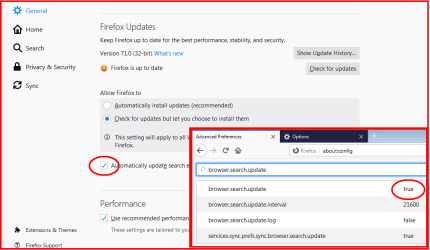
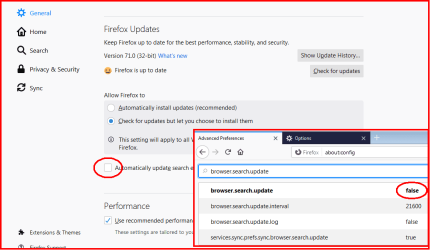
about:config
browser.search.update true/false
Default is true!
Double-click toggles or on the right side click the icon. Capture.JPG
 

My Computer My Computer

At a glance

Win 10 x64, Linux Lite, Win 7 x64, BlackArch,...
Computer type
PC/Desktop
Computer Manufacturer/Model Number
HP Desktop & Compaq Laptop
OS
Win 10 x64, Linux Lite, Win 7 x64, BlackArch, & Kali
Hard Drives
Samsung 850 Pro 256Gb,
Hitachi HDD 1Tb,
Crucial MX SSD 250Gb
Segate 3Tb USB 3.0 Ext. Backup HDD
Internet Speed
150Mbps dn, 20Mbps up
Antivirus
Avast Free, Malwarebytes Anti-Exploit & Anti-Ransomware
Browser
Firefox, Chrome, Opera, & VPN
I believe the popup changed with the introduction of Quantum!
about:config
browser.search.update true/false
Default is true!

I believe that only affects the Search engine updates, Snick. There used to be a setting in Options/Firefox Updates to enable/disable auto-updating the search engines (at least thru FF71), but in recent versions that option seems to have been removed from the Options control panel, even though it's still accessible in about:config.

FWIW, I haven't found any about:config setting that changes when the FF browser is changed from "Automatically install updates" to "Check for updates but let you choose", so I don't know where that's controlled. I have toggled every possible setting I can find in about:config, I've changed the update URLs in about:config to 127.0.0.1, and even renamed/deleted the updater.exe file from the program directory, all to no avail.
 

Attachments

  • browser-search-update1.png
    browser-search-update1.png
    22.6 KB · Views: 0
  • browser-search-update0.png
    browser-search-update0.png
    22.3 KB · Views: 0

My Computer My Computer

At a glance

Windows 7/8.1/10 multibootIntel Core i7-770048GB (2x16GB Crucial DDR4-3200 + 2x8GB Hynix ...Intel HD630 + AMD Radeon R7 450 PCIe
Computer type
PC/Desktop
Computer Manufacturer/Model Number
Dell Optiplex 7050
OS
Windows 7/8.1/10 multiboot
CPU
Intel Core i7-7700
Motherboard
Dell, Intel Q270 chipset
Memory
48GB (2x16GB Crucial DDR4-3200 + 2x8GB Hynix DDR4-2400)
Graphics Card(s)
Intel HD630 + AMD Radeon R7 450 PCIe
Monitor(s) Displays
Asus VC279 (27")
Screen Resolution
1920x1080
Hard Drives
Toshiba M.2 NVMe (256GB),
Samsung 960 Evo (500GB),
WD Red Plus 80EFBX (8TB)
I'm well aware of the removal of the options to not check for updates
Okay.

The OP was looking for a way to suppress the browser update popup, and your post #13 mentioned the popup and the browser.search.update config setting. I read post #13 as suggesting you were implying they were related, so my post was to point out browser.search.update has nothing to do with the popup the OP was concerned with. If your post was clear to everyone else, then my post can be disregarded.
 

My Computer My Computer

At a glance

Windows 7/8.1/10 multibootIntel Core i7-770048GB (2x16GB Crucial DDR4-3200 + 2x8GB Hynix ...Intel HD630 + AMD Radeon R7 450 PCIe
Computer type
PC/Desktop
Computer Manufacturer/Model Number
Dell Optiplex 7050
OS
Windows 7/8.1/10 multiboot
CPU
Intel Core i7-7700
Motherboard
Dell, Intel Q270 chipset
Memory
48GB (2x16GB Crucial DDR4-3200 + 2x8GB Hynix DDR4-2400)
Graphics Card(s)
Intel HD630 + AMD Radeon R7 450 PCIe
Monitor(s) Displays
Asus VC279 (27")
Screen Resolution
1920x1080
Hard Drives
Toshiba M.2 NVMe (256GB),
Samsung 960 Evo (500GB),
WD Red Plus 80EFBX (8TB)
Delete
 
Last edited:

My Computer My Computer

At a glance

Windows 7 Ultimate x64
Computer type
PC/Desktop
OS
Windows 7 Ultimate x64
Back
Top