What do I need to make my file transferring speeds faster?

TechSeven

member
Member
VIP
Local time
6:19 AM
Messages
407
How do I get the fastest data transfer speeds when transferring big and small files?

From a little research I found that the latest types of usbs are usb 3.2 Gen 1 and gen 2 and maybe Gen 2×2 (roughly).

Maybe buying one of those M.2 ssds or nvme ssds might also make the data transfer speeds faster (i have no idea).

I feel like my data transfer speeds aint really that fast. Maybe we can check this by running crystal disk mark (i would need help with walk through though).

I do have some old equipment and I believe this is the culprit for not the fastest data transfer speeds.

I have a HAF 922 mid tower and been using this since like 2010 and I think it has USB 2.0 at best.

I have a two seagate externals and a Samsung ssd with Windows 7 on it.

I installed crystal disk mark but not really sure how to use.

I would like you to check my speeds and guide me to whatever will get me faster data transfer speeds.

So maybe I'm thinking maybe I need a new pc case with USB 3.2 gen 2?

I also want to buy a new hard drive as I need more space for media, but I'm not sure which to get as I want faster transfer speeds.
 

My Computer My Computer

At a glance

Windows 7 Home Premium 64biti7 4790k processorPatriot 16gbEVGA GeForce GTX 980 Ti FTW
Computer type
PC/Desktop
Computer Manufacturer/Model Number
Custom Build (First built from scratch in 2010 by someone else.. then I rebuilt it in 2015).
OS
Windows 7 Home Premium 64bit
CPU
i7 4790k processor
Motherboard
Z97 Sabertooth Mark 1
Memory
Patriot 16gb
Graphics Card(s)
EVGA GeForce GTX 980 Ti FTW
Monitor(s) Displays
19" Monitor
Screen Resolution
1920 x 1080
Hard Drives
Samsung 850 Evo 120gb ssd
PSU
Corsair Cx600
Case
Haf 922
Cooling
Hydro Series H60 High Performance 120 mm
Keyboard
Microsoft
Mouse
Logitech
Browser
Firefox 37.0.4
Other Info
*Computer Manufacturer/Model Number: HP 15-d002tx Notebook* /

OS: Windows 7 Home Premium 64-bit / CPU: Intel Core i3-3110M / Memory: DDR3 4GB / Graphics Card: Intel HD Graphics 4000, GeForce 820M / Keyboard: Microsoft / Browser: Firefox 37.0
First of all let's define the problem.
Transfer from where to where? External hard disk? Over the LAN? Over internet?
How much data and number of files are we talking about? What are your current speeds and how much improvement do you expect/need?
 

My Computer My Computer

At a glance

Windows 7 Ultimate x64Intel Core i7-740QM8 GB DDR3NVIDIA GeForce 330GT
Computer type
Laptop
Computer Manufacturer/Model Number
Toshiba Sattelite A665-S6092
OS
Windows 7 Ultimate x64
CPU
Intel Core i7-740QM
Memory
8 GB DDR3
Graphics Card(s)
NVIDIA GeForce 330GT
Screen Resolution
1366x768
Hard Drives
Samsung 840 SSD 500GB
1TB USB3 external HD
Cooling
Coolermaster Notepal U3 notebook cooling pad
Internet Speed
3mbps ASDL
Antivirus
ClamWin 0.98.7
Browser
Opera 12.17 x86 (main), Firefox 38 (sec), IE11 (last resort)
Thanks for your reply.

Good point i should have added all of that.

Let me run a few transfers and i will let you know what i get.

I transfer files maybe external to external hard drive. Maybe desktop to external. Something like that.
 

My Computer My Computer

At a glance

Windows 7 Home Premium 64biti7 4790k processorPatriot 16gbEVGA GeForce GTX 980 Ti FTW
Computer type
PC/Desktop
Computer Manufacturer/Model Number
Custom Build (First built from scratch in 2010 by someone else.. then I rebuilt it in 2015).
OS
Windows 7 Home Premium 64bit
CPU
i7 4790k processor
Motherboard
Z97 Sabertooth Mark 1
Memory
Patriot 16gb
Graphics Card(s)
EVGA GeForce GTX 980 Ti FTW
Monitor(s) Displays
19" Monitor
Screen Resolution
1920 x 1080
Hard Drives
Samsung 850 Evo 120gb ssd
PSU
Corsair Cx600
Case
Haf 922
Cooling
Hydro Series H60 High Performance 120 mm
Keyboard
Microsoft
Mouse
Logitech
Browser
Firefox 37.0.4
Other Info
*Computer Manufacturer/Model Number: HP 15-d002tx Notebook* /

OS: Windows 7 Home Premium 64-bit / CPU: Intel Core i3-3110M / Memory: DDR3 4GB / Graphics Card: Intel HD Graphics 4000, GeForce 820M / Keyboard: Microsoft / Browser: Firefox 37.0
It depends how you copy using built in robocopy is the fastest if you use explorer there is GUI lag it also depends on file type if you have antivirus as that will scan on read and write
 

My Computer My Computer

At a glance

win 8 32 bit
Computer type
PC/Desktop
OS
win 8 32 bit
So i transfered a movie back and fourth between two Seagate external drives.

The movie is called the last samurai and is 1.86 GB.

When transferring this movie file it would start at speeds around 224 MB/second (for the first two seconds roughly) and then drop to about 150 MB/second and maybe go upto about 160 MB/second or 170 MB/second then back down again to 150 MB/second.

This took 20 seconds.

It's not too bad but im sure it could be faster.
 

My Computer My Computer

At a glance

Windows 7 Home Premium 64biti7 4790k processorPatriot 16gbEVGA GeForce GTX 980 Ti FTW
Computer type
PC/Desktop
Computer Manufacturer/Model Number
Custom Build (First built from scratch in 2010 by someone else.. then I rebuilt it in 2015).
OS
Windows 7 Home Premium 64bit
CPU
i7 4790k processor
Motherboard
Z97 Sabertooth Mark 1
Memory
Patriot 16gb
Graphics Card(s)
EVGA GeForce GTX 980 Ti FTW
Monitor(s) Displays
19" Monitor
Screen Resolution
1920 x 1080
Hard Drives
Samsung 850 Evo 120gb ssd
PSU
Corsair Cx600
Case
Haf 922
Cooling
Hydro Series H60 High Performance 120 mm
Keyboard
Microsoft
Mouse
Logitech
Browser
Firefox 37.0.4
Other Info
*Computer Manufacturer/Model Number: HP 15-d002tx Notebook* /

OS: Windows 7 Home Premium 64-bit / CPU: Intel Core i3-3110M / Memory: DDR3 4GB / Graphics Card: Intel HD Graphics 4000, GeForce 820M / Keyboard: Microsoft / Browser: Firefox 37.0
The top speed you see is filling the cache once full it then slows down as there is none left
 

My Computer My Computer

At a glance

win 8 32 bit
Computer type
PC/Desktop
OS
win 8 32 bit
So i transfered a movie back and fourth between two Seagate external drives.

The movie is called the last samurai and is 1.86 GB.

When transferring this movie file it would start at speeds around 224 MB/second (for the first two seconds roughly) and then drop to about 150 MB/second and maybe go upto about 160 MB/second or 170 MB/second then back down again to 150 MB/second.

This took 20 seconds.

It's not too bad but im sure it could be faster.

Just a curious question. :-)
How many TB of data do you copy each day? as you see that speed as a major problem?
 

My Computer My Computer

At a glance

Linux:Debian, Kali.. 2xWin8.1,2x,1x7Pro, Retr...cpu's intel 8088 up to intel i7 gen9.. dual x...oldest 1024KB newest 64GBmostly internals i don't game
Computer type
PC/Desktop
Computer Manufacturer/Model Number
AsusX53, Aspire E1-572. AsusUX32A, HP Pro3130mt+3010mt, HP Proliant ML150G3, 3xCustom, i3, i5, i7
OS
Linux:Debian, Kali.. 2xWin8.1,2x,1x7Pro, Retro:1x2003server.1xXPpro, 1xW2k,1x98SE,1x95,1x3.11
CPU
cpu's intel 8088 up to intel i7 gen9.. dual xenon on server
Motherboard
a lot of them :-)
Memory
oldest 1024KB newest 64GB
Graphics Card(s)
mostly internals i don't game
Sound Card
old retro=soundblaster.. newer ones internal
Monitor(s) Displays
smalest 12" largest 26"
Internet Speed
100/100
Antivirus
NortonInternetSecurity, MS, Avast, (not on the same computer
Browser
IE8, IE9. IE11, Firefox
Other Info
I can't fit all info on all my computers in these fields :-D
I already gave you a suggestion on a hard drive option in your last thread. But seen as how this is more about external hard drives and speed capability, right off the bat you'll want a SSD. Now with a SSD of course the price goes through the proverbial roof with more storage being needed.

No, you don't need a new computer at all. What you want is a PCI-e USB 3.1 card. This PCI-e card fits in the back of your computer and will give you USB 3.2 speed. Or you could opt for a front panel 5.25 USB 3.0 solution. Something like this. But that will require your motherboard to have an onboard USB 3.0 20 pin connector. Read your motherboard manual to find out.

If you want the fastest in the USB interface you'll want USB 3.1 and that would be achieved by a PCI-e board in the back of your PC. Then you could buy USB 3.1 cables to be able to use it from the front.

This is the PCI-e USB 3.1 card I'm talking about. I link to this one because I think Vantec makes some decent stuff. I don't own this card, but I do own their USB to SATA adapter and its performed well. VANTEC 2-Port USB 3.1 Gen II Type A/C PCIe Host Card Model UGT-PC371AC - Newegg.com

Note that USB 3.2 is a completely different connector than the USB connector you're now used to. This is the future of USB. And I think it doesn't matter if the connector is upright or down.

Edit -

Yeah, USB 3.2 uses a type C connector which is reversible.

USB 3.2 that uses this type of C connector can be USB 3.2, 2 or USB 3.2, 2x2. But not all type C connectors are USB 3.2. I think Mac uses type C and that wouldn't be USB 3.2. At least the older versions. USB 3.2 is the newest standard.
 

My Computer My Computer

At a glance

Windows 7 Ultimate x64
Computer type
PC/Desktop
OS
Windows 7 Ultimate x64
I recommend copying folders and files in "clumps", rather than moving. Safer that way. You used the word transferred earlier, does mean you did a copyNpaste or a moveNpaste?
 

My Computer My Computer

At a glance

Windows 7 Professional 64-bitDesktop i5; Acers i5 & i7desktop 16GB; 1 Acer 8GB & 1 Acer 16GB
Computer type
PC/Desktop
Computer Manufacturer/Model Number
Antec desktop; Acer Aspire laptops
OS
Windows 7 Professional 64-bit
CPU
Desktop i5; Acers i5 & i7
Memory
desktop 16GB; 1 Acer 8GB & 1 Acer 16GB
Hard Drives
1TB split into 2 equal partitions [OS and data] usable by RJS
Internet Speed
AT&T DSL
Browser
FF, GChrome, msIE
Other Info
Windows 7 Firewall, Emsisoft AM/AV, MSE [scan-only], SpywareBlaster, Ruiware/BillP combine
I purchased a Vantec PCIe 3.0 2 rear 2 cable front port a while back. Very happy with price and performance. It was before PCIe 3.1 was out.
Make sure you read the instructions to find the drivers that come on the CD. There are a plethora of them, & you need the correct folder with installer.

Snick
 

My Computer My Computer

At a glance

Win 10 x64, Linux Lite, Win 7 x64, BlackArch,...
Computer type
PC/Desktop
Computer Manufacturer/Model Number
HP Desktop & Compaq Laptop
OS
Win 10 x64, Linux Lite, Win 7 x64, BlackArch, & Kali
Hard Drives
Samsung 850 Pro 256Gb,
Hitachi HDD 1Tb,
Crucial MX SSD 250Gb
Segate 3Tb USB 3.0 Ext. Backup HDD
Internet Speed
150Mbps dn, 20Mbps up
Antivirus
Avast Free, Malwarebytes Anti-Exploit & Anti-Ransomware
Browser
Firefox, Chrome, Opera, & VPN
When you transfer data from one device to another, the transfer speed is limited by the weakest device on the chain and normally it isn't the communication device (USB).
USB 2.0 has a transfer speed of 480M b/s or 60M B/s
USB 3.0 Has a transfer speed of 4800M b/s or 600M B/s

USB flash disk that I have:
- Kingston 16G (USB 2.0) = 8M B/s
- Polaroid 32G (USB 3.0) = 45M B/s (the transfer speed is below USB 2.0)

USB 3.0 HDD caddy
- WD 2.5" HDD = 75M B/s

SATA 600 to SATA 600
- HDD to HDD = Best is 170M B/s

If you are able to transfer data to or from an external drive at 150M B/s (Bytes/s not bits/s) don't expect better speeds only if you're transferring from a SSD to another SSD.
 

My Computers My Computers

  • At a glance

    Windows 7 HP 64i5 6600K - 800MHz to 4200MHz4+4G GSkill DDR4 3000IG - Intel 530
    Computer type
    PC/Desktop
    Computer Manufacturer/Model Number
    custom build
    OS
    Windows 7 HP 64
    CPU
    i5 6600K - 800MHz to 4200MHz
    Motherboard
    GA-Z170-HD3P
    Memory
    4+4G GSkill DDR4 3000
    Graphics Card(s)
    IG - Intel 530
    Monitor(s) Displays
    Samsung 226BW
    Screen Resolution
    1680x1050
    Hard Drives
    (1) -1 SM951 – 128GB M.2 AHCI PCIe SSD drive for Windows 7 and Lubuntu
    (2) -1 WD SATA 3 - 1T for Data
    (3) -1 WD SATA 3 - 1T for backup
    PSU
    Thermaltake 450W TR2 gold
    Keyboard
    Old and good Chicony mechanical keyboard
    Mouse
    Logitech mX performance - 9 buttons (had to disable some)
    Internet Speed
    500Mb/s
    Browser
    Firefox 64
    Other Info
    TinyWall firewall
  • At a glance

    Windows 7 Proi7-4500U 800MHz to 3.0GHz(4+4)G DDR3 1600IG intel 4400 + NVIDIA GeForce GT 745M
    Computer type
    Laptop
    System Manufacturer/Model Number
    Asus Q550LF
    OS
    Windows 7 Pro
    CPU
    i7-4500U 800MHz to 3.0GHz
    Motherboard
    Asus Q550LF
    Memory
    (4+4)G DDR3 1600
    Graphics Card(s)
    IG intel 4400 + NVIDIA GeForce GT 745M
    Sound Card
    Realtek
    Monitor(s) Displays
    LG Display LP156WF4-SPH1
    Screen Resolution
    1920 x 1080
    Hard Drives
    BX500 120G SSD for Windows and programs +
    1T HDD for data
    Internet Speed
    500 Mb/s
    Browser
    Firefox
    Other Info
    TinyWall firewall
I recommend copying folders and files in "clumps", rather than moving. Safer that way. You used the word transferred earlier, does mean you did a copyNpaste or a moveNpaste?


During that time i right clicked on the folder and held the button down, i then dragged it to the other drive and then i let go of the click and chose the move here option.
 

My Computer My Computer

At a glance

Windows 7 Home Premium 64biti7 4790k processorPatriot 16gbEVGA GeForce GTX 980 Ti FTW
Computer type
PC/Desktop
Computer Manufacturer/Model Number
Custom Build (First built from scratch in 2010 by someone else.. then I rebuilt it in 2015).
OS
Windows 7 Home Premium 64bit
CPU
i7 4790k processor
Motherboard
Z97 Sabertooth Mark 1
Memory
Patriot 16gb
Graphics Card(s)
EVGA GeForce GTX 980 Ti FTW
Monitor(s) Displays
19" Monitor
Screen Resolution
1920 x 1080
Hard Drives
Samsung 850 Evo 120gb ssd
PSU
Corsair Cx600
Case
Haf 922
Cooling
Hydro Series H60 High Performance 120 mm
Keyboard
Microsoft
Mouse
Logitech
Browser
Firefox 37.0.4
Other Info
*Computer Manufacturer/Model Number: HP 15-d002tx Notebook* /

OS: Windows 7 Home Premium 64-bit / CPU: Intel Core i3-3110M / Memory: DDR3 4GB / Graphics Card: Intel HD Graphics 4000, GeForce 820M / Keyboard: Microsoft / Browser: Firefox 37.0
Megahertz07 - "When you transfer data from one device to another, the transfer speed is limited by the weakest device on the chain"


Yes im aware of this and that is good point too.
 

My Computer My Computer

At a glance

Windows 7 Home Premium 64biti7 4790k processorPatriot 16gbEVGA GeForce GTX 980 Ti FTW
Computer type
PC/Desktop
Computer Manufacturer/Model Number
Custom Build (First built from scratch in 2010 by someone else.. then I rebuilt it in 2015).
OS
Windows 7 Home Premium 64bit
CPU
i7 4790k processor
Motherboard
Z97 Sabertooth Mark 1
Memory
Patriot 16gb
Graphics Card(s)
EVGA GeForce GTX 980 Ti FTW
Monitor(s) Displays
19" Monitor
Screen Resolution
1920 x 1080
Hard Drives
Samsung 850 Evo 120gb ssd
PSU
Corsair Cx600
Case
Haf 922
Cooling
Hydro Series H60 High Performance 120 mm
Keyboard
Microsoft
Mouse
Logitech
Browser
Firefox 37.0.4
Other Info
*Computer Manufacturer/Model Number: HP 15-d002tx Notebook* /

OS: Windows 7 Home Premium 64-bit / CPU: Intel Core i3-3110M / Memory: DDR3 4GB / Graphics Card: Intel HD Graphics 4000, GeForce 820M / Keyboard: Microsoft / Browser: Firefox 37.0
F22 Simpilot - "I already gave you a suggestion on a hard drive option in your last thread."


I am trying to find one similar but have not found one yet.


F22 Simpilot - "What you want is a PCI-e USB 3.1 card"


Good idea tbh, but i want to change my pc case. I just have not found one that i want yet.
 

My Computer My Computer

At a glance

Windows 7 Home Premium 64biti7 4790k processorPatriot 16gbEVGA GeForce GTX 980 Ti FTW
Computer type
PC/Desktop
Computer Manufacturer/Model Number
Custom Build (First built from scratch in 2010 by someone else.. then I rebuilt it in 2015).
OS
Windows 7 Home Premium 64bit
CPU
i7 4790k processor
Motherboard
Z97 Sabertooth Mark 1
Memory
Patriot 16gb
Graphics Card(s)
EVGA GeForce GTX 980 Ti FTW
Monitor(s) Displays
19" Monitor
Screen Resolution
1920 x 1080
Hard Drives
Samsung 850 Evo 120gb ssd
PSU
Corsair Cx600
Case
Haf 922
Cooling
Hydro Series H60 High Performance 120 mm
Keyboard
Microsoft
Mouse
Logitech
Browser
Firefox 37.0.4
Other Info
*Computer Manufacturer/Model Number: HP 15-d002tx Notebook* /

OS: Windows 7 Home Premium 64-bit / CPU: Intel Core i3-3110M / Memory: DDR3 4GB / Graphics Card: Intel HD Graphics 4000, GeForce 820M / Keyboard: Microsoft / Browser: Firefox 37.0
During that time i right clicked on the folder and held the button down, i then dragged it to the other drive and then i let go of the click and chose the move here option.


I would refrain from using the move option when you transfer data from an internal source to an external source like a USB stick or hard drive. The reason is because if something happens during transfer your data on both the computer and USB drive will be corrupted.

When you transfer data from a computer to a USB stick or external hard drive attached via USB or firewire, etc, use the copy/paste option to mitigate any possible corruption. Then you can delete the source on the computer if you want. While most times you may not get any coruption during the transfer, the threat does exist. Especially if you suddenly lose power and have no UPS (Uninterruptible Power Supply)
 

My Computer My Computer

At a glance

Windows 7 Ultimate x64
Computer type
PC/Desktop
OS
Windows 7 Ultimate x64
If you want to move data from withen you computer and only from withen you computer, that should be fine and you can accomplish this with an addition of a right click context menu via a registry hack shown here: Add Copy To / Move To on Windows 7 or Vista Right-Click Menu


F22 Simpilot - "What you want is a PCI-e USB 3.1 card"


Good idea tbh, but i want to change my pc case. I just have not found one that i want yet.


Computer case has nothing to do with it. It depends on your motherboard and if it supports PCI-e slots. New motherboards of today do.

Unless you're mistakenly calling your "computer case" a computer as it pertains to the motherboard and all of its internals...
 

My Computer My Computer

At a glance

Windows 7 Ultimate x64
Computer type
PC/Desktop
OS
Windows 7 Ultimate x64
It bears repeating only once more: copyNpaste is more safe than moveNpaste, proven by the experience of others and myself.
 

My Computer My Computer

At a glance

Windows 7 Professional 64-bitDesktop i5; Acers i5 & i7desktop 16GB; 1 Acer 8GB & 1 Acer 16GB
Computer type
PC/Desktop
Computer Manufacturer/Model Number
Antec desktop; Acer Aspire laptops
OS
Windows 7 Professional 64-bit
CPU
Desktop i5; Acers i5 & i7
Memory
desktop 16GB; 1 Acer 8GB & 1 Acer 16GB
Hard Drives
1TB split into 2 equal partitions [OS and data] usable by RJS
Internet Speed
AT&T DSL
Browser
FF, GChrome, msIE
Other Info
Windows 7 Firewall, Emsisoft AM/AV, MSE [scan-only], SpywareBlaster, Ruiware/BillP combine
Roland,

When you do a copy, Windows copy's the file, however when you do a Move operation, the system is exactly the same, the file is copied to the location required for the move and then checked, when the check is passed only then is the original file deleted.

So technically a move should be as reliable as a copy
 

My Computers My Computers

  • At a glance

    Windows 11 Pro x64 [Latest Release and Releas...Ryzen 9 5950X, 3.8 - 5.2 MHz64GB [2 x 32GB] DDR4 3200MHz4GB NVIDIA GEFORCE GTX 1650 Ti
    Computer type
    PC/Desktop
    Computer Manufacturer/Model Number
    ChillBlast - Custom to my design
    OS
    Windows 11 Pro x64 [Latest Release and Release Preview]
    CPU
    Ryzen 9 5950X, 3.8 - 5.2 MHz
    Motherboard
    Asus Prime X570-Pro
    Memory
    64GB [2 x 32GB] DDR4 3200MHz
    Graphics Card(s)
    4GB NVIDIA GEFORCE GTX 1650 Ti
    Sound Card
    On-board SPDIF to 5.1 System + HDMI [5.1 system]
    Monitor(s) Displays
    32" UHD 32 Bit HDR Monitor + 43" UHD 4K 32Bit HDR TV
    Screen Resolution
    2 x 3840 x 2160 @60Hz
    Hard Drives
    1TB M2 SSD OS, 500GB Fast Access SSD, 2 x 8TB Data + Various Externals from 1TB to 4TB, 10TB NAS
    PSU
    NZXT C750 80 PLUS Gold 750W Modular PSU
    Case
    Workstation Case [Matt Black]
    Cooling
    NZXT Kraken X63 280mm CPU Cooler +2x Quiet Case fans
    Keyboard
    Logitech Wireless MX Keys & K400 + others
    Mouse
    Logitech Wireless MX Master 3S
    Internet Speed
    920 MB Down 50 MB Up
    Antivirus
    BitDefender Total Security Pro
    Browser
    Chrome (always run latest Non-Beta)
    Other Info
    Also run ...
    Laptop - Quad 8GB - Windows 10 Pro x64
    Nexus 7 Android tablet x2
    Samsung 10.2" tablet
    Blackview TAB 8 4G Android Tablet c/w Keyboard
    Wacom Intuos Pro Medium Pen Pad
    Wacom Intuos Pro Small Pen Pad
    Wacom Expresskeys Remote
    Loopdeck+ Graphics Controller
    Shuttle Pro v2 Control
  • At a glance

    Windows 11 Pro x64 Latest RPIntel I7 10750H 5.0GHz32GB [2x16GB] DDR4 2933 MHznVidia GTX1650Ti 4 GB GDDR6
    Computer type
    Laptop
    System Manufacturer/Model Number
    Dell XPS 17 10750H
    OS
    Windows 11 Pro x64 Latest RP
    CPU
    Intel I7 10750H 5.0GHz
    Motherboard
    Dell XPS
    Memory
    32GB [2x16GB] DDR4 2933 MHz
    Graphics Card(s)
    nVidia GTX1650Ti 4 GB GDDR6
    Sound Card
    Stock [Realtek] 4 Speaker
    Monitor(s) Displays
    17" IPS UHD+ Infinity Edge Touchscreen
    Screen Resolution
    3840 x 2400
    Hard Drives
    2TB M2 NVMe, 4TB External + various 500GB & 1TB External NVMe (also have access to spinner HDD from
    PSU
    Stock
    Case
    Stock XPS Aluminium & Carbon Fibre
    Cooling
    Stock - Active Fan Control
    Keyboard
    Backlit + Various Logitech
    Mouse
    Stock Track Pad + Logitech MX Trackball
    Internet Speed
    72 MB Down 18MB Up
    Browser
    Chrome
    Other Info
    Also run ...
    Laptop - Quad 8GB - Windows 10 Pro x64
    Nexus 7 Android tablet x2
    10.2" tablet
    Sony Z3 Android Smartphone
    Wacom Intuos Pro Medium Pen Pad
    Wacom Intuos Pro Small Pen Pad
    Wacom Expresskeys Remote
    Loopdeck+ Graphics Controller
    Shuttle Pro v2 Control Pad
    10TB NAS
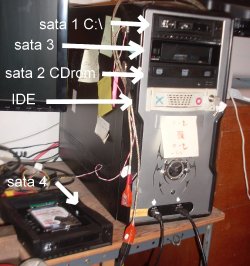
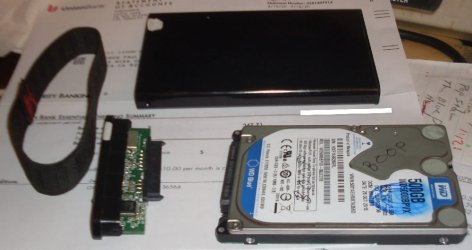
I often move large quantities of data. Like this:
1st image:
sata 1 = c:\ swappable - same drive tray as sata 4
sata 2 = cdrom
sata 3 = swappable tray bare accepts both 3½" & 2½" hdds
sata 4 = swappable tray uses a tray can accept bare hdds

2nd image:
2½" usb case Held together with that elastic band!
I can go from 2½" usb and plugged in to sata 3 in 10-15-20 seconds!

Power button "on" on sata 3, walla! plug hdd in sata 4, power on, walla!" Transfer data at sata speeds between all hdds.
I have a bunch of old IDE hdds with a lot of stored data I can access at 'higher than usb3x+ speeds)
sata 4 tray is same as sata 1 tray, both intended for internal use, but used outside, + seperate 5+12 v power supply, keeps the heat down inside computer!

sata.jpg

2½.jpg
 
Last edited:

My Computer My Computer

At a glance

Windows 7 Home Premium bitamd?4 gig
Computer type
Laptop
Computer Manufacturer/Model Number
toshiba 505
OS
Windows 7 Home Premium bit
CPU
amd?
Motherboard
?
Memory
4 gig
Monitor(s) Displays
Samsung S27D360 &S24D300 - Acer K222HQL - Eizo 21" (4x3)
Screen Resolution
1280 x 720 -1600x900 - (eizo 1024x768
Hard Drives
240 ssd
PSU
amd (?)
Mouse
logitech tackball
Antivirus
360 total security
Browser
firefox portable 29.0.1
Roland, When you do a copy, Windows copy's the file, however when you do a Move operation, the system is exactly the same, the file is copied to the location required for the move and then checked, when the check is passed only then is the original file deleted. So technically a move should be as reliable as a copy.
Barman, you are right as rain, however, also rare, experience, for me anyhow, has now and then shown a Move and Paste has somehow, somewhere, for some reason, gone wrong. A little more so if one is also doing another task which involves reading/writing to the hard-drive.
 

My Computer My Computer

At a glance

Windows 7 Professional 64-bitDesktop i5; Acers i5 & i7desktop 16GB; 1 Acer 8GB & 1 Acer 16GB
Computer type
PC/Desktop
Computer Manufacturer/Model Number
Antec desktop; Acer Aspire laptops
OS
Windows 7 Professional 64-bit
CPU
Desktop i5; Acers i5 & i7
Memory
desktop 16GB; 1 Acer 8GB & 1 Acer 16GB
Hard Drives
1TB split into 2 equal partitions [OS and data] usable by RJS
Internet Speed
AT&T DSL
Browser
FF, GChrome, msIE
Other Info
Windows 7 Firewall, Emsisoft AM/AV, MSE [scan-only], SpywareBlaster, Ruiware/BillP combine
Back
Top