
Solved New Firefox update reset my settings

jim davis

New member
Member
VIP
Local time
11:53 PM
Messages
191
Location
Walking, Taking In The Sweet Air
So I get my newest fire fox up date, which seems twice weekly these days, I have a few tabs open
like you tube Etc. and go ahead and accept. turn off computer, and next day shorty after computer is on, it says its gonna activate the update, at which point all my short cuts go blank, I go to you tube and there's no volume or sound, all my folders start only opening half size....every-time i do some thing computer makes juvenile bonks and bells sounds.
So I go through getting all this stuff quiet and/or sound back on, firefox volume back on, an a hour behind on my work schedule-Boring!!! and still can't get new file folders to fully open, how does firefox need to get in that part of my computer????
is there a way to shut off firefox updates?, cause i would rather rough it.

I almost never go to a non trust worthy site.
have a good one :D


jim
 

My Computer

Computer type
PC/Desktop
Computer Manufacturer/Model Number
dell optiplex 745
OS
7 Home Prem. 32 bit, c drive 74.4 space CPU 3.00 GHZ
CPU
?
Motherboard
?
Memory
64 ?
Hard Drives
1 TARA BITE WESTERN
Cooling
FAN IN FRONT AND a fan in back
Internet Speed
100 mbps
Antivirus
Avast and many others
Browser
firefox
Other Info
Patience Please, I know nothing, Zip, Zero about computers
Hi again jim davis,

Your grief seems to never end unfortunately!
I'm on FF Quantum 81.0 x64 now and haven't had issues, at least not yet anyway. :D
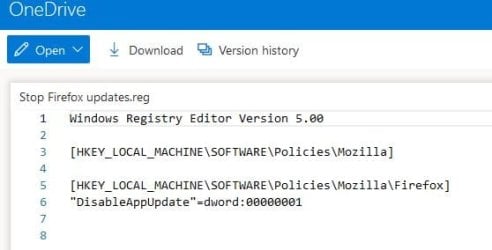
Here you go, as requested, from another Sevenforums helper's post. Registry modification script.
Stop Firefox updates.reg

Snick
 

My Computer

Computer type
PC/Desktop
Computer Manufacturer/Model Number
HP Desktop & Compaq Laptop
OS
Win 10 x64, Linux Lite, Win 7 x64, BlackArch, & Kali
Hard Drives
Samsung 850 Pro 256Gb,
Hitachi HDD 1Tb,
Crucial MX SSD 250Gb
Segate 3Tb USB 3.0 Ext. Backup HDD
Internet Speed
150Mbps dn, 20Mbps up
Antivirus
Avast Free, Malwarebytes Anti-Exploit & Anti-Ransomware
Browser
Firefox, Chrome, Opera, & VPN
[SIZE=3 said:
Snick[/SIZE];3477058]Hi again jim davis,

Your grief seems to never end unfortunately!
I'm on FF Quantum 81.0 x64 now and haven't had issues, at least not yet anyway. :D
Here you go, as requested, from another Sevenforums helper's post. Registry modification script.
Stop Firefox updates.reg

Snick


Hi Snick
I read here at forum some other guy had very similar problem.
And thanks for your help, but i have not a clue in the world what to do with this

this info, MS has become a world of abbreviations for folks who live in it.
so where do i put this and thanks :thumbsup:


[HKEY_LOCAL_MACHINE\SOFTWARE\Policies\Mozilla\Firefox]
"DisableAppUpdate"=dword:00000001
 

My Computer

Computer type
PC/Desktop
Computer Manufacturer/Model Number
dell optiplex 745
OS
7 Home Prem. 32 bit, c drive 74.4 space CPU 3.00 GHZ
CPU
?
Motherboard
?
Memory
64 ?
Hard Drives
1 TARA BITE WESTERN
Cooling
FAN IN FRONT AND a fan in back
Internet Speed
100 mbps
Antivirus
Avast and many others
Browser
firefox
Other Info
Patience Please, I know nothing, Zip, Zero about computers
jim davis

Sorry I should have provided an explanation. My Bad! :eek:
You don't copy and paste, you click download. When Stop Firefox updates.reg is on your computer, double-click it, choose yes. It then runs and places a registry entry in your registry to Disable Mozilla Firefox Automatic Updates.

Capture.JPG

I''ll explain the entire script which is the orange text.

First line is the editor version, second line creates the folder in the registry folder and sub folders, the sub folders begin at the backslash \ So HKEY_LOCAL_MACHINE is the main/directory folder that is already there, SOFTWARE is the subfolder that is already there, Policies is the subfolder already there, If there is no Mozilla subfolder it creates it if it is not already there (it should be being that you have Firefox installed). The third line creates entry DisableAppUpdate and =dword:assigns dword: the value of 00000001 which the binary for enable. Which enables Mozilla Firefox Disable App Update.

You could do the same thing manually, by opening regedit, clicking on HKEY_LOCAL_MACHINE then SOFTWARE then Policies then Mozilla, create DisableAppUpdate, then =dword: & add the value 00000001.
The 00000001 is the binary that enables the reg key DisableAppUpdate

Simple actually, not so for most. Hope that helps your understanding.

The reg script does all the legwork for you and prevents errors that may occur with manual additions. Depending on what you enter or delete in the registry you could cause Windows to cease functionality or a less serious error like something not working or not working the way is should, or maybe if you're lucky, nothing at all.

Windows Registry Editor Version 5.00

[HKEY_LOCAL_MACHINE\SOFTWARE\Policies\Mozilla]

[HKEY_LOCAL_MACHINE\SOFTWARE\Policies\Mozilla\Firefox]
"DisableAppUpdate"=dword:00000001

Snick


My Computer

Computer type
PC/Desktop
Computer Manufacturer/Model Number
HP Desktop & Compaq Laptop
OS
Win 10 x64, Linux Lite, Win 7 x64, BlackArch, & Kali
Hard Drives
Samsung 850 Pro 256Gb,
Hitachi HDD 1Tb,
Crucial MX SSD 250Gb
Segate 3Tb USB 3.0 Ext. Backup HDD
Internet Speed
150Mbps dn, 20Mbps up
Antivirus
Avast Free, Malwarebytes Anti-Exploit & Anti-Ransomware
Browser
Firefox, Chrome, Opera, & VPN

My Computers

System One System Two

Excellent suggestion townsbg!

You can change Firefox channels with an about:config tweak. normal, beta, not sure if that can be done with ESR, as I have never tried it.
I'd backup my system before attempting a change via that method for safety purposes.
Changing Your Update Channel • mozillaZine Forums

Snick


My Computer

Computer type
PC/Desktop
Computer Manufacturer/Model Number
HP Desktop & Compaq Laptop
OS
Win 10 x64, Linux Lite, Win 7 x64, BlackArch, & Kali
Hard Drives
Samsung 850 Pro 256Gb,
Hitachi HDD 1Tb,
Crucial MX SSD 250Gb
Segate 3Tb USB 3.0 Ext. Backup HDD
Internet Speed
150Mbps dn, 20Mbps up
Antivirus
Avast Free, Malwarebytes Anti-Exploit & Anti-Ransomware
Browser
Firefox, Chrome, Opera, & VPN
The registry trick explanation is on my website here

What do you mean by file folders being messed up? In all of your computer or just in Firefox?

To rule out a plug-in, add-on or possible prefs.js issue, hold the shift key and then launch Firefox. Firefox will now launch in safe mode. Does it work without issue?

Please describe your "file folder" issue in more detail.
 

My Computer

Computer type
PC/Desktop
OS
Windows 7 Ultimate x64
You might want Firefox ESR.


No I think its a greater problem,

its the naive users who put up with this crap. none of this MS junk is stable enough to work in any sort of a dignified manner for any reasonable length of time, and folks just put up with it to have a E-identity.
Now...I have spent not less then 24 full hours on the phone, trying to get my 400.00 Epson printer to work,
which is another piece of junk that should be class action suited as well out of existence.

But I digress.

Does snick or anyone know where this Firefox ad-on came from, cause last I looked, the site it was at seemed a little "Home Made" and since forums are crawling with home made program peddlers
that actually are data miners Etc. I would like to know if anyone has "bug checked" this ad on.
 

My Computer

Computer type
PC/Desktop
Computer Manufacturer/Model Number
dell optiplex 745
OS
7 Home Prem. 32 bit, c drive 74.4 space CPU 3.00 GHZ
CPU
?
Motherboard
?
Memory
64 ?
Hard Drives
1 TARA BITE WESTERN
Cooling
FAN IN FRONT AND a fan in back
Internet Speed
100 mbps
Antivirus
Avast and many others
Browser
firefox
Other Info
Patience Please, I know nothing, Zip, Zero about computers
I've been using a "policies.json" file, placed within a "distribution" folder in the "Program Files\Mozilla Firefox" folder for years with no issues. I simply move the distribution folder to my deskop when I do want to update the browser, and then replace the folder after the update to keep Mozilla from installing further updates until I want them. The contents of the policies.json file:


{
"policies": {
"DisableAppUpdate": true
}
}


Copy everything between the outer brackets and past into a notepad file. Save the file as "policies.json". Create a 'distribution' folder under your Mozilla Firefox, Program Files folder and move the file you into that folder.


The "About Mozilla Firefox", Help page should then read: "Updates disabled by your system administrator"
 

My Computer

Computer type
PC/Desktop
Computer Manufacturer/Model Number
Dell Precision M6500 / Dell Insprion 3847
OS
Windows 7 Pro 32bit / Windows 7 Professional
CPU
Intel Core i7-620M Duel Core 2.66GHz / Intel Core i5-4460
Memory
4.0 GB / 8.0 GB
Graphics Card(s)
1.0 GB NVIDIA Quadro FX 2800M / Intel HD Graphics
Screen Resolution
1440x900 / 1920x1080
I have spent not less then 24 full hours on the phone, trying to get my 400.00 Epson printer to work, which is another piece of junk that should be class action suited as well out of existence.

Does snick or anyone know where this Firefox ad-on came from, cause last I looked, the site it was at seemed a little "Home Made" and since forums are crawling with home made program peddlers
that actually are data miners Etc. I would like to know if anyone has "bug checked" this ad on.


  1. Which Epson printer do you have? I have an Epson XP-400 and it has been working flawlessly for years, wired & wireless.
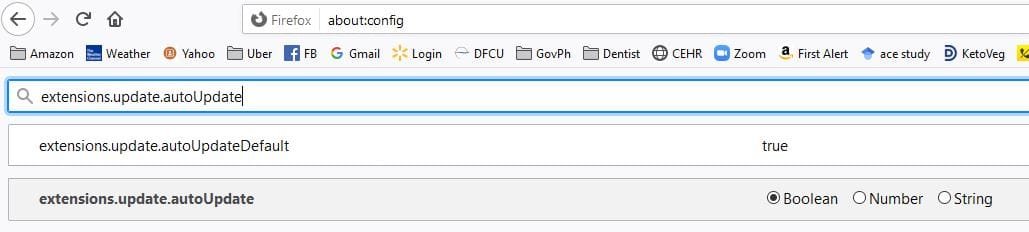
  2. What Firefox Add-on are you referring to? Reg script, i.e. registry entry script is authored by F22 Simpilot & the website linked to is F22 Simpilot's, which is stated as such in post #7. The reg script works very similar, if not identical to, a Firefox about:config tweak.
Capture.JPG

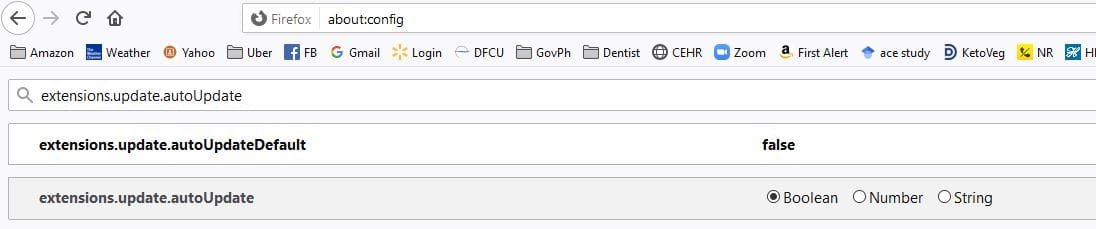
You access Firefox about:config by typing about:config in the URL section, as I have done in the screenshots. To change the boolean entry from true to false and vice-versa you double-click the 1st entry.

Capture 2.JPG
3. Bug checked add-on? Again which add-on are you referring to please? You were provided the source code, detailed explanation as to how the reg script works. F22 Simpilot graciously provided a link to the website and author info. Anyone with basic scripting knowledge can create a simple script, be it Reg script, Batch script, or PowerShell script.
What is a Script? - Computer Hope

We are here to provide free assistance/help in resolving OPs issue(s). No one, to the best of my knowledge, has purposely attempted to introduce malware, keyloggers, data miners, etc. Too many of us view/monitor posts, including Forum Admins for that to happen, & if such an error occurs, it is relatively quickly ascertained and corrected.

Snick
 
Last edited:

My Computer

Computer type
PC/Desktop
Computer Manufacturer/Model Number
HP Desktop & Compaq Laptop
OS
Win 10 x64, Linux Lite, Win 7 x64, BlackArch, & Kali
Hard Drives
Samsung 850 Pro 256Gb,
Hitachi HDD 1Tb,
Crucial MX SSD 250Gb
Segate 3Tb USB 3.0 Ext. Backup HDD
Internet Speed
150Mbps dn, 20Mbps up
Antivirus
Avast Free, Malwarebytes Anti-Exploit & Anti-Ransomware
Browser
Firefox, Chrome, Opera, & VPN
  1. Which Epson printer do you have? I have an Epson XP-400 and it has been working flawlessly for years, wired & wireless.
  2. What Firefox Add-on are you referring to? Reg script, i.e. registry entry script is authored by F22 Simpilot & the website linked to is F22 Simpilot's, which is stated as such in post #7. The reg script works very similar, if not identical to, a Firefox about:config tweak.
View attachment 412550

You access Firefox about:config by typing about:config in the URL section, as I have done in the screenshots. To change the boolean entry from true to false and vice-versa you double-click the 1st entry.

View attachment 412551
3. Bug checked add-on? Again which add-on are you referring to please? You were provided the source code, detailed explanation as to how the reg script works. F22 Simpilot graciously provided a link to the website and author info. Anyone with basic scripting knowledge can create a simple script, be it Reg script, Batch script, or PowerShell script.
What is a Script? - Computer Hope

We are here to provide free assistance/help in resolving OPs issue(s). No one, to the best of my knowledge, has purposely attempted to introduce malware, keyloggers, data miners, etc. Too many of us view/monitor posts, including Forum Admins for that to happen, & if such an error occurs, it is relatively quickly ascertained and corrected.

Snick


ha ha ha Thanks snick
but life is too short to mess with all the above,

but what i did get out of it is some one

""Gives a dam"

and for that i thank you
my Epson is one of the many that "Auto uses up the color " to make you buy more ink"
Even tho you only print in black

I am taking it back as I speak and getting a toner printer, even the store said Epson was a shame and to buy toner machines only, my library just threw out their inkjet machines Too.


did anyone ever safety check that Alive site you sent me to that down loads some stop UPDATES program for firefox??
 

My Computer

Computer type
PC/Desktop
Computer Manufacturer/Model Number
dell optiplex 745
OS
7 Home Prem. 32 bit, c drive 74.4 space CPU 3.00 GHZ
CPU
?
Motherboard
?
Memory
64 ?
Hard Drives
1 TARA BITE WESTERN
Cooling
FAN IN FRONT AND a fan in back
Internet Speed
100 mbps
Antivirus
Avast and many others
Browser
firefox
Other Info
Patience Please, I know nothing, Zip, Zero about computers
ha ha ha Thanks snick
but life is too short to mess with all the above, but what i did get out of it is some one ""Gives a dam" and for that i thank you
my Epson is one of the many that "Auto uses up the color " to make you buy more ink"
Even tho you only print in black
I am taking it back as I speak and getting a toner printer, even the store said Epson was a shame and to buy toner machines only, my library just threw out their inkjet machines Too.

did anyone ever safety check that Alive site you sent me to that down loads some stop UPDATES program for firefox??

We all care and give a damn about helping resolve OPs computer issues. We provide free help. Why would we do that if we don't give a damn?

Actually the reg script is double-click & downloaded the script from the website link on a previous post by F22Simpilot. The website is F22Simpilot's & is the moderator (Skynet), I have no doubt it is safe. It is a computer forum just like Sevenforums.

The about:config tweak is copy and paste or type about:config in your URL
choose I'll be careful at popup, copy and paste extensions.update.autoUpdateDefault double-click to change true to false & then close about:config

If you choose print in Grayscale, Epson Ink Jet printer only uses black! In printer properties you can choose draft, text, or text & image. I use text unless I'm printing on Photo Paper then I choose Best Photo.

Do you order ink from 3rd party supplier?
I do, Swift Ink here in Metro Detroit, double size less than single Epson brand. Probably not feasible from where you live, however, you most likely can find a local company near you.
Epson XP-400 200XL High Yield Cartridges
Can always find a coupon code for free shipping and Swift Ink offers specials. They stand behind their product. I had two black XXL cartridges, same cartridge batch numbers (they don't manufacture the cartridges just fill with ink) that wouldn't work. Tried reinstalling several times, tried cleaning print heads 5-6 times wouldn't print. Contacted them via their website. They sent out 2 new ones same day. Those are the only ones I had an issue with in 10 years.

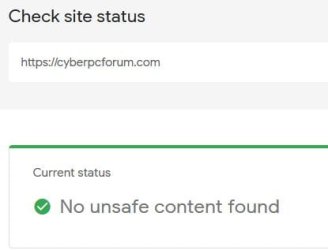
Additional regarding safe website. Why would you think we would post an unreputable website link?

Google safe browsing URL/site checker results as you requested.

Capture.JPG

Snick
 
Last edited:

My Computer

Computer type
PC/Desktop
Computer Manufacturer/Model Number
HP Desktop & Compaq Laptop
OS
Win 10 x64, Linux Lite, Win 7 x64, BlackArch, & Kali
Hard Drives
Samsung 850 Pro 256Gb,
Hitachi HDD 1Tb,
Crucial MX SSD 250Gb
Segate 3Tb USB 3.0 Ext. Backup HDD
Internet Speed
150Mbps dn, 20Mbps up
Antivirus
Avast Free, Malwarebytes Anti-Exploit & Anti-Ransomware
Browser
Firefox, Chrome, Opera, & VPN
jim davis,

Here's a few Inkjet suppliers in your neck of the woods. Please peruse at your pleasure. If available the XXL or double ink cartridge, etc are the most economical. You could try bulk ink and refill too. Usually 1 or 2 times then the printhead and electronics take a dump. Not sure how the fill status works on the newer cartridges. I only have experience with refills from many years ago.

Ireland's Leading Ink Cartridge and Laser Toner Supplier
Ink Cartridges & Laser Toners Ireland, Cheap Printer Ink ...
Printer Ink & Toner Cartridges Ireland | Buy Printer Cartridges ...
Inksdirect for the best quality ink and toner cartridges
Printer Ink | Ink Cartridges Ireland | Ink Cartridges Dublin ...

Are you aware a color laser printer is relatively expensive & so are the toner cartridges.
You can by bulk toner and refill them, much easier than inkjet, & can refill many times. I've rebuild, and or serviced many laser printers, color and black & white.
I have a HP B&W I obtained from AFT Michigan while I worked there as a contractor. They were trashing it. Took it home, hooked it up and it made a bearing squeal noise and wouldn't print. Opened the case, moved the laser prism lock to open, removed the prism, placed a drop of machine oil in the bearing hole, replaced the prism, closed the lock, closed the case and it's been working fine for 9 years. Had brand new hi-yield toner cartridge in & a spare one in the box too. (10,000 sheets each)

Snick
 

My Computer

Computer type
PC/Desktop
Computer Manufacturer/Model Number
HP Desktop & Compaq Laptop
OS
Win 10 x64, Linux Lite, Win 7 x64, BlackArch, & Kali
Hard Drives
Samsung 850 Pro 256Gb,
Hitachi HDD 1Tb,
Crucial MX SSD 250Gb
Segate 3Tb USB 3.0 Ext. Backup HDD
Internet Speed
150Mbps dn, 20Mbps up
Antivirus
Avast Free, Malwarebytes Anti-Exploit & Anti-Ransomware
Browser
Firefox, Chrome, Opera, & VPN
We would really like to help you sort your issues out, but you have to be a little forthcoming with answers to the questions we asked. I already asked about what file/folder issue you have. I need to know more about what you're referring to about this so I know what's going on. Also, you were asked about the add-on you had installed that might be an issue.

Three things here:

1) What is an "Alive" site? If you're referring to cyberpcforum.com, that is my website. I own and operate it. I'm the sole proprietor and made the whole damn thing right down to core code. Trust me when I tell you I have spam/hacker crap under control with my site unless my host gets hacked. Here's a Virus Total link: VirusTotal

2) Your first mistake was buying an Epson. Read the reviews on a Brother or HP printer and at that get a laser. As you said, "toner" printer. I used to work for a company that recycled computer equipment, and printer cartridges was my specialty.

3) Add-ons and plug-ins can be installed automatically by other software you are running. Also, Java Script can do funny things in your browser. Like mine for cryptocurrency, send you malware, leak your IP if you use a VPN, among a whole host of other stuff. In order to stay abreast of malware delivered via Java Script or an infected Ad, first use uBlock Origin in your browser and use and learn how to use the now free Sandboxie which will keep your browser in a sandbox so nothing should be able to touch your computer unless you tell it to. This means that when you use Sandboxie and you download something you will have to allow it in the recovery box after it downloads. If you didn't expect a download, don't recover it.

In Firefox press control + shift + a and tell me what extensions you have installed.
 

My Computer

Computer type
PC/Desktop
OS
Windows 7 Ultimate x64
jim davis,

here's a few inkjet suppliers in your neck of the woods. Please peruse at your pleasure. If available the xxl or double ink cartridge, etc are the most economical. You could try bulk ink and refill too. Usually 1 or 2 times then the printhead and electronics take a dump. Not sure how the fill status works on the newer cartridges. I only have experience with refills from many years ago.

ireland's leading ink cartridge and laser toner supplier
ink cartridges & laser toners ireland, cheap printer ink ...
printer ink & toner cartridges ireland | buy printer cartridges ...
inksdirect for the best quality ink and toner cartridges
printer ink | ink cartridges ireland | ink cartridges dublin ...

are you aware a color laser printer is relatively expensive & so are the toner cartridges.
You can by bulk toner and refill them, much easier than inkjet, & can refill many times. I've rebuild, and or serviced many laser printers, color and black & white.
I have a hp b&w i obtained from aft michigan while i worked there as a contractor. They were trashing it. Took it home, hooked it up and it made a bearing squeal noise and wouldn't print. Opened the case, moved the laser prism lock to open, removed the prism, placed a drop of machine oil in the bearing hole, replaced the prism, closed the lock, closed the case and it's been working fine for 9 years. Had brand new hi-yield toner cartridge in & a spare one in the box too. (10,000 sheets each)

snick


please see my next post and thank you
 

My Computer

Computer type
PC/Desktop
Computer Manufacturer/Model Number
dell optiplex 745
OS
7 Home Prem. 32 bit, c drive 74.4 space CPU 3.00 GHZ
CPU
?
Motherboard
?
Memory
64 ?
Hard Drives
1 TARA BITE WESTERN
Cooling
FAN IN FRONT AND a fan in back
Internet Speed
100 mbps
Antivirus
Avast and many others
Browser
firefox
Other Info
Patience Please, I know nothing, Zip, Zero about computers
We would really like to help you sort your issues out, but you have to be a little forthcoming with answers to the questions we asked. I already asked about what file/folder issue you have. I need to know more about what you're referring to about this so I know what's going on. Also, you were asked about the add-on you had installed that might be an issue.

Three things here:

1) What is an "Alive" site? If you're referring to cyberpcforum.com, that is my website. I own and operate it. I'm the sole proprietor and made the whole damn thing right down to core code. Trust me when I tell you I have spam/hacker crap under control with my site unless my host gets hacked. Here's a Virus Total link: VirusTotal

2) Your first mistake was buying an Epson. Read the reviews on a Brother or HP printer and at that get a laser. As you said, "toner" printer. I used to work for a company that recycled computer equipment, and printer cartridges was my specialty.

3) Add-ons and plug-ins can be installed automatically by other software you are running. Also, Java Script can do funny things in your browser. Like mine for cryptocurrency, send you malware, leak your IP if you use a VPN, among a whole host of other stuff. In order to stay abreast of malware delivered via Java Script or an infected Ad, first use uBlock Origin in your browser and use and learn how to use the now free Sandboxie which will keep your browser in a sandbox so nothing should be able to touch your computer unless you tell it to. This means that when you use Sandboxie and you download something you will have to allow it in the recovery box after it downloads. If you didn't expect a download, don't recover it.

In Firefox press control + shift + a and tell me what extensions you have installed.


Wow !
I really gotta Thank both Simpilot and Snick for 2 of the best reply's I have ever got on a computer forum ABOVE.
So much so I will copy them and add to my Comp Tools file, which is a absolute first. :thumbsup:

this is laser right on info, but my Covid hangover is back, and I need to lay down for a while,
after eating a few nails of garlic, ester C and lime spiked orange juice, which never fails to push it off again, unless I walk in the rain as i did 2 days ago.
Thanks Huge Time!
 

My Computer

Computer type
PC/Desktop
Computer Manufacturer/Model Number
dell optiplex 745
OS
7 Home Prem. 32 bit, c drive 74.4 space CPU 3.00 GHZ
CPU
?
Motherboard
?
Memory
64 ?
Hard Drives
1 TARA BITE WESTERN
Cooling
FAN IN FRONT AND a fan in back
Internet Speed
100 mbps
Antivirus
Avast and many others
Browser
firefox
Other Info
Patience Please, I know nothing, Zip, Zero about computers
We would really like to help you sort your issues out, but you have to be a little forthcoming with answers to the questions we asked. I already asked about what file/folder issue you have. I need to know more about what you're referring to about this so I know what's going on. Also, you were asked about the add-on you had installed that might be an issue.

Three things here:

1) What is an "Alive" site? If you're referring to cyberpcforum.com, that is my website. I own and operate it. I'm the sole proprietor and made the whole damn thing right down to core code. Trust me when I tell you I have spam/hacker crap under control with my site unless my host gets hacked. Here's a Virus Total link: VirusTotal

2) Your first mistake was buying an Epson. Read the reviews on a Brother or HP printer and at that get a laser. As you said, "toner" printer. I used to work for a company that recycled computer equipment, and printer cartridges was my specialty.

3) Add-ons and plug-ins can be installed automatically by other software you are running. Also, Java Script can do funny things in your browser. Like mine for cryptocurrency, send you malware, leak your IP if you use a VPN, among a whole host of other stuff. In order to stay abreast of malware delivered via Java Script or an infected Ad, first use uBlock Origin in your browser and use and learn how to use the now free Sandboxie which will keep your browser in a sandbox so nothing should be able to touch your computer unless you tell it to. This means that when you use Sandboxie and you download something you will have to allow it in the recovery box after it downloads. If you didn't expect a download, don't recover it.

In Firefox press control + shift + a and tell me what extensions you have installed.

Again GREAT response F22 Simpilot!

Agree with your evaluation/explanation totally!

I believe I answered OP's remark regarding your website, including a screenshot of Googles web-check. I'm sure you, as I & other Forum members who respond to OP inquiries, endeavor to provide accurate information and links to clean websites.

OP is long on verbiage without answering pertinent questions, and continues to do so, as you are now fully aware. Hard to provide meaningful help as a result! Very frustrating!

Sandboxie - Sandbox software for application isolation and ...

Snick
 

My Computer

Computer type
PC/Desktop
Computer Manufacturer/Model Number
HP Desktop & Compaq Laptop
OS
Win 10 x64, Linux Lite, Win 7 x64, BlackArch, & Kali
Hard Drives
Samsung 850 Pro 256Gb,
Hitachi HDD 1Tb,
Crucial MX SSD 250Gb
Segate 3Tb USB 3.0 Ext. Backup HDD
Internet Speed
150Mbps dn, 20Mbps up
Antivirus
Avast Free, Malwarebytes Anti-Exploit & Anti-Ransomware
Browser
Firefox, Chrome, Opera, & VPN
Again GREAT response F22 Simpilot!

OP is long on verbiage without answering pertinent questions, and continues to do so, as you are now fully aware. Hard to provide meaningful help as a result! Very frustrating!
Snick

Hello Snick
My name is Jim, not OP,
My life is very busy, if you have some burning desire to get feed back on your "Suggestions" ASAP
please do not respond to my post, while i admire and appreciate your wisdom on these subjects,
for me responding and acting very quickly to some ones ideas on a computer form has been a three times disaster for me,
one time it even cost me an xp computer, and if its ok with you? I don't want to rehash that-
other then everybody thinks they are a computer expert at other forums (less policed by Admin then this one) and blindly following advice can be horrific.
When i post, my goal often is not to come back to see "Suggestions", for about 2 weeks so i may
get several answers and with the hope minds that really know what their doing have criticized the bad posts.
Lastly I make a living making folks feel seen and acknowledged at the "Heart" level, because that's the way most people are, what is "Long Winded" for one person, is life saving personal reaffirmation to another.
You have proved often to be most trust worthy source of Info for a non admin member of this forum,
and I give you real credit for that, cause you actually help these guys run the place, at what must be one of the highest levels of "know how" out here.
However, do remember, when you post here or anywhere, your throwing out input into a world of bad, sometimes criminal advice everywhere and....... Plaque Covid, death, joblessness, acute distraction and endless worry.
Hope this helps you understand some of your feelings you state your having in reaction to folks from different cultures and life situations then your own.
Stay Safe

jim Davis
 

My Computer

Computer type
PC/Desktop
Computer Manufacturer/Model Number
dell optiplex 745
OS
7 Home Prem. 32 bit, c drive 74.4 space CPU 3.00 GHZ
CPU
?
Motherboard
?
Memory
64 ?
Hard Drives
1 TARA BITE WESTERN
Cooling
FAN IN FRONT AND a fan in back
Internet Speed
100 mbps
Antivirus
Avast and many others
Browser
firefox
Other Info
Patience Please, I know nothing, Zip, Zero about computers
We would really like to help you sort your issues out, but you have to be a little forthcoming with answers to the questions we asked. I already asked about what file/folder issue you have. I need to know more about what you're referring to about this so I know what's going on. Also, you were asked about the add-on you had installed that might be an issue.

Three things here:

1) What is an "Alive" site? If you're referring to cyberpcforum.com, that is my website. I own and operate it. I'm the sole proprietor and made the whole damn thing right down to core code. Trust me when I tell you I have spam/hacker crap under control with my site unless my host gets hacked. Here's a Virus Total link: VirusTotal

2) Your first mistake was buying an Epson. Read the reviews on a Brother or HP printer and at that get a laser. As you said, "toner" printer. I used to work for a company that recycled computer equipment, and printer cartridges was my specialty.

3) Add-ons and plug-ins can be installed automatically by other software you are running. Also, Java Script can do funny things in your browser. Like mine for cryptocurrency, send you malware, leak your IP if you use a VPN, among a whole host of other stuff. In order to stay abreast of malware delivered via Java Script or an infected Ad, first use uBlock Origin in your browser and use and learn how to use the now free Sandboxie which will keep your browser in a sandbox so nothing should be able to touch your computer unless you tell it to. This means that when you use Sandboxie and you download something you will have to allow it in the recovery box after it downloads. If you didn't expect a download, don't recover it.

In Firefox press control + shift + a and tell me what extensions you have installed.


Thank you Simpilot


for the very good reason of folks, just wanting to help, this post took own a world of many directions, As I go on and off oxygen and other stuff from a bout of covid, my user experience here was one of being over whelmed. I fixed the file folder issue by resetting file preferences and doing a "Restart" as stated this glitch appeared with on set of a Fire Fox update, which is beyond my understanding, cause my add on's remain unchanged, but I saw others mention this as their experience also with a fire fox update
elsewhere.


1. Thats so very cool you made that site and down load, truly you deserve a 5 Star something for doing that, but be advised, as this point in the digital journey most folks have been burned badly using Down Loads from generic looking sites, so much so, Major Geeks has made a living addressing just that subject. I would dress it up your site with a few reviews Etc. for the record, its now part of my "Comp Help" bookmarks.

2.Webs reviews and printers in general are all most criminal, and it is gone now, and i am going for a toner machine, toner seeming the least of all ill's.

3. I dumped java/acrobat and am now trying to open PDF's with "Libre" but have not got it to work yet. thank you for sandboxie, that is one very sweet idea,,,, I will investigate later as i have the energy.

Ha Ha drink your orange juice, stay safe
Jim Davis
 
Last edited:

My Computer

Computer type
PC/Desktop
Computer Manufacturer/Model Number
dell optiplex 745
OS
7 Home Prem. 32 bit, c drive 74.4 space CPU 3.00 GHZ
CPU
?
Motherboard
?
Memory
64 ?
Hard Drives
1 TARA BITE WESTERN
Cooling
FAN IN FRONT AND a fan in back
Internet Speed
100 mbps
Antivirus
Avast and many others
Browser
firefox
Other Info
Patience Please, I know nothing, Zip, Zero about computers
Thanks to all who chimed in here, very glad for your input and diligence

STAY SAFE :cool:
 

My Computer

Computer type
PC/Desktop
Computer Manufacturer/Model Number
dell optiplex 745
OS
7 Home Prem. 32 bit, c drive 74.4 space CPU 3.00 GHZ
CPU
?
Motherboard
?
Memory
64 ?
Hard Drives
1 TARA BITE WESTERN
Cooling
FAN IN FRONT AND a fan in back
Internet Speed
100 mbps
Antivirus
Avast and many others
Browser
firefox
Other Info
Patience Please, I know nothing, Zip, Zero about computers
Back
Top