Are there any programs exactly like NT Backup, but for Windows 7 ?

mulambo

New member
Member
VIP
Local time
5:25 AM
Messages
110
Hello everybody, first post here, I'm Emanuele from Italy and I would like to ask you a question about backups, especially system state backups.
I've been used to NT Backup for a long time, with my older versions of Windows XP and it always worked fine: no administrator settings to solve, full customization of entries and elements to include/exclude from backup, full precision and no problems ( I just had for the backup to end and that's all).
Now I'm using the default Windows 7 system backup utility, but I'm not as that satisfied: can't customize which folder to exclude, can't backup the system state only and if I change anything about the disk (for example: a new partition) the restore system utility doesn't even work.


So, is there a real clone or a really similar program to Windows XP NT Backup, but for Windows 7 ?
I'm looking for a backup software that doesn't just backup files, but also acts with administrator rights/privileges without too much of a hassle or without any problem or further procedure to follow. NT Backup was so easy to to use and pretty effective too, I wonder why Microsoft switched to such utility which looks unstable and too dictatorial, not leaving the user the ability to choose what to backup or not.


Also dimension and structure of backup files are different with this new utility... I mean, with NTBackup you just had a .bkf file in the end and that was enough, now with the Windows 7 utilty you got 2 files and a folder and you can't even choose where to save them (Microsoft took for granted that any user had a specific hard drive for that ? ).


I hope anyone of you can help me finding such a program, I've been looking for that and I've been always disappointed by the variety of backup softwares I tried out there so far.. all of them just too huge for the real abilities they actually offered. I mean, NTBackup was just a little software in size, but it did so much! I wonder if there is anything exactly like it out there, not just a file-sync program but a full working backup software which can restore anything exactly as it was, just like NTBackup did :huh:
 

My Computer My Computer

Computer type
PC/Desktop
OS
Windows 7, 64bit pro
I don't know exactly what you are asking, because I never used ntbackup.

Karens replicator is good for file/folder backup.

Karen's Replicator the Backup Utility for Windows v3.7.6 Released May 25, 2020 | Karen's Power Tools


There are many imaging programs in addition to ms own windows system image program.

Aomei backupper is popular for disk/partition imaging and is very simple to use.

Download Free Windows Backup Software


O&O diskimage has lot of advanced functions and there is a giveaway version

Registration for your FREE license of O&O DiskImage 14

they will send an email , clcik the link and they send another email with your free license.

download pro v14 program here
Download Archive
 

My Computers My Computers

System One System Two

  • Computer type
    PC/Desktop
    OS
    7 X64
    CPU
    i5 8400
    Motherboard
    gigabyte b365m ds3h
    Memory
    2x8gb 3200mhz
    Hard Drives
    various
    PSU
    pure power 11 400w cm
    Case
    Coolermaster
    Cooling
    cryorig m9i
  • Computer type
    PC/Desktop
    OS
    7x64
    CPU
    g5400
    Motherboard
    ga b365m ds3h
    Memory
    8gb ddr4 2400
    PSU
    xfx pro 450w
NT Backup was the default backup software for Windows XP, it restored system image, files and it offered also the opportunity to select or exclude specific files or folders (with the use of filters or by just clicking on the folder checkboxes on a system list). It also had an incremental backup option where updated files were marked differently.


Basically all the selected files (including system image/ system state, registry, program settings, etc... practically the system as it is, but just the system , not the whole partition) were stored into a .bkf file which could be moved anywhere and it could be open with the same program (NTBackup), immediately recognizing it. Backups worked even with different machines, I used it once on two totally different computers and Windows started perfectly (I just had to install the new drivers on the new machine).


Honestly, I'm not looking for an imaging software, or a partition cloning software.
For files backup I already use Freefile Sync which is freeware, not shareware.


About AOMEI, tried that but it was kinda spammy, as much as many others (like HandyBackup, Uranium, Partlogic, etc...) loading unwanted programs like updates, ads, and extra (still unwanted) features. Surprisingly such programs were not frree, they were huge and not even complete or they were offering the same kind of service of many other freewares (but with less options). All of them weren't able to backup system states (probably because they're third-party softwares).


I think I can't just solve it by just copying files, especially if they're system files which require privileges and authorizations (Windows just can't copy or replace them).
NTBackup replaced system files without any authorization and never missed, I wonder why newer programs are actually worse than older ones.


Isn't there a way for Windows 7 backup to make a backup of the system which excludes a certain folder (like documents, not related to system) ?


I'm just looking for a program that, in case of Windows re-installation, brings Windows to its previous status EXACTLY as it was. NTBackup did that, I wonder why newer programs can't do that as well, as Windows 7 restore doesn't even work sometimes (and I tried it after many re-installation of the system).
 

My Computer My Computer

Computer type
PC/Desktop
OS
Windows 7, 64bit pro
I have been using and recommending Aomei a long while.

kinda spammy, as much as many others (like HandyBackup, Uranium, Partlogic, etc...) loading unwanted programs like updates, ads, and extra (still unwanted) features.

Rubbish.


Isn't there a way for Windows 7 backup to make a backup of the system which excludes a certain folder (like documents, not related to system) ?

Not officially. If you want those features, use a 3rd party program or use XP.
 

My Computers My Computers

System One System Two

  • Computer type
    PC/Desktop
    OS
    7 X64
    CPU
    i5 8400
    Motherboard
    gigabyte b365m ds3h
    Memory
    2x8gb 3200mhz
    Hard Drives
    various
    PSU
    pure power 11 400w cm
    Case
    Coolermaster
    Cooling
    cryorig m9i
  • Computer type
    PC/Desktop
    OS
    7x64
    CPU
    g5400
    Motherboard
    ga b365m ds3h
    Memory
    8gb ddr4 2400
    PSU
    xfx pro 450w
Yeah I'll probably just connect the hard drive to an XP machine and do it from there then, I think there could be no other solution unless there's some program like NTBackup for Windows 7... unfortunely even Aomei wasn't that trustable to me, too big and too slow, lots of unwanted feauture and it didn't actually backup the system, just the non-system files so it's practically the same thing as a lightweight file-synch program (like FreefileSync), just a more "modern" graphic... if people pay up a program just for its graphics when the program should just function then I don't wonder why some programs are lacking of the most basic features even an OS from 2000 can provide... it's still kinda unbelievable to me.
 

My Computer My Computer

Computer type
PC/Desktop
OS
Windows 7, 64bit pro
*update* I've found a nice software called Cobian backup 11, it seems to support its own form of Shadow Copy service so I guess it could work in case of restoration of system protected/blocked files and folders on Windows 7 (didn't try it though). It looks like a good program, I copied the system files selectively (it takes a bit of work on configuration, but there are enough guides on the web) and it also gives 7z/zip compression and it's totally lightweight in comparison with Aomei, Uranium and all the rest (and it's FREE). Good program indeed, absolutely suggested.
 

My Computer My Computer

Computer type
PC/Desktop
OS
Windows 7, 64bit pro
Have a look and learn how to use FreeFileSync.
 

My Computer My Computer

Computer type
PC/Desktop
OS
Windows 7 Ultimate x64
Have a look and learn how to use FreeFileSync.
well that's actually what I talked about 3-4 comments ago, I've been using it for years, at least once a month ;)
anyway, Freefilesync could not help, even when run as administrator it couldn't replace system files and some of them (the most relevant ones) would just not be copied or restored properly (or not at all), probably because it doesn't act as a "shadow copy service" (or something like that) like NTBackup (that, I think is run by SYSTEM itself)... but it's awesome as regards folder sync, when used carefully.


That's why I was looking for a third party software that actually acted like SYSTEM itself, with all privileges/rights, so it could actually backup and restore system files correctly, exactly as they are on the HD. I just hope this Cobian 11 will work well when I'll have to restore the system, or else I got to reinstall everything over again.


About imaging softwares: if I had another HD (exactly like the one I use for the system) it would be ok, but I must save space for other things on the other HD's so I can't rely on the whole copy of the system partition. My system HD also seems to be weirdly triggerable by partition operations, I've already re-installed windows more than once after trying Easus products (the system just got stuck in reboot loop with the "Batch operations executed succesfully" window message, for those who know it) and I sincerely don't want to use it again. I'm too scared of that, If I have to manage partitions I use another PC with WinXp on it.
 

My Computer My Computer

Computer type
PC/Desktop
OS
Windows 7, 64bit pro
You're going about this all wrong I'm afraid. I'm a HUGE backup freak in more ways then you can shake a stick at. My website for example is encrypted and backed up to no less than eight forms of media. I'm taking cloud providers, different computers, USB stick, DVD/RW and Blu-ray BD-RE. My database is only about 20 MB so I can do that. If it grows by some miracle I can use Gsplit3 to split the encrypted SFX archive and backup to 50 GB or 100 GB Blu-rays.

Now that is just my website. For more pertinent data that I'd like to keep backed up on a more reoccurring basis, most of that data is also encrypted and sent to the cloud (three cloud providers), hard drives, optical media and computers using a local FTP server (like to go WebDAV one day).

Then the grand daddy of them all. I do a full 1:1 disk clone with Clonezilla about once a month. I have to use Clonezilla because it's the only cloning software I found that will clone a FDE (Full Disk Encryption) computer. And I have used Clonezilla just recently to clone my former 500 GB SSD to a new 1 TB SSD. After that I just had to go into Disk Management and extend the partition.

So with that all being said you have to approach this from one or both ways.

1) Create routine data backups for important data like documents, images, etc with FreeFileSync firing off via the Task Scheduler to copy to a secondary internal HDD, and then copying that data to another external drive as a backup of a backup. You want air gaped backups. You get a massive power surge, lightning strike or nearby lightning strike it can and will own and tea bag your data. Your PSU can also crap out and take HDD data with it. That's why you want a good, reputable high quality PSU. I extend that protection to a UPS (Uninterruptible Power Supply) rated for active PSUs. I have a CyberPower unit with display. Read here about one of its capabilities. The reason why you'd want a UPS is because an abrupt power loss could take your data and/or computer with it. I've read my fare share of help threads on many tech forums all over the Internet of this happening. Also, make use of other forms of media like optical and the cloud for backups of backups of backups. NEVER trust the cloud. That's someone else's server/s. Here today gone tomorrow. Be it an act of God or what else.

2) Do a periodic full 1:1 disk clone to an external hard drive.

The reason why you can't backup system files and what not is because those are protected by system level permissions. If your goal is to backup system level files, then a full disk clone or a hard drive image is what you'd have to do. Driveimage XML is what will create a full disk image, but I've never messed with it too much let alone know how to restore that. I don't can't care for images of hard drives but rather than just clone the whole drive to another drive of equal or greater size and store that in my $35 fireproof safe along with the rest of my media.

I have used the Chinese made* (see footnote) AOMEI Backupper and it's a very simple cloning or drive imaging software. Just chose the source, your C drive, and the destination, the external (or internal) hard drive for the clone. To restore, make sure you use AOMEI Backupper's live disk builder to create a boot disk prior to needing it and write to USB or optical disk. They give you two types to chose from. A Windows PE image or a Linux image both with AOMEI Backupper installed. Test them first! I didn't have luck with the Windows version so I use the Linux version. I have successfully used AOMEI Backupper many times to not only clone but write back a clone to a netbook. I booted the netbook (a Dell Mini 910) with the AOMEI Backupper Linux boot USB stick and cloned to another blank USB stick. When I had to clone back to a new internal HDD in the netbook, I again booted the AOMEI Backupper Linux boot USB stick and cloned from the USB stick that had the clone to the internal flash drive. The trick here is that you have to boot the USB stick first and then about 2 seconds later immediately insert your blank USB stick for the clone otherwise it's like the netbook can't boot from the first USB stick.

In summary.

Backup important data on a reoccurring basis with FreeFileSync or by other means to another HDD and backup that HDD that is air gaped. Make use of more than one cloud provider, USB sticks and other external sources of data storage like optical that does have good bit integrity. At least with my Pioneer Blu-ray burner it does.

Every once in a while do a full 1:1 disk clone of the computer to an external HDD that is air gaped.

Preferably you'd want to store all this media in a fireproof safe. Place all media in sandwich bags. If paper use plastic sleeves. Reason being is that if God forbid there is a fire the contents inside the safe will get moist due to the safe's building materials and the moisture inside the safe.

Now I think I know of a way to run FreFileSync as a system level user. It may or may not work and is very hacky, but you're far better off messing around with AOMEI Backupper, Driveimage XML or another comparable product be if free or paid for.

I wrote all this for you to understand and explore possible solutions based on what I do personally that has worked for me.

*Despite being Chinese made, I have scanned the software at Virus Total and nothing found. I also scanned the product on my computer and nothing found. I do run a tight ship looking for alternative data streams, DLL hooks, hidden data, you freaking name it. I monitor HDD activity of files being written, deleted or modified and watch the network interface with a network packet sniffer. There are a couple of issues though. 1) AOMEI Backupper creates its own service that can tie up boot up or shutdown. Just stop and disable the service. 2) The program adds its self to your Windows firewall which is probably for update notifications and what not. I removed that firewall entry. Other than those two issues (which are minor) the cloning software is straight forward and easy to use.
 
Last edited:

My Computer My Computer

Computer type
PC/Desktop
OS
Windows 7 Ultimate x64
The three cloud providers I use are Box, Mega and Amazon S3. Mega offers 50 GB for free, though I think there may be strings attached to that, but so far so good and they have a desktop program. Box is paid for and my free 10GB account was grandfathered into their paid for services it seems. I don't think they have a free tier anymore. Amazon AWS S3 is a little more complex. You create what are called buckets and each bucket is where you might have a computer upload its data to be backed up. So bucket Alpha could be for computer A and bucket Bravo could be for computer B. Just make sure you don't allow public permissions. There is Google Dork that can search public buckets for very interesting things. Sometimes people don't know how to configure their buckets and now all that data is free for the taking. Be it your local police department, health department, etc

You can use CloudBerry Backup to schedule uploads to Amazon S3 or other cloud providers. CrossFTP or WinSCP can be used in a FTP kind of way, but I found that to be very slow. I have used Duplicati, but there were some minor issues and I didn't care for it. Maybe by now that's been fixed. Duplicati is free software.

I use Amazon AWS S3 myself to offload attachments to my website for data segregation and to help increase page load times and lower CPU resources at my host. Ever see a website use cloudfront? That's Amazon AWS (Amazon Web Services) to off load java scrip, CSS, etc for better page speed. You can even offload Google fonts to your cloud provider like AWS if you want. With S3 you have to mess with CORS.

Anyway... LOL! I have about 7 GB at AWS S3 and I pay about 70 cents a month. :D AWS is a pay as you go type of service so it grows as you grow. That's really the whole nature of "the cloud."
 

My Computer My Computer

Computer type
PC/Desktop
OS
Windows 7 Ultimate x64
Well, tbh I don't trust clouds very much, I mean... it's my data, why should I share it with strangers? As you said, also, nobody knows what happens to the servers and I don't have a great connection anyway. I can understand a private cloud (like a Intranet or something) but I see this cloud thing (very modern / contemporary thing) very suspiciously, especially if it regards private informations. In terms of money it's basically a virtually infinite hard drive for rent. Buying one makes me more comfortable and secure, but again... the big limit is space.

About AOMEI, well, I tried it and it's a big big program, in terms of size... in terms of utility it has basically the same functions of many other freeware tools and utilities out there. What's suspicious about it it's the size, I would doubt there's more than just a very expensive shell in there. Case 1: coders are nuts, Case 2: coders are hiding something, Case 3: they make it "weight" more just to make it look more "affordable" (but anyway, they're taking advantage of folks, as a little search on google and a little more information can bring people to better softwares... and for free!). All of this is just a bunch of theories, too much paranoia, I just discarded it and tried less expensive solutions (in terms of memory and RAM usage).

About all the rest, well yeah I get you're very experienced in terms of backing up stuff, but actually my point is exactly like that: I need a third party software that acts like system software (so no conflicts with the system). Imaging and partition copy could be actually a problem in terms of restoring only what I need. NTBackup, as regards my experience, was precise and effective... but it worked on XP only. Windows 7 uses 2 confusing methods for backup, and I've also experienced failures in them (very stressful failures, since I had to reinstall it over again).
So, yeah, I keep hoping that Cobian 11 will do the job well, as nothing else seems to equal the potential of NTBackup. Unfortunely I have limiting connection (just 30GB per month) so I must save on file size, and also my hardware is limited (a couple of hard disks), sometimes I must even use DVD's (well, a blue-ray would be better... but again: money issues).
Thanks for your help though, I think I'd evaluate the Clonezilla option ( since usually any software that ends with -zilla is a good one, lol).
 

My Computer My Computer

Computer type
PC/Desktop
OS
Windows 7, 64bit pro
I think I'd evaluate the Clonezilla option ( since usually any software that ends with -zilla is a good one, lol).


Not necessarily. Don't put blind faith in market product names. For example, Filezilla is the go to FTP client by many, but for me I shy away of the popular for reasons I can't quite express, but it turns out that a lot of my not wanting to follow what everyone else does proves smart on my part. In the case of Filezilla it does not default to binary mode so when you transfer images back and forth from your server you WILL corrupt them. Many people don't know this and yet freely use the FTP client until they have a rude awakening. If you use Filezilla you need to turn on binary mode. I use a very decent FTP client called WinSCP and it has everything you could ever ask for and can navigate an Amazon AWS S3 bucket as well. And it defaults to binary mode by default.

The other "zilla." Mozilla. At one time they were great, very great in fact. I used the Mozilla Suit browser and email client back then. Then the Phoenix browser (precursor to Firefox), and of course used Firefox for years and years and customized my install like no one's business. Then around circa 2008 came Chrome and everyone and their great uncle went Chrome for some stupid reason so Mozilla lost market share. So ever since then Firefox started to copy Chrome in every way possible and introducing a whole bunch of telemetry in the browser along the way. They say they focus on privacy and what not. Not so. I block at least four of their telemetry domains at OpenDNS and in my hosts file. Mozilla also ousted their CEO because of his political beliefs. So much for the 1st amendment and our Constitution rights. If big tech doesn't like your political stance then out you go. That isn't right. If I ran a tech company, I don't care if you're a Democrat, Republican, Wig, Tea Party, Independent, black, brown, white, yellow, pink or cyan. I hired you because you are capable of doing the job duties and making my (our) company prosper. Unfortunately for big tech like Twitter, Facebook, Google et al they're going to have a very rude awaking.

Now the other aforementioned "zilla." Clonezilla. It's name has the "zilla" but its software isn't all contrived with nonsense and it just does what it's suppose to do: clone. Nothing more, nothing less.

So I guess the question becomes: is it all in a name? I don't think so. In my humble opinion that is.

Footnotes.

Backlash Against Brendan Eich Crossed A Line

Clonezilla - Wikipedia

FileZilla - Wikipedia

phpBB • [Solved] SFTP in FileZilla with phpBB - Page 2
 

My Computer My Computer

Computer type
PC/Desktop
OS
Windows 7 Ultimate x64
In the case of Filezilla it does not default to binary mode so when you transfer images back and forth from your server you WILL corrupt them.
Thanks for the tip, I just discovered it was set to "Automatic" by default, never checked that option before (didn't know about it actually). But it still remains a good freeware to me, I only know FlashXP as alternative or CuteFTP and one is freetotry, the other I don't remember what it was.
If big tech doesn't like your political stance then out you go.
Yeah, lol, but I guess it's generally like "if your boss doesn't like you, you're fired", politics are just part of the "like factor". Yeah, Firefox got overloaded with a lot of useless features... and I don't really like the fact that every add-on needs to be updated according to the browser's update (I also don't like many sites don't even recognize older firefox versions as "suitable browser" )... but it's still a good choice for me, like Filezilla.

I block at least four of their telemetry domains at OpenDNS and in my hosts file.
Interesting, how to do that ?
I hired you because you are capable of doing the job duties and making my (our) company prosper.
Yep, but unfortunely prosperity leans toward the right wing, where the money-obsesseds are (somebodys say c*caine-addicts as well, but I didn't say that lol).
So I guess the question becomes: is it all in a name? I don't think so.
Neither I, just talked about my experience about the -zilla suffix in medias, it's all stuff that I'm usually leaned to appreciate ( other mentionable examples: the song Godzilla, Godzilla itself, etc...).
 

My Computer My Computer

Computer type
PC/Desktop
OS
Windows 7, 64bit pro
Interesting, how to do that ?

I'll tell you the easy way for the hosts file method. Download and install Everything.exe. Downloads - voidtools If your computer is 64 bit, use the 64 bit version installer.

Now in Everything search for hosts. The path will be, C:\Windows\System32\drivers\etc

Right click the hosts file and open the path. Temporally rename hosts to hosts.txt. You may have to go into your Control Panel | Folder Options and allow to show file extensions.

Now once you have the hosts file opened as a text document add the following after this line:

# ::1 localhost.

Code:
127.0.0.1 download.cdn.mozilla.net 
127.0.0.1 aus5.mozilla.org 
127.0.0.1 download.mozilla.org
127.0.0.1 firefox.settings.services.mozilla.com
127.0.0.1 d2nxq2uap88usk.cloudfront.net
127.0.0.1 proxyserverecs-1736642167.us-east-1.elb.amazonaws.com
127.0.0.1 locprod2-elb-us-west-2.prod.mozaws.net
127.0.0.1 autopush.prod.mozaws.net
127.0.0.1 prod.pocket.prod.cloudops.mozgcp.net
127.0.0.1 prod.detectportal.prod.cloudops.mozgcp.net

Anything with a # in front of it comments that entry out so that it won't be used.


After you're done adding those domains to your hosts file save and rename the hosts file from hosts.txt to just hosts as was before. As an added security precaution, right click the hosts file and chose properties and mark the file read only. That will help if malware tries to add its own entries to your hosts file. It's not 100% full proof, but better than nothing. If you want to edit the hosts file again you will have to temporally untick read only so that you can edit the fie.

Now I like to edit damn near everything with Notepad ++. When I search for hosts in Everything.exe I can just right click the hosts file in Everything and open with notepad ++, But it appears the new version of Everything doesn't allow that. At least it won't work on my laptop. It does here on my desktop with Everything version 1.4.1.877 (x64). The version on my laptop is 1.4.1.969. So this is why I explained the .txt editing route. Unless of course you want to use an older version of Everything and install Notepad ++.

This may cripple your browser in some way I'm sure. So far so good for me though. But I don't use Firefox that much unless I have to. I use the niche browser Pale Moon. The download.mozilla.org domain may be for add-on updates. I'd have to find out. What 127.0.0.1 does is send the domain to localhost, i.e null. So it can't go out and reach the server. This list of domains may not be complete and could change at any time. This is just what I have captured while packet sniffing my network traffic.

For OpenDNS you'll have to create an OpenDNS account and add the two OPenDNS domain server IPs to your router or network card's domain name server IPs. Then in your OpenDNS account block list add those domains. Not the 127.0.0.1 part. Been a happy OpenDNS user since 2008. If you want an explanation on how to use OpenDNS then check out Network Chuck's video here: block ADULT sites and other BAD STUFF on your home network (EASY) - YouTube

How he was able to use his Amazon Echo Show like that was with the IFTTT website. If you want to go that far then check out their website and see what it has to offer. IFTTT literally means, If This Then That. Of course anyone can voice command an Echo. LOL

Now if you notice on NetworkChuck's video, when he got a block from OpenDNS it should have showed his custom block page, but instead shows a TLS error. The reason for that is because you need to install Cisco's TLS certificate in your computer or browser certificate store. This was never a problem prior to Cisco buying OpenDNS. Block Page Errors: Installing the Cisco Umbrella Root CA – OpenDNS


Going further. If you would like to block Nvidea telemetry crap, then add the following domains to the hosts file and/or OpenDNS blocks. Yes, there is a mountain of Nvidea telemetry crap poring out of your computer if you use an Nvidea driver. These are the domains I have captured, it may not be complete and could change at anytime. By the way, I would never install their Experience component. Just stupid fluff you don't need for a GPU driver.

Code:
127.0.0.1 gfwsl.geforce.com
127.0.0.1 gfe.geforce.com
127.0.0.1 telemetry.nvidia.com
127.0.0.1 gfe.nvidia.com
127.0.0.1 telemetry.gfe.nvidia.com
127.0.0.1 events.gfe.nvidia.com
127.0.0.1 activation-dc1.gfe.nvidia.com
127.0.0.1 activation.gfe.nvidia.com
::1 activation.gfe.nvidia.com
::1 activation-dc1.gfe.nvidia.com
::1 gfwsl.geforce.com
::1 gfe.geforce.com
::1 telemetry.nvidia.com
::1 gfe.nvidia.com
::1 telemetry.gfe.nvidia.com
::1 events.gfe.nvidia.com


Yep, but unfortunely prosperity leans toward the right wing, where the money-obsesseds are (somebodys say c*caine-addicts as well, but I didn't say that lol).
Neither I, just talked about my experience about the -zilla suffix in medias, it's all stuff that I'm usually leaned to appreciate ( other mentionable examples: the song Godzilla, Godzilla itself, etc...).

Free market capitalism is neither left-wing or right-wing. It doesn't side with any one religious belief, sex, race or creed. The old adage that said only those that were Republican or right-wing were rich fat cats is just nonsense. The owner of Amazon, Jeff Bezos is the richest man in the world worth around $184 billion with a B dollars. Though, I've heard Putin could be worth a lot as well, I don't think no one knows for sure and don't let Wikipedia et al be your fact finder. Now Jeff Bezos is no right wing man by any stretch of the imagination. He just gave away 10 billion to climate change non profits. 10 billion! I would have gave it to St. Jude which is a children's cancer treatment hospital.


Bill Gates? The creator of the Windows OS? He's no right-wing guy either. He's worth around $119 billion.

The top three richest people in the world are:

1) Bezos

2) Gates

3) Bernard Arnault

The top two are left-wing.

Footnotes.

Is Bill Gates a Democrat or Republican? - Quora

What Is Jeff Bezos'''s Political Party?

Donor Lookup • OpenSecrets

Donor Lookup • OpenSecrets

They're voting R because they want to keep their money. LMAO! It's like I shall support this, but don't take my money for this.

Oh! Cocaine addicts? There's rumors, maybe hard prof that Bill Clinton was a coke head and his staff were coke heads as well. I guess some of that crap goes all the way to his governor days in Arkansas.

Anyway, enough with the political BS. History shows again and again how nature points up the folly of man...
 
Last edited:

My Computer My Computer

Computer type
PC/Desktop
OS
Windows 7 Ultimate x64
I don't know why, but Everything doesn't look for the file hosts.
I've also tried opening it with notepad++ or renaming... another process is using so I cannot save or edit it. :huh:


about the left/right wing stuff, yeah, probably that's something we have lost in time, the capitalist/socialist dualism worked as economic theories just in the past. nowadays there's no more distinction, no more political identity, it's total chaos (unfortunely, not totall anarchy)... people earn from values, they exploit ideologies, anything can make money (as long as people want that thing, and this justifies the incredible amount of bulls*t sold on Amazon and similar esellers, or the creation of consummeristic niches) and money/success itself has become the only value.
One of the greatest examples of corruption of morality and the total lack of ethics due to modern mass disidentification is that dude from China who was known for his "animal rights activism" but then an undercover footage revealed he just PAID people to torture animals and by recording such videos he convinced a lot of donors to give their money away to him.
That is just one example of many more scammers which make this world more cynical year by year.
Misery increases misery.


That's why Bezos, Gates and similar "powerful" people are the best "examples" or "models" of humanity, the ones who get more praise and attention, because they have what people crave : financial security. Despite the fact that Bezos exploits his employees and Gates may just be a normal businessman who got rich by his own hands, honestly I would do the same things they do if I had a lot of money like them... but so much money for a single person... that is the real nonsense.
Just because we forgot the meaning of a certain word, it doesn't mean that word has no meaning.


Same goes for ideologies: just because we have lost hope or faith, it doesn't mean they cannot be achieved back. We just have to stop entertainment from being so prominent in our culture, but that's a whole different story.


All those people you see getting richer and richer... they all do it because they wanna shine amongst the others, they wanna fake divinity, but they're just slaves to their self-perception (to not confuse with the "ego" , which is actually a good thing in the psychological structure of a human being). In fact, those people just do it for the likes, the envy or jealousy of others. They have no real self-esteem that's why they need to exploit, to humiliate others, to command, to prevail, to stand on the top of the hill (where they cannot even breathe).


Not casually at all you mentioned Putin, a dictator, lol


I can tell you I'm beyond this illusion of power. If you need other people to confirm your self-esteem, then it means you're insecure. So such people act out of their own insecurity. They're so successful because their level of fear is more than common humans, or just for pure luck.


I remember a sentence by Takeshi Kitano in one of his movies "Sonatine" :
<< Maybe I'm so able in killing others, because I'm too scared to kill myself. >>
That's sums up the predatory compulsion of economics lately.


to shorten it all : we're all objectivists today
 
Last edited:

My Computer My Computer

Computer type
PC/Desktop
OS
Windows 7, 64bit pro
So a couple of things. If you type in the word, hosts in Everything.exe it doesn't show up? There should be several actually. The hosts file you're looking for is in the path C:\Windows\System32\drivers\etc.

If you went to that path and can't edit it then that tells me a couple of things. Either it's marked as read only, or a firewall/anti-virus is blocking you from editing it.

About Bezos, Gates and Putin. LOL Both Bezos and Gates are interesting people in their own right. They both had the business acumen to do what they have did and it has paid off for them. Just like Zuckerberg and Facebook, or Jack Dorsey of Twitter, or Musk of several companies. Now with Gates, Bezos and Musk, I personally look up to them in the sense that they have the skills to do what they did are are like the Rockefellers, Edison, Carnegie, etc of America's industrial revolution. Except here in the 21st century we have a technical revolution of sorts and that pretty much started when the vacuum tube was replaced by the transistor. Now with Jack Dorsey and Zuckerberg they are very interesting people in every sense of the word and history will record that Twitter helped to topple a government, spread ideas and bring political advertising and opinion to the palm of your hand or on your computer screen. But, BUT, this is immense power and so far it look like Facebook and Twitter are not adhering to the framework that is the U.S. Constitution with the the 1st amendment. We know that they will outright ban anyone they want for any purpose. Now of course there is a limit as to what you would want being spewed on the platform, but it doesn't really follow a fair and balanced approach. For instance, Facebook or Twitter may ban all opinion, discussion, and conjecture relating to the latest crap called QAnon, but at the same time allow crap relating to radical Islam or Chinese propaganda that systematically violates human rights on a day by day basis. This is not exactly the theocracy of a progressive/liberal mind. It's the theocracy of the likes of Stalin or Chairman Mao. Once upon a time the left was about the free expression of ideas and rights. Now the left has seemly gone farther and farther left. And I see that on an almost daily basis here on the news with the erasing of the past by virtue of tearing down statues, renaming schools or burning books much like what Nazism was all about. Don't believe it, read a damn history book.

Speaking of books, it would be very wise to own paper versions before its too late...

I end with this song. Revolution (Remastered 2009) - YouTube
 

My Computer My Computer

Computer type
PC/Desktop
OS
Windows 7 Ultimate x64
Oh! Forgot about Putin. Putin is also an interesting fellow, but I don't think a business acumen kind of guy but more on the lines of politics. He comes from the KGB and I believe thinks the old way of things even though the iron curtain turned to rust and blew away in the wind. Sometimes I feel like Qorbachev had more sense. I see he's still alive today and has several books. When Reagan passed away, I saw Qorbachev on TV at the funeral. I thought that was pretty damn impressive given the history. Remember that old speech by Reagan known the world over? "Mr. Gorbachev, tear down this wall." It was on November 9th 1989 that I saw the Berlin wall fall live on TV under Gorbachev's presidency. Flash forward to the year 2014 and Putin annexes Crimea. Da faq?! Then there was that whole Georgia/Ossetia conflict, but I think there may be blame on both sides with that one. I could go on...
 

My Computer My Computer

Computer type
PC/Desktop
OS
Windows 7 Ultimate x64
The proof is in the Putin...
 

My Computer My Computer

Computer type
PC/Desktop
Computer Manufacturer/Model Number
Antec desktop; Acer Aspire laptops
OS
Windows 7 Professional 64-bit
CPU
Desktop i5; Acers i5 & i7
Memory
desktop 16GB; 1 Acer 8GB & 1 Acer 16GB
Hard Drives
1TB split into 2 equal partitions [OS and data] usable by RJS
Internet Speed
AT&T DSL
Browser
FF, GChrome, msIE
Other Info
Windows 7 Firewall, Emsisoft AM/AV, MSE [scan-only], SpywareBlaster, Ruiware/BillP combine
Late POST:

There was instance of did the back up for win7 that should probably does needed because the back up you can find other missing files there in last or old windows that has been running on your system and then do this thing that and this like find all your missing game instead , for example like this application that named filefinder.exe


View attachment filefinder.zip


with this application try find the lost file in explorer in back up files of your win7.


IMPORTANT:
For existence in any avoid and fetching bug to break in case of apply to get in to some priviledge environment you should enable Restore System just make sure the file at service call restore is auto and run at any bug you had prevent by renew it the Restore again thats for disclose the bug came to breach into your file caching system, and NT back up just goes like this but do it in cause "use restricted"


View attachment PowerShellV2_SDK_Samples.zip


and do this for instance you sure what is you were doing for build new virtual of intelligence evaluate the base 6 and 60 then generate wave at places as low or high and at end even on load then sanitize on unload like this build exp files


View attachment vssreports.zip.


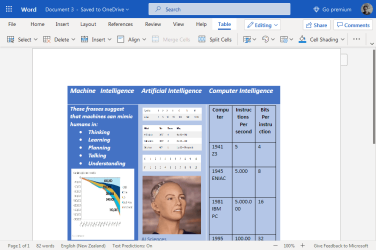
It is expected that Machine Learning (ML) will shift to AutoML to allow programmers to solve problems without creating models.

For instance, optical reading uses low layers to identify edges, and higher layers to identify letters.
see this:


Screenshot_2020-12-22 Document 3 docx - Microsoft Word Online.png


View attachment Document 3.pdf


In conclusion</h2> <p>And with that, we’ve finished! With some care, we’ve walked through a near-complete implementation of <code>prefers-contrast</code> in Firefox. Triggered updates and tests are not covered, but are relatively small details. If you’d like to see all of the code and tests for <code>prefers-contrast</code> take a look at the Phabricator patch <a href="https://phabricator.services.mozilla.com/D79553">here</a>.</p> <p><code>prefers-contrast</code> is a powerful and important media query that makes it easier for web authors to create accessible web pages. Using <code>prefers-contrast</code> websites can adjust to high and forced contrast preferences in ways that they were entirely unable to before. To get <code>prefers-contrast</code>, grab a copy of <a href="https://www.mozilla.org/en-US/firefox/channel/desktop/">Firefox Nightly </a>and set <code>layout.css.prefers-contrast.enabled</code> to <code>true</code> in <code>about:config</code>. Now, go forth and build a more accessible web! <img src="https://s.w.org/images/core/emoji/12.0.0-1/72x72/1f389.png" alt="🎉" class="wp-smiley" style="height: 1em; max-height: 1em;" /></p> <p>Mozilla works to make the internet a global public resource that is open and accessible to all.


sincerelly yours: AWN7F
 

My Computer My Computer

Computer type
PC/Desktop
Computer Manufacturer/Model Number
ACER / MS-7512 MICRO-STAR INTERNATIONAL.CO.LTD
OS
Microsoft Windows 7 Ultimate OS Version 6.1.7601 Service Pac
CPU
Intel(R) Core(TM)2 Quad CPU [email protected]
Motherboard
x64 Family 6 Model 15 Stepping 11 P45 Platinum (MS-7512)
Memory
Total Memory 3.0 GB
Graphics Card(s)
AMD Radeon HD 6570
Sound Card
AMD High Definition Audio Device
Monitor(s) Displays
SM215 / AMD Radeon HD6570
Screen Resolution
1366 x 768 x 75 hertz
Hard Drives
Name ST3250310AS ATA Device
Media Type Fixed hard disk media
Capability 232.9 GB
Interface Type IDE
Partitions 3
Total Cylinders
Keyboard
Standard PS2/ Keyboard
Mouse
Microsoft PS/2 Mouse
Internet Speed
100Mbps
Antivirus
360 Total Security
Browser
Firefox Developer Edition
uhm... whut ? :sarc:
 

My Computer My Computer

Computer type
PC/Desktop
OS
Windows 7, 64bit pro
Back
Top