Solved 32gb(16gb usable) memory and slightly slower CPU after win 7 reinstall

Xp4me

New member
Member
Local time
8:21 AM
Messages
65
Build info:
Motherboard Gigabyte 990FXA-UD5 Rev 3.0
Processor FX 8350 AMD 8 - Core
Power Supply Seasonic M12 II Bronze 650 W
SSD Samsung SSD 840 EVO
HDD Seagate Barracuda ST3000DM001 3TB
Memory Mushkin Silverline 8GB x 4 32GB
Graphics Card MSI Twin Frozr Geforce GTX 660


I run a dual boot system on separate drives. XP on HDD and Win 7 Pro on SSD. I recently bought a new SSD drive: Samsung Evo 860 256GB, but was unable to use it because it just wasn't compatible with my AMD SATA drivers so I sent it back. I tried to do a reinstall of win 7 back onto the old SSD Samsung Evo 840 120GB. Usually, not a problem, this time if I deleted the partition and tried to format the new partition I would get a error saying that it could not be installed on that disk. However, if I deleted the partition, did a reboot from install CD and just installed it on the unallocated space then it would except the install.
I assumed that it would just create partitions on it's own, but it didn't. In Disk Management it shows as being healthy, it has boot, page file, crash dump, primary partition, but all in just one big partition. From what I remember there should be a system partition with 100GB, a MBR partition and a primary partition. The OS seems to working okay, maybe a little slow. When I did some checking I realized that it's now only using 16GB of memory out of the 32GB available (shows 32GB in bios) and noticed that half the memory is now in hardware reserve. I also ran the windows experience index and everything was at 7.9 where it should be except for memory and CPU that both showed at 7.7.


So my questions are can the OS run normally the way it's currently install?
Could the way that it's installed be the cause of the 32GB (16GB usable) and slight decrease in CPU performance?
Is it possible that the CPU got bumped and slightly damaged (bent pin) while I was working inside the case? The CPU frequency shows slightly over 4000 where it should be when it comes to speed, but it could still be damaged and just not communicating with the memory correctly.

Any help would be appreciated. I need to get this resolved before ordering another new SSD and trying to do the win 7 install on it.
 

My Computer My Computer

At a glance

XP 32 Bit & Win 7 64 BitFX 8350 AMD 8 - CoreMushkin Silverline 8GB x2 16GBMSI Twin Frozr Geforce GTX 660
Computer type
PC/Desktop
Computer Manufacturer/Model Number
Custom build
OS
XP 32 Bit & Win 7 64 Bit
CPU
FX 8350 AMD 8 - Core
Motherboard
Gigabyte 990FXA-UD5
Memory
Mushkin Silverline 8GB x2 16GB
Graphics Card(s)
MSI Twin Frozr Geforce GTX 660
Hard Drives
SSD Samsung SSD 840 EVO
HDD Seagate Barracuda ST3000DM001 3TB
Antivirus
Bitdefender Internet Security
Browser
Firefox
I recently bought a new SSD drive: Samsung Evo 860 256GB, but was unable to use it because it just wasn't compatible with my AMD SATA drivers so I sent it back.

I'm sorry, but this doesn't make any sense at all. A SATA is SATA, is a SATA. At least should be. SATA: Serial AT Attachment. The only driver that should be involved here is the default Windows driver. Unless you're talking about the AHCI driver which you pre-install during Windows installation. Ever see Windows say something like, "press F6 to install a third party driver?" You do that and you'd have this unzipped AHCI driver on a USB drive and withen the Windows install navigate to your USB drive to pre-install the AHCI driver. If that's what you've done, and it really is the right driver, i.e the AHCI driver, not the RAID driver, then I don't know what to think. I've never known a hard drive to be incompatible with a SATA interface. EVER.

Your RAM issue:

If you go into BIOS, is the XMP RAM profile turned on?

Does the RAM pass the QVL list of compatible RAM from the motherboard manufacture's website? Your memory support list is here
 

My Computer My Computer

At a glance

Windows 7 Ultimate x64
Computer type
PC/Desktop
OS
Windows 7 Ultimate x64
There are at least three or four flash memory manufactures. Samsung, Crucial (Micron) and Hynix. Everything else will be based on their flash memory. Instead of being on the bandwagon and going Samsung, try a Crucial MX series of HDDs. It's all I use and have performed great. I even use their RAM products.

I don't know what's with the marketing crap of the words; Evo, Hero and Origin. Though, my cooler is a Coolermaster Evo 212. LOL! Freaking Evo! Been a damn good cooler though.
 

My Computer My Computer

At a glance

Windows 7 Ultimate x64
Computer type
PC/Desktop
OS
Windows 7 Ultimate x64
I'm sorry, but this doesn't make any sense at all. A SATA is SATA, is a SATA.
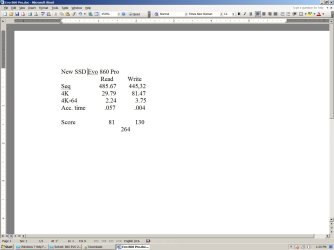
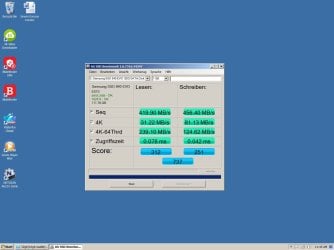
If you do a internet search for "samsung evo 860 pro amd ahci sata controller driver issues" then you will see all the issues that people are having. I returned the Evo 860 pro mainly because something just wasn't right with the way that the computer was running. I used AS SSD Benchmark to test it. See attached, I didn't think to take a print screen of the Evo 860, but I did write the scores down. I just ran the test on old SSD evo 840 that I reinstalled until i figure out what is going on and order a different new SSD. Take note of the 4K-64 scores. When I did a search to see if anyone else was having problems that's when i saw all the AMD issues being discussed. I was running out of time to return the new SSD and wasn't going to take any chances and get stuck with it, so I just returned it.
I found this post: Solved: 860 EVO 250GB causing freezes on AMD system - Page 2 - Samsung Community Read the 2nd post on this page, it starts with:EDIT UPDATE: ======= I found the cause of the issue.===========. He seems to be on the same page as you, talking about letting the microsoft driver take care if it, but he also mentions loosing some performance by doing so. Why shouldn't I be able to use the AMD sata controller for possible better performance?
I went in and tried to roll back to the microsoft driver, but that option is greyed out.
 

Attachments

  • New Evo 860 AS SSD Benchmark.jpg
    New Evo 860 AS SSD Benchmark.jpg
    80.1 KB · Views: 0
  • Evo 840 AS SSD Benchmark.jpg
    Evo 840 AS SSD Benchmark.jpg
    88.2 KB · Views: 0

My Computer My Computer

At a glance

XP 32 Bit & Win 7 64 BitFX 8350 AMD 8 - CoreMushkin Silverline 8GB x2 16GBMSI Twin Frozr Geforce GTX 660
Computer type
PC/Desktop
Computer Manufacturer/Model Number
Custom build
OS
XP 32 Bit & Win 7 64 Bit
CPU
FX 8350 AMD 8 - Core
Motherboard
Gigabyte 990FXA-UD5
Memory
Mushkin Silverline 8GB x2 16GB
Graphics Card(s)
MSI Twin Frozr Geforce GTX 660
Hard Drives
SSD Samsung SSD 840 EVO
HDD Seagate Barracuda ST3000DM001 3TB
Antivirus
Bitdefender Internet Security
Browser
Firefox
Nvme disks have been coming down in price. Might be worth seeing if you can get one for not much more than a sata ssd. For mobos that didn't come with nvme support, there are sometimes bios updates available, or otherwise clover can be used to boot from nvme disk in a pcie slot.

Just had a quick look and there is only a £5 difference between crucial mx ssd and crucial p5 nvme of the same capacity. Though a pcie to nvme adapter is needed for some machines, they can be pretty cheap.
 

My Computers My Computers

  • At a glance

    7 X64i5 84002x8gb 3200mhz
    Computer type
    PC/Desktop
    OS
    7 X64
    CPU
    i5 8400
    Motherboard
    gigabyte b365m ds3h
    Memory
    2x8gb 3200mhz
    Hard Drives
    various
    PSU
    pure power 11 400w cm
    Case
    Coolermaster
    Cooling
    cryorig m9i
  • At a glance

    7x64g54008gb ddr4 2400
    Computer type
    PC/Desktop
    OS
    7x64
    CPU
    g5400
    Motherboard
    ga b365m ds3h
    Memory
    8gb ddr4 2400
    PSU
    xfx pro 450w
here[/URL]

The computer was built in 2014 and has been running fine up until now. I have never changed any settings in the bios. I did go in to look for XMP Ram profile, but did not see anything with that name. The System Memory Multiplier is 8 which is correct. The Memory Frequency is 1600MHZ which is not correct, but total Memory is 32GB which is what's physically installed and is seen in bios just not being used.
I ran a test with Hot CPU Tester and have attached the two logs. In the Diagnostic Report it shows no memory or HD errors were found. However, in the Log Console report on Number 000015 it shows:Could not read SMbios data.
 

My Computer My Computer

At a glance

XP 32 Bit & Win 7 64 BitFX 8350 AMD 8 - CoreMushkin Silverline 8GB x2 16GBMSI Twin Frozr Geforce GTX 660
Computer type
PC/Desktop
Computer Manufacturer/Model Number
Custom build
OS
XP 32 Bit & Win 7 64 Bit
CPU
FX 8350 AMD 8 - Core
Motherboard
Gigabyte 990FXA-UD5
Memory
Mushkin Silverline 8GB x2 16GB
Graphics Card(s)
MSI Twin Frozr Geforce GTX 660
Hard Drives
SSD Samsung SSD 840 EVO
HDD Seagate Barracuda ST3000DM001 3TB
Antivirus
Bitdefender Internet Security
Browser
Firefox
here[/URL]

It's funny you mentioned Crucial SSD's, I was just looking at SSD's on newegg last night and was wondering if they were any good. Maybe I will go with crucial this time, I'm going to go check out their MX series.
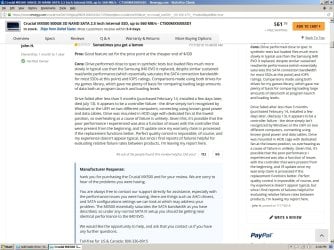
Just checked Crucial and found this, see attached. The manufacturer is also talking about AHCI drivers and SATA configurations. They also made this statement " under any normal SATA III setup you should be getting near identical performance to the 840 EVO" also bothers me. I currently have the Evo 840 and I'm looking for something better, not equal to.
 

Attachments

  • Newwegg Review.jpg
    Newwegg Review.jpg
    275.4 KB · Views: 0

My Computer My Computer

At a glance

XP 32 Bit & Win 7 64 BitFX 8350 AMD 8 - CoreMushkin Silverline 8GB x2 16GBMSI Twin Frozr Geforce GTX 660
Computer type
PC/Desktop
Computer Manufacturer/Model Number
Custom build
OS
XP 32 Bit & Win 7 64 Bit
CPU
FX 8350 AMD 8 - Core
Motherboard
Gigabyte 990FXA-UD5
Memory
Mushkin Silverline 8GB x2 16GB
Graphics Card(s)
MSI Twin Frozr Geforce GTX 660
Hard Drives
SSD Samsung SSD 840 EVO
HDD Seagate Barracuda ST3000DM001 3TB
Antivirus
Bitdefender Internet Security
Browser
Firefox

My Computers My Computers

  • At a glance

    7 X64i5 84002x8gb 3200mhz
    Computer type
    PC/Desktop
    OS
    7 X64
    CPU
    i5 8400
    Motherboard
    gigabyte b365m ds3h
    Memory
    2x8gb 3200mhz
    Hard Drives
    various
    PSU
    pure power 11 400w cm
    Case
    Coolermaster
    Cooling
    cryorig m9i
  • At a glance

    7x64g54008gb ddr4 2400
    Computer type
    PC/Desktop
    OS
    7x64
    CPU
    g5400
    Motherboard
    ga b365m ds3h
    Memory
    8gb ddr4 2400
    PSU
    xfx pro 450w
Unless you're talking about the AHCI driver which you pre-install during Windows installation. Ever see Windows say something like said:
I have what I believe to be the AHCI SATA controller driver on a flash drive that I used years ago when i installed the OS. It never asks me to press F6, but there is a generic option at the bottom that says "Load Driver" Correct me if I'm wrong, but I always thought that you only need to do the preinstall if the drive is not being seen. I can see the drive, but if I delete the partition or format the partition then i get the message that it can't be install to that disc. This happens whether or not I load the SATA driver which i never really know if it loads or not because it never lets me know anything. The only way i could get it to install this last time was by installing to the unallocated space.
 

My Computer My Computer

At a glance

XP 32 Bit & Win 7 64 BitFX 8350 AMD 8 - CoreMushkin Silverline 8GB x2 16GBMSI Twin Frozr Geforce GTX 660
Computer type
PC/Desktop
Computer Manufacturer/Model Number
Custom build
OS
XP 32 Bit & Win 7 64 Bit
CPU
FX 8350 AMD 8 - Core
Motherboard
Gigabyte 990FXA-UD5
Memory
Mushkin Silverline 8GB x2 16GB
Graphics Card(s)
MSI Twin Frozr Geforce GTX 660
Hard Drives
SSD Samsung SSD 840 EVO
HDD Seagate Barracuda ST3000DM001 3TB
Antivirus
Bitdefender Internet Security
Browser
Firefox
That is why you could consider nvme. Even a cheaper nvme on pcie 2 will be much faster than sata ssd.

The two nvme updates for win7 are in my sig at the bottom of this post.

You could try this:

[OFFER] Gigabyte 990FXA-UD5 (Rev 3.0) Modified FC Versioned UEFI/BIOS

Or you could use clover on a usb stick.
[Guide] NVMe-boot without modding your UEFI/BIOS (Clover-EFI bootloader method) - 33

Thanks, but right now I'm just trying to get my OS installed correctly and get my entire installed memory working again. The last thing I want to do now is start modifying my bios.
 

My Computer My Computer

At a glance

XP 32 Bit & Win 7 64 BitFX 8350 AMD 8 - CoreMushkin Silverline 8GB x2 16GBMSI Twin Frozr Geforce GTX 660
Computer type
PC/Desktop
Computer Manufacturer/Model Number
Custom build
OS
XP 32 Bit & Win 7 64 Bit
CPU
FX 8350 AMD 8 - Core
Motherboard
Gigabyte 990FXA-UD5
Memory
Mushkin Silverline 8GB x2 16GB
Graphics Card(s)
MSI Twin Frozr Geforce GTX 660
Hard Drives
SSD Samsung SSD 840 EVO
HDD Seagate Barracuda ST3000DM001 3TB
Antivirus
Bitdefender Internet Security
Browser
Firefox
Back
Top