How to decrease 'blue light' from my monitor?

tkmops

New member
Member
Local time
10:09 AM
Messages
63
How to decrease 'blue light' from my monitor?

Win 7

Is there a way using one(or more?) of the following to decrease the 'blue-light' coming from my monitor(and not use a downloaded 3rd party program):

1) Win 7...I've read that Win 10 has a 'night light' function, but not Win 7. Does anyone know of a way to do the same thing that 'night light' does, but on Win7?

2) Monitor:LG IPS LED 23MP57HQ-P...I've played with the 'color temp' and 'SixColor', but they destroy the 'just right' settings for brightness, contrast, gamma and saturation I have set up in my video card.

3) Nvidia Card:GeForce 9600 GT-using YCbCr444(seems to look better than the RGB setting)

I know I could buy a 'blue-light' film or a plastic frame that 'hangs' on my monitor...I'm just trying to find if there's a way to do this without spending money.

Ideas, anyone?

Thanks!
 

My Computer

Computer type
PC/Desktop
Computer Manufacturer/Model Number
Custom
OS
Win 7 64 bit
CPU
I5
Memory
6GB
Graphics Card(s)
Nvidia
1) Win 7...I've read that Win 10 has a 'night light' function, but not Win 7. Does anyone know of a way to do the same thing that 'night light' does, but on Win7?


Win10's night light provides a scheduled reduction of blue light, usually set to kick in for the evenings.

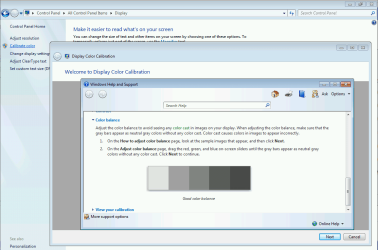
What you can do easily in Win7 (and Win10, come to that) is permanently reduce the blue light by using the 'Display Color Calibration' function, in Win7 it's found in the Control Panel.
.
 

Attachments

  • calibrate color W7.PNG
    calibrate color W7.PNG
    90 KB · Views: 0

My Computers

System One System Two

  • Computer type
    Laptop
    Computer Manufacturer/Model Number
    Toshiba satellite C650D
    OS
    Windows 7 Home Premium x64
    CPU
    AMD V120
    Memory
    4GB
    Internet Speed
    150 Mbps
    Antivirus
    MSE
    Browser
    IE11, Edge, Firefox
    Other Info
    I also have W7 Pro on my System Two, and several W7 Hyper-V VMs. My other machines run Windows 10/11. Their specs are in my Ten Forums & Eleven Forum profiles.
  • Computer type
    Laptop
    System Manufacturer/Model Number
    Lenovo Thinkpad T430
    OS
    Windows 7 Pro x64
    CPU
    Intel i5-3320M
    Memory
    8 GB
    Hard Drives
    250GB Samsung SSD 860 EVO
    Other Info
    Antivirus: MSE
f.lux, flux, a 3rd party utility has helped me for some years now, it reduces the blue and the glare quite a bit on most computers, on my laptops, not quite as dramatic, Acer Aspires have no brightness or contrast controls hardware-wise that I ever found. And, I have not located such within Windows 7 either. However, f.lux really does help a bit!
 

My Computer

Computer type
PC/Desktop
Computer Manufacturer/Model Number
Antec desktop; Acer Aspire laptops
OS
Windows 7 Professional 64-bit
CPU
Desktop i5; Acers i5 & i7
Memory
desktop 16GB; 1 Acer 8GB & 1 Acer 16GB
Hard Drives
1TB split into 2 equal partitions [OS and data] usable by RJS
Internet Speed
AT&T DSL
Browser
FF, GChrome, msIE
Other Info
Windows 7 Firewall, Emsisoft AM/AV, MSE [scan-only], SpywareBlaster, Ruiware/BillP combine
Win10's night light provides a scheduled reduction of blue light, usually set to kick in for the evenings.

What you can do easily in Win7 (and Win10, come to that) is permanently reduce the blue light by using the 'Display Color Calibration' function, in Win7 it's found in the Control Panel.
.

I've tried the 'Display Color Calibration' function', but since it's a 'global' color change, it affects any video/TV/movies that I watch on my PC. I've got my Nvidia card set up for perfect brightness, contrast, color saturation, and gamma. The reducing 'blue light' that I'm talking about is 'invisible'...reducing it will not alter what I see.
 

My Computer

Computer type
PC/Desktop
Computer Manufacturer/Model Number
Custom
OS
Win 7 64 bit
CPU
I5
Memory
6GB
Graphics Card(s)
Nvidia
I've tried the 'Display Color Calibration' function', but since it's a 'global' color change, it affects any video/TV/movies that I watch on my PC.

So does Windows 10's night light, the only difference is that it's done on a schedule.
The reducing 'blue light' that I'm talking about is 'invisible'...reducing it will not alter what I see.
The only 'blue' light that's 'invisible' is UV. Anything that reduces the amount of visible blue light will reduce the color temperature and visibly 'warm' what you see. The human eye is remarkably adaptable and will see the color balance as normal after a little while.

It's not clear what you hope to achieve. If it's reducing UV eye damage without changing the color temperature, then a physical UV filter in front of the screen is the only solution. If it's reducing the harmful effects of blue light on your sleep patterns, then lowering the color temperature of the display is the only solution (either with color calibration, W10 night light, or a physical filter) and that will be noticeable until your eyes adapt.
 

My Computers

System One System Two

  • Computer type
    Laptop
    Computer Manufacturer/Model Number
    Toshiba satellite C650D
    OS
    Windows 7 Home Premium x64
    CPU
    AMD V120
    Memory
    4GB
    Internet Speed
    150 Mbps
    Antivirus
    MSE
    Browser
    IE11, Edge, Firefox
    Other Info
    I also have W7 Pro on my System Two, and several W7 Hyper-V VMs. My other machines run Windows 10/11. Their specs are in my Ten Forums & Eleven Forum profiles.
  • Computer type
    Laptop
    System Manufacturer/Model Number
    Lenovo Thinkpad T430
    OS
    Windows 7 Pro x64
    CPU
    Intel i5-3320M
    Memory
    8 GB
    Hard Drives
    250GB Samsung SSD 860 EVO
    Other Info
    Antivirus: MSE
Back
Top