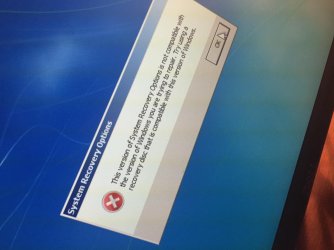
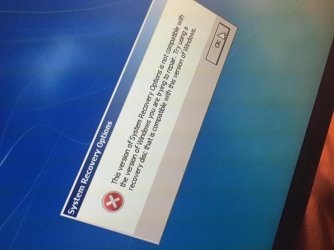
Hi seven forums I am having a problem with my pc today. It started when I was playing Mass Effect and all of a sudden my computer froze. I rebooted and during reboot I noticed the BOOT_DEVICE_LED was lit up solid red during the reboot. Surely enough my screen read SELECT PROPER BOOT DEVICE AND REBOOT... After an hour on Google ive preformed a few troubleshooting steps but noting has working. I inserted a windows 7 install disk which recognizes both of my drives, but not my OS because it isn't appering in the System Recovery Options. So I ran DISKPART, selected disk 0 where my OS is installed, selected partition 1 and marked it as active, then rebooted. Upon reboot I have a new error, BOOTMGR is missing..! Once again I booted to the disk and tried to open the Recovery Tools again but it gives me an error saying the version of system recovery is not compatible with my version of windows. So that is where I am at now any help would be appreciated because I am stumped and I would prefer not having to clean install :/ thanks I will post pictures of the errors if needed
My Computer
At a glance
Windows 7 Pro x64AMD FX 83504x 2GB DDR3-1600 G.Skill RipJawMSI Raedon R7 250X
- Computer type
- PC/Desktop
- Computer Manufacturer/Model Number
- Asus Custom
- OS
- Windows 7 Pro x64
- CPU
- AMD FX 8350
- Motherboard
- Asus M5A99X EVO R2.0
- Memory
- 4x 2GB DDR3-1600 G.Skill RipJaw
- Graphics Card(s)
- MSI Raedon R7 250X
- Hard Drives
- 2x 1TB WD Blue 64MB Cache
- Antivirus
- Bit Defender Total 2015
- Browser
- Firefox