GPT formatted hard drive boot requirement in multiformat environment ?

Username77

New member
Local time
3:26 AM
Messages
2
So, I want to install and boot Win7 64bit on an MBR disk, with CSM enabled and any security boot etc turned off.

While later adding larger data disks (physical) that have to be formatted as GPT due to size.

But then I read this document from MS:
Windows and GPT FAQ | Microsoft Docs
In particular the part about 'Mixing':

Mixing and matching GPT and MBR disks on the same system
GPT and MBR disks can be mixed on systems that support GPT, as described earlier. However, you must be aware of the following restrictions:

Systems that support UEFI require that boot partition must reside on a GPT disk. Other hard disks can be either MBR or GPT.
Both MBR and GPT disks can be present in a single dynamic disk group. Volume sets can span both MBR and GPT disks.


Which seems to imply that I HAVE TO install Win7 on a GPT disk, if I also want to use (larger) additional GPT data drives as well ?
Which is something I really do NOT want to do, because... reasons.

- Can someone in the know explain to me how to interpret that statement from MS ?
Is it possible to still use MBR installation for the OS/win7 and be able to use large GPT storage drives on the same computer ?

Since I'm rather clueless about this fancy GPT thing, I'd be thinking it should not matter what type of disk formatting the OS itself has, as long as it has inherent GPT support, for the data drives that is?
Which win7 64bit has, as far as I have gathered.

But MS seems to disagree..... 🤨

Thanks.
 

My Computer My Computer

At a glance

winxp
Computer type
PC/Desktop
OS
winxp
Welcome to the Forum

- GPT data drives (HDDs or SSDs) can be used in win (7, 8 or 10) 32 bits or 64 bits
- UEFI-GPT boot able drive MUST have UEFI BIOS computer AND 64bits OS.

You can have win 7 (32 or 64 bits) installed on a MBR (limit usable = 2.2T) and have another drive (any size) as GPT. My laptop has a small boot able SSD as Legacy - MBR (for windows and programs) and a large HDD for data as GPT.
 

My Computers My Computers

  • At a glance

    Windows 7 HP 64i5 6600K - 800MHz to 4200MHz4+4G GSkill DDR4 3000IG - Intel 530
    Computer type
    PC/Desktop
    Computer Manufacturer/Model Number
    custom build
    OS
    Windows 7 HP 64
    CPU
    i5 6600K - 800MHz to 4200MHz
    Motherboard
    GA-Z170-HD3P
    Memory
    4+4G GSkill DDR4 3000
    Graphics Card(s)
    IG - Intel 530
    Monitor(s) Displays
    Samsung 226BW
    Screen Resolution
    1680x1050
    Hard Drives
    (1) -1 SM951 – 128GB M.2 AHCI PCIe SSD drive for Windows 7 and Lubuntu
    (2) -1 WD SATA 3 - 1T for Data
    (3) -1 WD SATA 3 - 1T for backup
    PSU
    Thermaltake 450W TR2 gold
    Keyboard
    Old and good Chicony mechanical keyboard
    Mouse
    Logitech mX performance - 9 buttons (had to disable some)
    Internet Speed
    500Mb/s
    Browser
    Firefox 64
    Other Info
    TinyWall firewall
  • At a glance

    Windows 7 Proi7-4500U 800MHz to 3.0GHz(4+4)G DDR3 1600IG intel 4400 + NVIDIA GeForce GT 745M
    Computer type
    Laptop
    System Manufacturer/Model Number
    Asus Q550LF
    OS
    Windows 7 Pro
    CPU
    i7-4500U 800MHz to 3.0GHz
    Motherboard
    Asus Q550LF
    Memory
    (4+4)G DDR3 1600
    Graphics Card(s)
    IG intel 4400 + NVIDIA GeForce GT 745M
    Sound Card
    Realtek
    Monitor(s) Displays
    LG Display LP156WF4-SPH1
    Screen Resolution
    1920 x 1080
    Hard Drives
    BX500 120G SSD for Windows and programs +
    1T HDD for data
    Internet Speed
    500 Mb/s
    Browser
    Firefox
    Other Info
    TinyWall firewall
Is it possible to still use MBR installation for the OS/win7 and be able to use large GPT storage drives on the same computer ?

Since I'm rather clueless about this fancy GPT thing, I'd be thinking it should not matter what type of disk formatting the OS itself has, as long as it has inherent GPT support, for the data drives that is?

Welcome to Seven Forums.

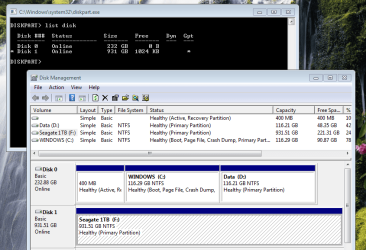
You are correct. The MS requirements are just saying that if you want to install the OS as UEFI, then you must use a GBT boot drive.

Your legacy MBR install can use GPT on any drives except for its boot drive, as mine does here - MBR disk 0 (boot), GPT disk 1...
.
 

Attachments

  • W7 - MBR & GPT.PNG
    W7 - MBR & GPT.PNG
    56.8 KB · Views: 0

My Computers My Computers

  • At a glance

    Windows 7 Home Premium x64AMD V1204GB
    Computer type
    Laptop
    Computer Manufacturer/Model Number
    Toshiba satellite C650D
    OS
    Windows 7 Home Premium x64
    CPU
    AMD V120
    Memory
    4GB
    Internet Speed
    150 Mbps
    Antivirus
    MSE
    Browser
    IE11, Edge, Firefox
    Other Info
    I also have W7 Pro on my System Two, and several W7 Hyper-V VMs. My other machines run Windows 10/11. Their specs are in my Ten Forums & Eleven Forum profiles.
  • At a glance

    Windows 7 Pro x64Intel i5-3320M8 GB
    Computer type
    Laptop
    System Manufacturer/Model Number
    Lenovo Thinkpad T430
    OS
    Windows 7 Pro x64
    CPU
    Intel i5-3320M
    Memory
    8 GB
    Hard Drives
    250GB Samsung SSD 860 EVO
    Antivirus
    MSE
Ah, I see ! Thankyou all for clearing that up!

As I read the part with "Systems that support UEFI require .." quite literally... :rolleyes:

As in, if your 'system' merely 'supports' UEFI (as an option, but which you are not using), you'd still have to install Windows("boot partion") on a GPT disk IF you want to add separate GPT disks later.

Oh well, at least I now know better, heh...
 

My Computer My Computer

At a glance

winxp
Computer type
PC/Desktop
OS
winxp
Back
Top