SSD upgrade Problem "the selected GPT formatted disk contains ...."

MartinDay007

New member
Local time
12:20 PM
Messages
7
SSD upgrade Problem "the selected GPT formatted disk contains ...."

I have a Toshiba Portege Z830 that came with a single 128GB SSD.

I want to upgrade the SSD to 500GB (Samsung 840 EVO mSATA).

So I attached an external HDD and a RW DVD, created a system image backup and a system repair disk after which I shut down and swapped the SSD, rebooted, restored and everything is working as it did before.

However, now the new SSD is installed through the disk computer management's disk management facility it is showing 4 partitions and an unallocated partition of 346GB.

When I try to format the unallocated partition I get the following error message.

"the selected GPT formatted disk contains a partition which is not of type 'PARTITION_BASIC_DATA_GUID' and is both preceded and followed by a partition type 'PARTITION_BASIC_DATA_GUID' "


The four partitions showing are:

1.46GB Healthy (Active, Recovery Partition)
8GB Healthy(Hibernation Partition)
11.85GB Healthy (Primary Partition)
97.93GB Healthy(Boot Page File, Crash Dump, Primary Partition)

If I click on the 97GB partition it won't allow me to expand the volume only shrink it.

Looking up that error on the Internet it would seem that I need to convert the SSD to a MBR format, but it also seems to suggest that you can only then have a maximum of 4 partitions and I am assuming I need at least 5.

Although all the references to this error seem to refer to MBR there is nothing displayed that confirms that the existing partitions are usng a MBR format so I am not 100% certain that this is the same problem.

It also appears that I can convert the SSD to a GBT disk, although I suspect the new SSD disk is already formatted as GBT.

Converting the SSD to MBR or GBT seems to be a destructive process and I'm concerned that as this is my only disk if I attempt to convert the disk to either MBR or GBT using DISKPART it will crash the system as it is going to wipe all the data.

Can anyone offer any advice?

Can anyone confirm that this is a problem to do with MBR and GBT formatting?

Is there something simple I can do to resolve this problem?

My uneducated feeling is that I need to keep the disk as GBT but if I try to wipe everything will I loose the system as this is the primary and only disk and not a secondary disk.

If I am able to wipe all the partitions and convert the SSD to GBT when I restore the image disk backup will the files be restored as GBT or will they simply revert back to MBR?

If I wipe all the partitions and convert the SSD to MBR, when I restore the image disk backup will I be left with 4 partitions and then unable to create a 5th, or will I then be able to expand one of the existing partitions?

I assume I need all of the existing partitions, the only one I recognise is the 97GB which is the C drive but I am assuming the other partitions are used for recovery, hibernation and something else important.

I'm a little reluctant to guess with out more information so any guidance would be most appreciated.

Thanks in advance.
 

My Computer My Computer

OS
Windows 7
The four partitions showing are:

1.46GB Healthy (Active, Recovery Partition)
8GB Healthy(Hibernation Partition)
11.85GB Healthy (Primary Partition)
97.93GB Healthy(Boot Page File, Crash Dump, Primary Partition)

If I click on the 97GB partition it won't allow me to expand the volume only shrink it.

Do those same 4 partitions also exist on the original 128 gb SSD?

Not sure I ever heard of a hibernation partition as opposed to a hibernation file.

Can you post a screen shot of what you see now in Windows Disk Management on the larger SSD?

Have you attempted to extend the 97 gb partition with a tool such as Partition Wizard?
 

My Computer My Computer

Computer type
PC/Desktop
Computer Manufacturer/Model Number
Ignatz Special; 4 speed manual gearbox; factory air conditioning; one of one
OS
Windows 7 Home Premium SP1, 64-bit
CPU
Intel Skylake i5-6600K, not overclocked
Motherboard
AsRock Z170M Extreme 4, micro ATX
Memory
8 GB HyperX DDR4-2666 (2 x 4 GB)
Graphics Card(s)
none; graphics are integrated on CPU
Sound Card
onboard: Realtek ALC1150; external: USB Behringer UF0-202
Monitor(s) Displays
Dell S2340M 23 inch IPS
Screen Resolution
1600 x 900
Hard Drives
System: Crucial MX100 series SSD, 128 GB;
Data: Samsung Spinpoint 103SJ, 1 TB;
Backup: WD Caviar Green WD30EZRX-00D8PB0, 3 TB
PSU
Rosewill SilentNight 500 watt fanless, semi-modular
Case
Antec Solo II
Cooling
Noctua NH-U12S; Noctua F12 intake, Noctua S12A exhaust
Keyboard
Microsoft 200 6JH-00001 USB
Mouse
Dell or Microsoft optical wired; USB
Antivirus
Microsoft Security Essentials and Malwarebytes Premium
Browser
Pale Moon
Other Info
All fans PWM; speeds at idle: CPU circa 500 rpm; intake circa 600 rpm; exhaust circa 600 rpm; CPU temps 27 idle and 47 C load in a warm room (27 C/81 F) when running Intel Extreme Tuning Utility stress test.
The four partitions showing are:

1.46GB Healthy (Active, Recovery Partition)
8GB Healthy(Hibernation Partition)
11.85GB Healthy (Primary Partition)
97.93GB Healthy(Boot Page File, Crash Dump, Primary Partition)

If I click on the 97GB partition it won't allow me to expand the volume only shrink it.

Do those same 4 partitions also exist on the original 128 gb SSD?

Not sure I ever heard of a hibernation partition as opposed to a hibernation file.

Can you post a screen shot of what you see now in Windows Disk Management on the larger SSD?

Have you attempted to extend the 97 gb partition with a tool such as Partition Wizard?


Thanks for your reply ignatzatsonic

I assume the same 4 partitions exist on the original 128GB SSD - as the sizes seem to add up.

This is a screenshot of the Windows Disk Management

computermanager.png


I did look to try and extend the 97GB using the windows disk management but the option is greyed out and I assume because if I understand right that in order to extend the space has to be contiguous. To be honest I would prefer to extend the 97GB rather than have another partition.

I downloaded the Partition Wizard and tried to extend but it would only allow me to take space from the system partition, so again I assume that is because it is the only space available that would allow the extended space to be contiguous.

I tried creating a partition using the partition wizard and this came up with a more friendly error saying that there were no free MBR slots on the disk, which seems to confirm that I will either have to delete one of the existing partitions, or convert everything to GBT.
 

My Computer My Computer

OS
Windows 7
After reading up on the hibernation and other primary partitions, and since I have a recent image backup and the original SSD disk to fall back on I decided to delete the hibernation and primary partitions. This then allowed me to expand the C partition.

It all seemed to work and I have tested that the system still hibernates okay so it doesn't seem to need that space.

I am not sure if I should leave the C drive expanded to its maximum or if I should leave enough space to allow another two partitions to be created just in case there is a need for them.

I can't help feeling that as there are only 4 MBR slots that any system facility could not rely on being able to create a partition as it must be quite common for people to have more than one partition.
 

My Computer My Computer

OS
Windows 7
We don't have your system specs, so don't know who made your PC.

My guess would be that the 11.85 gb partition that you deleted was related to factory recovery or perhaps tools of some type. Whatever, it's history as you deleted it.

I have not recently used Partition Wizard, but am pretty sure you simply did not operate it correctly as it should have allowed you to add that 346.52 gb of unallocated space to C. It's the best tool for that job. You are correct that you could not do it with Windows Disk Management, which requires that the unallocated space be IMMEDIATELY to the right of the partition to be extended.
 

My Computer My Computer

Computer type
PC/Desktop
Computer Manufacturer/Model Number
Ignatz Special; 4 speed manual gearbox; factory air conditioning; one of one
OS
Windows 7 Home Premium SP1, 64-bit
CPU
Intel Skylake i5-6600K, not overclocked
Motherboard
AsRock Z170M Extreme 4, micro ATX
Memory
8 GB HyperX DDR4-2666 (2 x 4 GB)
Graphics Card(s)
none; graphics are integrated on CPU
Sound Card
onboard: Realtek ALC1150; external: USB Behringer UF0-202
Monitor(s) Displays
Dell S2340M 23 inch IPS
Screen Resolution
1600 x 900
Hard Drives
System: Crucial MX100 series SSD, 128 GB;
Data: Samsung Spinpoint 103SJ, 1 TB;
Backup: WD Caviar Green WD30EZRX-00D8PB0, 3 TB
PSU
Rosewill SilentNight 500 watt fanless, semi-modular
Case
Antec Solo II
Cooling
Noctua NH-U12S; Noctua F12 intake, Noctua S12A exhaust
Keyboard
Microsoft 200 6JH-00001 USB
Mouse
Dell or Microsoft optical wired; USB
Antivirus
Microsoft Security Essentials and Malwarebytes Premium
Browser
Pale Moon
Other Info
All fans PWM; speeds at idle: CPU circa 500 rpm; intake circa 600 rpm; exhaust circa 600 rpm; CPU temps 27 idle and 47 C load in a warm room (27 C/81 F) when running Intel Extreme Tuning Utility stress test.
I downloaded the Partition Wizard and tried to extend but it would only allow me to take space from the system partition, so again I assume that is because it is the only space available that would allow the extended space to be contiguous.

I tried creating a partition using the partition wizard and this came up with a more friendly error saying that there were no free MBR slots on the disk, which seems to confirm that I will either have to delete one of the existing partitions, or convert everything to GPT.
MBR disks allow up to four primary partitions, or three primary partitions and one "extended partition" which supports from 1-120 logical partitions inside of it. Partition Wizard can handle both primary and logical partitions, and can also convert one of your primary partitions into an "extended partition" where you now have one logical partition inside of it. You can then do further maintenance (e.g. shrinking that logical partition) to allow for the creation of two or more logical partitions inside that one "extended partition" (which contains logical allocated partitions as well as logical freespace).

Partition Wizard can create or delete partitions, and can resize partitions using adjacent available/unallocated space, and can "slide partitions left and right" using adjacent available/unallocated space. So if you think through what you'd like your setup to be, Partition Wizard can do it all for you.

If you want to do maintenance to your operating C-partition while Windows is running, you can start the operation using PW while still running under Windows but it will need to re-boot to complete it. At re-boot time PW kicks in to finish the earlier started operation, and when finished it continues on with the normal Windows boot process. When you get your Windows desktop you will now be operating with your resized C-partition.

Alternatively, you can use PW's standalone boot CD instead of running the program under Windows. Operating through this standalone boot CD method allows you to now do ANYTHING you want all at once, and without an intervening re-boot required to complete the operation. Everything will be completed right here and now, in this standalone non-Windows mode.

NOTE: GPT architecture is not limited to 4 primary partitions (or 3 plus and extended) as MBR is. But unless it's required, MBR is fine as the combination of primary and logical partitions can give you whatever you want, with whatever partitions sizes you want, constrained only by the fact that logical partitions must be adjacent to each other since they all live within the one "extended partition".
 

My Computer My Computer

Computer type
PC/Desktop
Computer Manufacturer/Model Number
Home-built, two systems (1) and (2)
OS
Windows 7 Pro x64 (1), Win7 Pro X64 (2)
CPU
i5-3350p 3.1Ghz/6MB-cache (1); E8400 3.0Ghz/6MB-cache (2)
Motherboard
ASUS P8Z77-V Pro (1); ASUS P5Q3 (2)
Memory
8GB PC3-12800 DDR3 (1); 4GB PC3-10600 DDR3 (2)
Graphics Card(s)
ATI HD7750 (1), (see TV cards); ATI R7 250 (2)
Sound Card
Realtek ALC892 HD Audio (1); Realtek ALC1200 HD Audio (2)
Monitor(s) Displays
Eizo HD2441W LCD, Eizo S2433W (1); Eizo 24" S2433W (2)
Screen Resolution
1920x1200, 1920x1200 (1); 1920x1200 (2)
Hard Drives
(1) 1TB SATA-II (7200RPM), 2x2TB SATA-III (7200RPM), 250GB SATA-III (10000RPM) for OS; 2x2TB external USB 3.0

(2) 320GB SATA-II (7200RPM), 750GB SATA-II (7200RPM), 150GB SATA-II (10000RPM) for OS; 2TB external USB 3.0
PSU
Nesteq ECS-6001 600W (1); Nesteq ECS-5001 500W (2)
Case
Acousti-Case 360 (1) and (2)
Cooling
Noctua NH-U12P SE2 for CPU, 2x120mm case fans (1) and (2)
Keyboard
IBM PS/2 (1) and (2)
Mouse
Logitech MX Revolution wireless (1); Microsoft wired (2)
Internet Speed
100mbps down / 10mbps up
Antivirus
Microsoft Security Essentials; Malwarebyte Anti-Malware Pro
Browser
Firefox
Other Info
Ceton InfiniTV 4-tuner cablecard-enabled TV card as well as Hauppauge HVR-2250 OTA/ATSC 2-tuner TV card in (1), running under Win7 WMC
This is the normal scenario after restoring a much smaller disk to a larger disk. Use the bootable CD of Partition Wizard to add the space to whichever partition you like.

And don't try to define another partition in the unallocated space. I think this is a MBR disk and you already have 4 primary partitions. Any attempt to define an additional partition will result in conversion of the whole disk into dynamic - and then you cannot boot any more.

Here is the how to tutorial:

How to extend system C partition with partition magic?

And never forger APPLY (top left).
 
Last edited:

My Computer My Computer

Computer Manufacturer/Model Number
HP, Dell, Gateway, Toshiba - 4 laptops and 2 desktops
OS
Vista, Windows7, Mint Mate, Zorin, Windows 8
CPU
from 1.6GHz Duo to i7
Monitor(s) Displays
2x HP w2207
Hard Drives
5x HDD, 7x SSD, 12x Externals
Keyboard
with trackball - no mices
Mouse
Trackball mice
Internet Speed
DSL 6000
I was asked to look at this which somehow landed in hardware forum. These are normally dealt with daily in Install forum.

The screenshot shows an MBR disk if its booting or there could be no Active flag. But there is no System Flag signifying the partition booting the OS so it should not even boot. Normally the Active flag points to the System partition. Can you check it with Partition Wizard boot disk which can settle Disk Mgmt misreporting?

We also need to see screenshot of source drive Disk Mgmt.
 
Thanks for all the replies, I can confirm that without the deleted partitions everything seems to be working, the system hibernates okay and reboots okay.

As others have suggested I suspect that one of the partitions was probably a factory reset, the hibernate partition seems to not be essential for the system to hibernate.

I have ordered an external mSATA enclosure, when it arrives I will be able to access the original SSD.

I will post the original SSD partitions and I will be able to run tests on that SSD.
 

My Computer My Computer

OS
Windows 7
You cannot have an MBR disk without a System partition. There is no System flag on your Active partition which normally points to where it should be. Try running a few Startup Repairs.

We also need to see Partition Wizard boot disk screenshot to compare it to as this can clear up Disk Mgmt misreporting (I thought I just said all this).

Did you delete the Hibernation partition and it Hibernates without it? Unhide Hidden and System files in Folder Options>View and look for the Hiberfile.sys. Is it on C now? If so do you notice any difference?

Did you keep the Recovery partition for a reason? If you don't intend to use Factory Recovery - which is the worst possible install of Win7 one can have - then I would move the Bootmgr - Move to C:\ with EasyBCD - Windows 7 Forums to delete Recovery and absorb its space into whichever partitions need it using How to extend partition easily with Partition Wizard - video help.

Finally if this is the factory install then that is the worst install of Win7 possible so transferring that to an SSD is like putting a Yugo engine into a Porsche. No tech enthusiast would run such an install bloated out with duplicate factory utilities that interfere with better versions built into Win7. I would seriously consider doing a Clean Reinstall Windows 7
 
Last edited:

My Computer My Computer

Computer type
PC/Desktop
Computer Manufacturer/Model Number
home built
OS
Multi-Boot W7_Pro_x64 W8.1_Pro_x64 W10_Pro_x64 +Linux_VMs +Chromium_VM
CPU
AMD Athlon II x4 620
Motherboard
Gigabyte GA-MA785G-UD3H
Memory
6GB GSkill DDR2 800
Graphics Card(s)
AMD 4670 GPU + AMD 4200 IGP
Sound Card
on board Realtek ALC889A
Monitor(s) Displays
RCA 40" LCD TV, Insignia 32" LCD TV, HP 15" LCD monitor
Screen Resolution
1680 x 1050
Hard Drives
OCZ Vertex 3 120GB,
Samsung F3 1TB (3),
Several others - WD, Seagate, Hitachi, ...
PSU
Corsair 500 W
Case
Rosewill mid tower
Cooling
CM 90mm rifle
Keyboard
Gyration wireless, Logitech wireless, Dell USB wired
Mouse
Gyration wireless, Logitech wireless, V7 USB wired
Internet Speed
Spectrum - 100Mbps D / 10Mbps U
Antivirus
Avast, MBAM3, EMET, WinPatrol
Browser
Pale Moon, Firefox, IE
Other Info
2 multi-boot PC's
Mainly HTPC/Office/Gen purpose (no gaming).
Trendnet USB KVM.
LG DVD burner/Blue Ray Player.
Tray system for removable SATA backup drives.

Not currently OCd, under-volted.
I use Hybrid sleep, rarely re-boot or shutdown.

Hauppauge HD-PVR, Avermedia PCIe TV Tuner, Hauppauge PCI TV Tuner.
You could put your old SSD back into the laptop just to see how the original partition structure was set up.
Post a screenshot of that disk here so everyone can see it. (please expand the Disk Management window so all of the information can be seen).

You could also check to see if that disk was MBR or GPT.
http://www.sevenforums.com/tutorials/244566-hard-drive-gpt-mbr.html

It should not make any difference in day-to-day operation whether the disk is GPT or MBR, but I believe it is important that the source and destination disks be the same file system when the image is transferred. So that would be good to know.

Seeing the old SSD may shed some light on what is going on with the restored image on the new SSD.
 

My Computer My Computer

Computer type
PC/Desktop
Computer Manufacturer/Model Number
Home Built - Jan 2013
OS
Windows 7 64 Bit Home Premium SP1
CPU
i7-3820
Motherboard
Asus P9X79-PRO - Bios 4608
Memory
GSkill F3-14900CL9Q - 16GB
Graphics Card(s)
EVGA GeForce GTX660 - Driver 352.86
Sound Card
On board Realtek ALC898
Monitor(s) Displays
Acer S271HL
Screen Resolution
1920 x 1080
Hard Drives
#1- Samsung 840 Pro Series
#2- Western Digital WD1002FAEX Sata3 Black
#3- Western Digital WD1002FAEX Sata3 Black
PSU
Corsair CMPSU-850TX-V2 - 850 watt (by Seasonic)
Case
Corsair Obsidian 550D
Cooling
Standard 3 120mm case fans, Cooler Master Hyper 212 EVO
Keyboard
MS KC-0405
Mouse
Intellimouse 5-button
Internet Speed
56 Mbits/Sec (on a good day)
Antivirus
Avast & Malwarebytes
Browser
Firefox
Other Info
Asus DVD - DRW-24B1ST 24X
Thanks, David. This is really new so will read that and more on it asap.
 
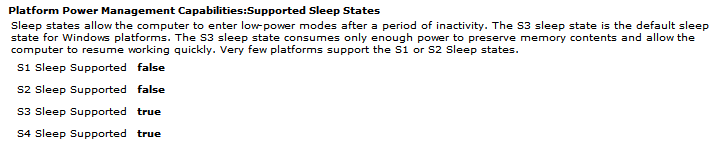
IRST transfers the PC state from Windows S3 sleep to S4 Hibernate.
Intel states it resumes from this hibernate as fast as Wake from Sleep.

Intel Rapid Start Technology BIOS component transfers active memory pages from system DRAM to SSD after the system has been in Sleep mode (S3) for a preset period of time. Lastly, the hardware is transitioned to an S4 power state—enabling an OEM to deliver a zero power standby state —while the operating system remains in its Sleep mode.
During Intel Rapid Start Technology resume, the BIOS component executes based on a wake event such as a pressed power button or OEM-enabled HID (keyboard, mouse) activity. It quickly reads the memory snapshot stored on the SSD and populates the system DRAM with previously saved active memory pages.
Source: https://software.intel.com/en-us/articles/what-is-intel-rapid-start-technology
There is a PDF in that link with more info.

Deleting the Hibernation partition would mean this IRST feature won't work.
 

My Computer My Computer

Computer type
PC/Desktop
Computer Manufacturer/Model Number
home built
OS
Multi-Boot W7_Pro_x64 W8.1_Pro_x64 W10_Pro_x64 +Linux_VMs +Chromium_VM
CPU
AMD Athlon II x4 620
Motherboard
Gigabyte GA-MA785G-UD3H
Memory
6GB GSkill DDR2 800
Graphics Card(s)
AMD 4670 GPU + AMD 4200 IGP
Sound Card
on board Realtek ALC889A
Monitor(s) Displays
RCA 40" LCD TV, Insignia 32" LCD TV, HP 15" LCD monitor
Screen Resolution
1680 x 1050
Hard Drives
OCZ Vertex 3 120GB,
Samsung F3 1TB (3),
Several others - WD, Seagate, Hitachi, ...
PSU
Corsair 500 W
Case
Rosewill mid tower
Cooling
CM 90mm rifle
Keyboard
Gyration wireless, Logitech wireless, Dell USB wired
Mouse
Gyration wireless, Logitech wireless, V7 USB wired
Internet Speed
Spectrum - 100Mbps D / 10Mbps U
Antivirus
Avast, MBAM3, EMET, WinPatrol
Browser
Pale Moon, Firefox, IE
Other Info
2 multi-boot PC's
Mainly HTPC/Office/Gen purpose (no gaming).
Trendnet USB KVM.
LG DVD burner/Blue Ray Player.
Tray system for removable SATA backup drives.

Not currently OCd, under-volted.
I use Hybrid sleep, rarely re-boot or shutdown.

Hauppauge HD-PVR, Avermedia PCIe TV Tuner, Hauppauge PCI TV Tuner.
Could it be meant for Windows 8 fast boot?

Doesn't that use hibernation to simulate fast boot?

Do we know S4 is even needed for 7? I don't remember it coming up before this.
 

My Computer My Computer

Computer type
PC/Desktop
Computer Manufacturer/Model Number
home built
OS
Multi-Boot W7_Pro_x64 W8.1_Pro_x64 W10_Pro_x64 +Linux_VMs +Chromium_VM
CPU
AMD Athlon II x4 620
Motherboard
Gigabyte GA-MA785G-UD3H
Memory
6GB GSkill DDR2 800
Graphics Card(s)
AMD 4670 GPU + AMD 4200 IGP
Sound Card
on board Realtek ALC889A
Monitor(s) Displays
RCA 40" LCD TV, Insignia 32" LCD TV, HP 15" LCD monitor
Screen Resolution
1680 x 1050
Hard Drives
OCZ Vertex 3 120GB,
Samsung F3 1TB (3),
Several others - WD, Seagate, Hitachi, ...
PSU
Corsair 500 W
Case
Rosewill mid tower
Cooling
CM 90mm rifle
Keyboard
Gyration wireless, Logitech wireless, Dell USB wired
Mouse
Gyration wireless, Logitech wireless, V7 USB wired
Internet Speed
Spectrum - 100Mbps D / 10Mbps U
Antivirus
Avast, MBAM3, EMET, WinPatrol
Browser
Pale Moon, Firefox, IE
Other Info
2 multi-boot PC's
Mainly HTPC/Office/Gen purpose (no gaming).
Trendnet USB KVM.
LG DVD burner/Blue Ray Player.
Tray system for removable SATA backup drives.

Not currently OCd, under-volted.
I use Hybrid sleep, rarely re-boot or shutdown.

Hauppauge HD-PVR, Avermedia PCIe TV Tuner, Hauppauge PCI TV Tuner.
I was thinking of available power states in BIOS settings which only ever seems to go to S3, but still enables Hibernate. Perhaps I'm mistaken. I need to study HiberPartition deeper.
 
S4 should be listed in the report created by this Elevated CMD: powercfg -energy

Just ran a report on this PC
EnergyRpt.PNG

I believe I can only select S1 or S3 in BIOS on this PC.
It's been a while since I looked at this in BIOS.
 

My Computer My Computer

Computer type
PC/Desktop
Computer Manufacturer/Model Number
home built
OS
Multi-Boot W7_Pro_x64 W8.1_Pro_x64 W10_Pro_x64 +Linux_VMs +Chromium_VM
CPU
AMD Athlon II x4 620
Motherboard
Gigabyte GA-MA785G-UD3H
Memory
6GB GSkill DDR2 800
Graphics Card(s)
AMD 4670 GPU + AMD 4200 IGP
Sound Card
on board Realtek ALC889A
Monitor(s) Displays
RCA 40" LCD TV, Insignia 32" LCD TV, HP 15" LCD monitor
Screen Resolution
1680 x 1050
Hard Drives
OCZ Vertex 3 120GB,
Samsung F3 1TB (3),
Several others - WD, Seagate, Hitachi, ...
PSU
Corsair 500 W
Case
Rosewill mid tower
Cooling
CM 90mm rifle
Keyboard
Gyration wireless, Logitech wireless, Dell USB wired
Mouse
Gyration wireless, Logitech wireless, V7 USB wired
Internet Speed
Spectrum - 100Mbps D / 10Mbps U
Antivirus
Avast, MBAM3, EMET, WinPatrol
Browser
Pale Moon, Firefox, IE
Other Info
2 multi-boot PC's
Mainly HTPC/Office/Gen purpose (no gaming).
Trendnet USB KVM.
LG DVD burner/Blue Ray Player.
Tray system for removable SATA backup drives.

Not currently OCd, under-volted.
I use Hybrid sleep, rarely re-boot or shutdown.

Hauppauge HD-PVR, Avermedia PCIe TV Tuner, Hauppauge PCI TV Tuner.
I think in Windows 8.1, it does not let you delete the hiberfile. If you try the powercfg command, it comes back barking at it. But a hiberfile partition (which I have never seen before except for the pagefile in Linux), that is another story. I am sure Partition Wizard would delete it.
 

My Computer My Computer

Computer Manufacturer/Model Number
HP, Dell, Gateway, Toshiba - 4 laptops and 2 desktops
OS
Vista, Windows7, Mint Mate, Zorin, Windows 8
CPU
from 1.6GHz Duo to i7
Monitor(s) Displays
2x HP w2207
Hard Drives
5x HDD, 7x SSD, 12x Externals
Keyboard
with trackball - no mices
Mouse
Trackball mice
Internet Speed
DSL 6000
I just turned off Hibernate on Win 8.1 and it deleted the hiberfil.sys without problems.
That is an old PC with Legacy BIOS.

I wonder if newer PCs with UEFI, IRST, Fast Boot ... work differently.
 

My Computer My Computer

Computer type
PC/Desktop
Computer Manufacturer/Model Number
home built
OS
Multi-Boot W7_Pro_x64 W8.1_Pro_x64 W10_Pro_x64 +Linux_VMs +Chromium_VM
CPU
AMD Athlon II x4 620
Motherboard
Gigabyte GA-MA785G-UD3H
Memory
6GB GSkill DDR2 800
Graphics Card(s)
AMD 4670 GPU + AMD 4200 IGP
Sound Card
on board Realtek ALC889A
Monitor(s) Displays
RCA 40" LCD TV, Insignia 32" LCD TV, HP 15" LCD monitor
Screen Resolution
1680 x 1050
Hard Drives
OCZ Vertex 3 120GB,
Samsung F3 1TB (3),
Several others - WD, Seagate, Hitachi, ...
PSU
Corsair 500 W
Case
Rosewill mid tower
Cooling
CM 90mm rifle
Keyboard
Gyration wireless, Logitech wireless, Dell USB wired
Mouse
Gyration wireless, Logitech wireless, V7 USB wired
Internet Speed
Spectrum - 100Mbps D / 10Mbps U
Antivirus
Avast, MBAM3, EMET, WinPatrol
Browser
Pale Moon, Firefox, IE
Other Info
2 multi-boot PC's
Mainly HTPC/Office/Gen purpose (no gaming).
Trendnet USB KVM.
LG DVD burner/Blue Ray Player.
Tray system for removable SATA backup drives.

Not currently OCd, under-volted.
I use Hybrid sleep, rarely re-boot or shutdown.

Hauppauge HD-PVR, Avermedia PCIe TV Tuner, Hauppauge PCI TV Tuner.
Back
Top