I need help to set up another user account on my Windows 7 laptop

Melita

New member
Power User
VIP
Local time
6:14 PM
Messages
293
Location
Canada
I am the administrator for my Windows 7 home premium. I have set up another user account without admin privileges. The desktop shows only Internet Explorer 8. So unable to connect to the internet to download Firefox for the new account. From the new account I tried to access the Firefox installer from my (Admins) Downloads folder but unable to do so. What can I do.
 

My Computer My Computer

At a glance

Windows 7 Home Premium 64bitAMD Dual Core C-502GB DDR3/320GB HDDAMD Radeon HD 6250
Computer Manufacturer/Model Number
Laptop - Acer Aspire 5250-BZ479
OS
Windows 7 Home Premium 64bit
CPU
AMD Dual Core C-50
Memory
2GB DDR3/320GB HDD
Graphics Card(s)
AMD Radeon HD 6250
Monitor(s) Displays
15.6" HD LED LCD
Internet Speed
ADSL
I have set up another user account without admin privileges. .... From the new account I tried to access the Firefox installer from my (Admins) Downloads folder but unable to do so. What can I do.

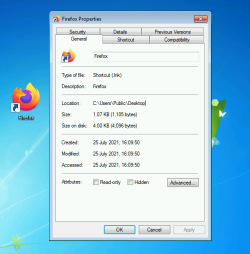
Run the installer from your Admin account. It should place a shortcut in the Public Desktop folder so that all users can see it and will be able to run it.

Firefox public desktop shortcut.PNG
 

My Computers My Computers

  • At a glance

    Windows 7 Home Premium x64AMD V1204GB
    Computer type
    Laptop
    Computer Manufacturer/Model Number
    Toshiba satellite C650D
    OS
    Windows 7 Home Premium x64
    CPU
    AMD V120
    Memory
    4GB
    Internet Speed
    150 Mbps
    Antivirus
    MSE
    Browser
    IE11, Edge, Firefox
    Other Info
    I also have W7 Pro on my System Two, and several W7 Hyper-V VMs. My other machines run Windows 10/11. Their specs are in my Ten Forums & Eleven Forum profiles.
  • At a glance

    Windows 7 Pro x64Intel i5-3320M8 GB
    Computer type
    Laptop
    System Manufacturer/Model Number
    Lenovo Thinkpad T430
    OS
    Windows 7 Pro x64
    CPU
    Intel i5-3320M
    Memory
    8 GB
    Hard Drives
    250GB Samsung SSD 860 EVO
    Antivirus
    MSE
Thank you for your reply. I am very sorry I asked the question wrong and wasted your time. But it did give me a clue. I should have asked, "from the new Standard Account, how I can open Firefox, that I have already installed under my Admin account.

Taking a cue from your reply above, I looked in Public Desktop and found there are no short cuts at all in that folder (empty). I have installed 4 Browsers as Admin; Firefox, Epic, Mypal and Basilisk. They made short cuts on my Desktop but made none in Public Desktop folder.

Searching around, I found that I am able to open many programs from the Standard Account, by using shortcuts placed in All Users Start Menu folder. These shortcuts would have been placed there at the time I installed the programs earlier, from the Admin Account. There are literally hundreds of shortcuts, some in folders, not only for opening those programs but also with shortcuts for uninstalling, documentary support, their web sites etc. etc. The catch is, no shortcuts have been placed there for any of my Browsers. From the Admin Account I placed the missing Browser shortcuts, one at a time, in All Users Start Menu folder. With this folder still open in the Admin Account, the shortcuts worked fine. After logging off and opening the Standard Account I found that every shortcut was corrupted with the usual notification window saying "the program this shortcut refers to has been moved or.........." and asking whether to delete the shortcut. The appearance of the icon also changed to some thing completely different.

Next I tried placing these shortcuts in the Public Desktop, Standard Account Desktop and also in C:>Users>Public folder and got exactly the same result. All 4 Browsers refuse to be opened from the Standard Account. What is left for me to do?

 

My Computer My Computer

At a glance

Windows 7 Home Premium 64bitAMD Dual Core C-502GB DDR3/320GB HDDAMD Radeon HD 6250
Computer Manufacturer/Model Number
Laptop - Acer Aspire 5250-BZ479
OS
Windows 7 Home Premium 64bit
CPU
AMD Dual Core C-50
Memory
2GB DDR3/320GB HDD
Graphics Card(s)
AMD Radeon HD 6250
Monitor(s) Displays
15.6" HD LED LCD
Internet Speed
ADSL
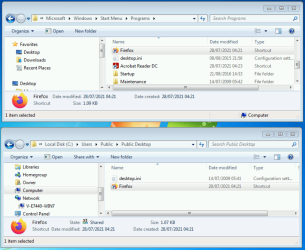
I find it hard to understand why a standard user doesn't have access to the Firefox you installed. However I install it, whether the online installer or the stand-alone installer, at no point does it offer an option to only install for this user. By default all users can run it. The installer should place a shortcut in the Public Desktop folder, and another in the All Users Start menu at C:\ProgramData\Microsoft\Windows\Start Menu\Programs.

The only case where it may not be able to do that would be if you ran the installer as a Standard user., then it may only be able to place the shortcuts in the user's own Start menu and Desktop. Are you sure you ran it when signed in as an Administrator?

Firefox installed shortcuts.PNG
 

My Computers My Computers

  • At a glance

    Windows 7 Home Premium x64AMD V1204GB
    Computer type
    Laptop
    Computer Manufacturer/Model Number
    Toshiba satellite C650D
    OS
    Windows 7 Home Premium x64
    CPU
    AMD V120
    Memory
    4GB
    Internet Speed
    150 Mbps
    Antivirus
    MSE
    Browser
    IE11, Edge, Firefox
    Other Info
    I also have W7 Pro on my System Two, and several W7 Hyper-V VMs. My other machines run Windows 10/11. Their specs are in my Ten Forums & Eleven Forum profiles.
  • At a glance

    Windows 7 Pro x64Intel i5-3320M8 GB
    Computer type
    Laptop
    System Manufacturer/Model Number
    Lenovo Thinkpad T430
    OS
    Windows 7 Pro x64
    CPU
    Intel i5-3320M
    Memory
    8 GB
    Hard Drives
    250GB Samsung SSD 860 EVO
    Antivirus
    MSE
Are you sure you ran it when signed in as an Administrator?
I am sure of this. There has always been only one account that I have been using for over 10 years and that is my admin account, the one I installed Firefox with. The Standard account is a recent effort of mine that has turned out to be a mess!
 

My Computer My Computer

At a glance

Windows 7 Home Premium 64bitAMD Dual Core C-502GB DDR3/320GB HDDAMD Radeon HD 6250
Computer Manufacturer/Model Number
Laptop - Acer Aspire 5250-BZ479
OS
Windows 7 Home Premium 64bit
CPU
AMD Dual Core C-50
Memory
2GB DDR3/320GB HDD
Graphics Card(s)
AMD Radeon HD 6250
Monitor(s) Displays
15.6" HD LED LCD
Internet Speed
ADSL
Back
Top