Solved Can't Connect to Wi-Fi

TDKMate

New member
Member
VIP
Local time
2:36 PM
Messages
335
First, I know next to zero about Wi-Fi. Short version: I cannot get anything (laptops) to connect to my Linksys WRT3200ACM router.

Over a few years I’ve tried four times to no avail. Three times to help someone with their laptops (virus scans and the like) but now I finally broke down and got my own laptop, a Lenovo “ideapad 5 Pro”.

Both my desktop computers are hardwired in. I’ve never used Wi-Fi, but did know enough that I had to turn it on, and the Guest account, in the router.

The problem is I can’t even get the laptop started in that it requires a Wi-Fi connection to continue. Like every other time I’ve tried, logging on to my router fails with the laptop needing a “Network Security Key”.

Heck I don’t even know what that is. So I tried both bands and the Guest account, using their respective passwords. I tried the router’s ‘name’ too. No joy.

And, on the laptop, I tried the different band names (like …5GHz and Guest) and the routers name. Still no joy.

I also let the router do a firmware update, too. That was nice as it doubled my download speeds!! But still no joy getting Wi-Fi.

I have a little bit of time that I can return the laptop if I can't get things to work, but I’d rather keep it.

I’m desperate…

Any ideas?
.
 

My Computer My Computer

At a glance

Win 7 Pro 64 SP1i7 6700K SkyLake32 GBnVidia GTX 970
Computer type
PC/Desktop
Computer Manufacturer/Model Number
home built
OS
Win 7 Pro 64 SP1
CPU
i7 6700K SkyLake
Motherboard
MSI Gaming M7
Memory
32 GB
Graphics Card(s)
nVidia GTX 970
Sound Card
onboard
Monitor(s) Displays
DELL U2711
Screen Resolution
2560x1440
Hard Drives
1 SSD OS, 2 WD Black Caviar data harddrives
PSU
EVGA Super Nova 850W G2 'Gold'
Case
Thermaltake Soprano Snow Edition
Cooling
Cooler Master Hyper 212 evo
Keyboard
Logitech K350
Mouse
Mad Kats RATT
Antivirus
Avast
Browser
Firefox
Try https://downloads.linksys.com/downloads/userguide/WRT3200ACM__UG_International.pdf

if you haven't already.

From that manual:

Connect to the secure wireless name shown in the Quick Start Guide that came with your
router. (You can change the network name and password later.) If you need help
connecting to the network refer to your device documentation


You say your two desktops are "hardwired" in. Does that mean they are connected to the router by cable ? If so, those connections required the security password key to start with ?

If none of that is useful, email Linksys from one of the connected Desktops ? I seriously doubt it is the laptop that is the issue, just the initial security key for the router. Example: to setup a Netcomm router at the very beginning, the router is factory set for login name Admin and then password Admin. Then you can, and should, change this to something secure. Netcomm have publicly provided this information online in the pdf Manual for their routers.
 

My Computer My Computer

At a glance

Windows 7 Pro x64Intel i5-8265U8gbIntel Iris Plus 655
Computer type
Laptop
Computer Manufacturer/Model Number
HP 250 G7
OS
Windows 7 Pro x64
CPU
Intel i5-8265U
Motherboard
Intel Coffee Lake
Memory
8gb
Graphics Card(s)
Intel Iris Plus 655
Sound Card
Realtek HDA
Monitor(s) Displays
Generic
Screen Resolution
1366 x 768
Hard Drives
Crucial P5 NVMe 1Tb internal
WD's 4Tb, 3Tb, 2 x 2Tb external
Mouse
Logi wireless
Internet Speed
45 Mbps
Antivirus
AVG
Browser
Firefox 88, Pale Moon 29, Brave 129
Other Info
Combination of i5-8265U with Crucial P5 achieves Crystal Bench scores > 5000

Iris Plus GPU (Whiskey Lake) driver from BioStar

HP 250 G7 is a budget machine
Hi

hmmmm, the message computer needs a Wifi connection to continue is throwing me
That message as far as i know relates to an Installation/upgrade of the OS

From what i can find thats a Windows 10 comp thats upgradable to W11, im wondering if its trying to upgrade???
(suggest you hit our sister w10/w11 forums - more people troubleshooting there now)

Anyway back to your problem
Router
1) DO NOT USE the router Guest account
2) Enable and set the wifi output to both 2.4 & 5 GHz
3) Password is there a label attached with it on it, NOPE its in the quick start guide just read the manual
NOW your Comp, you only need to connect to it NOT login to it
1) does that message appear with a BLUE background, if so my hmmmmmmm comment is correct
2) if not and your on the standard desktop, LEFT click on the wifi signal icon - is your Network shown..
your ISP, something like Comcast123456 thats your SSID
a) if yes - select it and in the next window enter your password,
b) if no icon - turn on wifi, proceed as above


NOTE
Ethernet connections do NOT require a password it auto connects, to get you past the internet connection required screen just use the cable from one of your other comps, remove cable then setup wif

You do not need to use the Linksys Smart Wifi setup, thats an extra, but you may have to enable/dissable smart wifi button 2 on the router
 
Last edited:

My Computer My Computer

At a glance

W7 home premium 32bit/W7HP 64bit/w10 tp insid...E5300 dual core3gbNvidia Geforce 7100 Nforce 630i
Computer type
PC/Desktop
Computer Manufacturer/Model Number
medionl/Aspire 6930G/acer x55a
OS
W7 home premium 32bit/W7HP 64bit/w10 tp insider ring
CPU
E5300 dual core
Motherboard
medion MS7366
Memory
3gb
Graphics Card(s)
Nvidia Geforce 7100 Nforce 630i
Monitor(s) Displays
avixc
Internet Speed
n (isp resticted to 72)
Antivirus
mse/pands
Browser
palemoon
Other Info
Belkin Fd7050 n USB using Railink RT2870 drivers, more upto date
Open a cmd prompt type

netsh wlan show networks

do you see your own wifi ?
 

My Computer My Computer

At a glance

win 8 32 bit
Computer type
PC/Desktop
OS
win 8 32 bit
Which is exactly the same as LEFT click on wifi icon, mine gives quicker access to connection option

whats showing on wifi icon >> ! > redX > yellow bomb
(right click gives more detail or troubleshoot option)
 

My Computer My Computer

At a glance

W7 home premium 32bit/W7HP 64bit/w10 tp insid...E5300 dual core3gbNvidia Geforce 7100 Nforce 630i
Computer type
PC/Desktop
Computer Manufacturer/Model Number
medionl/Aspire 6930G/acer x55a
OS
W7 home premium 32bit/W7HP 64bit/w10 tp insider ring
CPU
E5300 dual core
Motherboard
medion MS7366
Memory
3gb
Graphics Card(s)
Nvidia Geforce 7100 Nforce 630i
Monitor(s) Displays
avixc
Internet Speed
n (isp resticted to 72)
Antivirus
mse/pands
Browser
palemoon
Other Info
Belkin Fd7050 n USB using Railink RT2870 drivers, more upto date
Thanks for the replies. I’ll try to answer all the questions:

“You say your two desktops are "hardwired" in. Does that mean they are connected to the router by cable ? If so, those connections required the security password key to start with ?”
Yes, they are both connected via CAT5e cables to the rear Ethernet ports. No passwords or the like required.

I’ve had this router for years and the two desktops have worked just fine.

“hmmmm, the message computer needs a Wifi connection to continue is throwing me
That message as far as i know relates to an Installation/upgrade of the OS”

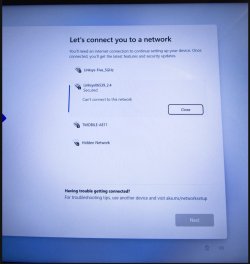
Yes, it’s a brand new laptop. See the attached for what I’m seeing, and can’t get past. I thought I would just be able to turn it on and get Windows, then I’d have to register and the like. This is new to me, too.

“1) DO NOT USE the router Guest account”
OK

“2) Enable and set the wifi output to both 2.4 & 5 GHz”
Done

“3) Password is there a label attached with it on it, NOPE its in the quick start guide just read the manual
NOW your Comp, you only need to connect to it NOT login to it”

Not quite following, maybe the attached screenshot will help.

“1) does that message appear with a BLUE background, if so my hmmmmmmm comment is correct”
See screenshot.

“2) if not and your on the standard desktop, LEFT click on the wifi signal icon - is your Network shown.. your ISP, something like Comcast123456 thats your SSID”
I don’t have Wi-Fi on my desktops, so no Wi-Fi icon. Never been asked for a SSID.

“...but you may have to enable/dissable smart wifi button 2 on the router”
Don’t know what it’s set at; it’s a long way away and I’ll check it out after this.

“Open a cmd prompt type
netsh wlan show networks
do you see your own wifi ?”

No, but then I don’t have Wi-Fi on my desktop.
.
 

Attachments

  • Laptop Screenshot-01.jpg
    Laptop Screenshot-01.jpg
    101.5 KB · Views: 1

My Computer My Computer

At a glance

Win 7 Pro 64 SP1i7 6700K SkyLake32 GBnVidia GTX 970
Computer type
PC/Desktop
Computer Manufacturer/Model Number
home built
OS
Win 7 Pro 64 SP1
CPU
i7 6700K SkyLake
Motherboard
MSI Gaming M7
Memory
32 GB
Graphics Card(s)
nVidia GTX 970
Sound Card
onboard
Monitor(s) Displays
DELL U2711
Screen Resolution
2560x1440
Hard Drives
1 SSD OS, 2 WD Black Caviar data harddrives
PSU
EVGA Super Nova 850W G2 'Gold'
Case
Thermaltake Soprano Snow Edition
Cooling
Cooler Master Hyper 212 evo
Keyboard
Logitech K350
Mouse
Mad Kats RATT
Antivirus
Avast
Browser
Firefox
Hi thanks for screenshot, any chance of the one on your LAPTOP taskbar.....(right hand side)

be right back with more comments really want to see what Windows is saying

- - - Updated - - -

right from that screenshot, is that from Desktop or Laptop
its telling me that your router is transmitting both 2.4 and 5hz signals
Move to the 5ghz on that screen (password will be required --- do you still have the quick setup guide leaflet)

BOTH require a password the lock symbol is showing on them
(see my note re button 2 on your router)
 

My Computer My Computer

At a glance

W7 home premium 32bit/W7HP 64bit/w10 tp insid...E5300 dual core3gbNvidia Geforce 7100 Nforce 630i
Computer type
PC/Desktop
Computer Manufacturer/Model Number
medionl/Aspire 6930G/acer x55a
OS
W7 home premium 32bit/W7HP 64bit/w10 tp insider ring
CPU
E5300 dual core
Motherboard
medion MS7366
Memory
3gb
Graphics Card(s)
Nvidia Geforce 7100 Nforce 630i
Monitor(s) Displays
avixc
Internet Speed
n (isp resticted to 72)
Antivirus
mse/pands
Browser
palemoon
Other Info
Belkin Fd7050 n USB using Railink RT2870 drivers, more upto date
Hi thanks for screenshot, any chance of the one on your taskbar.....(right hand side)
be right back with more comments really want to see what Windows is saying
- - - Updated - - -
right from that screenshot, is that from Desktop or Laptop
its telling me that your router is transmitting both 2.4 and 5hz signals
Move to the 5ghz on that screen (password will be required --- do you still have the quick setup guide leaflet)
BOTH require a password the lock symbol is showing on them
(see my note re button 2 on your router)
That IS the entire screenshot (from a camera) of the laptop screen. That is the full top-to-bottom of the full right side. I did not include more of the left side as it's all 'white space' and contains not words or the like.

The "Linksys06539_2.4" is a little misleading in that is the Name of the router (given by Linksys) and not the speed.

I have tried that choice, the 5GHz band, and (not shown in this screenshot) as well as the 2.4 band and the Guest accounts.

All give the same needs a “Network Security Key” message.

I'll post this then go look at button #2 (the router is 55 feet away and i have to pull it out...)
.
 

My Computer My Computer

At a glance

Win 7 Pro 64 SP1i7 6700K SkyLake32 GBnVidia GTX 970
Computer type
PC/Desktop
Computer Manufacturer/Model Number
home built
OS
Win 7 Pro 64 SP1
CPU
i7 6700K SkyLake
Motherboard
MSI Gaming M7
Memory
32 GB
Graphics Card(s)
nVidia GTX 970
Sound Card
onboard
Monitor(s) Displays
DELL U2711
Screen Resolution
2560x1440
Hard Drives
1 SSD OS, 2 WD Black Caviar data harddrives
PSU
EVGA Super Nova 850W G2 'Gold'
Case
Thermaltake Soprano Snow Edition
Cooling
Cooler Master Hyper 212 evo
Keyboard
Logitech K350
Mouse
Mad Kats RATT
Antivirus
Avast
Browser
Firefox
In that case it looks like its an MS request to set up your Account..... way different to W7

FOR THE MOMENT please use an ethernet cable, just unplug from from one of your desktops and slam it in the laptop ethernet port --- IT WILL auto-connect, then complete MS update/registration

once your updated, shut down - unplug the cable - reboot then from w10 background screen, follow my initial instructions to setup wifi --- you still NEED the password from the quick start leaflet that came with your browser
 

My Computer My Computer

At a glance

W7 home premium 32bit/W7HP 64bit/w10 tp insid...E5300 dual core3gbNvidia Geforce 7100 Nforce 630i
Computer type
PC/Desktop
Computer Manufacturer/Model Number
medionl/Aspire 6930G/acer x55a
OS
W7 home premium 32bit/W7HP 64bit/w10 tp insider ring
CPU
E5300 dual core
Motherboard
medion MS7366
Memory
3gb
Graphics Card(s)
Nvidia Geforce 7100 Nforce 630i
Monitor(s) Displays
avixc
Internet Speed
n (isp resticted to 72)
Antivirus
mse/pands
Browser
palemoon
Other Info
Belkin Fd7050 n USB using Railink RT2870 drivers, more upto date
... snip ...(see my note re button 2 on your router)

OK, I held the button in for a few seconds and tried again. No joy. Yes I tried both accounts showing with the same results.

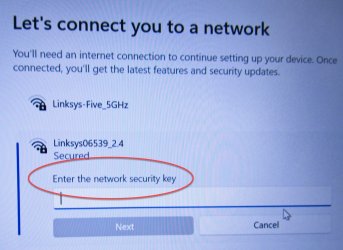
The first camera shot attached if of the laptop screen showing the message I'm getting, regardless of which laptop I've tried in the past. (Note: all prior laptops were already up and running; I was just trying to do maintenance for friends and download tools like AV programs and the like.)

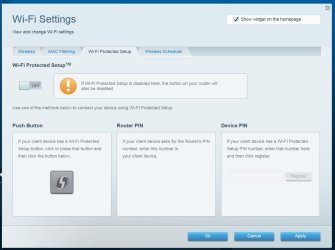
So I went into the router again and took a computer screenshot of the Wi-Fi Settings page. I have No idea what to do here.
.

- - - Updated - - -

In that case it looks like its an MS request to set up your Account..... way different to W7

FOR THE MOMENT please use an ethernet cable, just unplug from from one of your desktops and slam it in the laptop ethernet port --- IT WILL auto-connect, then complete MS update/registration

once your updated, shut down - unplug the cable - reboot then from w10 background screen, follow my initial instructions to setup wifi --- you still NEED the password from the quick start leaflet that came with your browser
Sadly, no Ethernet port on the laptop. (And I thought they all had one...)
 

Attachments

  • Laptop Screenshot-02.jpg
    Laptop Screenshot-02.jpg
    203.3 KB · Views: 0
  • Wi Fi Settings on Router -01.jpg
    Wi Fi Settings on Router -01.jpg
    78 KB · Views: 0

My Computer My Computer

At a glance

Win 7 Pro 64 SP1i7 6700K SkyLake32 GBnVidia GTX 970
Computer type
PC/Desktop
Computer Manufacturer/Model Number
home built
OS
Win 7 Pro 64 SP1
CPU
i7 6700K SkyLake
Motherboard
MSI Gaming M7
Memory
32 GB
Graphics Card(s)
nVidia GTX 970
Sound Card
onboard
Monitor(s) Displays
DELL U2711
Screen Resolution
2560x1440
Hard Drives
1 SSD OS, 2 WD Black Caviar data harddrives
PSU
EVGA Super Nova 850W G2 'Gold'
Case
Thermaltake Soprano Snow Edition
Cooling
Cooler Master Hyper 212 evo
Keyboard
Logitech K350
Mouse
Mad Kats RATT
Antivirus
Avast
Browser
Firefox
great last 2 screen shots

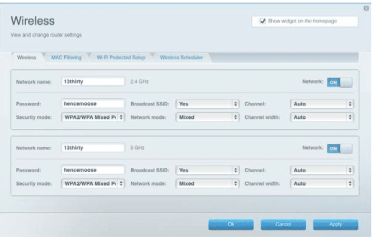
in the last one go to the wireless tab, on that screen you will see the PASSWORD, note it
then go back to the Enter security password key and enter it

did you notice the difference between the original and last wifi setup page you now have the enter password option
 

Attachments

  • wifi.PNG
    wifi.PNG
    42.5 KB · Views: 3

My Computer My Computer

At a glance

W7 home premium 32bit/W7HP 64bit/w10 tp insid...E5300 dual core3gbNvidia Geforce 7100 Nforce 630i
Computer type
PC/Desktop
Computer Manufacturer/Model Number
medionl/Aspire 6930G/acer x55a
OS
W7 home premium 32bit/W7HP 64bit/w10 tp insider ring
CPU
E5300 dual core
Motherboard
medion MS7366
Memory
3gb
Graphics Card(s)
Nvidia Geforce 7100 Nforce 630i
Monitor(s) Displays
avixc
Internet Speed
n (isp resticted to 72)
Antivirus
mse/pands
Browser
palemoon
Other Info
Belkin Fd7050 n USB using Railink RT2870 drivers, more upto date
great last 2 screen shots

in the last one go to the wireless tab, on that screen you will see the PASSWORD, note it
then go back to the Enter security password key and enter it

did you notice the difference between the original and last wifi setup page you now have the enter password option
Wow, I can’t thank you enough, torchwood!! I never would’ve thought that “Network Security Key” meant Enter Password. Amazing.

I went to the 5GHz account on the laptop, entered the password you showed to me how to find, clacked it in, and the laptop is now doing its buzz-buzz-whir-whir thing.

The router’s Network Map shows it’s on the map at 5GHz

No, I didn’t notice a difference as I’ve been going thru so many screens that I couldn’t keep track.

It’s now at the Sign in or Create an MS Account. So I’ll get busy with that (new) stuff (though I didn’t really want to make an account…).

Again, thank you.
.
 

My Computer My Computer

At a glance

Win 7 Pro 64 SP1i7 6700K SkyLake32 GBnVidia GTX 970
Computer type
PC/Desktop
Computer Manufacturer/Model Number
home built
OS
Win 7 Pro 64 SP1
CPU
i7 6700K SkyLake
Motherboard
MSI Gaming M7
Memory
32 GB
Graphics Card(s)
nVidia GTX 970
Sound Card
onboard
Monitor(s) Displays
DELL U2711
Screen Resolution
2560x1440
Hard Drives
1 SSD OS, 2 WD Black Caviar data harddrives
PSU
EVGA Super Nova 850W G2 'Gold'
Case
Thermaltake Soprano Snow Edition
Cooling
Cooler Master Hyper 212 evo
Keyboard
Logitech K350
Mouse
Mad Kats RATT
Antivirus
Avast
Browser
Firefox
Glad its sorted

hitting that No2 button on the router, enabled the password signin option, and turned OFF protected mode
(protected mode meant it could only be done with your comp also having this security feature)

good luck with W10
 

My Computer My Computer

At a glance

W7 home premium 32bit/W7HP 64bit/w10 tp insid...E5300 dual core3gbNvidia Geforce 7100 Nforce 630i
Computer type
PC/Desktop
Computer Manufacturer/Model Number
medionl/Aspire 6930G/acer x55a
OS
W7 home premium 32bit/W7HP 64bit/w10 tp insider ring
CPU
E5300 dual core
Motherboard
medion MS7366
Memory
3gb
Graphics Card(s)
Nvidia Geforce 7100 Nforce 630i
Monitor(s) Displays
avixc
Internet Speed
n (isp resticted to 72)
Antivirus
mse/pands
Browser
palemoon
Other Info
Belkin Fd7050 n USB using Railink RT2870 drivers, more upto date
Glad its sorted
hitting that No2 button on the router, enabled the password signin option, and turned OFF protected mode
(protected mode meant it could only be done with your comp also having this security feature)

good luck with W10
Thanks for the explanation; I was curious.

Oh, and it turns out to be Win 11. Haven't had time to play with it much, though.

And for the humor of it, I got confused with another naming convention. One of the things it wanted was a Security PIN right after getting the personal info for the MS account. Naturally, I made it long and complicated to protect the account. It turns out it is really for the Windows Logon Password. Why couldn't they just call it that??

So that was the first thing I Googled and changed the 'PIN' to something more reasonable. Oh well, LOL...
.
 

My Computer My Computer

At a glance

Win 7 Pro 64 SP1i7 6700K SkyLake32 GBnVidia GTX 970
Computer type
PC/Desktop
Computer Manufacturer/Model Number
home built
OS
Win 7 Pro 64 SP1
CPU
i7 6700K SkyLake
Motherboard
MSI Gaming M7
Memory
32 GB
Graphics Card(s)
nVidia GTX 970
Sound Card
onboard
Monitor(s) Displays
DELL U2711
Screen Resolution
2560x1440
Hard Drives
1 SSD OS, 2 WD Black Caviar data harddrives
PSU
EVGA Super Nova 850W G2 'Gold'
Case
Thermaltake Soprano Snow Edition
Cooling
Cooler Master Hyper 212 evo
Keyboard
Logitech K350
Mouse
Mad Kats RATT
Antivirus
Avast
Browser
Firefox
torchwood

My wifi experience is with Netgear and Netcomm routers. In both cases, the passwords for wifi channels 2.4 and 5Ghz are contained on separate business cards in the initial retail box. They're not listed in the router application itself.

In your experience, do other router manufacturers besides Linksys list the wifi passwords within the actual router pages ? This is just a learning question.
 

My Computer My Computer

At a glance

Windows 7 Pro x64Intel i5-8265U8gbIntel Iris Plus 655
Computer type
Laptop
Computer Manufacturer/Model Number
HP 250 G7
OS
Windows 7 Pro x64
CPU
Intel i5-8265U
Motherboard
Intel Coffee Lake
Memory
8gb
Graphics Card(s)
Intel Iris Plus 655
Sound Card
Realtek HDA
Monitor(s) Displays
Generic
Screen Resolution
1366 x 768
Hard Drives
Crucial P5 NVMe 1Tb internal
WD's 4Tb, 3Tb, 2 x 2Tb external
Mouse
Logi wireless
Internet Speed
45 Mbps
Antivirus
AVG
Browser
Firefox 88, Pale Moon 29, Brave 129
Other Info
Combination of i5-8265U with Crucial P5 achieves Crystal Bench scores > 5000

Iris Plus GPU (Whiskey Lake) driver from BioStar

HP 250 G7 is a budget machine
Hi @ian50

I dont know of any others i've had about 5/6 NONE of them had this option.
mine like yours either came with a seperate card or on a label attached.
To be honest i think its a severe security risk----
especially if the default router admin password has not been changed and one of the standard ones ie admin/12345 etc
 

My Computer My Computer

At a glance

W7 home premium 32bit/W7HP 64bit/w10 tp insid...E5300 dual core3gbNvidia Geforce 7100 Nforce 630i
Computer type
PC/Desktop
Computer Manufacturer/Model Number
medionl/Aspire 6930G/acer x55a
OS
W7 home premium 32bit/W7HP 64bit/w10 tp insider ring
CPU
E5300 dual core
Motherboard
medion MS7366
Memory
3gb
Graphics Card(s)
Nvidia Geforce 7100 Nforce 630i
Monitor(s) Displays
avixc
Internet Speed
n (isp resticted to 72)
Antivirus
mse/pands
Browser
palemoon
Other Info
Belkin Fd7050 n USB using Railink RT2870 drivers, more upto date
To be honest i think its a severe security risk ...

Yes, so do I, that's why I asked. Just plug an Ethernet cable from the Linksys router into your own laptop, read the wifi password, then later log into the other person's machine from another room whenever you wish to.

And yes too for the router login. As I said, both Netgear and Netcomm in my experience just have Admin/Admin as the default login when new. So simple, so obvious.

Netcomm, at least, publish this in a pdf on their website.
 

My Computer My Computer

At a glance

Windows 7 Pro x64Intel i5-8265U8gbIntel Iris Plus 655
Computer type
Laptop
Computer Manufacturer/Model Number
HP 250 G7
OS
Windows 7 Pro x64
CPU
Intel i5-8265U
Motherboard
Intel Coffee Lake
Memory
8gb
Graphics Card(s)
Intel Iris Plus 655
Sound Card
Realtek HDA
Monitor(s) Displays
Generic
Screen Resolution
1366 x 768
Hard Drives
Crucial P5 NVMe 1Tb internal
WD's 4Tb, 3Tb, 2 x 2Tb external
Mouse
Logi wireless
Internet Speed
45 Mbps
Antivirus
AVG
Browser
Firefox 88, Pale Moon 29, Brave 129
Other Info
Combination of i5-8265U with Crucial P5 achieves Crystal Bench scores > 5000

Iris Plus GPU (Whiskey Lake) driver from BioStar

HP 250 G7 is a budget machine
l haven't had much time to 'play' with my new laptop, but it's been connecting fine to the internet.

Thanks again for all the help!

Will mark as Solved.
.
 

My Computer My Computer

At a glance

Win 7 Pro 64 SP1i7 6700K SkyLake32 GBnVidia GTX 970
Computer type
PC/Desktop
Computer Manufacturer/Model Number
home built
OS
Win 7 Pro 64 SP1
CPU
i7 6700K SkyLake
Motherboard
MSI Gaming M7
Memory
32 GB
Graphics Card(s)
nVidia GTX 970
Sound Card
onboard
Monitor(s) Displays
DELL U2711
Screen Resolution
2560x1440
Hard Drives
1 SSD OS, 2 WD Black Caviar data harddrives
PSU
EVGA Super Nova 850W G2 'Gold'
Case
Thermaltake Soprano Snow Edition
Cooling
Cooler Master Hyper 212 evo
Keyboard
Logitech K350
Mouse
Mad Kats RATT
Antivirus
Avast
Browser
Firefox
Back
Top