Don't know what web browser I should use anymore. Recommendations?

Daeslender

New member
Local time
8:43 PM
Messages
7
First of all, hi guys! How are you doing? Haven't been around here in a while, I kindda forgot about this place, whoops.

So lately I've found myself having no idea what web browser I should be using. It seems to be that every browser I know I find to be pretty garbage now. That includes Chrome, of course, Opera, Edge (Haven't even tried it honestly, and I won't, seems like another generic Chromium browser with Microsoft's stinky fingers stuck on it) and pretty much all Chromium based browsers (including regular Chromium itself), Firefox, Waterfox, and other Gecko based browsers.

The things that all these browsers (or most of them) have in common is having some absolutely disgusting UI's, they're really slow, LOVE to eat resources and have very, very questionable practices, not only about privacy but also about stuff like forcing updates on you.

Now, I used to use Palemoon for a pretty long time, but honestly it has become way too slow and a lot of websites don't even seem to load properly on it. And even if it wasn't for that, I'm not keen on supporting the project after learning that its creator disallowed some guy who had forked it to create a fork that runs on Windows XP (called MyPal) from using Palemoon's source code, apparently because the MyPal guy wasn't providing the source code to his fork... even tho I'm pretty sure he was.

I also gave the K-Meleon browser a chance. It has some of the same problems as Palemoon, except it's definitely not as slow, infact, it's pretty fast, but again, most modern pages don't work properly on it.

Now, I could just use two browsers, one that I use for regular web browsing and another for the important pages that I need to use that don't work properly on the other browser. But honestly, I'd like to use just one.

Problem is, I can't find any browsers that fit my liking. All the ones I know have that damn flat design UI crap, they run slow as hell and force updates down my throat. It's like I either have to pick that or a browser that doesn't work properly.

I'm hoping you guys can help me out here, I need to find something that isn't an eyesore (something that looks like, I dunno, 2010 Firefox. None of that flat design crap) and that doesn't eat many resources (and I get that part of this problem is modern websites themselves with all their bloat, but I find it hard to believe that my browser has to use half or more of my RAM because a website has 10mb of JS loaded on it). And of course, one that respects my privacy.
 

My Computer My Computer

At a glance

Windows 7 Professional x64 / Windows XP Profe...AMD FX 63008GB DDR3NVidia GTX 1030
Computer type
PC/Desktop
Computer Manufacturer/Model Number
Custom Build
OS
Windows 7 Professional x64 / Windows XP Professional x86 / Linux Manjaro
CPU
AMD FX 6300
Motherboard
Asus M5A78L-M LX3
Memory
8GB DDR3
Graphics Card(s)
NVidia GTX 1030
Screen Resolution
1920x1080
Hard Drives
Seagate Barracuda 500GB SATA
Seagate Barracuda 1000GB SATA
Browser
Waterfox G4.0.2.1, Firefox 82.0.2 (64-bit), Palemoon 28.15.0
Personally, I still use Pale Moon as my daily driver, even though the developers are DICK heads. Especially FAT-MATT.
I use it mainly because Moonchild is an security conscious guy and keeps PM up to date. PM has NO telemetry. (aka Google tracking) Also it is one of the two browsers left that can use the old XUL Firefox add-ons to change the UI into something usable. I use Waterfox as a backup. Google is destroying the web by forcing their F'ed up web standards down web developers throats. (Google should not have two of the five seats on the Web Standards board) I do have to keep a copy of Chrome portable around for those websites that are coded for Chrome and "Chrome only". Granted, PM is extremely slow however that is offset by using 1/4 to 1/10 of the memory than any chrome based browser. Also by not having a new process for every tab opened. Which slows my old laptop to a crawl using any chrome based browser. I'm not really recommending you go back to PM but I suggest if you are worried about privacy, DON'T use Chrome or any chrome based browser, besides Firefox gives all their telemetry to Google since the only money Mozilla gets these days comes from Google, which makes them Google's lackey. (actually, most of Mozilla's programmers also work for Google) Why do you think Firefox became a Chrome clone? Google ordered them to change, or they would pull their money. In the end all I can say is to try them all and see if you find one you can still live with.

I was really disappointed with the MyPal fiasco. The source code was linked and it was Moonchild's lackey FAT-MATT that caused all of that. Tobin, after 6 years of working on the project has basically come to think that he owns the project instead of Moonchild. It seems that MC will kiss Tobin's ass when necessary.

EDIT:
Also read this:
EFF Warns Chrome Users: 'Manifest V3 Is Deceitful and Threatening' - Slashdot
 

My Computer My Computer

At a glance

Windows 10 22H2 ProIntel(R) Xeon W-10885M2x 32 GB DDR4 ECC memory (128 GB max)Intel onboard GPU 1080p - Quadro RTX 5000 Max...
Computer type
Laptop
Computer Manufacturer/Model Number
Dell Precision 15 7550 Workstation
OS
Windows 10 22H2 Pro
CPU
Intel(R) Xeon W-10885M
Motherboard
Dell
Memory
2x 32 GB DDR4 ECC memory (128 GB max)
Graphics Card(s)
Intel onboard GPU 1080p - Quadro RTX 5000 Max-Q GPU 4K
Hard Drives
1TB Samsung 9100 Pro main M2 SSD
2x 2TB Samsung 9100 Pro temp storage M2 SSD (6 TB max)
Mouse
Logitech MX-25 Bluetooth
Internet Speed
slow
Antivirus
MS
Browser
Pale Moon 34.x.x - x64 AVX2 build
I use Firefox ESR. Once I saw posted here a website with the of number of reported security risks and Firefox had one of the highest whereas Firefox ESR had one of the lowest. I suppose it is all of those continuous overhauls. You get to continue using an older version of Firefox longer and it is still supported. Plus it is designed for an enterprise so you can set up group policy restrictions that disable certain things like automatic updates. As for the UI there are plenty of themes. Pertaining memory usage, in my opinion with the web getting more complicated plus with html 5 that might be a necessity. If you really have 8 gb of ram that shouldn't be a problem. It isn't for me but I keep unnecessary services turned off. I avoid Chrome and Edge like the plague or covid. There are derivatives that are more focused on privacy.
 

My Computers My Computers

  • At a glance

    Windows 7 pro/Windows 10 ProIntel i7 860 Quad core 2.8 ghz8 gbATI Radeon HD 5770 1 gb ram
    Computer type
    PC/Desktop
    Computer Manufacturer/Model Number
    HP Pavillion Elite HPE-250f
    OS
    Windows 7 pro/Windows 10 Pro
    CPU
    Intel i7 860 Quad core 2.8 ghz
    Memory
    8 gb
    Graphics Card(s)
    ATI Radeon HD 5770 1 gb ram
    Monitor(s) Displays
    Alienware 25 AW2521HF & Viewsonic
    Screen Resolution
    1920 x1080 & 1680x1050
    Hard Drives
    WD blue 1 tb & 500 gb.
    Browser
    FF of course.
    Other Info
    https://www.bestbuy.com/site/hp-pavilion-elite-desktop-intel-core-i7-processor-8gb-memory-1tb-hard-drive/9921493.p?skuId=9921493
  • At a glance

    Windows 2012 R2 Data center/Linux Minti3 9100 3.6GHz, 8M cache, 4C/4T8GB 2666MT/s DDR4 ECC UDIMM
    Computer type
    PC/Desktop
    System Manufacturer/Model Number
    Dell Poweredge T140
    OS
    Windows 2012 R2 Data center/Linux Mint
    CPU
    i3 9100 3.6GHz, 8M cache, 4C/4T
    Memory
    8GB 2666MT/s DDR4 ECC UDIMM
    Monitor(s) Displays
    Viewsonic
    Screen Resolution
    1680x1050
    Hard Drives
    1 TB & 750 GB
    Other Info
    https://www.dell.com/en-us/work/shop/productdetailstxn/poweredge-t140?~ck=bt
I use Waterfox Classic mainly for the classic theme restorer plugin, which Firefox killed compatibility for.

I'd use Pale Moon but transferring things like bookmarks, browser history, etc over is 110% impossible to do. Even manual attempts just reverse themselves.
 

My Computer My Computer

At a glance

Windows 7 Home Premium x64Intel Pentium Dual Core 2.6 GHz6 GBstock factory for this model
Computer type
PC/Desktop
Computer Manufacturer/Model Number
Gateway DX4822-01
OS
Windows 7 Home Premium x64
CPU
Intel Pentium Dual Core 2.6 GHz
Motherboard
stock factory for this model
Memory
6 GB
Graphics Card(s)
stock factory for this model
Sound Card
stock factory for this model
Monitor(s) Displays
Dell P2010Ht
Screen Resolution
1600 x 900
Hard Drives
1 TB Western Digital
PSU
300 watt
Cooling
80mm case fan, CPU fan, 60mm front intake
Keyboard
Logitech
Mouse
HP 3-button optical wheel mouse
Internet Speed
fiber optic
Antivirus
MSE, SuperAntiSpyware, Malwarebytes Free
When I set up my Win 7 P4 machine around 2010, it only need 1GB DRAM because web bloat was not an issue. Both IE and Firefox were single process. I preferred FF, syncing to the cloud, extensions and power-user features.

Today IE is the best choice. Privacy is not the issue people claim, just disable the two options in settings/privacy. Syncing to the cloud is essential because I dual-boot Win 7&10. Memory usage is probably lowest due to sleeping tabs. Plus I put a big pagefile on the new SSD.
 

My Computer My Computer

At a glance

Windows 7 Professional 64bitCore 2 Duo 3.0Mhz4GB DDR2GeForce GT 710
Computer type
PC/Desktop
Computer Manufacturer/Model Number
ASRock
OS
Windows 7 Professional 64bit
CPU
Core 2 Duo 3.0Mhz
Motherboard
G31M-VS2
Memory
4GB DDR2
Graphics Card(s)
GeForce GT 710
Sound Card
GeForce GT 710
Monitor(s) Displays
Philips 4K 43"
Hard Drives
Atlas 15K2
SATA SSD
PSU
Coolmax 400W
Case
Black mini tower
Cooling
Fans
Keyboard
Many
Mouse
Microsoft Modern
Internet Speed
DSL 1.5M
Browser
Edge
I use Waterfox Classic mainly for the classic theme restorer plugin, which Firefox killed compatibility for.I'd use Pale Moon but transferring things like bookmarks, browser history, etc over is 110% impossible to do. Even manual attempts just reverse themselves.

What browser are you trying to transfer from?
If transferring from Firefox, Waterfox, or SeaMonkey all you need to do is copy the "Places.sqlite" from any of those browsers to the Pale Moon profile to get all the history and bookmarks. For passwords copy the "cert9.db and key4.db and logins.json" files. If your trying to transfer from Chrome or ChrEdge I cant help you.
 

My Computer My Computer

At a glance

Windows 10 22H2 ProIntel(R) Xeon W-10885M2x 32 GB DDR4 ECC memory (128 GB max)Intel onboard GPU 1080p - Quadro RTX 5000 Max...
Computer type
Laptop
Computer Manufacturer/Model Number
Dell Precision 15 7550 Workstation
OS
Windows 10 22H2 Pro
CPU
Intel(R) Xeon W-10885M
Motherboard
Dell
Memory
2x 32 GB DDR4 ECC memory (128 GB max)
Graphics Card(s)
Intel onboard GPU 1080p - Quadro RTX 5000 Max-Q GPU 4K
Hard Drives
1TB Samsung 9100 Pro main M2 SSD
2x 2TB Samsung 9100 Pro temp storage M2 SSD (6 TB max)
Mouse
Logitech MX-25 Bluetooth
Internet Speed
slow
Antivirus
MS
Browser
Pale Moon 34.x.x - x64 AVX2 build
I have loads to say about this, but I have to "unplug." I come from Netscape all those years ago. Then Phoenix and the Mozilla suite. Once my beloved Firefox started copying Chrome I jumped that sinking ship full of fools.

Yes, you're right, browsers now-a-days are absolute Crap with a capital C created by people who have the title that also begins with the letter C. I say that for many, many reasons I don't feel like typing right now.

In short, it requires several browsers. Like what was mentioned, I too use Pale Moon, but I customized the living crap out of it and forge the UA (User Agent) to help prevent web breakage. It's pretty damn bad the the Nazis of the Internet want YOU to use a mainline browser, or their crap HTML, CSS, JS won't render on the webpage. That is bullcrap to the next level, let me tell you. And it's probably due to Google pushing this since they pretty much own websites by proxy of SEO (Search Engine Optimization). SEO is MASSIVE marketing capital.

So, I run Pale Moon, then Ungoogled Chromium, Firefox and Brave. UnGoogled Chromium is Ungoogled. I tested it a couple years ago with a network packet sniffer. Haven't done that with the latest version. I will here one day soon though. Probably a waste of time since Google is stripped out of it, but it's part and parcel of the nerd ethos.

Now, I run all these browsers in something called Sandboxie. If configured correctly, that too will afford you some security. Probably better than any spying, over bloated, pile of crap, definition-based anti-virus can muster. Believe me.

Yeah, it's a sad and pathetic world we live in today with a combination of ass sniffing in terms of analytics and telemetry and a massive one step forward for "progress" and two steps back in terms of common sense functionality and aesthetics.

It's pretty much gotten to the point you learn HTML, JS and CSS, how to compile with Visual Studio and tune some open source browser project for your own use. I'm thinking of doing that with Pale Moon because I want XUL and not WebExtension crap. I may release it on Github. It'll be a real PITA to keep up with CVEs and what not though.


Food for i/o calorie burn. Opera used to be a great Norwegian made browser. They sold to the Chinese communist party. Like Tencent, and the long glorious list of BS, they can eat a virtualized rootkit...

Yeah, Tobin is a 'new paradigm' alright... As I said on their forum, if he had his own code paradigm, computers would probably start to smoke! And I'm not talking about bud either. Raw, unadulterated i/o carbon emissions.

Addendum:

As I feel we've reached the apex of the wussification of the world, it seems like its spilled onto mainline software by virtue of its moronic platitudes. Make sense?
 

My Computer My Computer

At a glance

Windows 7 Ultimate x64
Computer type
PC/Desktop
OS
Windows 7 Ultimate x64
I was a Pale Moon user but am finding a growing list of sites that don't render properly or at all (Discord, VMWare knowledgebase, Bitchute..).
Not a problem if you're a Windows 7 user but for those of us that still have XP machines the Pale Moon forks are your only choice. Pale Moon is dead to me after they killed off all forks.

The only browsers I use now are Vivaldi and LibreWolf.

Today IE is the best choice. Privacy is not the issue people claim, just disable the two options in settings/privacy. Syncing to the cloud is essential because I dual-boot Win 7&10. Memory usage is probably lowest due to sleeping tabs. Plus I put a big pagefile on the new SSD.

IE is the WORST choice, always has been. It is the most targetted browser for malware thanks to its buggy ActiveX which was a favorite of miscreants to exploit for drive-by installs. If you must use browser with a Microsoft logo use Edge, Microsoft has abandoned IE and so should you.

Therein lies the problem with the modern web - Google is the dictator of web standards and web developers are too lazy to code for more that one browser (Chrome). Manifest V3 is a load of crap. Google's white-wash claims it's meant to better protect against malicious extensions by limiting their ability to intercept incoming network data and process/filter it before it gets displayed in the browser (Adblockers). If Google really wanted to protect you against malicious extensions they would invest more in better policing the Chrome Web Store. Limiting ad-blocking is the main goal of Manifest V3 - follow the money.

Yea, I'll probably get banned for violating rule #13, but hey sites that depend more on user contributed content need to know who butters their bread.
 

My Computer My Computer

At a glance

Windows 7 Pro x64
Computer type
PC/Desktop
OS
Windows 7 Pro x64
I agree about IE. It is well past it's prime and it has always been heavily targeted.
 

My Computers My Computers

  • At a glance

    Windows 7 pro/Windows 10 ProIntel i7 860 Quad core 2.8 ghz8 gbATI Radeon HD 5770 1 gb ram
    Computer type
    PC/Desktop
    Computer Manufacturer/Model Number
    HP Pavillion Elite HPE-250f
    OS
    Windows 7 pro/Windows 10 Pro
    CPU
    Intel i7 860 Quad core 2.8 ghz
    Memory
    8 gb
    Graphics Card(s)
    ATI Radeon HD 5770 1 gb ram
    Monitor(s) Displays
    Alienware 25 AW2521HF & Viewsonic
    Screen Resolution
    1920 x1080 & 1680x1050
    Hard Drives
    WD blue 1 tb & 500 gb.
    Browser
    FF of course.
    Other Info
    https://www.bestbuy.com/site/hp-pavilion-elite-desktop-intel-core-i7-processor-8gb-memory-1tb-hard-drive/9921493.p?skuId=9921493
  • At a glance

    Windows 2012 R2 Data center/Linux Minti3 9100 3.6GHz, 8M cache, 4C/4T8GB 2666MT/s DDR4 ECC UDIMM
    Computer type
    PC/Desktop
    System Manufacturer/Model Number
    Dell Poweredge T140
    OS
    Windows 2012 R2 Data center/Linux Mint
    CPU
    i3 9100 3.6GHz, 8M cache, 4C/4T
    Memory
    8GB 2666MT/s DDR4 ECC UDIMM
    Monitor(s) Displays
    Viewsonic
    Screen Resolution
    1680x1050
    Hard Drives
    1 TB & 750 GB
    Other Info
    https://www.dell.com/en-us/work/shop/productdetailstxn/poweredge-t140?~ck=bt
As of the current Waterfox Classic version which I updated to recently, I am getting semi-frequent hang-ups/freezes. The browser will randomly take up 100% CPU & hang, the entire system becomes unresponsive, in many cases the mouse shuts off. Tonight I waited it out, but in most instances I've had to hold the power button down & force a restart. Event Viewer logs show no errors when this happens.

Shame they make rolling back versions a real hassle, if not impossible.
 

My Computer My Computer

At a glance

Windows 7 Home Premium x64Intel Pentium Dual Core 2.6 GHz6 GBstock factory for this model
Computer type
PC/Desktop
Computer Manufacturer/Model Number
Gateway DX4822-01
OS
Windows 7 Home Premium x64
CPU
Intel Pentium Dual Core 2.6 GHz
Motherboard
stock factory for this model
Memory
6 GB
Graphics Card(s)
stock factory for this model
Sound Card
stock factory for this model
Monitor(s) Displays
Dell P2010Ht
Screen Resolution
1600 x 900
Hard Drives
1 TB Western Digital
PSU
300 watt
Cooling
80mm case fan, CPU fan, 60mm front intake
Keyboard
Logitech
Mouse
HP 3-button optical wheel mouse
Internet Speed
fiber optic
Antivirus
MSE, SuperAntiSpyware, Malwarebytes Free
A rollback means you backup your profile, use Revo Uninstaller and uninstall the browser, and then install the older version. Now add your profile back. Extensions might be another matter though, but that depends on how far back you'll go.
 

My Computer My Computer

At a glance

Windows 7 Ultimate x64
Computer type
PC/Desktop
OS
Windows 7 Ultimate x64
Shame they make rolling back versions a real hassle, if not impossible.
That's why you need to backup your profile when upgrading. To downgrade just install the older version and copy the backed up profile.

Ah, you beat me to it.
 

My Computer My Computer

At a glance

Windows 10 22H2 ProIntel(R) Xeon W-10885M2x 32 GB DDR4 ECC memory (128 GB max)Intel onboard GPU 1080p - Quadro RTX 5000 Max...
Computer type
Laptop
Computer Manufacturer/Model Number
Dell Precision 15 7550 Workstation
OS
Windows 10 22H2 Pro
CPU
Intel(R) Xeon W-10885M
Motherboard
Dell
Memory
2x 32 GB DDR4 ECC memory (128 GB max)
Graphics Card(s)
Intel onboard GPU 1080p - Quadro RTX 5000 Max-Q GPU 4K
Hard Drives
1TB Samsung 9100 Pro main M2 SSD
2x 2TB Samsung 9100 Pro temp storage M2 SSD (6 TB max)
Mouse
Logitech MX-25 Bluetooth
Internet Speed
slow
Antivirus
MS
Browser
Pale Moon 34.x.x - x64 AVX2 build
I use Firefox ESR. Once I saw posted here a website with the of number of reported security risks and Firefox had one of the highest whereas Firefox ESR had one of the lowest. I suppose it is all of those continuous overhauls. You get to continue using an older version of Firefox longer and it is still supported. Plus it is designed for an enterprise so you can set up group policy restrictions that disable certain things like automatic updates. As for the UI there are plenty of themes. Pertaining memory usage, in my opinion with the web getting more complicated plus with html 5 that might be a necessity. If you really have 8 gb of ram that shouldn't be a problem. It isn't for me but I keep unnecessary services turned off. I avoid Chrome and Edge like the plague or covid. There are derivatives that are more focused on privacy.

I use Firefox ESR 52.1.2 (32-bit), and MyPal 29.3.0 (32-bit).

I like what the "Classic Theme Restorer" does to Firefox.

MyPal is the only one that will let me log in to the control panel of my hostinger.com site.

---

Signature
 

My Computers My Computers

  • At a glance

    Windows XP SP3 32-bit OSIntel(R) Core(TM)2 Duo CPU3 GBEVGA GeForce GTX 560 Ti SuperClocked Ed 1GB B...
    Computer type
    PC/Desktop
    Computer Manufacturer/Model Number
    Acer Veriton M265 / Acer Veriton M275
    OS
    Windows XP SP3 32-bit OS
    CPU
    Intel(R) Core(TM)2 Duo CPU
    Motherboard
    ???
    Memory
    3 GB
    Graphics Card(s)
    EVGA GeForce GTX 560 Ti SuperClocked Ed 1GB Bundle
    Hard Drives
    268 GB Total
    126 GB Used
    142 GB Free
    Antivirus
    None
    Browser
    Firefox ESR 52.1.2 (32-bit) / MyPal 29.3.0 (32-bit)
  • Computer type
    PC/Desktop
    Antivirus
    None

My Computers My Computers

  • At a glance

    Windows 7 pro/Windows 10 ProIntel i7 860 Quad core 2.8 ghz8 gbATI Radeon HD 5770 1 gb ram
    Computer type
    PC/Desktop
    Computer Manufacturer/Model Number
    HP Pavillion Elite HPE-250f
    OS
    Windows 7 pro/Windows 10 Pro
    CPU
    Intel i7 860 Quad core 2.8 ghz
    Memory
    8 gb
    Graphics Card(s)
    ATI Radeon HD 5770 1 gb ram
    Monitor(s) Displays
    Alienware 25 AW2521HF & Viewsonic
    Screen Resolution
    1920 x1080 & 1680x1050
    Hard Drives
    WD blue 1 tb & 500 gb.
    Browser
    FF of course.
    Other Info
    https://www.bestbuy.com/site/hp-pavilion-elite-desktop-intel-core-i7-processor-8gb-memory-1tb-hard-drive/9921493.p?skuId=9921493
  • At a glance

    Windows 2012 R2 Data center/Linux Minti3 9100 3.6GHz, 8M cache, 4C/4T8GB 2666MT/s DDR4 ECC UDIMM
    Computer type
    PC/Desktop
    System Manufacturer/Model Number
    Dell Poweredge T140
    OS
    Windows 2012 R2 Data center/Linux Mint
    CPU
    i3 9100 3.6GHz, 8M cache, 4C/4T
    Memory
    8GB 2666MT/s DDR4 ECC UDIMM
    Monitor(s) Displays
    Viewsonic
    Screen Resolution
    1680x1050
    Hard Drives
    1 TB & 750 GB
    Other Info
    https://www.dell.com/en-us/work/shop/productdetailstxn/poweredge-t140?~ck=bt

My Computer My Computer

At a glance

Windows 10 22H2 ProIntel(R) Xeon W-10885M2x 32 GB DDR4 ECC memory (128 GB max)Intel onboard GPU 1080p - Quadro RTX 5000 Max...
Computer type
Laptop
Computer Manufacturer/Model Number
Dell Precision 15 7550 Workstation
OS
Windows 10 22H2 Pro
CPU
Intel(R) Xeon W-10885M
Motherboard
Dell
Memory
2x 32 GB DDR4 ECC memory (128 GB max)
Graphics Card(s)
Intel onboard GPU 1080p - Quadro RTX 5000 Max-Q GPU 4K
Hard Drives
1TB Samsung 9100 Pro main M2 SSD
2x 2TB Samsung 9100 Pro temp storage M2 SSD (6 TB max)
Mouse
Logitech MX-25 Bluetooth
Internet Speed
slow
Antivirus
MS
Browser
Pale Moon 34.x.x - x64 AVX2 build

My Computers My Computers

  • At a glance

    Windows 7 pro/Windows 10 ProIntel i7 860 Quad core 2.8 ghz8 gbATI Radeon HD 5770 1 gb ram
    Computer type
    PC/Desktop
    Computer Manufacturer/Model Number
    HP Pavillion Elite HPE-250f
    OS
    Windows 7 pro/Windows 10 Pro
    CPU
    Intel i7 860 Quad core 2.8 ghz
    Memory
    8 gb
    Graphics Card(s)
    ATI Radeon HD 5770 1 gb ram
    Monitor(s) Displays
    Alienware 25 AW2521HF & Viewsonic
    Screen Resolution
    1920 x1080 & 1680x1050
    Hard Drives
    WD blue 1 tb & 500 gb.
    Browser
    FF of course.
    Other Info
    https://www.bestbuy.com/site/hp-pavilion-elite-desktop-intel-core-i7-processor-8gb-memory-1tb-hard-drive/9921493.p?skuId=9921493
  • At a glance

    Windows 2012 R2 Data center/Linux Minti3 9100 3.6GHz, 8M cache, 4C/4T8GB 2666MT/s DDR4 ECC UDIMM
    Computer type
    PC/Desktop
    System Manufacturer/Model Number
    Dell Poweredge T140
    OS
    Windows 2012 R2 Data center/Linux Mint
    CPU
    i3 9100 3.6GHz, 8M cache, 4C/4T
    Memory
    8GB 2666MT/s DDR4 ECC UDIMM
    Monitor(s) Displays
    Viewsonic
    Screen Resolution
    1680x1050
    Hard Drives
    1 TB & 750 GB
    Other Info
    https://www.dell.com/en-us/work/shop/productdetailstxn/poweredge-t140?~ck=bt
I'm currently testing Brave as default browser, with Waterfox and Firefox kept up to date in the wings.

As yet, Brave is only a few weeks on my PC, so there may still be unexpected, ugly surprises to come. So far, there has been a few minor glitches that were overcome without too much trouble (mostly getting it to play nicely with my 3rd party firewall).

Things that are good about Brave:

i) It is very fast. Cloud finessed, although based on Chromium. Addons I use are Ublock Origin and one other: Github has the information to load these even though the Chromium addons library doesn't list them, so that issue isn't a no-go

2) I've found the Dark theme colour is quite pleasant to work with, and there is a reasonably exhaustive range of settings

Things that are "bad" about Brave:

1) No ability to prevent upgrades or put them on hold apart from crippling the browser in its' folder. This defeats the purpose of using this browser of course.

2) Unknown to me as yet is whether the developer' promise that the browser is secure against tracking ("Privacy guaranteed ...") is actually truthful. Based on Chromium, are there backdoors for Google since it seems at least plausible that the developers are on a Google payroll somewhere. Firefox for example has that distinct disadvantage. At this stage, I'm using the 3rd party firewall to test any tracking leakage - this firewall is a German freeware package that is truly anal in monitoring all the little worms trying to phone home. I've been quite surprised by the number of different programme segments that attempt to do that.
 

My Computer My Computer

At a glance

Windows 7 Pro x64Intel i5-8265U8gbIntel Iris Plus 655
Computer type
Laptop
Computer Manufacturer/Model Number
HP 250 G7
OS
Windows 7 Pro x64
CPU
Intel i5-8265U
Motherboard
Intel Coffee Lake
Memory
8gb
Graphics Card(s)
Intel Iris Plus 655
Sound Card
Realtek HDA
Monitor(s) Displays
Generic
Screen Resolution
1366 x 768
Hard Drives
Crucial P5 NVMe 1Tb internal
WD's 4Tb, 3Tb, 2 x 2Tb external
Mouse
Logi wireless
Internet Speed
45 Mbps
Antivirus
AVG
Browser
Firefox 88, Pale Moon 29, Brave 129
Other Info
Combination of i5-8265U with Crucial P5 achieves Crystal Bench scores > 5000

Iris Plus GPU (Whiskey Lake) driver from BioStar

HP 250 G7 is a budget machine
I use Brave for Skype web. Just because it is Chromium based doesn't mean that it is Chrome based. Chrome is a customized version of Chromium so they are related but not the same. Also I could be wrong but I doubt that Google would care to spy one anyone other than Chrome users.

You need to be careful when clearing cache and back up the default folder first. I don't remember any specifics but a lot of stuff was reset twice when I did so and restoring that folder fix it. I would open it up after a clean it would be back to the default settings and home view. I don't remember if the bookmarks where deleted but I think that there is a bug in the cleaning process. Also ccleaner can't see it but that might be due to my version. It is older and pre nagware.
 

My Computers My Computers

  • At a glance

    Windows 7 pro/Windows 10 ProIntel i7 860 Quad core 2.8 ghz8 gbATI Radeon HD 5770 1 gb ram
    Computer type
    PC/Desktop
    Computer Manufacturer/Model Number
    HP Pavillion Elite HPE-250f
    OS
    Windows 7 pro/Windows 10 Pro
    CPU
    Intel i7 860 Quad core 2.8 ghz
    Memory
    8 gb
    Graphics Card(s)
    ATI Radeon HD 5770 1 gb ram
    Monitor(s) Displays
    Alienware 25 AW2521HF & Viewsonic
    Screen Resolution
    1920 x1080 & 1680x1050
    Hard Drives
    WD blue 1 tb & 500 gb.
    Browser
    FF of course.
    Other Info
    https://www.bestbuy.com/site/hp-pavilion-elite-desktop-intel-core-i7-processor-8gb-memory-1tb-hard-drive/9921493.p?skuId=9921493
  • At a glance

    Windows 2012 R2 Data center/Linux Minti3 9100 3.6GHz, 8M cache, 4C/4T8GB 2666MT/s DDR4 ECC UDIMM
    Computer type
    PC/Desktop
    System Manufacturer/Model Number
    Dell Poweredge T140
    OS
    Windows 2012 R2 Data center/Linux Mint
    CPU
    i3 9100 3.6GHz, 8M cache, 4C/4T
    Memory
    8GB 2666MT/s DDR4 ECC UDIMM
    Monitor(s) Displays
    Viewsonic
    Screen Resolution
    1680x1050
    Hard Drives
    1 TB & 750 GB
    Other Info
    https://www.dell.com/en-us/work/shop/productdetailstxn/poweredge-t140?~ck=bt
townsbg

Thanks for the reply. Yeah I know of course that Chromium is not Google Chrome but the Google variant is an antecedent with much common code, so I have a while to go yet on testing before I regard Brave as safe.

I'm afraid I don't have your faith in Google. I expect them to spy on everyone, and those developers who are recalcitrant are bought out with offers too good to say no to. This is a business model for large corps and smaller players. In my own area of geoscience, grass roots exploration and development are done by small, opportunistic players with the large players then picking and choosing who to chase for purchase after their own intel tags the most likely target. MS, Google, FB etc all follow this pattern - their inside intel (spying) is the crucial factor.

Bookmarks and logins from Waterfox and Firefox were imported by Brave after I'd fiddled about a bit sorting out what files Brave could read. Github was helpful here. That gave me some optimism in that Brave was not too limited in adaptability. It offers Startpage as a search engine, which the Fox stable now hides - another plus for Brave. And as I'd noted, Github provides addons that the Chrome webstore does not (note: Chrome webstore; it even asks for a Google sign in).

Profiles are in \User\User Name\AppData\Local\BraveSoftware\..., so nothing unusual. No nagware I've seen as yet, although upgrades uncontrolled by the user could add this unpleasantness in the future.

As it stands, this browser does all that I want at real speed without any serious drawbacks so far apart from the upgrade method. I'll keep assessing though.

- - - Updated - - -
townsbg

Thanks for the reply. Yeah I know of course that Chromium is not Google Chrome but the Google variant is an antecedent with much common code, so I have a while to go yet on testing before I regard Brave as safe.

I'm afraid I don't have your faith in Google. I expect them to spy on everyone, and those developers who are recalcitrant are bought out with offers too good to say no to. This is a business model for large corps and smaller players. In my own area of geoscience, grass roots exploration and development are done by small, opportunistic players with the large players then picking and choosing who to chase for purchase after their own intel tags the most likely target. MS, Google, FB etc all follow this pattern - their inside intel (spying) is the crucial factor.

Bookmarks and logins from Waterfox and Firefox were imported by Brave after I'd fiddled about a bit sorting out what files Brave could read. Github was helpful here. That gave me some optimism in that Brave was not too limited in adaptability. It offers Startpage as a search engine, which the Fox stable now hides - another plus for Brave. And as I'd noted, Github provides addons that the Chrome webstore does not (note: Chrome webstore; it even asks for a Google sign in).

Profiles are in \User\User Name\AppData\Local\BraveSoftware\..., so nothing unusual. No nagware I've seen as yet, although upgrades uncontrolled by the user could add this unpleasantness in the future.

As it stands, this browser does all that I want at real speed without any serious drawbacks so far apart from the upgrade method. I'll keep assessing though.
 

My Computer My Computer

At a glance

Windows 7 Pro x64Intel i5-8265U8gbIntel Iris Plus 655
Computer type
Laptop
Computer Manufacturer/Model Number
HP 250 G7
OS
Windows 7 Pro x64
CPU
Intel i5-8265U
Motherboard
Intel Coffee Lake
Memory
8gb
Graphics Card(s)
Intel Iris Plus 655
Sound Card
Realtek HDA
Monitor(s) Displays
Generic
Screen Resolution
1366 x 768
Hard Drives
Crucial P5 NVMe 1Tb internal
WD's 4Tb, 3Tb, 2 x 2Tb external
Mouse
Logi wireless
Internet Speed
45 Mbps
Antivirus
AVG
Browser
Firefox 88, Pale Moon 29, Brave 129
Other Info
Combination of i5-8265U with Crucial P5 achieves Crystal Bench scores > 5000

Iris Plus GPU (Whiskey Lake) driver from BioStar

HP 250 G7 is a budget machine
To add extensions, they are just Chrome extensions. Brave is a Chromium based browser. Meaning it uses the Blink engine just like Google Chrome (stupid name. Conjures up old classic cars and wheel hubs). Chromium (web browser) - Wikipedia

There's even headless chrome which is glorious security plagued crap for web Devs and what not.


brave 1.jpg


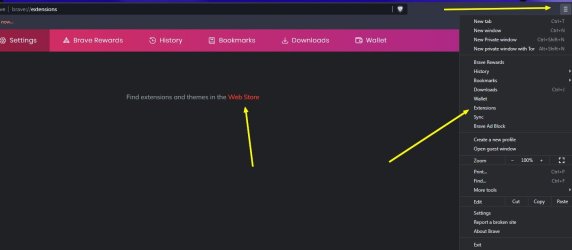
That icon top right is called a "hamburger menu".


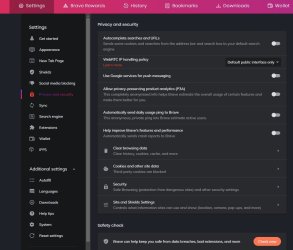
You'll want to go through ALL of the settings. And yes, Brave still uses and makes contact to Google. I see Google cloud IPs blocked in my firewall every time I open Brave. Even then, Google is EVERYWHERE! You can try to mitigate it as best you can, but you seriously need to know how. Question: you want to rid yourself of Google on the computer but do you use a mobile device running Android? That's Google to the nth degree. I even bet iOS uses Google. Google really is everywhere. You just need to know how to feed it BS and cut it out of the system you run. If you go through your computer's registry, I can almost bet that Google is there too. On the Android front, research how to Degoogle a phone. There are at least three third-party firmware OS's that'll do it. But you need a compatible phone and you might be at the mercy of those who tested the phone for the third-party Android OS. Funny enough, it seems like a damn Google Pixel phone is the most compatible for degoogleing a phone. Anyway...


brave 2.jpg


The ability to turn off updates anymore for anything seems to be frowned upon by the uber "soy boys" of the world thinking you'll automatically get hit by malware or get hacked by some hacker wearing a black hoodie wearing a typical Guy Fakes mask owned by Time Warner. (Time Warner owns the rights to the Guy Fawkes mask).

Depending on your use of a piece of software or OS or even hardware will in large part dictate your apparent "vulnerability" risk factors on not using the latest and greatest updates. Especially if you run things in unorthodox fashion like in a whole disk sandbox, a software sandbox or if your OS is Linux, Unix, etc. In terms of just updates for security and not improvements and functionality, you'd have to see what those particular updated and patched CVEs (Common Vulnerabilities and Exposures) are for and if they affect you. If perhaps a CVE that is patched deals with a certain type of privilege code escalation in certain circumstances that you will more than likely not be exposed to, then the update more than likely doesn't apply to you, the end user of the software or hardware. Which means you could pass the update on by until the next one or what ever with little to worry about.

Now, how on earth do you turn the forced crap off? Well, once upon a time it was as simple as turning off the update service for Brave in Windows services. That seems to have gone bye, bye since they probably don't like people controlling forced updates. I mean, Communism is the new in thing anymore. Why do I say this? Exhibit A and exhibit B. You'll notice that even though the original poster stated in clear English EXACTLY why he wanted the ability to turn off updates, a Brave Dev (or what ever the hell) STILL asks the question of "why." When I see this crap (and I deal with it all the time through customer support for every freaking thing) I immediately think A) low IQ and B) lack of reading comprehension. Probably both. Now you'll see in exhibit B the issue was raised some three years ago and still not resolved. It probably will never be "solved" either. Even though it's some simple code to do just that. The license of Brave allows you to edit the code as you wish. So if you know Javascript, have at it. Or take gamble, visit Fiverr and have someone well qualified to do it for you. Make sure they compile the source to be installed in Windows. You just won't ever be able to update. Which means you'll have to fix vulnerabilities yourself. Of you just apply the code snippet to each future update from the source, compile, and install. But that may be easier said then done.

According to exhibit A, adding a run time flag of --disable-auto-update will turn off updates. But not anymore! No, they removed that functionality as well. WTF is a run time flag? If you enter about:flags in the address bar they are all there. Obviously don't enable or turn something off you know nothing about. It's not an experimental run time flag either. I checked. More Info. Runtime Enabled Features

So, how do we force this mule to budge and do what we want, i.e. control updates? Uninstall Brave (I'd use Revo uninstaller. Just pay attention to the registry entries) and use portable Brave instead. Portapps - Brave™ portable I'd modify the YAML file (Yet Another Markup Language). Portapps - Configuration A YAML file is like a JSON file (Javascript Object Oriented Notation). Just use Notepad ++ to right click the file and open. It's human readable. Or, temporally rename to a .txt extension to read the file in Notepad. The choice is yours.

Here are the built-in modifications to the portable version versus the installed version. Portapps - Brave™ portable

What does portable mean? It means you should be able to copy it to a USB drive or what ever and run it on any x86 based computer right from the USB drive. ALL portable Apps are like that. But don't think this is more secure and private. It's not. And I would NEVER store passwords in a browser. And in this portable version of Brave they explicitly state not to because the encryption functionality isn't there for the portable version. Makes sense given the nature of it being portable. Instead, learn to use a password manager. Bitwarden is a good one. For the nerdy there's Keepass. Or you can try Spectre. Spectre: Passwords, Privacy-first

Okay, who's a book publisher? LOL!

- - - Updated - - -

Oh, WebRTC. Go here: WebRTC Leak Test - BrowserLeaks
 

My Computer My Computer

At a glance

Windows 7 Ultimate x64
Computer type
PC/Desktop
OS
Windows 7 Ultimate x64
Back
Top