Cannot Install .NET framework 4.8 on Windows 7

dstephens16

New member
Local time
8:59 AM
Messages
1

Attachments

My Computers

System One System Two

  • Computer type
    Laptop
    OS
    Win 7 64 bit
  • Computer type
    PC/Desktop

My Computer

Computer type
PC/Desktop
Computer Manufacturer/Model Number
HP Desktop & Compaq Laptop
OS
Win 10 x64, Linux Lite, Win 7 x64, BlackArch, & Kali
Hard Drives
Samsung 850 Pro 256Gb,
Hitachi HDD 1Tb,
Crucial MX SSD 250Gb
Segate 3Tb USB 3.0 Ext. Backup HDD
Internet Speed
150Mbps dn, 20Mbps up
Antivirus
Avast Free, Malwarebytes Anti-Exploit & Anti-Ransomware
Browser
Firefox, Chrome, Opera, & VPN
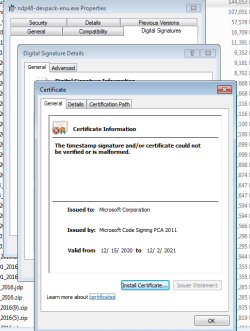
I'll go out on a limb here: Check on your system to see if you have Microsoft updates KB4474419 and KB4490628 installed. If any of those two are missing download it/them from Microsoft, install them, reboot, then try installing .NET 4.8 again. If you do need to install them remember to chose the correct download for your system i.e. (going by your signature) Windows 7 x64.
 

My Computer

Computer type
PC/Desktop
OS
Windows 7 Pro. x64 SP1
Most of a day wasted --- thanks MS

Grrr... dealing with "windoze" is why I have grey hair.
Accidentally took off a bunch of NET stuff today because there is no easy way to see what software uses it and
luck would have it that the first program I tried to fire up requires the NET framework.

MS sends you on a wild goose chase and they don't bother to tell you the latest version will not install or what the right one is (v4.8), or that the right one will not even install..... END OF RANT.

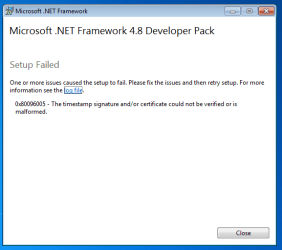
Now I have done everything mentioned here and the POS still will not install.
Almost an entire day stolen by the clowns at MS. IMHO they do this on purpose to try and coerce you into their latest OS and seriously some of them should be in jail for the stuff they pull.

Can anyone save my sanity and point me in the right direction?
Thanks in advance
 

My Computers

System One System Two

  • Computer type
    Laptop
    Computer Manufacturer/Model Number
    thinkpad T430
    OS
    7 pro
    CPU
    i7
    Memory
    16gb
  • Computer type
    PC/Desktop
2 Updates Worked !

I'll go out on a limb here: Check on your system to see if you have Microsoft updates KB4474419 and KB4490628 installed. If any of those two are missing download it/them from Microsoft, install them, reboot, then try installing .NET 4.8 again. If you do need to install them remember to chose the correct download for your system i.e. (going by your signature) Windows 7 x64.

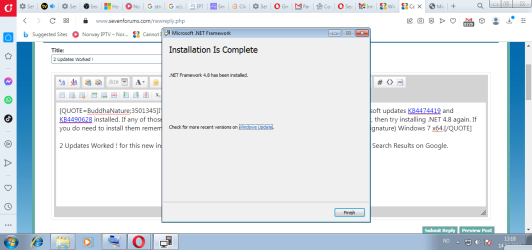
2 Updates Worked ! for this new installed Windows 7 where nothing is installed, this solution should be #1 Search Results on Google.

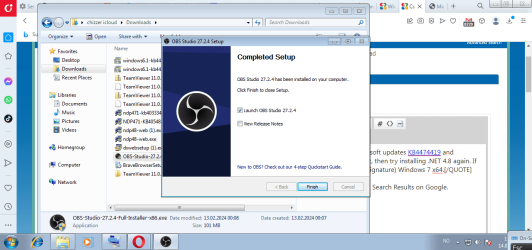
OBS is now installed without any problems thanks ? too .NET 4.8

image.png

image.png
 

My Computers

System One System Two

  • Computer type
    PC/Desktop
    Computer Manufacturer/Model Number
    aSOS
    OS
    Windows 7 Ultimate 32bit.
    Memory
    16 GB
    Hard Drives
    500 GB
    Browser
    Opera, Thanks ? Partners ?
  • Computer type
    PC/Desktop
This is my third day of trying to get the NET framework back on Windows 7 Pro.
I have mainly been led in circles from my Google searches.
I just tried the windows troubleshooter which tells me that Net v4.0 needs to be installed
and when I try to install V4 it fails.


With windows machines it seems like the financially prudent way to solve problems is to go out and hand your money over to MS for
their latest and greatest new OS or even throw the PC into a fire.

It is fast approaching the point where it is going to be cheaper to buy a new computer -- just like MS has it planned IMHO.

With MS they have even made it difficult to reinstall the OS since they don't giver you disks any longer.
 

My Computers

System One System Two

  • Computer type
    Laptop
    Computer Manufacturer/Model Number
    thinkpad T430
    OS
    7 pro
    CPU
    i7
    Memory
    16gb
  • Computer type
    PC/Desktop
Back
Top