Solved What gives battery status in File Explorer, Could export data?

Gomesz775

New member
Local time
7:48 PM
Messages
7
I live in a residential neighborhood and have my own office space. This phone is hooked to my Windows 7 PC (See note 1). I used a standard USB-C to USB-A connection.


Tracking the charge statistics of all my linked phones is something I enjoy well. The following screenshot was taken in File explorer:
iN7X3.png

Focus of the question: identifying what this program or path is. Task manager says it is "Device properties".
Is a RAM dump useful in this case? (See also remark 2).
[SUB]1: I kind of run a power-tower for mobile phones.
[/SUB][SUB]2: I have a memory dump of this task generated from the Task Manager[/SUB]
 

My Computers My Computers

  • At a glance

    Windows 7 32biti3 370M1.7 GBIntel (R) HD Graphics
    Computer type
    PC/Desktop
    Computer Manufacturer/Model Number
    Acer TravelMate 4740
    OS
    Windows 7 32bit
    CPU
    i3 370M
    Motherboard
    Generic
    Memory
    1.7 GB
    Graphics Card(s)
    Intel (R) HD Graphics
    Screen Resolution
    Wide XGA
    Hard Drives
    320GB hdd
    Keyboard
    Dell
    Mouse
    Dell
    Antivirus
    Kaspersky
    Browser
    chrome/firefox
  • At a glance

    WindowsIntel Core i7-11370H8 GB (2 x 4 GB), DDR4, 3200 MHz, dual-channelIntel Iris Xe Graphics
    Computer type
    Laptop
    System Manufacturer/Model Number
    5510
    OS
    Windows
    CPU
    Intel Core i7-11370H
    Motherboard
    Generic
    Memory
    8 GB (2 x 4 GB), DDR4, 3200 MHz, dual-channel
    Graphics Card(s)
    Intel Iris Xe Graphics
    Sound Card
    Realtek
    Screen Resolution
    1920 x 1080
    Hard Drives
    M.2 2230 512GB SSD
    Mouse
    Logitech
The battery information you're seeing in Windows is probably via something called ACPI

If you want statistics and other things, and are willing to learn, then dive into the Android Development Bridge (ADB). It's really a very simple script (program?) via the command line. So, if you want batter information data you'd enter adb shell dumpsys battery

You might be able to batch script this for each phone. And once it's batch scripted the possibilities are endless. YOu could fire off a batch file via Voicebot, via a timer or computer action using the program Shutter Lite or a more complex macro maker program of which several exist. If you know web code like JavaScript, HTML and CSS you might be able to do something with Electron.

Learn all about the ADB and the battery information command from the following links:


How to Install ADB on Windows, macOS, and Linux

https://developer.android.com/studio/command-line/adb

Battery Status: Android. if you want to know the battery status… | by Budhdi Sharma | Android Champ | Medium


- - - Updated - - -

Oh, in reference to that primary color threaded social media post on a broken Powershell script, check out the ADB capability of Batterystats and the Battery Historian script. But you'll have to run it in Docker. Once you learn Docker there's 's no going back. Pretty cool stuff.


https://developer.android.com/topic/performance/power/setup-battery-historian

Install Docker Desktop on Windows | Docker Documentation

- - - Updated - - -

If you have a Raspberry Pi.

The Best Way To Install Docker on a Raspberry Pi and other IoT devices. - JFrog Connect

Getting started with Docker on your Raspberry Pi . Docker Pirates ARMed with explosive stuff


Tip: Running Zenmap to find your Raspberry Pi IP address is unnecessary. You can look in your router's connected devices or use a program called Angry IP Scanner on your local network to find the Raspberry Pi. There are even Apps that will scan your local network right from your phone. An App I use on my phone is simply called Network Scanner. I'm able to see if perhaps a rouge device is on the network or on networks I connect to. Another App is Network Analyzer.
 

My Computer My Computer

At a glance

Windows 7 Ultimate x64
Computer type
PC/Desktop
OS
Windows 7 Ultimate x64
First and foremost, I appreciate your prompt response. I'll need some time to fully grasp everything indicated above; for now, I'll go into literature done over ACPI Windows script around the period when Windows 7 was popular.:-)


I investigated the ADB program. At How to Install ADB on Windows, macOS, and Linux, I am stuck at step 7 of the instructions for windows. I do not receive any kind of pop up in my phone.

[SUB]I did not install it: However, I have a strong hunch that you misinterpreted my desire to interact with and debug the phones. I need to get the information (or ACPI table?) from the PC directly.
[/SUB]


Unfortunately, I do not own a Rasberry Pi.


===

Gomesz775
 
Last edited:

My Computers My Computers

  • At a glance

    Windows 7 32biti3 370M1.7 GBIntel (R) HD Graphics
    Computer type
    PC/Desktop
    Computer Manufacturer/Model Number
    Acer TravelMate 4740
    OS
    Windows 7 32bit
    CPU
    i3 370M
    Motherboard
    Generic
    Memory
    1.7 GB
    Graphics Card(s)
    Intel (R) HD Graphics
    Screen Resolution
    Wide XGA
    Hard Drives
    320GB hdd
    Keyboard
    Dell
    Mouse
    Dell
    Antivirus
    Kaspersky
    Browser
    chrome/firefox
  • At a glance

    WindowsIntel Core i7-11370H8 GB (2 x 4 GB), DDR4, 3200 MHz, dual-channelIntel Iris Xe Graphics
    Computer type
    Laptop
    System Manufacturer/Model Number
    5510
    OS
    Windows
    CPU
    Intel Core i7-11370H
    Motherboard
    Generic
    Memory
    8 GB (2 x 4 GB), DDR4, 3200 MHz, dual-channel
    Graphics Card(s)
    Intel Iris Xe Graphics
    Sound Card
    Realtek
    Screen Resolution
    1920 x 1080
    Hard Drives
    M.2 2230 512GB SSD
    Mouse
    Logitech

My Computer My Computer

At a glance

Windows 7 Ultimate x64
Computer type
PC/Desktop
OS
Windows 7 Ultimate x64

We already do that at step 5 of setting up the phone.

What I don't get is this:

Image-002-2-300x180.png

btw I didn't do ./adb devices. I typed adb devices.

Something about a key is missing (perhaps the adb server needs that?)
 
Last edited:

My Computers My Computers

  • At a glance

    Windows 7 32biti3 370M1.7 GBIntel (R) HD Graphics
    Computer type
    PC/Desktop
    Computer Manufacturer/Model Number
    Acer TravelMate 4740
    OS
    Windows 7 32bit
    CPU
    i3 370M
    Motherboard
    Generic
    Memory
    1.7 GB
    Graphics Card(s)
    Intel (R) HD Graphics
    Screen Resolution
    Wide XGA
    Hard Drives
    320GB hdd
    Keyboard
    Dell
    Mouse
    Dell
    Antivirus
    Kaspersky
    Browser
    chrome/firefox
  • At a glance

    WindowsIntel Core i7-11370H8 GB (2 x 4 GB), DDR4, 3200 MHz, dual-channelIntel Iris Xe Graphics
    Computer type
    Laptop
    System Manufacturer/Model Number
    5510
    OS
    Windows
    CPU
    Intel Core i7-11370H
    Motherboard
    Generic
    Memory
    8 GB (2 x 4 GB), DDR4, 3200 MHz, dual-channel
    Graphics Card(s)
    Intel Iris Xe Graphics
    Sound Card
    Realtek
    Screen Resolution
    1920 x 1080
    Hard Drives
    M.2 2230 512GB SSD
    Mouse
    Logitech
In step 5 it says, " file transfer (MTP)” mode."

Is it in this mode?


You won't be able to send any commands to the phone via ADB and CMD prompt without FIRST making sure you have a link (a USB or WiFi link). Once that is settled you can move on to issuing commands via ADB.

And it looks like you may need a driver. I posted this link in my first post and that's where I learned you may need a driver.

https://developer.android.com/studio/run/oem-usb

Samsung Android USB Driver | Samsung Developers

Make sure you read all.

- - - Updated - - -

The key (RSA key) is missing because the link is bad to even give you that option for acceptance.
 

My Computer My Computer

At a glance

Windows 7 Ultimate x64
Computer type
PC/Desktop
OS
Windows 7 Ultimate x64
In step 5 it says, " file transfer (MTP)” mode."

Is it in this mode?

Yes, I have set ti to MTP.

You won't be able to send any commands to the phone via ADB and CMD prompt without FIRST making sure you have a link (a USB or WiFi link). Once that is settled you can move on to issuing commands via ADB.
Well, the file explorer already shows the phone.
And it looks like you may need a driver. I posted this link in my first post and that's where I learned you may need a driver.

https://developer.android.com/studio/run/oem-usb

Samsung Android USB Driver | Samsung Developers


Make sure you read all.
I followed the first link, it didn't mention a driver. I also visited this link but I was following the steps there (section before the steps didn't mention a driver. I will check these.
- - - Updated - - -
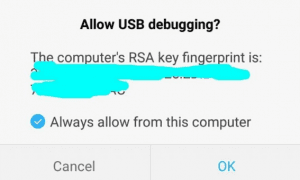
I installed the Samsung OEM driver and it worked

Screenshot_2022-05-15-21-05-00.jpg.


The key (RSA key) is missing because the link is bad to even give you that option for acceptance.

So, the computer is not connected to the phone correctly, right. But the USB connection is all well.
 
Last edited:

My Computers My Computers

  • At a glance

    Windows 7 32biti3 370M1.7 GBIntel (R) HD Graphics
    Computer type
    PC/Desktop
    Computer Manufacturer/Model Number
    Acer TravelMate 4740
    OS
    Windows 7 32bit
    CPU
    i3 370M
    Motherboard
    Generic
    Memory
    1.7 GB
    Graphics Card(s)
    Intel (R) HD Graphics
    Screen Resolution
    Wide XGA
    Hard Drives
    320GB hdd
    Keyboard
    Dell
    Mouse
    Dell
    Antivirus
    Kaspersky
    Browser
    chrome/firefox
  • At a glance

    WindowsIntel Core i7-11370H8 GB (2 x 4 GB), DDR4, 3200 MHz, dual-channelIntel Iris Xe Graphics
    Computer type
    Laptop
    System Manufacturer/Model Number
    5510
    OS
    Windows
    CPU
    Intel Core i7-11370H
    Motherboard
    Generic
    Memory
    8 GB (2 x 4 GB), DDR4, 3200 MHz, dual-channel
    Graphics Card(s)
    Intel Iris Xe Graphics
    Sound Card
    Realtek
    Screen Resolution
    1920 x 1080
    Hard Drives
    M.2 2230 512GB SSD
    Mouse
    Logitech
So, the computer is not connected to the phone correctly, right. But the USB connection is all well.

It's all layer 7 of the OSI model. OSI model - Wikipedia


Now, if you want those battery stats you were looking for, that article I linked to mentions the use of Docker for the Batterystats tool and the Battery Historian script. No, you don't need a Raspberry Pi for Docker. Docker will run in Windows 10/11 as well as other OSs. Not in Windows 7 that I know of, but there might be an old version or some hack/workaround. Probably not requirement for compatibility sake on down the road though...

If you need help with Docker go here. And/or watch some YouTube instructional videos on Docker.


I also visited this link but I was following the steps there (section before the steps didn't mention a driver. I will check these.

In that link, first paragraph | Run apps on a hardware device scroll down the page a bit where it says, Install OEM USB drivers
 

My Computer My Computer

At a glance

Windows 7 Ultimate x64
Computer type
PC/Desktop
OS
Windows 7 Ultimate x64
Back
Top