Help! Lost my whole drive after chkdsk!

Redstone99

New member
Local time
8:18 AM
Messages
9
I need some help please. I lost my whole windows 7 drive for some reason. I went to my windows 10 partition and ran chkdsk on my window 7 partition (on a separate physical drive). I used the options /X and /R for chkdsk. chkdsk reported no problems but now my entire 1TB window 7 drive shows as empty! Sure, enough, can't boot from it anymore and booting into linux shows it is empty also. What in the world happened and how can I fix this?
 

My Computer My Computer

At a glance

Windows 7 Home Premium 64bit
OS
Windows 7 Home Premium 64bit
are you getting an error like "no operating system has been found" or "the boot disk has failed" ?
I need some help please. I lost my whole windows 7 drive for some reason. I went to my windows 10 partition and ran chkdsk on my window 7 partition (on a separate physical drive). I used the options /X and /R for chkdsk. chkdsk reported no problems but now my entire 1TB window 7 drive shows as empty! Sure, enough, can't boot from it anymore and booting into linux shows it is empty also. What in the world happened and how can I fix this?
 

My Computers My Computers

  • At a glance

    Windows 7 Home Premium x64i5 9400F16GB DDR4 4X4GB 3200MHzNvidia GeForce GTX 970
    Computer type
    PC/Desktop
    Computer Manufacturer/Model Number
    ASUS
    OS
    Windows 7 Home Premium x64
    CPU
    i5 9400F
    Motherboard
    ASUS Prime Z390-P
    Memory
    16GB DDR4 4X4GB 3200MHz
    Graphics Card(s)
    Nvidia GeForce GTX 970
    Monitor(s) Displays
    Dell Ultrasharp 2007WFPb
    Screen Resolution
    1600x1200
    Hard Drives
    1TB Samsung 870 evo
    PSU
    EVGA Supernova 1000 GT
    Case
    Viper GX ATX
    Cooling
    Noctua NH-D15
    Keyboard
    Frutiger Aero
    Mouse
    HP M-UAE96
    Internet Speed
    900 MBPS download l 880 MBPS upload
    Antivirus
    Microsoft Security Essentials
    Browser
    Supermium
  • Computer type
    PC/Desktop
can you post a screenshot of win 10 disk management showing the windows 7 disk

and if you have a 3rd party partitioner post a screenie of that as well.

diskgenius free will do the job - portable version is fine Free Download DiskGenius Online
 

My Computers My Computers

  • At a glance

    7 X64i5 84002x8gb 3200mhz
    Computer type
    PC/Desktop
    OS
    7 X64
    CPU
    i5 8400
    Motherboard
    gigabyte b365m ds3h
    Memory
    2x8gb 3200mhz
    Hard Drives
    various
    PSU
    pure power 11 400w cm
    Case
    Coolermaster
    Cooling
    cryorig m9i
  • At a glance

    7x64g54008gb ddr4 2400
    Computer type
    PC/Desktop
    OS
    7x64
    CPU
    g5400
    Motherboard
    ga b365m ds3h
    Memory
    8gb ddr4 2400
    PSU
    xfx pro 450w
Thanks guys, as soon as I realized the drive was suddenly showing empty, I removed it from the system to avoid any further damage. It has almost a TB data on it so I am pretty concerned. I will hook it back up and take the screenshot you asked for. It is not printing anything at boot time as it shows empty.
 

My Computer My Computer

At a glance

Windows 7 Home Premium 64bit
OS
Windows 7 Home Premium 64bit
can you post a screenshot of win 10 disk management showing the windows 7 disk and if you have a 3rd party partitioner post a screenie of that as well. diskgenius free will do the job - portable version is fine Free Download DiskGenius Online

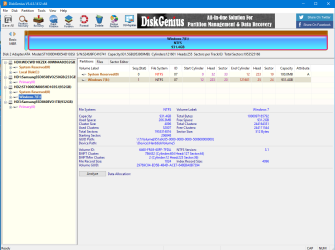
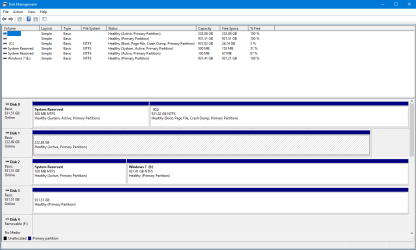
I have connected the drive up again and booted into Win10. With Disk Management and Disk Genius, the following pictures shows the result.

It looks like the drive is empty but there is almost 1 TB of data there and it just poof, disappeared after chkdsk. I'm sure it's still there somehow, but how can I fix this so I can access the files? Thanks.
 

Attachments

  • diskgenius_a.png
    diskgenius_a.png
    41.9 KB · Views: 1
  • diskgenius_b.png
    diskgenius_b.png
    48 KB · Views: 1
  • diskmanagement.png
    diskmanagement.png
    19.7 KB · Views: 1

My Computer My Computer

At a glance

Windows 7 Home Premium 64bit
OS
Windows 7 Home Premium 64bit
did you click the Files tab in diskgenius? If nothing showing you can try a data recovery program.

If there is stuff on disk3 it might just need a letter
 

My Computers My Computers

  • At a glance

    7 X64i5 84002x8gb 3200mhz
    Computer type
    PC/Desktop
    OS
    7 X64
    CPU
    i5 8400
    Motherboard
    gigabyte b365m ds3h
    Memory
    2x8gb 3200mhz
    Hard Drives
    various
    PSU
    pure power 11 400w cm
    Case
    Coolermaster
    Cooling
    cryorig m9i
  • At a glance

    7x64g54008gb ddr4 2400
    Computer type
    PC/Desktop
    OS
    7x64
    CPU
    g5400
    Motherboard
    ga b365m ds3h
    Memory
    8gb ddr4 2400
    PSU
    xfx pro 450w
did you click the Files tab in diskgenius? If nothing showing you can try a data recovery program.

If there is stuff on disk3 it might just need a letter

No, I didn't try that. I will look and see what it says. disk 3 is just my Linux ext4 drive. It is fine.

- - - Updated - - -

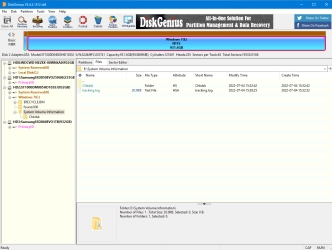
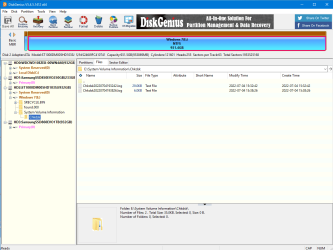
Ok, there were just a couple of files on the drive after looking with disk genius. One of them was a folder with the chkdsk logs.

There were two Chkdsk logs under "System Volume Information\Chkdsk" as shown in the pictures. The first is the one for the run that messed up my system. The second one was run after and didn't show any errors.
 

Attachments

  • diskgenius_c.png
    diskgenius_c.png
    41 KB · Views: 0
  • diskgenius_d.png
    diskgenius_d.png
    41.5 KB · Views: 0
  • diskgenius_e.png
    diskgenius_e.png
    41.7 KB · Views: 0

My Computer My Computer

At a glance

Windows 7 Home Premium 64bit
OS
Windows 7 Home Premium 64bit
I think you are in data recovey territory.
jumanji likes this sort of thing.
 

My Computers My Computers

  • At a glance

    7 X64i5 84002x8gb 3200mhz
    Computer type
    PC/Desktop
    OS
    7 X64
    CPU
    i5 8400
    Motherboard
    gigabyte b365m ds3h
    Memory
    2x8gb 3200mhz
    Hard Drives
    various
    PSU
    pure power 11 400w cm
    Case
    Coolermaster
    Cooling
    cryorig m9i
  • At a glance

    7x64g54008gb ddr4 2400
    Computer type
    PC/Desktop
    OS
    7x64
    CPU
    g5400
    Motherboard
    ga b365m ds3h
    Memory
    8gb ddr4 2400
    PSU
    xfx pro 450w
@SIW2

hmmmm........ I saw this thread about 2 hours ago ( till OP's post#7) and instantly gave up.

It transpires that the OP was unable to access the Windows 7 disk. He ran CheckDisk. And it wiped all data in that drive.

I had repeatedly written in these forums, if one is unable to access a disk, but the disk has a drive letter, one should use TestDisk to find out what file system corruption has taken place. Has it lost the volume boot record? If volume boot records are OK. one should try to repair MFT.( one wouldn't be able to access the files if MFT has gotten corrupt)

If TestDisk says MFT and MFT miiror is OK, then and only then he should run check disk to correct corrupted files (files that have lost the link to MFT). If MFT is corrupt - which means the file index is corrupt and not proper - and one runs check disk not knowing that, check disk will aggressively delete all files that are not properly indexed in MFT.

That is what has taken place in this case. The OP has booted into Linux and mounted the disk. It also found no files. Confirms that check disk has deleted all files.

If only the OP had asked for help in the very first instance when he was unable to access the disk, and before running check disk, he could have been guided properly. Nothing can be done now. Very sad.

 

My Computer My Computer

At a glance

Windows 7 Home Premium 32 bit
OS
Windows 7 Home Premium 32 bit
:( :(
 

My Computers My Computers

  • At a glance

    7 X64i5 84002x8gb 3200mhz
    Computer type
    PC/Desktop
    OS
    7 X64
    CPU
    i5 8400
    Motherboard
    gigabyte b365m ds3h
    Memory
    2x8gb 3200mhz
    Hard Drives
    various
    PSU
    pure power 11 400w cm
    Case
    Coolermaster
    Cooling
    cryorig m9i
  • At a glance

    7x64g54008gb ddr4 2400
    Computer type
    PC/Desktop
    OS
    7x64
    CPU
    g5400
    Motherboard
    ga b365m ds3h
    Memory
    8gb ddr4 2400
    PSU
    xfx pro 450w
Ok, thanks for the help guys. I guess this windows 7 drive is not totally recoverable.

It's not as bad as it sounds. It's not my main drive (which is linux) nor my second drive (which is win10) and I kept a redundant backup of all important files from the win7 drive on my windows 10 drive and I have a backup image (eh it's a couple years old) of the windows 7 drive itself on an external esata drive. So most everything is not lost.

I did download and run Recova tool on the drive and (after 5 1/2 hours) the deep scan found 1,700,000 files. No directory structure but plenty of individual files so if there were some pictures of something I needed, it's probably there.
 

My Computer My Computer

At a glance

Windows 7 Home Premium 64bit
OS
Windows 7 Home Premium 64bit
can you identify any , do they have names
 

My Computers My Computers

  • At a glance

    7 X64i5 84002x8gb 3200mhz
    Computer type
    PC/Desktop
    OS
    7 X64
    CPU
    i5 8400
    Motherboard
    gigabyte b365m ds3h
    Memory
    2x8gb 3200mhz
    Hard Drives
    various
    PSU
    pure power 11 400w cm
    Case
    Coolermaster
    Cooling
    cryorig m9i
  • At a glance

    7x64g54008gb ddr4 2400
    Computer type
    PC/Desktop
    OS
    7x64
    CPU
    g5400
    Motherboard
    ga b365m ds3h
    Memory
    8gb ddr4 2400
    PSU
    xfx pro 450w
Yes, they have filenames, just not directory paths.
 

My Computer My Computer

At a glance

Windows 7 Home Premium 64bit
OS
Windows 7 Home Premium 64bit
hav you tried recovering a few to check they are not corrupt?
 

My Computers My Computers

  • At a glance

    7 X64i5 84002x8gb 3200mhz
    Computer type
    PC/Desktop
    OS
    7 X64
    CPU
    i5 8400
    Motherboard
    gigabyte b365m ds3h
    Memory
    2x8gb 3200mhz
    Hard Drives
    various
    PSU
    pure power 11 400w cm
    Case
    Coolermaster
    Cooling
    cryorig m9i
  • At a glance

    7x64g54008gb ddr4 2400
    Computer type
    PC/Desktop
    OS
    7x64
    CPU
    g5400
    Motherboard
    ga b365m ds3h
    Memory
    8gb ddr4 2400
    PSU
    xfx pro 450w
Not yet, still considering what to do or it there are other recovery tools that might be better than Recova. Anyone know of any?

Btw, @jumanji wasn't entirely correct on his assumption on what happened. The Win7 disk *wasn't* inaccessible, I could read from it fine and access all the folders/files. But it started reporting the disk was full and even deleting some files didn't change that. So I figured a chkdsk run would fix it up. I didn't have any reason to think it would delete all the files :). Lesson learned.
 

My Computer My Computer

At a glance

Windows 7 Home Premium 64bit
OS
Windows 7 Home Premium 64bit
you can try scan with diskgenius and see what it finds. If what it reveals is any better than recuva managed, then you know another tool might give better results.

Not necessary to scan the whole disk just for testing. After several minutes, stop the scan and see what it has found.

If it does better than recuva, then you know it is possible and can either get a diskgenius license to do the recovery, or look for another tool that is free/cheap.

active filerecovery is worth a look - free scan and then license required to recover what it has found. It is less expensive than most $29.95 and seems effective.

Find and Restore Lost Files: Undelete deleted files and recover damaged disks
 

My Computers My Computers

  • At a glance

    7 X64i5 84002x8gb 3200mhz
    Computer type
    PC/Desktop
    OS
    7 X64
    CPU
    i5 8400
    Motherboard
    gigabyte b365m ds3h
    Memory
    2x8gb 3200mhz
    Hard Drives
    various
    PSU
    pure power 11 400w cm
    Case
    Coolermaster
    Cooling
    cryorig m9i
  • At a glance

    7x64g54008gb ddr4 2400
    Computer type
    PC/Desktop
    OS
    7x64
    CPU
    g5400
    Motherboard
    ga b365m ds3h
    Memory
    8gb ddr4 2400
    PSU
    xfx pro 450w
Back
Top