My whole drive is the partition?

user94858038

New member
Local time
2:29 PM
Messages
4
I put a new SSD in my laptop, fresh install to get dem speedz goin yknow.

But while the install I accidentally made the entire drive the partition.. so Windows and everything else is installed in the partition.

I know I can make a partition now but how will I get the Windows files to sit there? Or should I just reformat and reinstall again and get it right this time?

Thanks guys!
 

My Computer My Computer

At a glance

Windows 7 x64
Computer type
PC/Desktop
OS
Windows 7 x64
You can shrink c assuming there is room and create a new parition without loosing data with either disk management or 3rd party software which is often simpler to use
 

My Computer My Computer

At a glance

win 8 32 bit
Computer type
PC/Desktop
OS
win 8 32 bit
Any more info/directions on this?

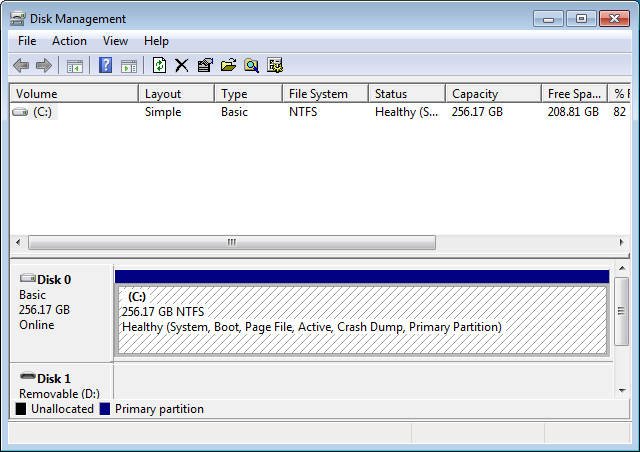
Here's a screenshot of my drive in disk management:

cvrVz97.png
 

My Computer My Computer

At a glance

Windows 7 x64
Computer type
PC/Desktop
OS
Windows 7 x64
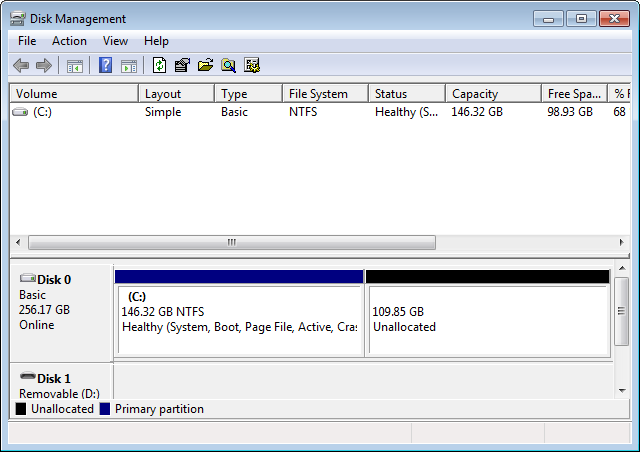
Right click on a partition > Shrink. Windows will automatically set a value that is available for shrinking. Don't set values higher than what can be shrinked on the space left. Then set a new drive name for it.
 

My Computer My Computer

At a glance

Windows 7 Home Premium 64-BITAMD A8 7200P8GB 1600mhzRadeon R5 (APU) + Radeon R5 M230 2GB Dual Gra...
Computer type
PC/Desktop
Computer Manufacturer/Model Number
ASUS X550ZE
OS
Windows 7 Home Premium 64-BIT
CPU
AMD A8 7200P
Motherboard
N/A
Memory
8GB 1600mhz
Graphics Card(s)
Radeon R5 (APU) + Radeon R5 M230 2GB Dual Graphics
Sound Card
Realtek ALC269 with SonicMaster
Monitor(s) Displays
Laptop Display
Screen Resolution
1920 x 1080 @60hz
Hard Drives
WDC WD50 00LPVX-80V0TT0 (500GB)
PSU
Laptop Charger
Mouse
ARMAGGEDON TEXTRON SCORPION 7
Internet Speed
100 mbps DOWN / 50 mbps UP
Antivirus
Windows Defender
Browser
Mozzila FireFox, Valve Steam in-game internet browser
Ok so I can split it in two, but I'm still not creating a partition just for windows files. What's the point of doing this? Shouldn't I have a 20GB or so partition for Windows and then use the rest?

rQ3UMCC.png
 

My Computer My Computer

At a glance

Windows 7 x64
Computer type
PC/Desktop
OS
Windows 7 x64
I put a new SSD in my laptop, fresh install to get dem speedz goin yknow.

But while the install I accidentally made the entire drive the partition.. so Windows and everything else is installed in the partition.

I know I can make a partition now but how will I get the Windows files to sit there? Or should I just reformat and reinstall again and get it right this time?

Thanks guys!

There's nothing wrong with having one partition for the entire drive. Most computers are set up that way. If you have one partition for the entire drive, then all of the free space on the drive is always available for Windows, for your files, for everything.

If you put two partitions on the one drive, then you are locking the amount of space that each partition has available to it. That means if there is free space in the Windows partition, the data partition can't use it, because the sizes are locked.

Some people prefer to have two partitions, because it makes backups a lot easier. That's how I have things set up in my computer. (Actually, I have two separate hard drives rather than two partitions on one drive.)
 

My Computer My Computer

At a glance

Linux Mint 18.2 xfce 64-bit (VMWare host) / W...Haswell4 GB
Computer type
PC/Desktop
Computer Manufacturer/Model Number
Dell
OS
Linux Mint 18.2 xfce 64-bit (VMWare host) / Windows 8.1 Pro 32-bit (VMWare guest)
CPU
Haswell
Memory
4 GB
Monitor(s) Displays
Acer 23"
Screen Resolution
1920 x 1080
Hard Drives
Two hard drives, 1TB each: One for Linux, one for my data.
Keyboard
IBM Model M
Antivirus
Sophos (Linux), Trend Micro (Windows)
Browser
Firefox, Opera
Other Info
I use Samba to share my data drive with the other computers at my house and with my guest session in VMWare Workstation Player.
Back
Top