
Public Folder Sharing - Turn On or Off in Windows 7

How to Turn Public Folder Sharing On or Off in Windows 7

   Information
The Public folders are a convenient way to share files on your computer. You can share files in the Public folders with other people using the same computer and with people using other computers on your network. Any file or folder you put in a Public folder is automatically shared with the people who have access to your Public folders.

The Public folders are located in the C:\Users\Public folder, and also included in libraries by default.

This tutorial will show you how to turn Public folder sharing on or off in Windows 7. Public folder sharing is turned off by default (except on a homegroup). When Public folder sharing is turned on, anyone on your computer or network (including homegroup members) can access these folders. When it's off, only people with a user account on your computer can access them.

You must be logged in as an administrator to be able to do the steps in this tutorial.

   Note
When you share the Public folder on your computer with other people, they can open and view the files stored there just as if they were stored on their own computers. If you give them permission to change files, any changes they make will change the files on your computer.

If you like, turning on password protected sharing will allow you to limit Public folder access (except on a homegroup) to only people with a user account and password on your local computer. Password protected sharing isn't available on a domain.


Here's How:
1. Do either step 2 or 3 below.

2. In Windows Explorer, and go to the C:\Users\Public folder. Right click on the Public folder or any file or folder in the Public folder, click on Share with and Advanced sharing settings. (see screenshot below)
Share-with.jpg

A) Go to step 4.
OR

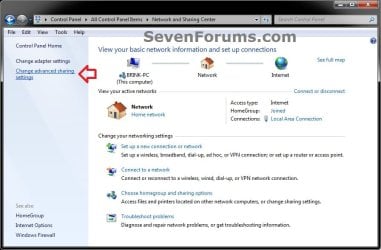
3. Open the Control Panel (icons view), and click on the Network and Sharing Center icon.
A) In the left pane, click on the Change advanced sharing settings link. (see screenshot below)
Step-1.jpg
B) Continue on to step 4.
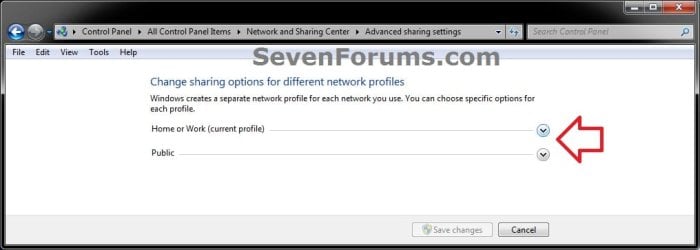
4. Click on the arrow.jpg to expand the network that you want to turn Public folder sharing on or off for. (see screenshot below)
NOTE: Normally this would be your current profile.
Step-2.jpg
5. To Turn On Public Folder Sharing
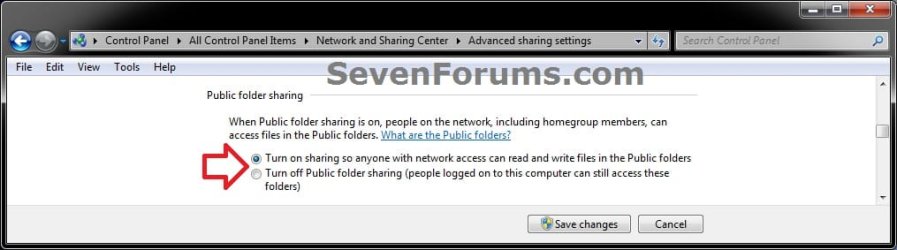
A) Select (dot) Turn on sharing so anyone with network access can read and write files in the Public folders. (see screenshot below step 7)

B) Go to step 7.
6. To Turn Off Public Folder Sharing
A) Select (dot) Turn off Public folder sharing (people logged on to this computer can still access these folders). (see screenshot below step 7)
7. Click on the Save Changes button. (see screenshot below)
Step-3.jpg
8. If prompted by UAC, then click on Yes.

9. When finished, you can close the Network and Sharing Center.
That's it,
Shawn


Last edited:
Hello, this is probably a silly question, I enabled public folder share for anonymous/guest, but my main user folder isn't hidden and stay there, is there anyway to hide the other user folder that's shared at \\<computer>\Users\*

I just want to show Public only for Guest/Anonymous user. Thank you
 

My Computer My Computer

At a glance

Windows 7 Ultimate x64i7-2670QM16GB Crossair ValueGT540M NVidia 1GB
Computer type
Laptop
Computer Manufacturer/Model Number
ASUS A43SV-VX072D | Custom Build CPU
OS
Windows 7 Ultimate x64
CPU
i7-2670QM
Motherboard
ASUS MotherBoard (ASUS A43SV Mobo American Megatrends)
Memory
16GB Crossair Value
Graphics Card(s)
GT540M NVidia 1GB
Sound Card
Realtek
Monitor(s) Displays
LG and BOC
Screen Resolution
1366x768
Hard Drives
SAMSUNG EVO 860 MZ-76P1T0BW 1TB
-------------- DEPRECATED -------------
HGST 7200rpm TRAVELSTAR 1TB
WD Blue 5400rpm 750GB
Cooling
taffware external Cooler
Keyboard
Logitec MK220
Mouse
Prolink without any specific number
Internet Speed
1mbps(small one :v)
Antivirus
AVAST PREMIER
Browser
Chrome
Hello, this is probably a silly question, I enabled public folder share for anonymous/guest, but my main user folder isn't hidden and stay there, is there anyway to hide the other user folder that's shared at \\<computer>\Users\*

I just want to show Public only for Guest/Anonymous user. Thank you

Hello BenyaminL, :-)

Do they have share access to your user folder?
 

My Computer My Computer

At a glance

64-bit Windows 11 Pro for WorkstationsIntel i7-8700K OC'd to 5 GHz64 GB (4x16GB) G.SKILL TridentZ RGB DDR4 3600...ASUS ROG-STRIX-GTX1080TI-O11G-GAMING
Computer type
PC/Desktop
Computer Manufacturer/Model Number
Self built custom
OS
64-bit Windows 11 Pro for Workstations
CPU
Intel i7-8700K OC'd to 5 GHz
Motherboard
ASUS ROG Maximus XI Formula Z390
Memory
64 GB (4x16GB) G.SKILL TridentZ RGB DDR4 3600 MHz
Graphics Card(s)
ASUS ROG-STRIX-GTX1080TI-O11G-GAMING
Sound Card
Integrated
Monitor(s) Displays
2 x Samsung Odyssey G7 27"
Screen Resolution
2560x1440
Hard Drives
1TB Samsung 990 PRO M.2,
4TB Samsung 990 PRO PRO M.2,
TerraMaster F8 SSD Plus NAS
PSU
Seasonic Prime Titanium 850W
Case
Thermaltake Core P3
Cooling
Corsair Hydro H115i
Keyboard
Logitech wireless K800
Mouse
Logitech MX Master 4
Internet Speed
2 Gb/s Download and 100 Mb/s Upload
Antivirus
Malwarebyte Anti-Malware Premium
Browser
Google Chrome
Other Info
Logitech Z625 speaker system,
Logitech BRIO 4K Pro webcam,
HP Color LaserJet Pro MFP M477fdn,
APC SMART-UPS RT 1000 XL - SURT1000XLI,
Galaxy S23 Plus phone
Hello BenyaminL, :-)

Do they have share access to your user folder?


No, but the folder is shown there, but on windows 10 when I go to that folder, only Public folder is shown
 

My Computer My Computer

At a glance

Windows 7 Ultimate x64i7-2670QM16GB Crossair ValueGT540M NVidia 1GB
Computer type
Laptop
Computer Manufacturer/Model Number
ASUS A43SV-VX072D | Custom Build CPU
OS
Windows 7 Ultimate x64
CPU
i7-2670QM
Motherboard
ASUS MotherBoard (ASUS A43SV Mobo American Megatrends)
Memory
16GB Crossair Value
Graphics Card(s)
GT540M NVidia 1GB
Sound Card
Realtek
Monitor(s) Displays
LG and BOC
Screen Resolution
1366x768
Hard Drives
SAMSUNG EVO 860 MZ-76P1T0BW 1TB
-------------- DEPRECATED -------------
HGST 7200rpm TRAVELSTAR 1TB
WD Blue 5400rpm 750GB
Cooling
taffware external Cooler
Keyboard
Logitec MK220
Mouse
Prolink without any specific number
Internet Speed
1mbps(small one :v)
Antivirus
AVAST PREMIER
Browser
Chrome
You could try using Share with > Nobody on your user profile folder to see if that may remove it from showing in shares.
 

My Computer My Computer

At a glance

64-bit Windows 11 Pro for WorkstationsIntel i7-8700K OC'd to 5 GHz64 GB (4x16GB) G.SKILL TridentZ RGB DDR4 3600...ASUS ROG-STRIX-GTX1080TI-O11G-GAMING
Computer type
PC/Desktop
Computer Manufacturer/Model Number
Self built custom
OS
64-bit Windows 11 Pro for Workstations
CPU
Intel i7-8700K OC'd to 5 GHz
Motherboard
ASUS ROG Maximus XI Formula Z390
Memory
64 GB (4x16GB) G.SKILL TridentZ RGB DDR4 3600 MHz
Graphics Card(s)
ASUS ROG-STRIX-GTX1080TI-O11G-GAMING
Sound Card
Integrated
Monitor(s) Displays
2 x Samsung Odyssey G7 27"
Screen Resolution
2560x1440
Hard Drives
1TB Samsung 990 PRO M.2,
4TB Samsung 990 PRO PRO M.2,
TerraMaster F8 SSD Plus NAS
PSU
Seasonic Prime Titanium 850W
Case
Thermaltake Core P3
Cooling
Corsair Hydro H115i
Keyboard
Logitech wireless K800
Mouse
Logitech MX Master 4
Internet Speed
2 Gb/s Download and 100 Mb/s Upload
Antivirus
Malwarebyte Anti-Malware Premium
Browser
Google Chrome
Other Info
Logitech Z625 speaker system,
Logitech BRIO 4K Pro webcam,
HP Color LaserJet Pro MFP M477fdn,
APC SMART-UPS RT 1000 XL - SURT1000XLI,
Galaxy S23 Plus phone
You could try using Share with > Nobody on your user profile folder to see if that may remove it from showing in shares.
Tried this, sadly still listed and same as before, user can't list the content, but the folder still shown sadly :/

EDIT : I end up disabling C:\Users sharing, and directly share C:\Users\Public to \\<Computer>\Public, because it really hurt to see my personal folder shown there. I don't know why Windows 10 can hide my main user folder, is it because WinSMB 3.0, or other thing, as we know, SMB on Windows 7 only reach 2.1, as the highest version. Thank you for trying to help.
 
Last edited:

My Computer My Computer

At a glance

Windows 7 Ultimate x64i7-2670QM16GB Crossair ValueGT540M NVidia 1GB
Computer type
Laptop
Computer Manufacturer/Model Number
ASUS A43SV-VX072D | Custom Build CPU
OS
Windows 7 Ultimate x64
CPU
i7-2670QM
Motherboard
ASUS MotherBoard (ASUS A43SV Mobo American Megatrends)
Memory
16GB Crossair Value
Graphics Card(s)
GT540M NVidia 1GB
Sound Card
Realtek
Monitor(s) Displays
LG and BOC
Screen Resolution
1366x768
Hard Drives
SAMSUNG EVO 860 MZ-76P1T0BW 1TB
-------------- DEPRECATED -------------
HGST 7200rpm TRAVELSTAR 1TB
WD Blue 5400rpm 750GB
Cooling
taffware external Cooler
Keyboard
Logitec MK220
Mouse
Prolink without any specific number
Internet Speed
1mbps(small one :v)
Antivirus
AVAST PREMIER
Browser
Chrome
Tried this, sadly still listed and same as before, user can't list the content, but the folder still shown sadly :/

EDIT : I end up disabling C:\Users sharing, and directly share C:\Users\Public to \\<Computer>\Public, because it really hurt to see my personal folder shown there. I don't know why Windows 10 can hide my main user folder, is it because WinSMB 3.0, or other thing, as we know, SMB on Windows 7 only reach 2.1, as the highest version. Thank you for trying to help.

Glad you got it hidden again.
 

My Computer My Computer

At a glance

64-bit Windows 11 Pro for WorkstationsIntel i7-8700K OC'd to 5 GHz64 GB (4x16GB) G.SKILL TridentZ RGB DDR4 3600...ASUS ROG-STRIX-GTX1080TI-O11G-GAMING
Computer type
PC/Desktop
Computer Manufacturer/Model Number
Self built custom
OS
64-bit Windows 11 Pro for Workstations
CPU
Intel i7-8700K OC'd to 5 GHz
Motherboard
ASUS ROG Maximus XI Formula Z390
Memory
64 GB (4x16GB) G.SKILL TridentZ RGB DDR4 3600 MHz
Graphics Card(s)
ASUS ROG-STRIX-GTX1080TI-O11G-GAMING
Sound Card
Integrated
Monitor(s) Displays
2 x Samsung Odyssey G7 27"
Screen Resolution
2560x1440
Hard Drives
1TB Samsung 990 PRO M.2,
4TB Samsung 990 PRO PRO M.2,
TerraMaster F8 SSD Plus NAS
PSU
Seasonic Prime Titanium 850W
Case
Thermaltake Core P3
Cooling
Corsair Hydro H115i
Keyboard
Logitech wireless K800
Mouse
Logitech MX Master 4
Internet Speed
2 Gb/s Download and 100 Mb/s Upload
Antivirus
Malwarebyte Anti-Malware Premium
Browser
Google Chrome
Other Info
Logitech Z625 speaker system,
Logitech BRIO 4K Pro webcam,
HP Color LaserJet Pro MFP M477fdn,
APC SMART-UPS RT 1000 XL - SURT1000XLI,
Galaxy S23 Plus phone
Back
Top