
Eject and Close CD/DVD Tray - Add to Desktop Context Menu

How to Add "Eject/Close CD/DVD Tray" to the Context Menu in Windows

   Information
This tutorial will show you how to add Eject/Close CD/DVD Tray to the folder background, drive, and desktop context menu, and file/folder context menu in Vista, Windows 7, and Windows 8.

When used by a user, it will toggle the default CD/DVD drive's tray to eject (open) or close.

   Note
You must be logged in as an administrator to be able to add this to the desktop context menu, but all users on the computer will be able to use it after it has been added.

If you need this to work for a specific CD/DVD drive letter instead, then please post and let me know. I'll be happy to modify the .bat and .reg files below for the drive letter you wanted instead. :)


EXAMPLE: "Eject/Close CD/DVD Tray" added to Desktop Context Menu
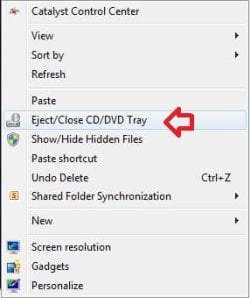
Example.jpg


Here's How:
1. Do either step 2 or 3 below for what you would like to do.


2. To Add "Eject/Close CD/DVD Tray" to Context Menu
A) Download the 32-bit or 64-bit version of NirCmd that is the same as your 32-bit or 64-bit Windows at the bottom of the website below, and save the ZIP file to your desktop.
NirCmd - Windows command line tool
B) Open the downloaded ZIP file, and extract (drag and drop) the nircmd.exe file to your desktop, and unblock the file.

C) Click/tap on the Download button below to download the .bat file below, and save the .bat to your desktop.
Eject-Close_CD-DVD.bat


Download


D) Unblock the .bat file.

E) Move both the unblocked nircmd.exe file and unblocked Eject-Close_CD-DVD.bat file into your C:\Windows\System32 folder, and approve (Continue-Yes).
NOTE: The bat file must be named this exactly. Rename if needed.

F) Click on the Download button below to download the .reg file below, and save the .reg file to your desktop.
Add_Eject-Close_CD-DVD_Tray_to_Context_Menu.reg


Download


G) Double click/tap on the REG file to merge it, then click/tap on Run, Yes (UAC-Windows 7/8) or Continue (UAC-Vista), Yes, and OK when prompted to approve the merge.
3. To Remove "Eject/Close CD/DVD Tray" from Context Menu
A) Click/tap on the Download button below to download the file below.
Remove_Eject-Close_CD-DVD_Tray_from_Context_Menu.reg


Download


B) In Windows Explorer, navigate to C:\Windows\System32, and delete the nircmd.exe and Eject-Close_CD-DVD.bat files.
That's it,
Shawn
 

Attachments

Last edited:
Great news. I'm glad the program Jeannie posted worked for you in Windows 10. :thumbsup:
 

My Computer My Computer

At a glance

64-bit Windows 11 Pro for WorkstationsIntel i7-8700K OC'd to 5 GHz64 GB (4x16GB) G.SKILL TridentZ RGB DDR4 3600...ASUS ROG-STRIX-GTX1080TI-O11G-GAMING
Computer type
PC/Desktop
Computer Manufacturer/Model Number
Self built custom
OS
64-bit Windows 11 Pro for Workstations
CPU
Intel i7-8700K OC'd to 5 GHz
Motherboard
ASUS ROG Maximus XI Formula Z390
Memory
64 GB (4x16GB) G.SKILL TridentZ RGB DDR4 3600 MHz
Graphics Card(s)
ASUS ROG-STRIX-GTX1080TI-O11G-GAMING
Sound Card
Integrated
Monitor(s) Displays
2 x Samsung Odyssey G7 27"
Screen Resolution
2560x1440
Hard Drives
1TB Samsung 990 PRO M.2,
4TB Samsung 990 PRO PRO M.2,
TerraMaster F8 SSD Plus NAS
PSU
Seasonic Prime Titanium 850W
Case
Thermaltake Core P3
Cooling
Corsair Hydro H115i
Keyboard
Logitech wireless K800
Mouse
Logitech MX Master 4
Internet Speed
2 Gb/s Download and 100 Mb/s Upload
Antivirus
Malwarebyte Anti-Malware Premium
Browser
Google Chrome
Other Info
Logitech Z625 speaker system,
Logitech BRIO 4K Pro webcam,
HP Color LaserJet Pro MFP M477fdn,
APC SMART-UPS RT 1000 XL - SURT1000XLI,
Galaxy S23 Plus phone
I'm glad it worked for you! I'll send you a bill at the end of the month. ;)

I just hope it is not going to be a big one, because I don't have the wherewithal to pay big bills. LOL!! :D
 

My Computer My Computer

At a glance

Windows 7
OS
Windows 7
Great news. I'm glad the program Jeannie posted worked for you in Windows 10. :thumbsup:

So am I. At least finally something is working for me. I have just had two weeks of HELL with windows cumulative updates, videlicet KB4013429. The latter, which I will always remember for the rest of my life, wouldn't install no matter what, to the point I had to "Refresh" my PC. And to add insult to the injury, another PC of mine on dual boot (Win 7 ultimate + Win 10 pro), would not boot the Win 10 OS after installing the darn update. I had to upgrade the Win 7 ultimate to Win 10 Pro and then delete the old Win 10 pro.

To make a long story short, I am finally back to normal and very happy now. :) :)

Thanks again Brink for your support.
 

My Computer My Computer

At a glance

Windows 7
OS
Windows 7
I just hope it is not going to be a big one, because I don't have the wherewithal to pay big bills. LOL!! :D

Oh, never mind. You couldn't afford it anyway. :)
 

My Computer My Computer

At a glance

Win 7 Ultimate 64 bitIntel i7-3930KKingston HyperX Genesis 32GB Kit (8x4GB Modul...MSI R7850 Twin Frozr 2GD5/OC Radeon HD 7850 2...
Computer type
PC/Desktop
Computer Manufacturer/Model Number
Custom Build
OS
Win 7 Ultimate 64 bit
CPU
Intel i7-3930K
Motherboard
ASUS P9X79 WS
Memory
Kingston HyperX Genesis 32GB Kit (8x4GB Modules) 1600MHz DDR
Graphics Card(s)
MSI R7850 Twin Frozr 2GD5/OC Radeon HD 7850 2GB 256-bit GDDR
Sound Card
Asus Xonar Essence STX
Monitor(s) Displays
3x Asus VG248QE 24", Vizio 32" TV
Screen Resolution
1920 x 1080, ?
Hard Drives
Samsung 128GB 840 Pro SSD (1),
Samsung 4TB 850 EVO SSDs (4)
Samsung 4TB 850 EVO SSDs (16) external backup drives used in 2.5" hot swap bays in the computer.
PSU
Corsair HX750w
Case
Antec Two Hundred v2 (modified)
Cooling
Cooler Master GeminII S524 120mm (fan replaced with a 140mm)
Keyboard
Logitech G510s
Mouse
Logitech M525 (two in use)
Internet Speed
=< 32Mbps down, 8Mbps up
Antivirus
AVAST!, MBAM, SAS, Spybot S&D (all but MBAM free) Glary Util
Browser
IE11
Other Info
LSI 9211-8i HBA card (8 SATA III ports), 2.5" & 3.5" Hot Swap Bays, HooToo HT-CR001 PCI-E to USB 3.0 Internal Hub + 6 Slot Card Reader, and LG Model CH12LS28 BD-ROM Optical Drive. Also, ScanSnap S1500 ADF duplexing scanner, Canon 9000F flat bed scanner, Corsair SP2500 2.1 speakers, Samsung CLP 415nw laser color printer, Cyberpower PP2200SW UPS
Hello!
I have been using Eject-Close CD/DVD for awhile now and it's worked like a charm... until recently. It still opens the drive but won't close it. It's another one of those "everything was ok until the last Windows update" kind of things. Any ideas?


Thanks!
 

My Computer My Computer

At a glance

Windows 10
Computer type
PC/Desktop
Computer Manufacturer/Model Number
Dell
OS
Windows 10
cappyb,

Have you tried "door control" whose download link can be found in post #55 from LayFitzgerald. I had the same issue with ejecting/closing the CD-DVD drive, and installed "door control"; it's been working like a charm since then. I still have it on my system (Windows 10 1803). :-)
 

My Computer My Computer

At a glance

Windows 7
OS
Windows 7
Thanks. I'll give it a try.
 

My Computer My Computer

At a glance

Windows 10
Computer type
PC/Desktop
Computer Manufacturer/Model Number
Dell
OS
Windows 10
thanks

it works. thanks.
 

My Computer My Computer

At a glance

win 7 64 bit home premium
Computer type
PC/Desktop
OS
win 7 64 bit home premium
I followed this exactly, and nothing happens. At first, all of the files got moved to syswow64. After moving everything to the right folder, I can see DVDOPEN created in my temp, but nothing happens.

Ahhhhhhhhh! When the batch file was created, it neglected to add my default optical device, so the command line was
Code:
nircmd.exe cdrom open
, not
Code:
nircmd.exe cdrom open f:
- But since that is supposed to be detected via the Computer's default Drive, what was happening was, I had UltraISO installed with 1 Virtual Drive set up, and that drive letter preceded my optical drive, so the Virtual drive was E: and the Optical drive was F:, ergo, it was detecting drive E: as Default, which, of course, it was probably ejecting the image I had mounted, but I couldn't see it, HAHAHA. Oh My! What a pain in the Eeema.
 
Last edited:

My Computer My Computer

At a glance

Windows 10/Windows 7 (My Idea- Virtual PC)Intel(R) Core(TM) i5-3470 CPU @ 3.20GHz16 GBnVidia GeForce GTX 750 Ti (2GB)
Computer type
PC/Desktop
Computer Manufacturer/Model Number
Lenovo Thinkcenter M92p
OS
Windows 10/Windows 7 (My Idea- Virtual PC)
CPU
Intel(R) Core(TM) i5-3470 CPU @ 3.20GHz
Motherboard
Lenovo MahoBay
Memory
16 GB
Graphics Card(s)
nVidia GeForce GTX 750 Ti (2GB)
Sound Card
nVidia HD Audio
Monitor(s) Displays
RCA 4KTV 50"
Screen Resolution
3840p x 2160p
Hard Drives
Onboard:
Seagate ST500DM009-2F110A 500GB
WDC WD4000FYYZ-01UL1B1 (WD-WCC131910831) [3726 GB]

USB 3.0
My Book 1140 (WCAZAD122454) [1862 GB]
Apple MDT MD10EAVS-00D7B0 (0000AB123473) [931 GB]

External:
WD Blue Innostar/Matsunichi (465 GB)
WD
PSU
Stock Thinkcenter M92p
Case
Stock Thinkcenter M92p
Cooling
Active
Keyboard
BYTEC BY-GA-KT-100-AC
Mouse
BYTEC
Internet Speed
1 GHz Down, 40 Mbps Up
Antivirus
Windows Defender
Browser
EDGE
Other Info
Old Other Info:
I finally have an Intel machine that has more than 8GB of Ram.
My ASUS M2N-SE AMD Windows 7 machine is back to Windows 7. Replaced the AMD 4400+ CPU and maxed out the RAM (4GB).
My Core Duo machine is only 2GB of Ram and it is locked to Windows XP in order to run Pro Tools 6.4, which I have been using since 2004.
I have one other Dell OptiPlex 980 tower, Identical to this one,
Hello Jonny, :-)


Looking at your other post below for this, you might see if starting over from scratch may help in case there may have been something else you missed.

Be sure to unblock the downloaded files on your desktop before moving them into the System32 folder.

How to get back right-click Close Tray on optical drive?
 

My Computer My Computer

At a glance

64-bit Windows 11 Pro for WorkstationsIntel i7-8700K OC'd to 5 GHz64 GB (4x16GB) G.SKILL TridentZ RGB DDR4 3600...ASUS ROG-STRIX-GTX1080TI-O11G-GAMING
Computer type
PC/Desktop
Computer Manufacturer/Model Number
Self built custom
OS
64-bit Windows 11 Pro for Workstations
CPU
Intel i7-8700K OC'd to 5 GHz
Motherboard
ASUS ROG Maximus XI Formula Z390
Memory
64 GB (4x16GB) G.SKILL TridentZ RGB DDR4 3600 MHz
Graphics Card(s)
ASUS ROG-STRIX-GTX1080TI-O11G-GAMING
Sound Card
Integrated
Monitor(s) Displays
2 x Samsung Odyssey G7 27"
Screen Resolution
2560x1440
Hard Drives
1TB Samsung 990 PRO M.2,
4TB Samsung 990 PRO PRO M.2,
TerraMaster F8 SSD Plus NAS
PSU
Seasonic Prime Titanium 850W
Case
Thermaltake Core P3
Cooling
Corsair Hydro H115i
Keyboard
Logitech wireless K800
Mouse
Logitech MX Master 4
Internet Speed
2 Gb/s Download and 100 Mb/s Upload
Antivirus
Malwarebyte Anti-Malware Premium
Browser
Google Chrome
Other Info
Logitech Z625 speaker system,
Logitech BRIO 4K Pro webcam,
HP Color LaserJet Pro MFP M477fdn,
APC SMART-UPS RT 1000 XL - SURT1000XLI,
Galaxy S23 Plus phone
Hello Jonny, :-)


Looking at your other post below for this, you might see if starting over from scratch may help in case there may have been something else you missed.

Be sure to unblock the downloaded files on your desktop before moving them into the System32 folder.

How to get back right-click Close Tray on optical drive?

Read my edit, it was G****** UltraISO, USURPING the default optical drive slot, HAHAHAHA! :roflmao:
 

My Computer My Computer

At a glance

Windows 10/Windows 7 (My Idea- Virtual PC)Intel(R) Core(TM) i5-3470 CPU @ 3.20GHz16 GBnVidia GeForce GTX 750 Ti (2GB)
Computer type
PC/Desktop
Computer Manufacturer/Model Number
Lenovo Thinkcenter M92p
OS
Windows 10/Windows 7 (My Idea- Virtual PC)
CPU
Intel(R) Core(TM) i5-3470 CPU @ 3.20GHz
Motherboard
Lenovo MahoBay
Memory
16 GB
Graphics Card(s)
nVidia GeForce GTX 750 Ti (2GB)
Sound Card
nVidia HD Audio
Monitor(s) Displays
RCA 4KTV 50"
Screen Resolution
3840p x 2160p
Hard Drives
Onboard:
Seagate ST500DM009-2F110A 500GB
WDC WD4000FYYZ-01UL1B1 (WD-WCC131910831) [3726 GB]

USB 3.0
My Book 1140 (WCAZAD122454) [1862 GB]
Apple MDT MD10EAVS-00D7B0 (0000AB123473) [931 GB]

External:
WD Blue Innostar/Matsunichi (465 GB)
WD
PSU
Stock Thinkcenter M92p
Case
Stock Thinkcenter M92p
Cooling
Active
Keyboard
BYTEC BY-GA-KT-100-AC
Mouse
BYTEC
Internet Speed
1 GHz Down, 40 Mbps Up
Antivirus
Windows Defender
Browser
EDGE
Other Info
Old Other Info:
I finally have an Intel machine that has more than 8GB of Ram.
My ASUS M2N-SE AMD Windows 7 machine is back to Windows 7. Replaced the AMD 4400+ CPU and maxed out the RAM (4GB).
My Core Duo machine is only 2GB of Ram and it is locked to Windows XP in order to run Pro Tools 6.4, which I have been using since 2004.
I have one other Dell OptiPlex 980 tower, Identical to this one,
LOL, I'm glad you got it sorted.
 

My Computer My Computer

At a glance

64-bit Windows 11 Pro for WorkstationsIntel i7-8700K OC'd to 5 GHz64 GB (4x16GB) G.SKILL TridentZ RGB DDR4 3600...ASUS ROG-STRIX-GTX1080TI-O11G-GAMING
Computer type
PC/Desktop
Computer Manufacturer/Model Number
Self built custom
OS
64-bit Windows 11 Pro for Workstations
CPU
Intel i7-8700K OC'd to 5 GHz
Motherboard
ASUS ROG Maximus XI Formula Z390
Memory
64 GB (4x16GB) G.SKILL TridentZ RGB DDR4 3600 MHz
Graphics Card(s)
ASUS ROG-STRIX-GTX1080TI-O11G-GAMING
Sound Card
Integrated
Monitor(s) Displays
2 x Samsung Odyssey G7 27"
Screen Resolution
2560x1440
Hard Drives
1TB Samsung 990 PRO M.2,
4TB Samsung 990 PRO PRO M.2,
TerraMaster F8 SSD Plus NAS
PSU
Seasonic Prime Titanium 850W
Case
Thermaltake Core P3
Cooling
Corsair Hydro H115i
Keyboard
Logitech wireless K800
Mouse
Logitech MX Master 4
Internet Speed
2 Gb/s Download and 100 Mb/s Upload
Antivirus
Malwarebyte Anti-Malware Premium
Browser
Google Chrome
Other Info
Logitech Z625 speaker system,
Logitech BRIO 4K Pro webcam,
HP Color LaserJet Pro MFP M477fdn,
APC SMART-UPS RT 1000 XL - SURT1000XLI,
Galaxy S23 Plus phone
Dawned on me, I use UltraISO to install everything, don't use my optical drives for anything but my music CDs to import em into iTunes. :lol:

BTW... I feel more at home HERE, than at Windows 8, despite racking up a huge rep there haha. Even though I really liked the original Windows 8. In 8.1 they started sticking us in the eye with the pointy end of "Needle" that Arya Stark carries around... That was when I lost interest in all new MS OS's, hell, gimme a Mac Pro tower. But from what I learned from using 8, I can fix any Windows machine on any OS now, including Windows 10's sandboxed Program Files and Windows folders. :mad::ROTFLMAO:
 

My Computer My Computer

At a glance

Windows 10/Windows 7 (My Idea- Virtual PC)Intel(R) Core(TM) i5-3470 CPU @ 3.20GHz16 GBnVidia GeForce GTX 750 Ti (2GB)
Computer type
PC/Desktop
Computer Manufacturer/Model Number
Lenovo Thinkcenter M92p
OS
Windows 10/Windows 7 (My Idea- Virtual PC)
CPU
Intel(R) Core(TM) i5-3470 CPU @ 3.20GHz
Motherboard
Lenovo MahoBay
Memory
16 GB
Graphics Card(s)
nVidia GeForce GTX 750 Ti (2GB)
Sound Card
nVidia HD Audio
Monitor(s) Displays
RCA 4KTV 50"
Screen Resolution
3840p x 2160p
Hard Drives
Onboard:
Seagate ST500DM009-2F110A 500GB
WDC WD4000FYYZ-01UL1B1 (WD-WCC131910831) [3726 GB]

USB 3.0
My Book 1140 (WCAZAD122454) [1862 GB]
Apple MDT MD10EAVS-00D7B0 (0000AB123473) [931 GB]

External:
WD Blue Innostar/Matsunichi (465 GB)
WD
PSU
Stock Thinkcenter M92p
Case
Stock Thinkcenter M92p
Cooling
Active
Keyboard
BYTEC BY-GA-KT-100-AC
Mouse
BYTEC
Internet Speed
1 GHz Down, 40 Mbps Up
Antivirus
Windows Defender
Browser
EDGE
Other Info
Old Other Info:
I finally have an Intel machine that has more than 8GB of Ram.
My ASUS M2N-SE AMD Windows 7 machine is back to Windows 7. Replaced the AMD 4400+ CPU and maxed out the RAM (4GB).
My Core Duo machine is only 2GB of Ram and it is locked to Windows XP in order to run Pro Tools 6.4, which I have been using since 2004.
I have one other Dell OptiPlex 980 tower, Identical to this one,
Is it possible to have this only on the context menu when right-clicking the disc drive?

I have an internal disc drive in the computer, but then at times I'll have one or more other disc drives connected, and variously with virtual disc drives going too (though I'm not sure how a virtual drive would be affected or affect anything in this context).

If it's just a desktop or general option, then I don't know how you target any particular drive.
 

My Computer My Computer

At a glance

Windows 7 Professional 64-bit
Computer type
PC/Desktop
OS
Windows 7 Professional 64-bit
Is it possible to have this only on the context menu when right-clicking the disc drive?

I have an internal disc drive in the computer, but then at times I'll have one or more other disc drives connected, and variously with virtual disc drives going too (though I'm not sure how a virtual drive would be affected or affect anything in this context).

If it's just a desktop or general option, then I don't know how you target any particular drive.


Hello hasefo, :-)

Sure thing. The .reg file below will remove the context menu from the other locations, and only have it added to the context menu of drives instead.

View attachment Add_Eject-Close_CD-DVD_Tray_to_Context_Menu_of_drives_only.reg
 

My Computer My Computer

At a glance

64-bit Windows 11 Pro for WorkstationsIntel i7-8700K OC'd to 5 GHz64 GB (4x16GB) G.SKILL TridentZ RGB DDR4 3600...ASUS ROG-STRIX-GTX1080TI-O11G-GAMING
Computer type
PC/Desktop
Computer Manufacturer/Model Number
Self built custom
OS
64-bit Windows 11 Pro for Workstations
CPU
Intel i7-8700K OC'd to 5 GHz
Motherboard
ASUS ROG Maximus XI Formula Z390
Memory
64 GB (4x16GB) G.SKILL TridentZ RGB DDR4 3600 MHz
Graphics Card(s)
ASUS ROG-STRIX-GTX1080TI-O11G-GAMING
Sound Card
Integrated
Monitor(s) Displays
2 x Samsung Odyssey G7 27"
Screen Resolution
2560x1440
Hard Drives
1TB Samsung 990 PRO M.2,
4TB Samsung 990 PRO PRO M.2,
TerraMaster F8 SSD Plus NAS
PSU
Seasonic Prime Titanium 850W
Case
Thermaltake Core P3
Cooling
Corsair Hydro H115i
Keyboard
Logitech wireless K800
Mouse
Logitech MX Master 4
Internet Speed
2 Gb/s Download and 100 Mb/s Upload
Antivirus
Malwarebyte Anti-Malware Premium
Browser
Google Chrome
Other Info
Logitech Z625 speaker system,
Logitech BRIO 4K Pro webcam,
HP Color LaserJet Pro MFP M477fdn,
APC SMART-UPS RT 1000 XL - SURT1000XLI,
Galaxy S23 Plus phone
Thank you!
 

My Computer My Computer

At a glance

Windows 7 Professional 64-bit
Computer type
PC/Desktop
OS
Windows 7 Professional 64-bit
You're most welcome.
 

My Computer My Computer

At a glance

64-bit Windows 11 Pro for WorkstationsIntel i7-8700K OC'd to 5 GHz64 GB (4x16GB) G.SKILL TridentZ RGB DDR4 3600...ASUS ROG-STRIX-GTX1080TI-O11G-GAMING
Computer type
PC/Desktop
Computer Manufacturer/Model Number
Self built custom
OS
64-bit Windows 11 Pro for Workstations
CPU
Intel i7-8700K OC'd to 5 GHz
Motherboard
ASUS ROG Maximus XI Formula Z390
Memory
64 GB (4x16GB) G.SKILL TridentZ RGB DDR4 3600 MHz
Graphics Card(s)
ASUS ROG-STRIX-GTX1080TI-O11G-GAMING
Sound Card
Integrated
Monitor(s) Displays
2 x Samsung Odyssey G7 27"
Screen Resolution
2560x1440
Hard Drives
1TB Samsung 990 PRO M.2,
4TB Samsung 990 PRO PRO M.2,
TerraMaster F8 SSD Plus NAS
PSU
Seasonic Prime Titanium 850W
Case
Thermaltake Core P3
Cooling
Corsair Hydro H115i
Keyboard
Logitech wireless K800
Mouse
Logitech MX Master 4
Internet Speed
2 Gb/s Download and 100 Mb/s Upload
Antivirus
Malwarebyte Anti-Malware Premium
Browser
Google Chrome
Other Info
Logitech Z625 speaker system,
Logitech BRIO 4K Pro webcam,
HP Color LaserJet Pro MFP M477fdn,
APC SMART-UPS RT 1000 XL - SURT1000XLI,
Galaxy S23 Plus phone
Works in All my Windows versions!

Thank you to the original author and NirSoft for all the wonderful and useful programs.
I'm currently using this method in Windows 7, 10, 11 and Windows 11 Insider Preview 25236. It just works everywhere!
 

My Computers My Computers

  • At a glance

    7 Ultimate, 10 Pro, 11 Pro, Linux Mint All 64...
    Computer type
    PC/Desktop
    Computer Manufacturer/Model Number
    custome build
    OS
    7 Ultimate, 10 Pro, 11 Pro, Linux Mint All 64 bit
  • Computer type
    PC/Desktop
Back
Top