Eject and Close CD/DVD Tray - Add to Desktop Context Menu

How to Add "Eject/Close CD/DVD Tray" to the Context Menu in Windows

   Information
This tutorial will show you how to add Eject/Close CD/DVD Tray to the folder background, drive, and desktop context menu, and file/folder context menu in Vista, Windows 7, and Windows 8.

When used by a user, it will toggle the default CD/DVD drive's tray to eject (open) or close.

   Note
You must be logged in as an administrator to be able to add this to the desktop context menu, but all users on the computer will be able to use it after it has been added.

If you need this to work for a specific CD/DVD drive letter instead, then please post and let me know. I'll be happy to modify the .bat and .reg files below for the drive letter you wanted instead. :)


EXAMPLE: "Eject/Close CD/DVD Tray" added to Desktop Context Menu
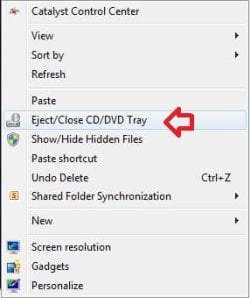
Example.jpg


Here's How:
1. Do either step 2 or 3 below for what you would like to do.


2. To Add "Eject/Close CD/DVD Tray" to Context Menu
A) Download the 32-bit or 64-bit version of NirCmd that is the same as your 32-bit or 64-bit Windows at the bottom of the website below, and save the ZIP file to your desktop.
NirCmd - Windows command line tool
B) Open the downloaded ZIP file, and extract (drag and drop) the nircmd.exe file to your desktop, and unblock the file.

C) Click/tap on the Download button below to download the .bat file below, and save the .bat to your desktop.
Eject-Close_CD-DVD.bat


Download


D) Unblock the .bat file.

E) Move both the unblocked nircmd.exe file and unblocked Eject-Close_CD-DVD.bat file into your C:\Windows\System32 folder, and approve (Continue-Yes).
NOTE: The bat file must be named this exactly. Rename if needed.

F) Click on the Download button below to download the .reg file below, and save the .reg file to your desktop.
Add_Eject-Close_CD-DVD_Tray_to_Context_Menu.reg


Download


G) Double click/tap on the REG file to merge it, then click/tap on Run, Yes (UAC-Windows 7/8) or Continue (UAC-Vista), Yes, and OK when prompted to approve the merge.
3. To Remove "Eject/Close CD/DVD Tray" from Context Menu
A) Click/tap on the Download button below to download the file below.
Remove_Eject-Close_CD-DVD_Tray_from_Context_Menu.reg


Download


B) In Windows Explorer, navigate to C:\Windows\System32, and delete the nircmd.exe and Eject-Close_CD-DVD.bat files.
That's it,
Shawn
 

Attachments

Last edited:
Love It

Getting to the "Open/Close" tray button is an awkward:( manoeuvre in my set up, but dropping in the disc is easy:D enough, so this is great, thanks :party:for the work.
 

My Computer My Computer

At a glance

Win7 Home Premium 64 biti7-26600 CPU @ 3.40GHz8.00GBNVIDIA GeForce GT545
Computer type
PC/Desktop
Computer Manufacturer/Model Number
Medion MS-7728
OS
Win7 Home Premium 64 bit
CPU
i7-26600 CPU @ 3.40GHz
Memory
8.00GB
Graphics Card(s)
NVIDIA GeForce GT545
Monitor(s) Displays
Dell U2312HM DVI
Screen Resolution
1920X1080
Hard Drives
HSS:250 GB
1396 GB
Keyboard
Standard PS/2
Mouse
HID Compliant
You're welcome dohouch, and welcome to Seven Forums. :)
 

My Computer My Computer

At a glance

64-bit Windows 11 Pro for WorkstationsIntel i7-8700K OC'd to 5 GHz64 GB (4x16GB) G.SKILL TridentZ RGB DDR4 3600...ASUS ROG-STRIX-GTX1080TI-O11G-GAMING
Computer type
PC/Desktop
Computer Manufacturer/Model Number
Self built custom
OS
64-bit Windows 11 Pro for Workstations
CPU
Intel i7-8700K OC'd to 5 GHz
Motherboard
ASUS ROG Maximus XI Formula Z390
Memory
64 GB (4x16GB) G.SKILL TridentZ RGB DDR4 3600 MHz
Graphics Card(s)
ASUS ROG-STRIX-GTX1080TI-O11G-GAMING
Sound Card
Integrated
Monitor(s) Displays
2 x Samsung Odyssey G7 27"
Screen Resolution
2560x1440
Hard Drives
1TB Samsung 990 PRO M.2,
4TB Samsung 990 PRO PRO M.2,
TerraMaster F8 SSD Plus NAS
PSU
Seasonic Prime Titanium 850W
Case
Thermaltake Core P3
Cooling
Corsair Hydro H115i
Keyboard
Logitech wireless K800
Mouse
Logitech MX Master 4
Internet Speed
2 Gb/s Download and 100 Mb/s Upload
Antivirus
Malwarebyte Anti-Malware Premium
Browser
Google Chrome
Other Info
Logitech Z625 speaker system,
Logitech BRIO 4K Pro webcam,
HP Color LaserJet Pro MFP M477fdn,
APC SMART-UPS RT 1000 XL - SURT1000XLI,
Galaxy S23 Plus phone
Brink...you've helped me before, so I had faith to try this. This is about the 4th "close tray" app I've tried, none work, incl this one. Using Win7/64 Home Prem, 2 LG CD/DVD reader/burners.

Everything seemed to go smoothly. D/L Nircmd-64.zip, came with 3 files, I pulled out nircmd.exe. Put it and .bat (both unlocked) in Sys32. Ran the REG file, did a restart.

But nothing added to context menu. Zip! I'm beginning to suspect the LGs, that's the only common thread to the all these "close tray" apps that don't work.

Any ideas?
 

My Computer My Computer

At a glance

Win 7 Home Prem 64
OS
Win 7 Home Prem 64
Hello Chris,

The REG file is what adds Eject/Close CD/DVD Tray to the context menu of the desktop. When you right click on the desktop and click on Eject/Close CD/DVD Tray, it runs the BAT file that has a command that runs using the nircmd.exe file.

What happens when you merge the REG file? Are you getting prompted to click on Run, Yes (UAC-Windows 7), Yes, and OK after merging it? You might also see if right clicking on the REG file and clicking on Merge will work to see if there may be a issue with your reg file associations.
 

My Computer My Computer

At a glance

64-bit Windows 11 Pro for WorkstationsIntel i7-8700K OC'd to 5 GHz64 GB (4x16GB) G.SKILL TridentZ RGB DDR4 3600...ASUS ROG-STRIX-GTX1080TI-O11G-GAMING
Computer type
PC/Desktop
Computer Manufacturer/Model Number
Self built custom
OS
64-bit Windows 11 Pro for Workstations
CPU
Intel i7-8700K OC'd to 5 GHz
Motherboard
ASUS ROG Maximus XI Formula Z390
Memory
64 GB (4x16GB) G.SKILL TridentZ RGB DDR4 3600 MHz
Graphics Card(s)
ASUS ROG-STRIX-GTX1080TI-O11G-GAMING
Sound Card
Integrated
Monitor(s) Displays
2 x Samsung Odyssey G7 27"
Screen Resolution
2560x1440
Hard Drives
1TB Samsung 990 PRO M.2,
4TB Samsung 990 PRO PRO M.2,
TerraMaster F8 SSD Plus NAS
PSU
Seasonic Prime Titanium 850W
Case
Thermaltake Core P3
Cooling
Corsair Hydro H115i
Keyboard
Logitech wireless K800
Mouse
Logitech MX Master 4
Internet Speed
2 Gb/s Download and 100 Mb/s Upload
Antivirus
Malwarebyte Anti-Malware Premium
Browser
Google Chrome
Other Info
Logitech Z625 speaker system,
Logitech BRIO 4K Pro webcam,
HP Color LaserJet Pro MFP M477fdn,
APC SMART-UPS RT 1000 XL - SURT1000XLI,
Galaxy S23 Plus phone
Brink......whoops, my bad. The entry is on the DESKTOP context menu, not the drive's context menu! So it works.

I have two CD/DVD trays. The entry appears to be controlling my D: drive correctly. Drive E: is apparently not being controlled at all, but I can live with that. Thnx.
 

My Computer My Computer

At a glance

Win 7 Home Prem 64
OS
Win 7 Home Prem 64
Ok. That's great news then. Yeah, it will only open/close the default CD/DVD drive.
 

My Computer My Computer

At a glance

64-bit Windows 11 Pro for WorkstationsIntel i7-8700K OC'd to 5 GHz64 GB (4x16GB) G.SKILL TridentZ RGB DDR4 3600...ASUS ROG-STRIX-GTX1080TI-O11G-GAMING
Computer type
PC/Desktop
Computer Manufacturer/Model Number
Self built custom
OS
64-bit Windows 11 Pro for Workstations
CPU
Intel i7-8700K OC'd to 5 GHz
Motherboard
ASUS ROG Maximus XI Formula Z390
Memory
64 GB (4x16GB) G.SKILL TridentZ RGB DDR4 3600 MHz
Graphics Card(s)
ASUS ROG-STRIX-GTX1080TI-O11G-GAMING
Sound Card
Integrated
Monitor(s) Displays
2 x Samsung Odyssey G7 27"
Screen Resolution
2560x1440
Hard Drives
1TB Samsung 990 PRO M.2,
4TB Samsung 990 PRO PRO M.2,
TerraMaster F8 SSD Plus NAS
PSU
Seasonic Prime Titanium 850W
Case
Thermaltake Core P3
Cooling
Corsair Hydro H115i
Keyboard
Logitech wireless K800
Mouse
Logitech MX Master 4
Internet Speed
2 Gb/s Download and 100 Mb/s Upload
Antivirus
Malwarebyte Anti-Malware Premium
Browser
Google Chrome
Other Info
Logitech Z625 speaker system,
Logitech BRIO 4K Pro webcam,
HP Color LaserJet Pro MFP M477fdn,
APC SMART-UPS RT 1000 XL - SURT1000XLI,
Galaxy S23 Plus phone
can u make it so that the context menu shows

close tray directly underneath eject

It makes it easier to find eject and close since they are close to one another
 

My Computer My Computer

At a glance

Microsoft Windows 7 Ultimate 64-bit 7601 Mult...Intel(R) Core(TM) i5-2500K CPU @ 3.30GHz16.00 GBAMD Radeon HD 6950
OS
Microsoft Windows 7 Ultimate 64-bit 7601 Multiprocessor Free Service Pack 1
CPU
Intel(R) Core(TM) i5-2500K CPU @ 3.30GHz
Motherboard
ASUSTeK Computer INC. P8Z68-V PRO
Memory
16.00 GB
Graphics Card(s)
AMD Radeon HD 6950
Sound Card
(1) AMD High Definition Audio Device (2) Webcam 250 (3)
Screen Resolution
1920 x 1080 x 32 bits (4294967296 colors) @ 60 Hz
Hard Drives
(1) M4-CT064M4SSD2 ATA Device (2) M4-CT128M4SSD2 ATA Device (3) SAMSUNG HD103SJ ATA Device (4) WDC WD20EARX-00PASB0 ATA Device (5) WDC WD20EARX-00PASB0 ATA Device (6) WDC WD20 EARS-00MVWB0 SCSI Disk Device (7) Generic USB CF Reader USB De
PSU
Corsair HX 650
Hello madmax,

The context menu item in this tutorial is basically just a toggle switch to open/close the default CD/DVD drive.
 

My Computer My Computer

At a glance

64-bit Windows 11 Pro for WorkstationsIntel i7-8700K OC'd to 5 GHz64 GB (4x16GB) G.SKILL TridentZ RGB DDR4 3600...ASUS ROG-STRIX-GTX1080TI-O11G-GAMING
Computer type
PC/Desktop
Computer Manufacturer/Model Number
Self built custom
OS
64-bit Windows 11 Pro for Workstations
CPU
Intel i7-8700K OC'd to 5 GHz
Motherboard
ASUS ROG Maximus XI Formula Z390
Memory
64 GB (4x16GB) G.SKILL TridentZ RGB DDR4 3600 MHz
Graphics Card(s)
ASUS ROG-STRIX-GTX1080TI-O11G-GAMING
Sound Card
Integrated
Monitor(s) Displays
2 x Samsung Odyssey G7 27"
Screen Resolution
2560x1440
Hard Drives
1TB Samsung 990 PRO M.2,
4TB Samsung 990 PRO PRO M.2,
TerraMaster F8 SSD Plus NAS
PSU
Seasonic Prime Titanium 850W
Case
Thermaltake Core P3
Cooling
Corsair Hydro H115i
Keyboard
Logitech wireless K800
Mouse
Logitech MX Master 4
Internet Speed
2 Gb/s Download and 100 Mb/s Upload
Antivirus
Malwarebyte Anti-Malware Premium
Browser
Google Chrome
Other Info
Logitech Z625 speaker system,
Logitech BRIO 4K Pro webcam,
HP Color LaserJet Pro MFP M477fdn,
APC SMART-UPS RT 1000 XL - SURT1000XLI,
Galaxy S23 Plus phone
Hello madmax,

The context menu item in this tutorial is basically just a toggle switch to open/close the default CD/DVD drive.

Can you post an image of how the context menu should look like in the windows 7
 

My Computer My Computer

At a glance

Microsoft Windows 7 Ultimate 64-bit 7601 Mult...Intel(R) Core(TM) i5-2500K CPU @ 3.30GHz16.00 GBAMD Radeon HD 6950
OS
Microsoft Windows 7 Ultimate 64-bit 7601 Multiprocessor Free Service Pack 1
CPU
Intel(R) Core(TM) i5-2500K CPU @ 3.30GHz
Motherboard
ASUSTeK Computer INC. P8Z68-V PRO
Memory
16.00 GB
Graphics Card(s)
AMD Radeon HD 6950
Sound Card
(1) AMD High Definition Audio Device (2) Webcam 250 (3)
Screen Resolution
1920 x 1080 x 32 bits (4294967296 colors) @ 60 Hz
Hard Drives
(1) M4-CT064M4SSD2 ATA Device (2) M4-CT128M4SSD2 ATA Device (3) SAMSUNG HD103SJ ATA Device (4) WDC WD20EARX-00PASB0 ATA Device (5) WDC WD20EARX-00PASB0 ATA Device (6) WDC WD20 EARS-00MVWB0 SCSI Disk Device (7) Generic USB CF Reader USB De
PSU
Corsair HX 650
Hello madmax,

The context menu item in this tutorial is basically just a toggle switch to open/close the default CD/DVD drive.

Can you post an image of how the context menu should look like in the windows 7

It's the example screenshot at the top of the tutorial for only when you right click on the desktop.
 
Last edited:

My Computer My Computer

At a glance

64-bit Windows 11 Pro for WorkstationsIntel i7-8700K OC'd to 5 GHz64 GB (4x16GB) G.SKILL TridentZ RGB DDR4 3600...ASUS ROG-STRIX-GTX1080TI-O11G-GAMING
Computer type
PC/Desktop
Computer Manufacturer/Model Number
Self built custom
OS
64-bit Windows 11 Pro for Workstations
CPU
Intel i7-8700K OC'd to 5 GHz
Motherboard
ASUS ROG Maximus XI Formula Z390
Memory
64 GB (4x16GB) G.SKILL TridentZ RGB DDR4 3600 MHz
Graphics Card(s)
ASUS ROG-STRIX-GTX1080TI-O11G-GAMING
Sound Card
Integrated
Monitor(s) Displays
2 x Samsung Odyssey G7 27"
Screen Resolution
2560x1440
Hard Drives
1TB Samsung 990 PRO M.2,
4TB Samsung 990 PRO PRO M.2,
TerraMaster F8 SSD Plus NAS
PSU
Seasonic Prime Titanium 850W
Case
Thermaltake Core P3
Cooling
Corsair Hydro H115i
Keyboard
Logitech wireless K800
Mouse
Logitech MX Master 4
Internet Speed
2 Gb/s Download and 100 Mb/s Upload
Antivirus
Malwarebyte Anti-Malware Premium
Browser
Google Chrome
Other Info
Logitech Z625 speaker system,
Logitech BRIO 4K Pro webcam,
HP Color LaserJet Pro MFP M477fdn,
APC SMART-UPS RT 1000 XL - SURT1000XLI,
Galaxy S23 Plus phone
Thanks Brink sure beats the push tray!
 

My Computer My Computer

At a glance

win7 Ultimate 64icore54 GigATI Radeon HD5700
Computer type
PC/Desktop
Computer Manufacturer/Model Number
custom build
OS
win7 Ultimate 64
CPU
icore5
Motherboard
Gigabyte P67
Memory
4 Gig
Graphics Card(s)
ATI Radeon HD5700
Sound Card
envy24
Monitor(s) Displays
Samsung SyncMaster T22HD/HP F1905
Screen Resolution
1680x1050
Hard Drives
Samsung
WDC
PSU
650
Case
GMC
Cooling
corsair
Keyboard
Dell
Mouse
MS3000
Internet Speed
slow
Antivirus
Microsoft
Browser
IE
You're most welcome Korea7. That was my main motivation for posting this tutorial. :D
 

My Computer My Computer

At a glance

64-bit Windows 11 Pro for WorkstationsIntel i7-8700K OC'd to 5 GHz64 GB (4x16GB) G.SKILL TridentZ RGB DDR4 3600...ASUS ROG-STRIX-GTX1080TI-O11G-GAMING
Computer type
PC/Desktop
Computer Manufacturer/Model Number
Self built custom
OS
64-bit Windows 11 Pro for Workstations
CPU
Intel i7-8700K OC'd to 5 GHz
Motherboard
ASUS ROG Maximus XI Formula Z390
Memory
64 GB (4x16GB) G.SKILL TridentZ RGB DDR4 3600 MHz
Graphics Card(s)
ASUS ROG-STRIX-GTX1080TI-O11G-GAMING
Sound Card
Integrated
Monitor(s) Displays
2 x Samsung Odyssey G7 27"
Screen Resolution
2560x1440
Hard Drives
1TB Samsung 990 PRO M.2,
4TB Samsung 990 PRO PRO M.2,
TerraMaster F8 SSD Plus NAS
PSU
Seasonic Prime Titanium 850W
Case
Thermaltake Core P3
Cooling
Corsair Hydro H115i
Keyboard
Logitech wireless K800
Mouse
Logitech MX Master 4
Internet Speed
2 Gb/s Download and 100 Mb/s Upload
Antivirus
Malwarebyte Anti-Malware Premium
Browser
Google Chrome
Other Info
Logitech Z625 speaker system,
Logitech BRIO 4K Pro webcam,
HP Color LaserJet Pro MFP M477fdn,
APC SMART-UPS RT 1000 XL - SURT1000XLI,
Galaxy S23 Plus phone
Hi
I did what was shown in the instructions but I don't get the same context menu like your picture.

I only get close tray and eject tray separately..

I am using windows 7 64bit
 

My Computer My Computer

At a glance

Microsoft Windows 7 Ultimate 64-bit 7601 Mult...Intel(R) Core(TM) i5-2500K CPU @ 3.30GHz16.00 GBAMD Radeon HD 6950
OS
Microsoft Windows 7 Ultimate 64-bit 7601 Multiprocessor Free Service Pack 1
CPU
Intel(R) Core(TM) i5-2500K CPU @ 3.30GHz
Motherboard
ASUSTeK Computer INC. P8Z68-V PRO
Memory
16.00 GB
Graphics Card(s)
AMD Radeon HD 6950
Sound Card
(1) AMD High Definition Audio Device (2) Webcam 250 (3)
Screen Resolution
1920 x 1080 x 32 bits (4294967296 colors) @ 60 Hz
Hard Drives
(1) M4-CT064M4SSD2 ATA Device (2) M4-CT128M4SSD2 ATA Device (3) SAMSUNG HD103SJ ATA Device (4) WDC WD20EARX-00PASB0 ATA Device (5) WDC WD20EARX-00PASB0 ATA Device (6) WDC WD20 EARS-00MVWB0 SCSI Disk Device (7) Generic USB CF Reader USB De
PSU
Corsair HX 650
Hello madmax,

The context menu added by the tutorial is only for when you right click on an empty area of your desktop.

It's not added to the drive's context menu in the Computer window.
 

My Computer My Computer

At a glance

64-bit Windows 11 Pro for WorkstationsIntel i7-8700K OC'd to 5 GHz64 GB (4x16GB) G.SKILL TridentZ RGB DDR4 3600...ASUS ROG-STRIX-GTX1080TI-O11G-GAMING
Computer type
PC/Desktop
Computer Manufacturer/Model Number
Self built custom
OS
64-bit Windows 11 Pro for Workstations
CPU
Intel i7-8700K OC'd to 5 GHz
Motherboard
ASUS ROG Maximus XI Formula Z390
Memory
64 GB (4x16GB) G.SKILL TridentZ RGB DDR4 3600 MHz
Graphics Card(s)
ASUS ROG-STRIX-GTX1080TI-O11G-GAMING
Sound Card
Integrated
Monitor(s) Displays
2 x Samsung Odyssey G7 27"
Screen Resolution
2560x1440
Hard Drives
1TB Samsung 990 PRO M.2,
4TB Samsung 990 PRO PRO M.2,
TerraMaster F8 SSD Plus NAS
PSU
Seasonic Prime Titanium 850W
Case
Thermaltake Core P3
Cooling
Corsair Hydro H115i
Keyboard
Logitech wireless K800
Mouse
Logitech MX Master 4
Internet Speed
2 Gb/s Download and 100 Mb/s Upload
Antivirus
Malwarebyte Anti-Malware Premium
Browser
Google Chrome
Other Info
Logitech Z625 speaker system,
Logitech BRIO 4K Pro webcam,
HP Color LaserJet Pro MFP M477fdn,
APC SMART-UPS RT 1000 XL - SURT1000XLI,
Galaxy S23 Plus phone
Hello madmax,

The context menu added by the tutorial is only for when you right click on an empty area of your desktop.

It's not added to the drive's context menu in the Computer window.

Well I click on the desktop and it doesn't show that context menu
Actually I click on the desktop just now and I get the same icon as shown in the pic now...

Also can you post an image of what it looks like when u click on the dvd drive?

What windows are u using?
I am on win 7 64bit

It would be good if u can make it show the same icon as the pic when clicking on the dvd drive.
 

My Computer My Computer

At a glance

Microsoft Windows 7 Ultimate 64-bit 7601 Mult...Intel(R) Core(TM) i5-2500K CPU @ 3.30GHz16.00 GBAMD Radeon HD 6950
OS
Microsoft Windows 7 Ultimate 64-bit 7601 Multiprocessor Free Service Pack 1
CPU
Intel(R) Core(TM) i5-2500K CPU @ 3.30GHz
Motherboard
ASUSTeK Computer INC. P8Z68-V PRO
Memory
16.00 GB
Graphics Card(s)
AMD Radeon HD 6950
Sound Card
(1) AMD High Definition Audio Device (2) Webcam 250 (3)
Screen Resolution
1920 x 1080 x 32 bits (4294967296 colors) @ 60 Hz
Hard Drives
(1) M4-CT064M4SSD2 ATA Device (2) M4-CT128M4SSD2 ATA Device (3) SAMSUNG HD103SJ ATA Device (4) WDC WD20EARX-00PASB0 ATA Device (5) WDC WD20EARX-00PASB0 ATA Device (6) WDC WD20 EARS-00MVWB0 SCSI Disk Device (7) Generic USB CF Reader USB De
PSU
Corsair HX 650
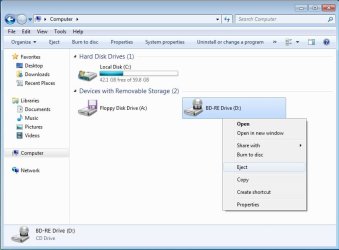
The context menu of a CD/DVD/BD drive doesn't have any icons, and only has the "Eject" option. It's the same in all Windows.
DVD.jpg
The icon used in the tutorial is a small DVD drive.
 

My Computer My Computer

At a glance

64-bit Windows 11 Pro for WorkstationsIntel i7-8700K OC'd to 5 GHz64 GB (4x16GB) G.SKILL TridentZ RGB DDR4 3600...ASUS ROG-STRIX-GTX1080TI-O11G-GAMING
Computer type
PC/Desktop
Computer Manufacturer/Model Number
Self built custom
OS
64-bit Windows 11 Pro for Workstations
CPU
Intel i7-8700K OC'd to 5 GHz
Motherboard
ASUS ROG Maximus XI Formula Z390
Memory
64 GB (4x16GB) G.SKILL TridentZ RGB DDR4 3600 MHz
Graphics Card(s)
ASUS ROG-STRIX-GTX1080TI-O11G-GAMING
Sound Card
Integrated
Monitor(s) Displays
2 x Samsung Odyssey G7 27"
Screen Resolution
2560x1440
Hard Drives
1TB Samsung 990 PRO M.2,
4TB Samsung 990 PRO PRO M.2,
TerraMaster F8 SSD Plus NAS
PSU
Seasonic Prime Titanium 850W
Case
Thermaltake Core P3
Cooling
Corsair Hydro H115i
Keyboard
Logitech wireless K800
Mouse
Logitech MX Master 4
Internet Speed
2 Gb/s Download and 100 Mb/s Upload
Antivirus
Malwarebyte Anti-Malware Premium
Browser
Google Chrome
Other Info
Logitech Z625 speaker system,
Logitech BRIO 4K Pro webcam,
HP Color LaserJet Pro MFP M477fdn,
APC SMART-UPS RT 1000 XL - SURT1000XLI,
Galaxy S23 Plus phone
Is it normal for the cmd.exe to flash on the screen every time you click to open/close?
 

My Computer My Computer

At a glance

Windows 7 home premium 64
Computer type
PC/Desktop
Computer Manufacturer/Model Number
HP
OS
Windows 7 home premium 64
Hello usernametaken, and welcome to Seven Forums.

Yep, it's normal for the command prompt to very quickly flash open and close when using this context menu.
 
Last edited:

My Computer My Computer

At a glance

64-bit Windows 11 Pro for WorkstationsIntel i7-8700K OC'd to 5 GHz64 GB (4x16GB) G.SKILL TridentZ RGB DDR4 3600...ASUS ROG-STRIX-GTX1080TI-O11G-GAMING
Computer type
PC/Desktop
Computer Manufacturer/Model Number
Self built custom
OS
64-bit Windows 11 Pro for Workstations
CPU
Intel i7-8700K OC'd to 5 GHz
Motherboard
ASUS ROG Maximus XI Formula Z390
Memory
64 GB (4x16GB) G.SKILL TridentZ RGB DDR4 3600 MHz
Graphics Card(s)
ASUS ROG-STRIX-GTX1080TI-O11G-GAMING
Sound Card
Integrated
Monitor(s) Displays
2 x Samsung Odyssey G7 27"
Screen Resolution
2560x1440
Hard Drives
1TB Samsung 990 PRO M.2,
4TB Samsung 990 PRO PRO M.2,
TerraMaster F8 SSD Plus NAS
PSU
Seasonic Prime Titanium 850W
Case
Thermaltake Core P3
Cooling
Corsair Hydro H115i
Keyboard
Logitech wireless K800
Mouse
Logitech MX Master 4
Internet Speed
2 Gb/s Download and 100 Mb/s Upload
Antivirus
Malwarebyte Anti-Malware Premium
Browser
Google Chrome
Other Info
Logitech Z625 speaker system,
Logitech BRIO 4K Pro webcam,
HP Color LaserJet Pro MFP M477fdn,
APC SMART-UPS RT 1000 XL - SURT1000XLI,
Galaxy S23 Plus phone
Ok I can live with that. And thanks for the quick reply. Also, I have my auto play turned off for cd/dvd, is there a way to add a right click play function that works the same way as this one?
 

My Computer My Computer

At a glance

Windows 7 home premium 64
Computer type
PC/Desktop
Computer Manufacturer/Model Number
HP
OS
Windows 7 home premium 64
Back
Top