
turkeypets
New member
- Local time
- 9:44 AM
- Messages
- 2
Okay i'm new and of course here cause i need help.
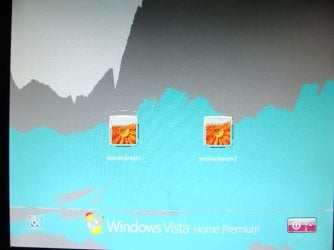
I swapped out my old ATI card for a old Nvidia GEFORCE GTX 650 Ti. The problem is there is a yellow question mark in Device Manager for the Nvidia and when i try to install drivers for the card i get artifacts on the screen. I will attach pictures of the artifacts. After i uninstall the drivers and restart, my computer trys to install Standard VGA Graphics Adapter.
I have tried the original CD and driver that came with the card and i get artifacts all over the screen. When i tried other drivers like 365.19/365.10 there aren't as many artifacts but there are blue dots and streaks all over the screen.
I'm doing clean installs every time i try a different driver.
No matter which driver i install the card still has a yellow question mark in device manager.
The first picture i attached is what the screen looks like when i install the original CD driver and also when i try driver 334.67
The second picture is when i try other drivers like 365.19/365.10 the shades of colors are gone but the blue dots and streaks are still there.
I swapped out my old ATI card for a old Nvidia GEFORCE GTX 650 Ti. The problem is there is a yellow question mark in Device Manager for the Nvidia and when i try to install drivers for the card i get artifacts on the screen. I will attach pictures of the artifacts. After i uninstall the drivers and restart, my computer trys to install Standard VGA Graphics Adapter.
I have tried the original CD and driver that came with the card and i get artifacts all over the screen. When i tried other drivers like 365.19/365.10 there aren't as many artifacts but there are blue dots and streaks all over the screen.
I'm doing clean installs every time i try a different driver.
No matter which driver i install the card still has a yellow question mark in device manager.
The first picture i attached is what the screen looks like when i install the original CD driver and also when i try driver 334.67
The second picture is when i try other drivers like 365.19/365.10 the shades of colors are gone but the blue dots and streaks are still there.
Attachments
Last edited:
My Computers
System One System Two
-
- Computer type
- PC/Desktop
- Computer Manufacturer/Model Number
- HP-Pavilion m9250f
- OS
- Windows Vista 64
- CPU
- Intel Core 2 Quad CPU Q6700 @ 2.66ghz 2.67 ghz
- Motherboard
- ASUSTek Computer Inc. Benicia
- Memory
- 8.00 gb
- Graphics Card(s)
- Nvidia GEFORCE GTX 560Ti
- Hard Drives
- ST3500630AS
- Antivirus
- no
- Browser
- Firefox and Chromium
-
- Computer type
- PC/Desktop

 rogram Files it has a CIM folder in it.