
[SOLVED] Wacom Pen CTL-460/K pressure not working in Windows 7
(check last part of the post for the solution I found, after :EDIT
I noticed there's something wrong in a Wacom Pen tablet (CTL460) I just bought.
It's recognized and working as regards pointing and click, on windows panel it also shows it's pressure-sensitive
but on other programs like MyPaint and Gimp, the pen is not pressure-sensitive.
I tried many options including enabling/disabling Input service and the drivers are official Wacom and updated, last available (while the preferences program works but the properties program doesn't, which is also very weird).
I also stopped and disabled previous graphic tablet services (Huion tablet, which worked properly), but to no avail.
So anyone has figured out how to solve this?
Here's a pic of the windows tablet commands program that shows that the graphic tablet is pressure sensitive and OK, while just graphics program (Gimp, MyPaint, Photoshop and Krita, so far...) don't recognize such feature correctly, and I don't know why tbh.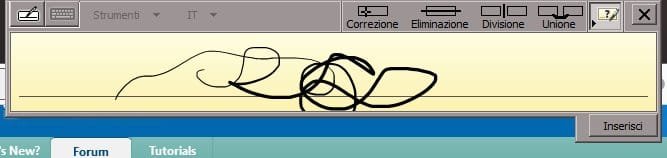
Also, when I launch wacom tablet properties it tells me it's not recognized

While it appears correctly on Windows devices list

:EDIT:
So, thanks to some luck and an advice from a Wacom employee, I found out how to solve it :
1. Under Power Options of Windows (the panel for energy saving settings), disable USB automatic deactivation as said here Disable USB Power Management on Windows 7 Machines
2. Uninstall ALL previously installed Wacom drivers (I did it both from Windows installed program list and with CCCleanear), some wacom system files still appear in Windows folder directory but this was not relevant.
3. Reboot
4. Install the 5.3.5-3 driver, you can find it on Wacom's official website under "previous versions" link (drivers). The tablet must be unplugged, even if the installer says "no wireless tablet was found" or something.
5. Reboot (even if not prompted at the end of the installer)
6. Plug the tablet.
(check last part of the post for the solution I found, after :EDIT
I noticed there's something wrong in a Wacom Pen tablet (CTL460) I just bought.
It's recognized and working as regards pointing and click, on windows panel it also shows it's pressure-sensitive
but on other programs like MyPaint and Gimp, the pen is not pressure-sensitive.
I tried many options including enabling/disabling Input service and the drivers are official Wacom and updated, last available (while the preferences program works but the properties program doesn't, which is also very weird).
I also stopped and disabled previous graphic tablet services (Huion tablet, which worked properly), but to no avail.
So anyone has figured out how to solve this?
Here's a pic of the windows tablet commands program that shows that the graphic tablet is pressure sensitive and OK, while just graphics program (Gimp, MyPaint, Photoshop and Krita, so far...) don't recognize such feature correctly, and I don't know why tbh.
Also, when I launch wacom tablet properties it tells me it's not recognized
While it appears correctly on Windows devices list
:EDIT:
So, thanks to some luck and an advice from a Wacom employee, I found out how to solve it :
1. Under Power Options of Windows (the panel for energy saving settings), disable USB automatic deactivation as said here Disable USB Power Management on Windows 7 Machines
2. Uninstall ALL previously installed Wacom drivers (I did it both from Windows installed program list and with CCCleanear), some wacom system files still appear in Windows folder directory but this was not relevant.
3. Reboot
4. Install the 5.3.5-3 driver, you can find it on Wacom's official website under "previous versions" link (drivers). The tablet must be unplugged, even if the installer says "no wireless tablet was found" or something.
5. Reboot (even if not prompted at the end of the installer)
6. Plug the tablet.
Last edited:
My Computer
At a glance
Windows 7, 64bit pro
- Computer type
- PC/Desktop
- OS
- Windows 7, 64bit pro


