Hi
Kgf,
Glad to see your spirits!
1. Very well said by sir
samuria : In the process of setup, one need to start with the drivers & programs first, follow the online instructions & only attach the device when it is asked. This way you can avoid many problems. But you started with the device plugged in first of all : a whole different thing & even well said an opposite!
2. Before making any changes to the present status/condition of the driver/service, I would like to look into all its dependencies.
For eg. If we wish to turn it automatic, we will first need to put all its dependencies on auto & their dependencies & so on. So, It makes a full tree of dependencies & we have to start from the root. So, follow the instructions & give me those details.
( I will use this app to gather the information in few clicks :
ServiWin: Windows Services/Drivers Tool (start/stop/restart service) )
We will create 2 html files which will describe the properties about your pc Drivers & Services.
So,
What you have to do is :
(i) Check whether your OS is 64 or 32 bit :
System Type - 32-bit (x86) or 64-bit (x64)
(ii) Make Download according to your OS :
For 32 bit :
View attachment serviwin32.zip
For 64 bit :
View attachment serviwin-x64.zip
(iii) Extract the zip to a folder.
(iv) Open the extracted folder & execute
Drivers.cmd &
Services.cmd one by one. They will create Services & Drivers html
(v) Share the files with me.
3. Before doing anything else, we will use one of win 7 in-built troubleshooters which automatically checks & solves device configuration problems.
So, What you have to do is :
(i) Keep your Tablet connected.
(ii) Keep connected to internet.
(iii) The Tutorial :
Windows Hardware and Devices Troubleshooter
(iv)follow the tutorial & get to the
Troubleshoot Computer Problems section.
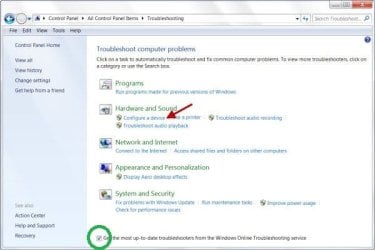
(v) Make sure that you first check the box marked with
Green Oval. This will automatically give you access to latest online troubleshooter.
(vi) Now click & execute
Configure a Device troubleshooter under
Hardware & Sound section.
Take care that you note down all the report it gives in various steps. That may be useful.
(vii ) Once done check the issue status.
Any queries, doubts ? Anything else ?
Let me know.
Thanks & Regards. ...



