Add USB 3.0 support to existing Win 7 install.

breezett93

New member
Local time
1:01 PM
Messages
9
I recently finished a brand new build using an i7 13700k on an asrock z690 pg riptide. After installing Windows 10, I brought over my Win 7 ssd. At the login screen, I have no keyboard/mouse function. When I'm booted into the Windows 10 drive, I can manipulate/move files etc on the Win 7 drive no problem.

Is there a way I can add USB 3.0 support to the Win 7 drive without having to reinstall Win 7?

Thanks.
 

My Computers My Computers

  • At a glance

    Windows 10 Pro
    Computer type
    PC/Desktop
    OS
    Windows 10 Pro
  • Computer type
    PC/Desktop
use dism++ to add the update first, then the drivers - all are in the USB3_win7_2021.zip attached to the bottom of all my posts.

can run dism++ in win10 or winpe and point it at the win7 installation.

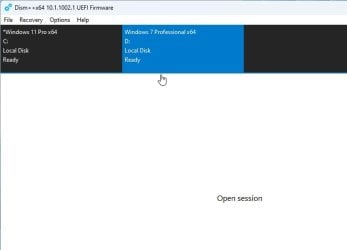
screenshots here using dism++

run dism++

dism++select1.jpg

in the top pane click the win7 installation to highlight it in blue.

dism++select2.jpg


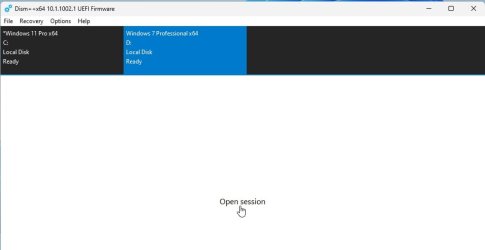
click "open session"

dism++select3.jpg

click Updates in the left pane
click ADD
browse to the update FILE

click Drivers in the left pane
click ADD
browse to the driver FOLDER
 
Last edited:

My Computers My Computers

  • At a glance

    7 X64i5 84002x8gb 3200mhz
    Computer type
    PC/Desktop
    OS
    7 X64
    CPU
    i5 8400
    Motherboard
    gigabyte b365m ds3h
    Memory
    2x8gb 3200mhz
    Hard Drives
    various
    PSU
    pure power 11 400w cm
    Case
    Coolermaster
    Cooling
    cryorig m9i
  • At a glance

    7x64g54008gb ddr4 2400
    Computer type
    PC/Desktop
    OS
    7x64
    CPU
    g5400
    Motherboard
    ga b365m ds3h
    Memory
    8gb ddr4 2400
    PSU
    xfx pro 450w
use dism++ to add the update first, then the drivers - all are in the USB3_win7_2021.zip attached to the bottom of all my posts.

can run dism++ in win10 or winpe and point it at the win7 installation.

screenshots here using dism++

run dism++

View attachment 422346

in the top pane click the win7 installation to highlight it in blue.

View attachment 422347


click "open session"

View attachment 422348

click Updates in the left pane
click ADD
browse to the update FILE

click Drivers in the left pane
click ADD
browse to the driver FOLDER

Do I have to do the Save Image and Unmount Image steps from your other guide? If so, it was asking for the path to the image file. I don't know where that is.
 

My Computers My Computers

  • At a glance

    Windows 10 Pro
    Computer type
    PC/Desktop
    OS
    Windows 10 Pro
  • Computer type
    PC/Desktop
Do I have to do the Save Image and Unmount Image

no. just follow the instructions in the quote you posted.
 

My Computers My Computers

  • At a glance

    7 X64i5 84002x8gb 3200mhz
    Computer type
    PC/Desktop
    OS
    7 X64
    CPU
    i5 8400
    Motherboard
    gigabyte b365m ds3h
    Memory
    2x8gb 3200mhz
    Hard Drives
    various
    PSU
    pure power 11 400w cm
    Case
    Coolermaster
    Cooling
    cryorig m9i
  • At a glance

    7x64g54008gb ddr4 2400
    Computer type
    PC/Desktop
    OS
    7x64
    CPU
    g5400
    Motherboard
    ga b365m ds3h
    Memory
    8gb ddr4 2400
    PSU
    xfx pro 450w
no. just follow the instructions in the quote you posted.
Okay, I got three successful popups (update, uaspstor, and xhci). Keyboard and mouse still not working. Are there additional settings in the eufi that I need to change?
 

My Computers My Computers

  • At a glance

    Windows 10 Pro
    Computer type
    PC/Desktop
    OS
    Windows 10 Pro
  • Computer type
    PC/Desktop

My Computers My Computers

  • At a glance

    7 X64i5 84002x8gb 3200mhz
    Computer type
    PC/Desktop
    OS
    7 X64
    CPU
    i5 8400
    Motherboard
    gigabyte b365m ds3h
    Memory
    2x8gb 3200mhz
    Hard Drives
    various
    PSU
    pure power 11 400w cm
    Case
    Coolermaster
    Cooling
    cryorig m9i
  • At a glance

    7x64g54008gb ddr4 2400
    Computer type
    PC/Desktop
    OS
    7x64
    CPU
    g5400
    Motherboard
    ga b365m ds3h
    Memory
    8gb ddr4 2400
    PSU
    xfx pro 450w
probably.
 

My Computers My Computers

  • At a glance

    7 X64i5 84002x8gb 3200mhz
    Computer type
    PC/Desktop
    OS
    7 X64
    CPU
    i5 8400
    Motherboard
    gigabyte b365m ds3h
    Memory
    2x8gb 3200mhz
    Hard Drives
    various
    PSU
    pure power 11 400w cm
    Case
    Coolermaster
    Cooling
    cryorig m9i
  • At a glance

    7x64g54008gb ddr4 2400
    Computer type
    PC/Desktop
    OS
    7x64
    CPU
    g5400
    Motherboard
    ga b365m ds3h
    Memory
    8gb ddr4 2400
    PSU
    xfx pro 450w
probably.

In Dism++, should the windows6.1-kb2864202 show up in the Update History? The most recent record is from August 2022 which is when I did the original install.
 

My Computers My Computers

  • At a glance

    Windows 10 Pro
    Computer type
    PC/Desktop
    OS
    Windows 10 Pro
  • Computer type
    PC/Desktop

My Computer My Computer

At a glance

win7 64bit Pro2.48G
Computer type
PC/Desktop
Computer Manufacturer/Model Number
Lenovo
OS
win7 64bit Pro
CPU
2.4
Memory
8G
Hard Drives
1T SSD
Back
Top